


this is post #598
https://www.excelfox.com/forum/showt...ll=1#post24089
https://www.excelfox.com/forum/showthread.php/2909-Appendix-Thread-Evaluate-Range-(-Codes-for-other-Threads-HTML-Tables-etc-)?p=24089&viewfull=1#post24089
https://www.excelfox.com/forum/showt...ge60#post24089
https://www.excelfox.com/forum/showthread.php/2909-Appendix-Thread-Evaluate-Range-(-Codes-for-other-Threads-HTML-Tables-etc-)/page60#post24089
Rem 2 Put formula in cell (Sub CarriageReturnLineFeedExcelVBAFormula() )
Having forced myself into going back to the basics, and getting a more deeper understanding of Evaluate(" ") , the problems in some syntax in putting formulas into a cell , or finding text things via an excel formula in Evaluate(" ") , which caused the excursion of this page , is easy to do, and sure to get it, as long as we are patient and cautious.
So armed with some knowledge of constructing the necessary strings, and some initial attempt at a a Results Summary Conclusion attempt we move on to get the same value in a cell as previously, but from a formula, that is to say, taking Evaluate(" ") string constructs that one step further to actually put a formula in a cell …. pseudo
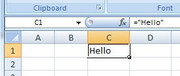
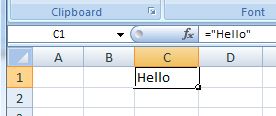
Put in the cell = a formula looking like , ="Hello"
, using
Put in the cell = Evaluate( string construct to actually give a formula, not the result from it )
Note , of course, you will still see the value result in the cell, but an indication that we actually put on a formula, rather than a value, should be seen in the formula bar, just as if we manually typed the formula in, ( assuming default Excel settings )
https://i.postimg.cc/9Mf54ycw/Formul...splay-text.jpg
Formula in cell, (to display text).JPG
An extra quote, or two, and stuff
Having battled out enough with the basics in the last few posts, it’s actually not so difficult from now on
Points to note
_1) literal text in a cell, needs to be put in initially, "in the first place" as it were, in quotes in the string construct for evaluate just to prevent Evaluate(" ") trying to interpret the text as some particular Excel thing. So far we did this explicitly like this
Evaluate("""" & "Mytext" & """")
, which you would have to do if your text was in a variable , - example if your text was in a string variable, strText, then you would need to do this
Evaluate("""" & strText & """")
, or we could consder the new line pair things we have been considering as variables, and as such also need to do like
Evaluate("""" & vbCr & vbLf & """")
For actual text, this would be the same
Evaluate("""Mytext""")
, but I would recommend always being explicit until maybe you have finished.
Based on the results and attempted explanations of Evaluate(" ") so far generally, and with a bit of hindsight again, I might have a go at a slightly modified explanation of Evaluate(" ")
If you or I type an = at the start of putting something in a cell, then that is a significant thing that calls into action deep Office innards coding which I expect is either the same, or in some way strongly related to, or very similar to, the coding that gets set off by Evaluate(" "). There will be similarities therefore in the result, where I am using the word result in its broadest sense here: Just one example of this similarity is that it could be that a text or number appearing in the cell would be that which would appear in a variable, Ex if you did something like this
Ex = Evaluate("What you put in a cell after typing in a = at the start")
But that is just part of the story, perhaps what is often given as the simplifies version of what Evaluate(" ") is about.
More fully, the string what VBA "sees" will need to be a syntax, or named thing, that Excel recognises, and its always very good practice when constructing the string in Evaluate, ( strEval, where strEval is like here, Evaluate(strEval) ) , to check what VBA sees via Debug.Print strEval
I expect there may be a priority to the order that things are done.
Calling something out
First, a reference to an object or something will have a varied effect. Maybe we could refer this to calling it out, like shouting at someone to call them to attention. It may make them do something or get them there, ready. We sometimes hear of "exposing an interface" having a similar effect to running it. I like the sound of calling it out
Do a formula to do something (even a formula!)
This is easy to get mislead and confused. If a string construct, what VBA finally "sees", can be recognised as a syntax that Excel would be happy with in a cell, A formula, then the result that would be obtained of that string with an = in front of it, in a cell, is what Evaluate(" ") will try to return. At a stretch of the imagination, this could be regarded as calling out an imaginary cell, by its name, its cell reference, where the imaginary cell has that formula in it. This should perhaps spark off someone smarter to get excited and tell me about kicking off an Excel4 macro somehow. Just now it’s a leap too far for my brain. But I think the idea is potentially sound
Having got to this level of understanding, maybe we can do close to anything , within reason, even … put a formula in a cell
So let’s have a go. Introduction to formula in a cell
Backwards working understand, to easier perhaps is this. (This is perhaps easier to understand, working backwards.)
For example , I want this formula to effectively be put in a cell ,
="Hello"
, which will mean that I see Hello in the cell, and in the formula bar I will see ="Hello"
If I was using VBA to put that formula in a cell, I would need to construct the VBA string context for that, which would be like
Range("A10") = "=""Hello"""
To achieve that from a code line like ,
Range("A10") = Evaluate("")
, then Evaluate("") will need to return "=""Hello"""
So far we have learnt that for returning "Hello" in VBA , the RHS == Evaluate("") , would need to look like this
Evaluate("""" & "Hello" & """")
In simplified terms, we can say that in that construction , the 4 quotes, """" is getting us a single quote in that "Hello" in VBA
So a simplified logic perhaps tells us we need a few more of the 4 quotes, """" bits, ( as well as an = somewhere )
Just looking carefully , and applying the simple logic tells us we want : a quote; a =; 2 quotes; the text Hello ; and finally 3 quotes.
So perhaps we want this VBA context string
Evaluate(VBA context string)
"""" & "=" & """" & """" & "Hello" & """" & """" & """"
This next simple coding shows the construction clearly breaking down each required string bit
Having got this far, at the final stage, we can simplify quite easily, if we wish to. The thing here to remember is that the & is only required toCode:Sub CallOutTextInCellFormula() ' https://www.excelfox.com/forum/showthread.php/2909-Appendix-Thread-Evaluate-Range-(-Codes-for-other-Threads-HTML-Tables-etc-)?p=24089&viewfull=1#post24089 ' Effectively put ="Hello" in a cell , which will mean that I see in the cell Hello and in the formula bar ="Hello" Let Range("A10") = "=""Hello""" ' we need from Evaluate(" ") a quote, a =, 2 quotes, Hello , and finally 3 quotes ' " = " " Hello " " " Let Range("A10") = Evaluate("""" & "=" & """" & """" & "Hello" & """" & """" & """") End Sub
_ link or glue variables or other VBA things to each other
or _ to link or glue variables or other VBA things to text
It is not required to link or glue text to text.
This means that bits like " & " can be removed
Do that with our last example, and you end up with this rather impressive looking beautiful thing
"""=""""Hello"""""""
Just to confuse or impress a little further, we have noted previously the somewhat "flexible" = that Evaluate(" ") seems to posses. There is no exception here, so we could add that last bit of apparent mystical magicness to that last string construction
"=""=""""Hello"""""""
_._________________Code:Sub CallOutTextInCellFormula() ' https://www.excelfox.com/forum/showthread.php/2909-Appendix-Thread-Evaluate-Range-(-Codes-for-other-Threads-HTML-Tables-etc-)?p=24089&viewfull=1#post24089 ' Effectively put ="Hello" in a cell , which will mean that I see in the cell Hello and in the formula bar ="Hello" Let Range("A10") = "=""Hello""" ' we need from Evaluate(" ") a quote, a =, 2 quotes, Hello , and finally 3 quotes ' " = " " Hello " " " Let Range("A10") = Evaluate("""" & "=" & """" & """" & "Hello" & """" & """" & """") ' ' simplified Let Range("A10") = Evaluate("""=""""Hello""""""") Let Range("A10") = Evaluate("=""=""""Hello""""""") End Sub
&
A small reminder about the & in string context both In VBA and Excel spreadsheet syntax.
As we seen already in a coupe of places ( https://www.excelfox.com/forum/showt...ll=1#post24083
https://www.excelfox.com/forum/showt...ll=1#post24050 ) we have this same "gluing together" thing in both Excel and VBA.
If the formula we are trying finally to put in a cell has in Excel a & , then that & will effectively be another bit of text to add.
Note also in the following example to get like a formula ="Hello"&" You" we cannot rely on Evaluate(" ") to somehow return us VBA connecting / gluing & bits , so we must do some simplification in such example cases.
Code:Sub CallOutTextInCellFormula() ' https://www.excelfox.com/forum/showthread.php/2909-Appendix-Thread-Evaluate-Range-(-Codes-for-other-Threads-HTML-Tables-etc-)?p=24089&viewfull=1#post24089 ' Effectively put ="Hello" in a cell , which will mean that I see in the cell Hello and in the formula bar ="Hello" Let Range("A10") = "=""Hello""" ' we need from Evaluate(" ") : a quote; a =; 2 quotes; Hello ; and finally 3 quotes ' " = " " Hello " " " Let Range("A10") = Evaluate("""" & "=" & """" & """" & "Hello" & """" & """" & """") ' ' simplified Let Range("A10") = Evaluate("""=""""Hello""""""") Let Range("A10") = Evaluate("=""=""""Hello""""""") ' Put ="Hello"& "You" in a cell Let Range("A11") = "=""Hello""" & "&" & """ You""" ' Evaluate will not be ablk to return the two connecting/ gluing VBA things " & " so we will need to be at the simplified level Let Range("A11") = "=""Hello""&"" You""" ' we need from Evaluate(" ") : a quote; a =; 2 quotes; Hello ; 2 quotes ; the & ; 2 quotes ; You ; and finally 3 quotes Let Range("A11") = Evaluate("""" & "=" & """" & """" & "Hello" & """" & """" & "&" & """" & """" & " You" & """" & """" & """") ' simplified Let Range("A11") = Evaluate("""=""""Hello""""&"""" You""""""") End Sub

 Reply With Quote
Bookmarks