Page 53 of 93 FirstFirst ... 343515253545563 ... LastLast
Results 521 to 530 of 935

Thread: Windows 10 and Office Excel

Hybrid View

Previous Post Previous Post   Next Post Next Post
  1. #1
    Fuhrer, Vierte Reich DocAElstein's Avatar
    Join Date
    Aug 2014
    Posts
    10,458
    Rep Power
    10

    First goes at "WPF" winutil

    Minute 6, 55 seconds https://youtu.be/xqBhFPW_LuM?t=415 .. limitation of this “open” non .exe way
    .. since It’s running in PowerShell. That will take precedence. It’s the parent that’s doing everything, .. If you do something in the GUI that sends back to PowerShell, it will lock the GUI until whatever is finished in the background.
    …If I did a full .exe on the front end and embedded PowerShell. It would not be like that


    Because we have the variables we can do things to them as in the old tool script, such as adding Add_Click stuff


    It’s the viewbox that makes it autoscale
    He finds WPF a bit more obscure than C
    He loves VS and the real time stuff
    He has effectively two panels, “grids split 30% 70% with
    Then he has a vertical stack panel ( which is the default ) which is the left most buttons.

    Rants as ever about Pull Requests he fucked up
    https://www.youtube.com/watch?v=xqBhFPW_LuM&t=575s
    Basically Chris has made a mess with Essential Tweaks and he is hiding it behind pretending he had bad Pull Requests. In fact he barely looked at the Pull Requests and those he did he messed up. So he is sort of going back and looking more carefully in a module like way, on the meat and splitting it. Just like my very first thoughts after getting clued up on his last year or so of the old Tool
    A bit later he goes someway to justify his comments – things are just merged in with no documentation, but who is responsible for that? Debatable,
    https://youtu.be/xqBhFPW_LuM?t=3687 https://youtu.be/xqBhFPW_LuM?t=3608 stuff there
    https://youtu.be/xqBhFPW_LuM?t=3688 Good night what a mess - got his Hibernations in a mess


    Drilling into meat, of it, line by line, ( hiding his mess up by saying making it perfect for everyone )
    When you select Laptop it will click the Misc. Tweaks for Enable Power Throttling ( to save battery, and Disable NumLock on Startup because a lot of Laptops don’t have affinity
    When you select Desktop it will click the Misc. Tweaks for Disable Power Throttling, and Enable NumLock on Startup because most people will want a ten key??
    In Essential Tweaks only Remove MS Apps is the one he wouldn’t do.

    Chris spends a bit of time doing the option click selections stuff,
    does some IF stuff to run on a checked box,
    then we are off to the meat, breaking up the old code

    _ Activity History

    _ The Debloat. While he was there, https://youtu.be/xqBhFPW_LuM?t=3473 decided to comment out #Microsoft.YourPhone
    ( https://www.youtube.com/watch?v=xqBhFPW_LuM&t=3496s talks about option new to remove a lot of office bloat )

    _ Game DVR. A few rants follow – stuff in the meat badly documented as it was a Pull Request that Chris did not implement correctly https://www.youtube.com/watch?v=xqBhFPW_LuM&t=575s documentation
    https://youtu.be/xqBhFPW_LuM?t=3687 https://youtu.be/xqBhFPW_LuM?t=3608 stuff there
    https://youtu.be/xqBhFPW_LuM?t=3688 Good night what a mess - got his Hibernations in a mess
    he says he was too lenient. Actually he was too lazy and made no attempt to check anything or had no idea about his own script and implications of Pull Requests on it.
    He is not always sure where things should go. He may think again where some bits go

    _ When the Home group 4 script lines are put on a click box, Chris changes the to disable to manual

    He got bogged down finding stuff so decided to just go back to the start in Essential Tweaks, and split stuff,
    _ starting with O&O

    _ 8 lines of the first meat went to Telemetry

    _ At WiFi he mentions again how bad Smartphones are: https://youtu.be/xqBhFPW_LuM?t=3945

    (_ Application suggestions, approx 13 lines, he decides to put in Telemetry)

    (_ Activity history already done that one )

    _ He is not too sure where WiFi and location tracking should go.

    _ He decides to jam all the feedback and all down to the dmwapp stuff into telemetry, ( so the whole fucked up WAP Properties Telemetry issue id missed again ), Telemetry will be the catch all
    Remote assistance gets dropped in here also, and Chris rants again that not even Microsoft use it:
    https://youtu.be/xqBhFPW_LuM?t=4430

    _ Restore point goes on its own click button thing.

    _ Super Fetch. Crap again that never worked. But it’s not clear if Chris did anything with it?

    _ Chris sees some more Hibernation stuff and copies it and is in a mess again. Missed something, second time around: https://youtu.be/xqBhFPW_LuM?t=4737 But that is disabling??
    ( rant first time around was enabling https://www.youtube.com/watch?v=xqBhFPW_LuM&t=3685s https://www.youtube.com/watch?v=xqBhFPW_LuM&t=3670s )
    Right here, Perfect crap https://youtu.be/xqBhFPW_LuM?t=4737
    No idea what Chris eventually put in the Disable Hibernation Button.

    _ Task manager Details. The good Pull request from the last video. Changing windows explorer view details. But he went off and god knows if he did anything with it. ( 20 H1 2257 or 2004 or 21 H2 , showing detail bugged out. Maybe a patch fixed it.
    _ Some mix up again with WiFi
    ( He advises someone to use 2016 version if you want LTSC )
    _ He decides to forget all about the tray icons

    _ We are into Num Loch again, something about the Add Type windows forms he does not like,
    The reason for disabling Num Loch is on some Laptops you may lose some of the right hand keyboard and people don’t know how to bring it back https://youtu.be/xqBhFPW_LuM?t=5040
    He says his whole script is wrong, he left it at default. Enable should be 2. Disable should be 0
    https://youtu.be/xqBhFPW_LuM?t=5094
    So finally he did it right.

    _ Changing Explorer view goes in Telemetry. No one need quick access

    _ Power Throttling. Definitely want that on LapTop Two lines taken from # reducing ram via regedit – the rest of that reducing ram stuff he comments with #### Performance Display and memory , and says he will come back but then changees that and puts that and almost everything up to service tweaks in Telemetry !!

    _ File extensions goes to a Misc TweakExts button.

    ** In the chat someone asks … 400K subscribers and only 240 watching. Michael Hathaway answers that Chris uses Bots: https://youtu.be/xqBhFPW_LuM?t=5632 , https://i.postimg.cc/sxD2B64m/Chris-uses-Bots.jpg
    _ Services ( comes back later – not sure where to put it)
    This Chris says works so well, and gives best feedback
    ( starts talking about Boot Time, the “Issues Thread” after Sam asks )
    Does his rant ( in love with issues , hate PR rant https://youtu.be/xqBhFPW_LuM?t=5840 Chris has superior knowledge ) , looks at Chat a bit apprehensive. .. Maybe because **
    _ Does the services

    _ Boot time UTC goes in Misc Tweaks Set time ( Dual Boot is it needed isd )

    Looks like he is getting lazy, fed up etc., and says he ignores background apps, and it looks like he ignores a lot of other stuff as well

    _ Display for performance. ( Shows the manual way to do it https://i.postimg.cc/3R048b9v/sysdp-cpl.jpg https://i.postimg.cc/ZqMvhhPm/sysdp-...ce-Optimum.jpg https://youtu.be/xqBhFPW_LuM?t=6194


    He starts doing Essential undo by including the previous own button for visual effects ( opposite of last added display for performance. )
    A button for all, copies initially just the whole meat from old script.
    He just goes through very quickly.

    _.____

    More laziness as he decides not to touch search

    He noticed that Clipboard History was deleted in Essential tweaks ( In services, so he takes from the enable/Undo button the meat and outs it in Undo
    "cbdhsvc_48486de" # On 28 April Chris notices that this disables Clipboard History, and puts the undo button stuff in Undo https://youtu.be/xqBhFPW_LuM?t=6505 )


    He does a run through, Run Tweaks, and notices he is deleting some apps he personally did not want to: Mindcraft, Whiteboard, xbox
    After that he decides to put this ( Remove MS Store Apps check button thing ) in Misc. Tweaks. He finally does that after forgetting to a few times.


    He might decide to break out Telemetry a bit more after the stream, and even the Undo also.

    He takes out all Result.Text stuff


    He starts the install bloating.
    Gets lost in looking at software to install, following suggestions in Chat.

    Chocolatey, Scoop (invoke… Chocolatey Scoop look into invoke... https://www.youtube.com/watch?v=xqBhFPW_LuM&t=10845s )


    We are probably at this point at this script from 30 April, 2022:
    Share ‘ChrisWPF30April.ps1’ https://app.box.com/s/r2nojdn17zm2rfwgnhro89n7xzlogiw6


    Because he was not finished, and because of Algorithm God, on Wednesday 4 May…._
    9.37 Fixing my biggest failure-nDlGkDENCyM_04 05 2022

    https://www.youtube.com/watch?v=nDlGkDENCyM
    9.37 Fixing my biggest failure-nDlGkDENCyM_04 05 2022 : https://app.box.com/s/mbm28cfv44c2k1wefblw3p4qlagxlo0
    l
    _... Fairly short video, Not much new

    Code signing, redirect https://youtu.be/nDlGkDENCyM?t=400


    Friday , May 6 , second sequential Live stream on new WPF tool!
    He starts very well, has a good Agenda, but gets bogged down in mostly boring crap bloating with more winget downloads.
    https://www.youtube.com/watch?v=7KPH608Av4E
    9.38 Live - Finalizing New Windows Tool-7KPH608Av4E_06 05 2022 https://drive.google.com/file/d/192_...?usp=drive_web

    _._____________________________

    There may be some Do Events in Forms for GUI user interactions

    He talks about wanting to do “Templates for feature requests” etc ?

    Going forward he says he is concentrating on the install.

    Sam asked him again to look at the “Issues Thread”, and Chris says he will at the end….
    ( Sam Zick $2.00 suggestions issue thread on github , Chris says he will do it before he goes to far )
    I think Chris is trying to hide all his incompetence and lax interest in the GitHub win10debloat page which has wasted a lot of peoples time stupidly.

    Someone suggests just linking nitenite, her slag’s it off. Says it was Ok for 10 years ago

    generic list then make array, better programming in PowerShell https://www.youtube.com/watch?v=7KPH608Av4E&t=3680s

    ( Chris thinks MS teams is shit, only idiots and those forced to use it use it )


    We are probably at this point at this script from Tuesday 10 May, 2022:
    Share ‘ChrisWPFTuesday10May2022.ps1’ https://app.box.com/s/zvxfm8upvij18kirbh0i6g6qbenlra27
    Last edited by DocAElstein; 05-14-2022 at 01:34 PM.

  2. #2
    Fuhrer, Vierte Reich DocAElstein's Avatar
    Join Date
    Aug 2014
    Posts
    10,458
    Rep Power
    10
    On Friday the 13th on his Live stream, ( which was on some obscure thing that I have no idea about ) he mentioned at the beginning just briefly the new WPF winutil,
    https://www.youtube.com/watch?v=yVEivfbJi1g&t=160s , says its not quite there and he will take the unusual step for him of launching a kind of alpha type release tomorrow Saturday 14 May, 2022. (He says he made a soft launch on Wednesday 11 may, 2022 ?)

    He gives a way to launch it from PowerShell ( or terminal ) Shell window, ###

    __ iwr –useb https://christitus.com/win | iex

    iwr : Invoke web request

    -useb : Just a kind of way to take the address

    https://christitus.com/win : This takes you to raw latest ( at Git Hub ) ( It re directs to https://raw.githubusercontent.com/Ch...in/winutil.ps1 )
    ( https://raw.githubusercontent.com/ChrisTitusTech/winutil/main/winutil.ps1 )

    | iex : Pipes you into the iex


    As announced, Chris uploaded on Saturday 14 May, 2022.
    https://www.youtube.com/watch?v=tPRv-ATUBe4
    9.39 The Best Windows Tool for 2022-tPRv-ATUBe4_14 05 2022 https://app.box.com/s/s6eph5yveshrokjmdqedlarkwiz72nnb
    Last edited by DocAElstein; 05-19-2022 at 03:47 PM.
    ….If you are my competitor, I will try all I can to beat you. But if I do, I will not belittle you. I will Salute you, because without you, I am nothing.
    If you are my enemy, we will try to kick the fucking shit out of you…..
    Winston Churchill, 1939
    Save your Forum..._
    KILL A MODERATOR!!

  3. #3
    Fuhrer, Vierte Reich DocAElstein's Avatar
    Join Date
    Aug 2014
    Posts
    10,458
    Rep Power
    10

    First Attempt at exe made from first "WPF" winutil ps1 ( 10-17 May, 2022 )

    This is post https://excelfox.com/forum/showthrea...ge53#post12803
    https://excelfox.com/forum/showthread.php/2408-Windows-10-and-Office-Excel/page53#post12803
    bitly link https://bit.ly/3lohUg2
    tinyurl https://tinyurl.com/uwd4u88h


    Testing making an exe from the new “WPF” winutil script.
    ( 17 May, 2022 )
    So we did this before for the previous script: https://excelfox.com/forum/showthrea...ge43#post12695 , which was following Chris’s instructions, for example: https://www.youtube.com/watch?v=dyDMmfvwT2w&t=1436s , https://youtu.be/dyDMmfvwT2w?t=6841


    TLDR: What you do
    _ Get the ps1 file. Put it somewhere and make a note where it is, (because you will need to give that path in one of the commands later )
    _ Open PowerShell, ( as Administrator ), and do the 4 commands, ( and you may also need to answer some prompts along the way with a single character)

    So, the full story, I am attempting the same again as I did before with the old script ( https://excelfox.com/forum/showthrea...ge43#post12695 ) …..
    Here we go
    We need the .ps1 File.
    Here is a app bix share link to the one Chris uploaded to GutHub and called a “soft release” on Tuesday 10 May, 2022. ( A week later, as I write this, and a few days after the official release video ,( https://www.youtube.com/watch?v=tPRv-ATUBe4 9.39 The Best Windows Tool for 2022-tPRv-ATUBe4_14 05 2022 https://app.box.com/s/s6eph5yveshrokjmdqedlarkwiz72nnb ) , it is still the newest available at GitHuib )
    Share ‘ChrisWPFTuesday10May2022.ps1’ https://app.box.com/s/zvxfm8upvij18kirbh0i6g6qbenlra27

    We need to put that File somewhere and make a note of the full Path, I have it at
    D:\Temp Opt\GitHub\ChrisNewWPF\ChrisWPFTuesday10May2022.ps1 ( https://i.postimg.cc/sf0KLvm9/Have-10-May-ps1-file.jpg )

    I open PowerShell as Administrator https://i.postimg.cc/tCb2hhmJ/Open-P...l-As-Admin.jpg

    I do these 4 basic commands:
    cd 'D:\Temp Opt\GitHub\ChrisNewWPF'
    Set-ExecutionPolicy Unrestricted

    ( I get asked some stuff and answer with the options something like yes to all )
    install-module ps2exe
    ( I get asked some stuff a couple of times , and answer with something like yes and yes to all)
    ps2exe .\ ChrisWPFTuesday10May2022.ps1 .\ ChrisWPFTuesday10May2022.exe
    The end result is that an exe appears: https://i.postimg.cc/brxg7Jdq/All-we...WPFwinutil.jpg , https://i.postimg.cc/Bb9N7DSh/exe-appeared.jpg


    If I compare
    _ what I get from double clicking on that exe file
    , with
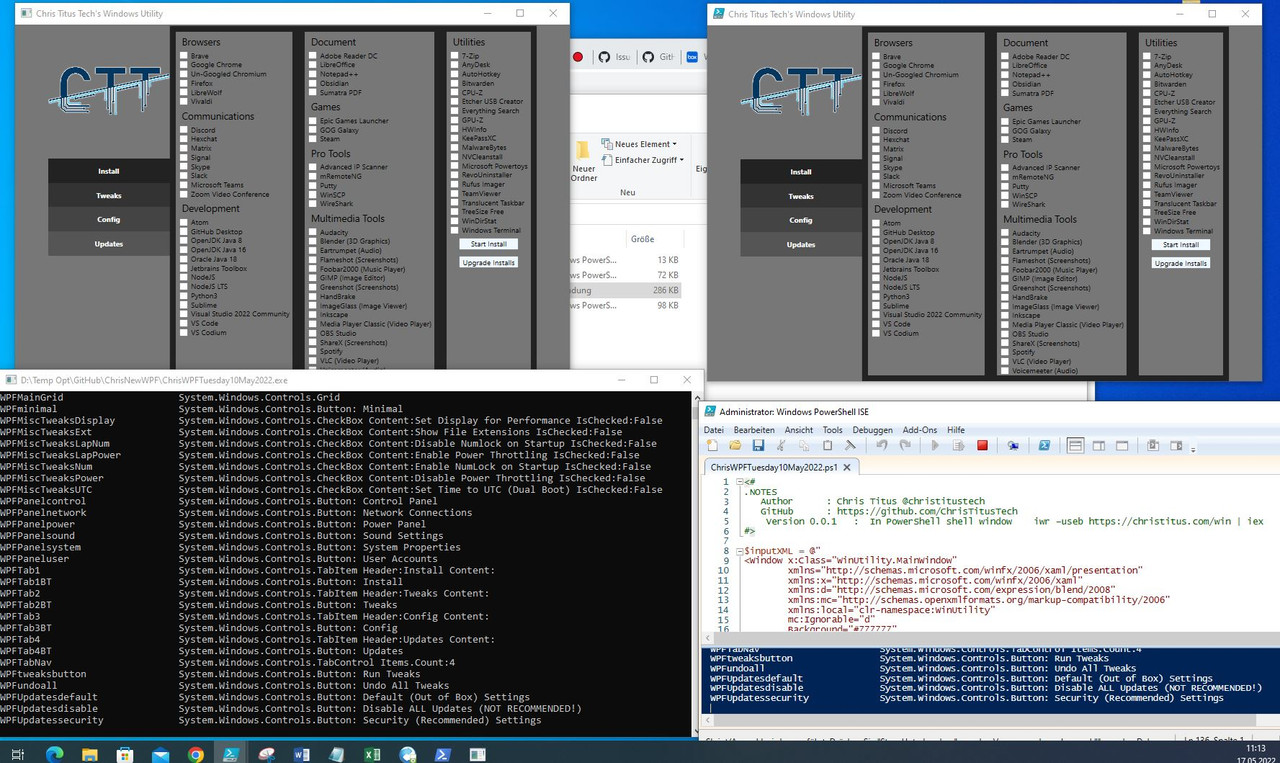
    _ what I get when hitting the play button with the ps1 file in the ISE, ( https://i.postimg.cc/9MvQqXm5/Hit-da...ton-in-ISE.jpg , https://i.postimg.cc/L5L6kd5q/Hit-Pl...ton-in-ISE.jpg )
    , then the results look at first glance to be identical: https://i.postimg.cc/CxP7T9Mn/WPFwin...f-made-exe.jpg
    _.____________________


    Here is the screenshot of the full commands and actions taken in the PowerShell window, ( and below is the exe I made !!! )
    __
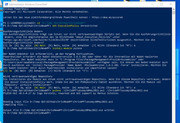
    In this window below I have copied the entire text from that screenshot, and the text in Blue is what I actually typed in – that is 4 basic commands and 3 single character answers. A , J and A

    Code:
    Windows PowerShell
    Copyright (C) Microsoft Corporation. Alle Rechte vorbehalten.
                                                                                                                           
    Lernen Sie das neue plattformübergreifende PowerShell kennen – https://aka.ms/pscore6                                           
    PS C:\WINDOWS\system32> cd 'D:\Temp Opt\GitHub\ChrisNewWPF'                                      
    PS D:\Temp Opt\GitHub\ChrisNewWPF> Set-ExecutionPolicy Unrestricted       
                                                 
    Ausführungsrichtlinie ändern
    Die Ausführungsrichtlinie trägt zum Schutz vor nicht vertrauenswürdigen Skripts bei. Wenn Sie die Ausführungsrichtlinie
     ändern, sind Sie möglicherweise den im Hilfethema "about_Execution_Policies" unter
    "https:/go.microsoft.com/fwlink/?LinkID=135170" beschriebenen Sicherheitsrisiken ausgesetzt. Möchten Sie die
    Ausführungsrichtlinie ändern?
    [J] Ja  [A] Ja, alle  [N] Nein  [K] Nein, keine  [H] Anhalten  [?] Hilfe (Standard ist "N"): A
    PS D:\Temp Opt\GitHub\ChrisNewWPF> install-module ps2exe
     
    Der NuGet-Anbieter ist erforderlich, um den Vorgang fortzusetzen.
    PowerShellGet erfordert die NuGet-Anbieterversion 2.8.5.201 oder höher für die Interaktion mit NuGet-basierten
    Repositorys. Der NuGet-Anbieter muss in "C:\Program Files\PackageManagement\ProviderAssemblies" oder
    "C:\Users\acer\AppData\Local\PackageManagement\ProviderAssemblies" verfügbar sein. Sie können den NuGet-Anbieter auch
    durch Ausführen von 'Install-PackageProvider -Name NuGet -MinimumVersion 2.8.5.201 -Force' installieren. Möchten Sie
    den NuGet-Anbieter jetzt durch PowerShellGet installieren und importieren lassen?
    [J] Ja  [N] Nein  [H] Anhalten  [?] Hilfe (Standard ist "J"):  J
     
    Nicht vertrauenswürdiges Repository
    Sie installieren die Module aus einem nicht vertrauenswürdigen Repository. Wenn Sie diesem Repository vertrauen, ändern
     Sie dessen InstallationPolicy-Wert, indem Sie das Set-PSRepository-Cmdlet ausführen. Möchten Sie die Module von
    'PSGallery' wirklich installieren?
    [J] Ja  [A] Ja, alle  [N] Nein  [K] Nein, keine  [H] Anhalten  [?] Hilfe (Standard ist "N"):  A
    PS D:\Temp Opt\GitHub\ChrisNewWPF> ps2exe .\ChrisWPFTuesday10May2022.ps1 .\ChrisWPFTuesday10May2022.exe
    PS2EXE-GUI v0.5.0.27 by Ingo Karstein, reworked and GUI support by Markus Scholtes
     
     
    Reading input file D:\Temp Opt\GitHub\ChrisNewWPF\ChrisWPFTuesday10May2022.ps1
    Compiling file...
     
    Output file D:\Temp Opt\GitHub\ChrisNewWPF\ChrisWPFTuesday10May2022.exe written
    PS D:\Temp Opt\GitHub\ChrisNewWPF>

    Summary: Recap What you do
    _ Get the ps1 file. Put it somewhere and make a note where it is, (because you will need to give that path in one of the commands later )
    _ Open PowerShell, ( as Administrator ), and do the 4 commands, ( and you may also need to answer some prompts along the way with a single character)


    !!! The Final made exe:
    Share ‘ChrisWPFTuesday10May2022.exehttps://app.box.com/s/x6smoishgjjzurpo5of7jhxxl1pbuvni

    made from this ps1 File:
    Share ‘ChrisWPFTuesday10May2022.ps1 https://app.box.com/s/zvxfm8upvij18kirbh0i6g6qbenlra27
    Last edited by DocAElstein; 05-19-2022 at 04:18 PM.

  4. #4
    Fuhrer, Vierte Reich DocAElstein's Avatar
    Join Date
    Aug 2014
    Posts
    10,458
    Rep Power
    10
    This is post https://excelfox.com/forum/showthrea...ge53#post12804
    https://excelfox.com/forum/showthread.php/2408-Windows-10-and-Office-Excel/page53#post12804


    https://i.postimg.cc/0NrV5zWj/WPF-10-17-and-17-May.jpg


    Some Pull Request stuff done 17 May, 2022

    ( aka another GitHub confused catastrophe
    Issues and Pull requests are stacking up, and Chris is already starting to get in a mess and loose control. ( He has introduced some Nursery school type templates people have to confirm to, which doesn’t help either: He has implemented just some of the Pull Requests, and is perhaps just randomly tackling some of the issues, and at the same time introducing some poxy dopey changes.
    I think Chris may be in danger of becoming the thing he swore to destroy….)


    Summary of changes, all in one go on 17May, ( or maybe (i) , (ii) , and then (iii) ):
    _ (i) Carterpersall tidied up the services and the comments on them, and did some other formatting of script indents
    _ (ii) Chris did some changes to the xml ?? https://i.postimg.cc/fR8Hhcv1/Git-Hu...Update-XML.jpg


    See https://excelfox.com/forum/showthrea...ll=1#post16495
    https://excelfox.com/forum/showthrea...age8#post16495


    decoupling xaml and ps1
    _ (iii) This next change calls up XML thing from a separate, MainWindow.xaml https://raw.githubusercontent.com/Ch...ainWindow.xaml
    Share ‘MainWindow_xami - StandAloneXML17May.txt’ https://app.box.com/s/lrf37fuhegad3jfgjltzlmckmw33lpj2
    Share ‘MainWindow.xaml’ https://app.box.com/s/3b6v4zmgb6njamh6khyqe44zpk7cmaak
    https://i.postimg.cc/fR8Hhcv1/Git-Hu...Update-XML.jpg


    It’s all a total mess. It looks like he changed something he was never using to update it to what he was using: It seems that the full script from 10 May, the full script from just before the last change (ii) on 17May, and the stand alone XLM in change (iii) all have the same XML stuff. (The big mystery seems to be for now where and what the previous XML used by Chris in (ii) has anything to do with anything anywhere. Possibly just another GitHub confused catastrophe


    Share ‘ChrisWPFTuesday10May2022.ps1’ https://app.box.com/s/end0t4spyl119iiixw9va922hdft4icx


    Mistery Red and Green stuff https://github.com/ChrisTitusTech/wi...d6f8ac9bee5a64
    Share ‘ChrisWPF17May2022(ii).ps1’ https://app.box.com/s/yrzoikeg9coggyt99ofin18f2cxkf849
    Share ‘May10-17XML.txt’ https://app.box.com/s/ykynprd9a3ra4w7kcif4h5ziubwktw2t
    Share ‘May17XML.txt’ https://app.box.com/s/gsqjpfmmqwpadmu8wchjrlfrqxwrrg6e


    The new thng thing (iii) , https://github.com/ChrisTitusTech/wi...89e4d5d2923b63
    https://i.postimg.cc/fR8Hhcv1/Git-Hu...Update-XML.jpg
    https://i.postimg.cc/90y83sxB/The-new-thing-iii.jpg
    https://i.postimg.cc/vHd27HB2/The-ne...-thing-iii.jpg
    https://raw.githubusercontent.com/Ch...ainWindow.xaml
    Share ‘MainWindow_xami - StandAloneXML17May.txt’ https://app.box.com/s/lrf37fuhegad3jfgjltzlmckmw33lpj2
    Share ‘MainWindow.xaml’ https://app.box.com/s/3b6v4zmgb6njamh6khyqe44zpk7cmaak

    Share ‘ChrisWPF17May2022.ps1’ https://app.box.com/s/lrzeyx55hjksedzrr649snrxfmfyvtkm
    Share ‘ChrisWPF17May2022(iii).ps1’ https://app.box.com/s/7u4lxbwrgubxgf37tduzx0e22s49alvf
    Last edited by DocAElstein; 05-20-2022 at 02:08 PM.
    ….If you are my competitor, I will try all I can to beat you. But if I do, I will not belittle you. I will Salute you, because without you, I am nothing.
    If you are my enemy, we will try to kick the fucking shit out of you…..
    Winston Churchill, 1939
    Save your Forum..._
    KILL A MODERATOR!!

  5. #5
    Fuhrer, Vierte Reich DocAElstein's Avatar
    Join Date
    Aug 2014
    Posts
    10,458
    Rep Power
    10
    Some Issues / Pull requests and other GitHub chaos confusion

    https://github.com/ChrisTitusTech/wi...d0dff82da4ab46
    Changing the PowerThrottlingOff key previously errored as the directory PowerThrottling does not exist by default
    - Fixed by adding a check in two places for the PowerThrottling directory, and if it does not exist it creates it,
    If(!(Test-Path "HKCU:\SYSTEM\CurrentControlSet\Control\Power\Power Throttling")){New-Item -Path "HKLM:\SYSTEM\CurrentControlSet\Control\Power" -Name "PowerThrottling"}

    From Chris…. commented May 13, 2022 https://github.com/ChrisTitusTech/winutil/pull/3
    The main issue with this PR is that it simply fails to do anything with Power Throttling by removing that path lines. A cleaner way is the complete removal of Power Throttling all together and the removal of it from the GUI. … I'm inclined to just remove the entire bit of code as it seems to have hurt more than helped. So I will close this PR and submit a new version with the full removal of Power Throttling.
    Last edited by DocAElstein; 05-24-2022 at 01:41 AM.

  6. #6
    Fuhrer, Vierte Reich DocAElstein's Avatar
    Join Date
    Aug 2014
    Posts
    10,458
    Rep Power
    10
    This post https://www.excelfox.com/forum/showt...ge54#post12904


    May 2023
    Getting lost, a year behind in May 2023, and my main Vista machine is dying.

    DogsPlop@t-online.de
    DogiesShit

    Dog Shite
    DogShitInABox156

    DogiesShit
    DogShitGit789


    A bit of orientiering
    Docs for last few sides, ( Previous last date looked at ):

    Share ‘ChrisNewWPFSchmereAbMay20222023Page54.doc’ https://app.box.com/s/fkxpjamgm3kl84l5bsodnsx3s9r0glkb
    Page 54 https://www.excelfox.com/forum/showt...e-Excel/page54
    #531 https://www.excelfox.com/forum/showt...ge54#post12904


    H:\Windows ComputerSpecsInfoAudit\Windows 10\Chris Titus Tech\DeBloatOptimize

    ( 03 June 2022 ) 447KB
    Share ‘DebloatOptimizePullPlonkerScriptAbApril2022Page 52and53.doc’ https://app.box.com/s/wjoacmbf4joseyui1ot0goyjp62hzk5k
    Page 52 https://www.excelfox.com/forum/showt...e-Excel/page52
    #511 https://excelfox.com/forum/showthrea...ge52#post12786

    Page 53 https://www.excelfox.com/forum/showt...e-Excel/page53
    #521 https://www.excelfox.com/forum/showt...ge53#post12796

    ( 17 May 2022 ) 474KB
    Share ‘Video Links and OldDebloatOptimize_OldandVideoLinks page41.doc’ https://app.box.com/s/pfi781yts7v2zgnlocmxn48k2tb220rv
    Page 41 https://www.excelfox.com/forum/showt...e-Excel/page41
    #401 https://www.excelfox.com/forum/showt...ge41#post12674

    ( 02 May 2022 ) 341KB
    Share ‘DebloatOptimizePullPlonkerScriptAbApril2022Page 52.doc’ https://app.box.com/s/bx7huvhboglrjtxrgmevy8olt1tyzg64
    Page 52 https://www.excelfox.com/forum/showt...e-Excel/page52
    #511 https://excelfox.com/forum/showthrea...ge52#post12786

    ( 05 April 2022 ) 532KB
    Share ‘DebloatOptimizePullPlonkerScriptPage50and51.doc ’ https://app.box.com/s/75t2omb4ci1znv31raol6mamb623v8j9
    Page 50 https://www.excelfox.com/forum/showt...e-Excel/page50
    #491 https://www.excelfox.com/forum/showt...ge50#post12766

    ( 05 April 2022 ) 371KB
    Share ‘Windows 10 excelfox Debloat Blogs Page42 Notes from Chris Videos.doc’ https://app.box.com/s/4l68iak0yrj3fb9o63ao9l0z1t5weh4h
    Page 42 https://www.excelfox.com/forum/showt...e-Excel/page42
    #411 https://www.excelfox.com/forum/showt...ge42#post12684

    ( 05 April 2022 ) 352KB
    Share ‘Windows 10 excelfox Debloat Blogs Page48 Examples.doc’ https://app.box.com/s/0cny9x0sjls0n0y6b6phmk9z8e3z45b1
    Page 48 https://www.excelfox.com/forum/showt...e-Excel/page48
    #471 https://www.excelfox.com/forum/showt...ge48#post12746

    ( 04 April 2022 ) 530KB
    Share ‘DebloatOptimizePullPlonkerScriptAbApril2022.doc ’ https://app.box.com/s/pleh9gub3ho23s6gfypa0nwvle8g7kbu

    ( 28 March 2022 ) 799KB
    Share ‘DebloatOptimizePullPlonkerScript.doc’ https://app.box.com/s/bgi2ka41lnrvn3vj4pysrgmjmfj85u0j
    Last edited by DocAElstein; 08-21-2023 at 05:17 PM.

  7. #7
    Fuhrer, Vierte Reich DocAElstein's Avatar
    Join Date
    Aug 2014
    Posts
    10,458
    Rep Power
    10
    slkhflskhfslkhf

  8. #8
    Fuhrer, Vierte Reich DocAElstein's Avatar
    Join Date
    Aug 2014
    Posts
    10,458
    Rep Power
    10
    slkhflskhfslkhf

  9. #9
    Fuhrer, Vierte Reich DocAElstein's Avatar
    Join Date
    Aug 2014
    Posts
    10,458
    Rep Power
    10
    slkhflskhfslkhf

  10. #10
    Fuhrer, Vierte Reich DocAElstein's Avatar
    Join Date
    Aug 2014
    Posts
    10,458
    Rep Power
    10
    slkhflskhfslkhf

Similar Threads

  1. Tests and Notes on Range Referrencing
    By DocAElstein in forum Test Area
    Replies: 70
    Last Post: 02-20-2024, 01:54 AM
  2. Tests and Notes for EMail Threads
    By DocAElstein in forum Test Area
    Replies: 29
    Last Post: 11-15-2022, 04:39 PM
  3. Notes tests. Excel VBA Folder File Search
    By DocAElstein in forum Test Area
    Replies: 39
    Last Post: 03-20-2018, 04:09 PM
  4. Replies: 2
    Last Post: 12-04-2012, 02:05 PM

Posting Permissions

  • You may not post new threads
  • You may not post replies
  • You may not post attachments
  • You may not edit your posts
  •