


Hi Alan,
Sorry it took so long to get back to you. I've been busy and have had very little time.
But now, I've cooked something, and it's not spaghetti. :-)
First, let me repeat what the request was: "I want to paste into empty cells" and "I want something that is universal."
That sounds so simple, but from my perspective, it's extremely difficult!
For all readers who don't know me and because I'm new here: I was a moderator and article author in Microsoft Answers for the past 15 years. The forum was closed and migrated to Q&A, and I still have these tasks there. That doesn't mean I know everything or am always right, but I usually know quite well what I'm talking about... hopefully. :-) Why I'm writing here now... another story.
Well, let's see what happens when I try your latest file, "Cow Pat.xls," on my computer.
The first thing that happens is a compiler error, and it marks "Left" when I run DonkeyPlops2.
The reason for this is a reference to VBBBCodeMakerJuni2026.xla in the project, whatever that thing is, get rid of it.
I click the button again and get the next VBA error, "Overflow," and no clues as to the cause.
When debugging the code, the error occurs in this line:
ClmCnt = ((Len(ShitIn) - Len(Replace(ShitIn, vbTab, ""))) / RwCnt) + 1
And the reason is that RwCnt is 0, so my clipboard is obviously just plain text... my mistake!?
If you keep experimenting, you'll eventually get to the point where only 2 characters come out of the clipboard, no matter what you do. The reason for this isn't the code, but the MSForms DLL, or rather, the operating system; I have Windows 11.
The DataObject only works reliably on older computers, or up to Windows 7. Starting with Windows 8, the routines in the operating system were changed, but Microsoft never updated the MSForms DLL, resulting in an incompatibility.
You can reproduce this with this code:
If no other windows are open besides Excel and VBA, you'll see "Andreas Killer" in the immediate window, so everything's fine. Now open the Windows Explorer and run the same code again, and you'll see "??" as the output.Code:Sub Test() Dim S As String With CreateObject("New:{1C3B4210-F441-11CE-B9EA-00AA006B1A69}") S = "Andreas Killer" .SetText S .PutInClipboard MsgBox "Just a break" .GetFromClipboard Debug.Print .GetText() End With End Sub
The solution to this problem is to use the Windows API and open and read the clipboard using Windows routines.
Okay, now that this problem is solved, let's look at the scenario itself. Well, to cut a long story short, it's far too simple. That's why I wanted to know exactly what was being copied where in the other forum, because analyzing the clipboard and the real life is much more complicated.
Let's create a new file and run this code to make it a bit more difficult.
A1 contains a line break, A2 is text, and A3 is a date shown in Jewish.Code:Sub GroundZero() Range("A1") = "1" & vbLf & "2" Range("A2").NumberFormat = "@" Range("A2") = "3-3" Range("A3") = Date Range("A3").NumberFormat = "[$-1043D]dddd, d mmmm yyyy" End Sub
Let's copy these three cells, select C1, and run DonkeyPlops2 again. In C1, we see additional "" signs, C2 is now a date, and C3 becomes text... worst case.
Well, a possible solution for this still-simple scenario would be what you're doing with the RangeToRange routines, but that's a workaround; it's no longer universal because it requires the "Spare" sheet, and that sheet must be visible! Simply hiding the sheet will give us an RTE 1004.
The original idea of reading the clipboard is the right way to go! Because it offers a great opportunity:
What if we copy data outside of Excel, e.g., on a website?
But before we get to that, let's take a closer look at the possible scenarios and what, IMHO, a universal solution must offer.
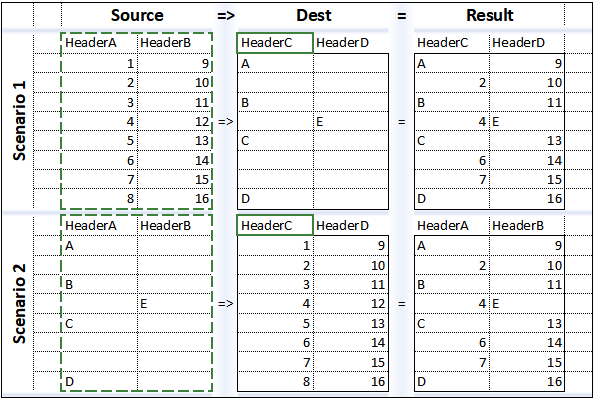
What we're doing here is "not really" pasting into empty cells; it's more like merging cells. Scenario 1 is what we've discussed so far. Just for fun, what if we flip it and want it to work like Scenario 2?
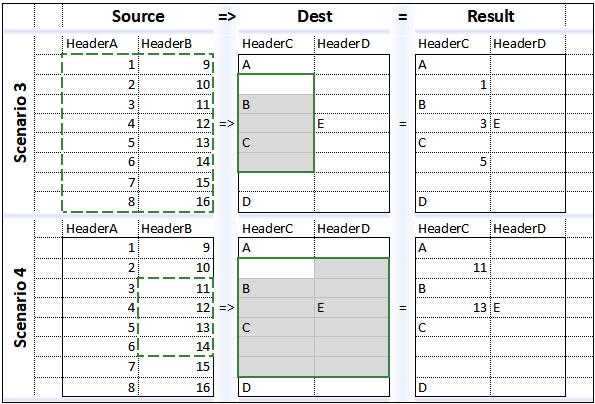
In both scenarios, the copied and pasted ranges are the same size, but this is often not the case in reality. Everyone knows the message Excel gives, even during a normal paste, that it's not possible because the selected range is different in size.
So what should we do? Shouldn't we automatically limit the range?
What if we misunderstood "Paste into empty cells"? In Scenario 1, the result is A,2,B,4,C,6,7,D. What if it should be A,1,B,2,C,3,4,D, so not data is lost and have a real Paste?
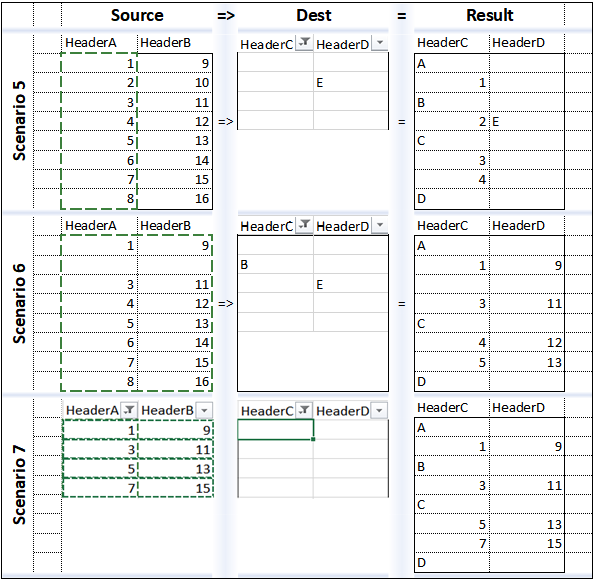
And that brings us very close to reality: We could filter the column and display only the empty rows and then simply paste, right? Well, the sad truth is, Excel itself can't do that, and almost every user has encountered this problem at some point. (Scenario 5)
And what if I have empty cells in the copied range and want to overwrite them in the target range? (Scenario 6)
And what if I want to copy from a filtered range and paste into another filtered range? (Scenario 7)
At this point, 99% of all Excel users will say: No, we can't make that work. I say we can! And even more, we can insert and merge simultaneously, in the source and/or target ranges! And all this with a universal code, without any special requirements.
I can share and explain how to do this, but IMHO it is clear that we need far more than just a few simple lines of code. So I have a question:
Where is the right place in this forum for an article and AddIn "How do I paste into a filtered range?"
Andreas.

 Reply With Quote
Bookmarks