


Pasting into Empty cells only
Question from the web
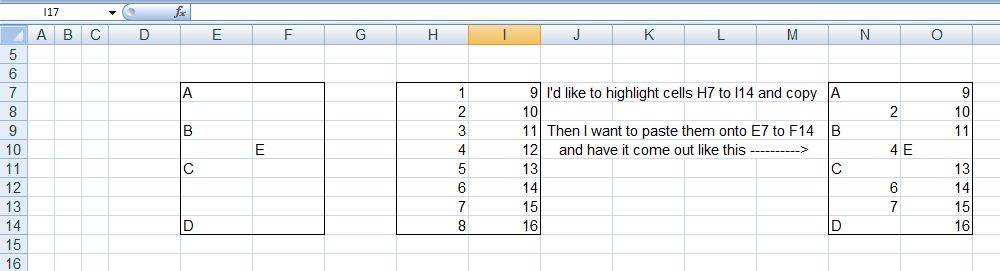
I'd like to copy a range of cells, all of which have data in them, and paste them into a rang, some of which have data and some don't.
I only want the data from my selection to be pasted if the corresponding cell is empty in the target cells.
I want something that is universal.
This ( Forum post over at excelforum.com ) is something that caught my eye, for a few reasons, for example….
_ (i) it is one of those things that might be a useful new feature added at some later date.
_ (ii) In line with my thinking to discourage using the newer versions, I like to think of solutions using existing features, in particular VBA
So what is needed is a VBA macro that pastes data from a source range to a destination range, but only if the destination cell is empty
_ (iii) A further challenge is that the thread starter seems to be really not wanting to get into VBA. About that….. Whilst I do think it is a good idea to encourage any Excel user to get into VBA, I do accept that there will be occasions when an individual passing looking for help really needs a quick answer and is not in the life situation where they want, need or have time to learn VBA. However in such a situation,
**_(iii)b if I can get a solution as close to one using built in features as possible, but has its workings in VBA, then perhaps that is a good compromise, and might help at a later date to encourage interest in VBA Office automation
So, the original Question:
( I modified just slightly the from Excel_Donk (Thread starter)'s example range, so as to emphasise the generality.)
https://i.postimg.cc/9QTFzwZ5/Copy-P...mpty-cells.jpg
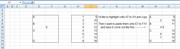
I'd like to highlight cells H7 to I16 and copy
Then I want to paste them onto E7 to F14 and have it come out as shown
So that all explains the question/ requirement……
Proposed solution(s) The general idea
** In accordance with _(iii)b, I am trying to get an answer as close to possible to that what the original poster might have expected to be now, or in the future. A "native" thing.
There are a couple of main things to consoder, stemming from what the original Thread poster wants to do: Copy and Paste
Copy
I would estimate that at the "Excel Donk” level, there is likely to be familiarity with the Copy , be it
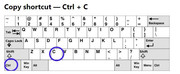
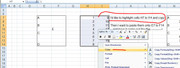
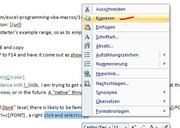
, ____ the keys Ctrl+c ; ____ a right click and select copy; ______¬¬¬¬___highlight and select the Excel Copy.
In other words, ( or rather pics), these sort of things
https://i.postimg.cc/HsB4W5sR/Ctrl-c.jpg https://i.postimg.cc/YqvSKsSS/highli...Excel-Copy.jpg https://i.postimg.cc/mrsZ9Zyc/Highli...elect-copy.jpg https://i.postimg.cc/YqTCpz4z/Right-...elect-copy.jpg
So the solution I propose will, amongst other things, use and require that well known thing: the copy.
(Special)Paste
Somebody familiar with copying and pasting around spreadsheets will probably be aware of, and possibly used, different options in the paste drop down,
https://i.postimg.cc/V6sNs2p0/Paste-options.jpg
They may or may not be aware of some further options on the PasteSpecial
https://i.postimg.cc/Qt6dF0Z4/Paste-...er-options.jpg
A natively thinking non VBA user may have expected an option to do the Paste Only on Empty Cells.
Unfortunately, I do not think it is easy to modify the existing options, and something close to that an idea that is available, an add-in is an option, but as add-ins are a major separate specialist topic, I will not consider those here.
I propose a small button that will perform the Paste Only on Empty Cells after a selection is made
So my proposal is
_ You highlight the cells , (those cells being the ones you want to Paste Only on Empty Cells ), and copy in the/ your familiar way
_ Select the range, ( or top left thereof), that you want to past onto, and hit the small button that I will organise
I will look at some solutions in next posts/replies


 Reply With Quote
Bookmarks