


Later
Post #546 https://www.excelfox.com/forum/showt...ll=1#post24137
https://www.excelfox.com/forum/showthread.php/2824-Tests-Copying-pasting-Cliipboard-issues?p=24137&viewfull=1#post24137
https://www.excelfox.com/forum/showt...ge55#post24137
https://www.excelfox.com/forum/showthread.php/2824-Tests-Copying-pasting-Cliipboard-issues/page55#post24137
My object creating abortion
In the coding of mine, ( Public Sub ListCLSIDs_Me() or Sub ListCLSIDs() ) , I only got the list of the 36 characters in the squiggly bracket , { } things. ( I did not know for sure how to get the name )
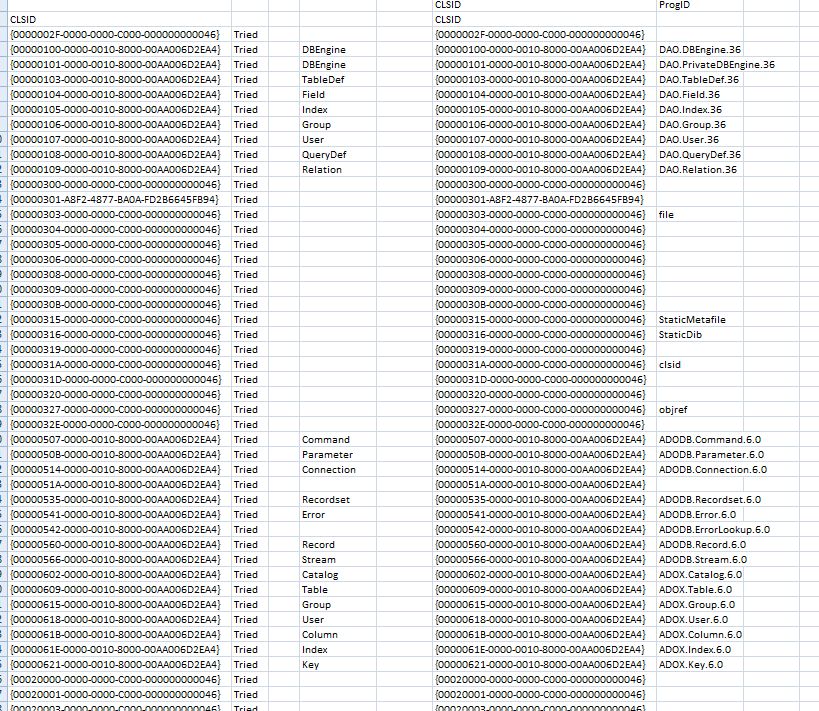
But I was interested in the name thing. So as I was not sure how to do it, I wrote , back then, that second program, Sub CLSIDsValueNames() to try and get that name somehow. It basically creates the object, or tries to, and if it is successful, it tries to get the TypeName( object ) of that object.
It works just on the selection you make in column A, the 36 characters in the squiggly bracket , { } things.
Back then, I did a few . but, I broke off from doing it for all the 6527 things, as after doing a few, some applications started appearing after a computer restart, and I had to tank them from the Task Manager.
But for the ones I did do so far, there is some similarity between what I get for my
____ = TypeName( the created object )
, and what Mike effectively gets from these 2 lineyMike’s
RegObject.getstringvalue &H80000000, "CLSID" & entryArray(ExRowCnt) & "\ProgId", "", KeyValue
Prog = KeyValue
Here, just as example, some of the first results
https://i.postimg.cc/2jGKt0dz/Mine-a...al-results.jpg
https://i.postimg.cc/htkym6n0/Mine-a...al-results.jpg
https://i.postimg.cc/ncwwFMwg/Mine-a...al-results.jpg
https://i.postimg.cc/tgFrNkCG/Mine-a...al-results.jpg
https://i.postimg.cc/76DKszfG/Mine-a...al-results.jpg
Check out also the worksheet named CLSIDsOldVista4810TZG in this file
CLSDsUndClassNames.xls - https://app.box.com/s/nkjwti5yym9j0v634hrxerz4x7n1o90w
Here again that abortion of a coding
Code:Sub CLSIDsValueNames() ' Dim Ws As Worksheet: Set Ws = Me ' Set Ws = ActiveSheet Dim RngSel As Range: Set RngSel = Selection If RngSel.Cells.Count = 1 Then MsgBox prompt:="Please select at least 2 cells in column A": Exit Sub If RngSel.Cells.Columns.Count <> 1 Then MsgBox prompt:="Please select at least 2 cells in only column A": Exit Sub If Not RngSel.Cells.Column = 1 Then MsgBox prompt:="Please select at least 2 cells in column A": Exit Sub Dim stearCel As Range For Each stearCel In RngSel Let Ws.Range("B" & stearCel.row & "").Value = "Tried" ' To indicate I tried - this can be useful to see where it crashed Dim OOPObj As Object On Error GoTo EyeEyeSkipper Set OOPObj = CreateObject("New:" & stearCel.Value & "") Let Ws.Range("D" & stearCel.row & "").Value = TypeName(OOPObj) Let Application.DisplayAlerts = False ThisWorkbook.Save ' This is done to save all got so far incase Excel crashes on next loop or below Let Application.DisplayAlerts = True On Error Resume Next OOPObj.Close On Error GoTo 0 Set OOPObj = Nothing EyeEyeSkipper: On Error GoTo -1 On Error GoTo 0 Next stearCel End Sub

 Reply With Quote
Bookmarks