


String experiments note:
Our main interest in this Thread is the behaviour of the string, but the experiments with the Long above where expected to fit in nicely before considering the string, as they did and do, but also an unexpected bonus was noticed. To experience this Bonus, it would likely be necessary to run the coding in the last post again, immediately before the coding in this post
String
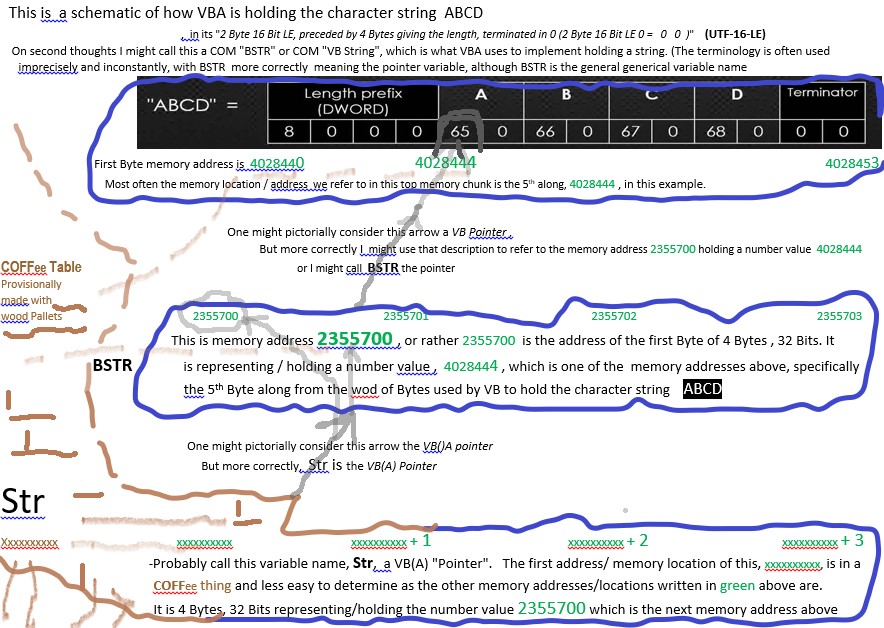
Skematic VBA String.jpg
String memory handling generally in computing, is a bit more dynamic/ complex than something like for a simple number, since even with modern computers, we don’t want to go around reserving a Giga Byte or two of memory every time we declare a string variable.
Here is a coding similar to the lastOne immediate unexpected interesting thing is the second code line Debug.Print VarPtr(Str) actually returned me the very same number as the second code line in the coding from the last post, Debug.Print VarPtr(Lng)!! I do realise that will not always be the case, but as I ran the coding shortly after running the previous coding on the same computer, then there is a chance it will be the same, as it was, … because….. how about this: What Dim Str As String in the coding below is doing, is very similar to what the Dim Lng As Long did/does in the coding from the last post, - it sets aside once again 4 Bytes (32 bits) for me. But the difference being now is that it is not reserving me a place to store any final number or character values, rather it is reserving me a place … for …. a …. 32Bit Pointer , specifically a pointer to a VB StringCode:Sub ConfusedWithVBAandVBStringPointerStuff() 1 Dim Str As String 2 Debug.Print VarPtr(Str) ' 2355700 I don't know where this number is held in memory. I don't care. 3 Debug.Print VarPtr(ByVal Str) ' 0 4 Debug.Print StrPtr(ByVal Str); StrPtr(Str) ' 0 0 Let Str = "ABCD" 5 Debug.Print VarPtr(Str) ' 2355700 - makes sense - no reason for this address to change. It is the first Byte of the 4 bytes that holds the VB pointer/ address, whatever value that is 6 Debug.Print VarPtr(ByVal Str) ' 4028444 7 Debug.Print StrPtr(ByVal Str); StrPtr(Str) ' 4028444 4028444 8 Debug.Print Str End Sub
So I could say, what I have is a VBA Pointer to a VB Pointer, or perhaps a VBA Pointer to what likely will be a VB Pointer – depending on how you feel the word pointer should be used.
At this stage, after Dim Str As String, and before Let Str = "ABCD", we are at a very similar to the second ( and final ) level in the last diagram, ( the main difference is that we have a value of 0 now instead of the value 2). In the previous diagram, the assignment Let Lng = 2 did not change much other than replacinf a value of zero with a value of 2. In the now case of a string, the Let Str = "ABCD" also does a simple change of value ( from 0 to 4028444 ) but that is not all: We are not at the final level in this case, (and the number that would be finally returned from VarPtr(ByVal Str after we assign the value is not the final, string value , but rather will be the address of the final string, 4028444. (But note also that address is not of the start memory point I finally use for my string, but rather 4 Bytes along where the actual Unicode UTF-16 LE encoding Bytes start. )
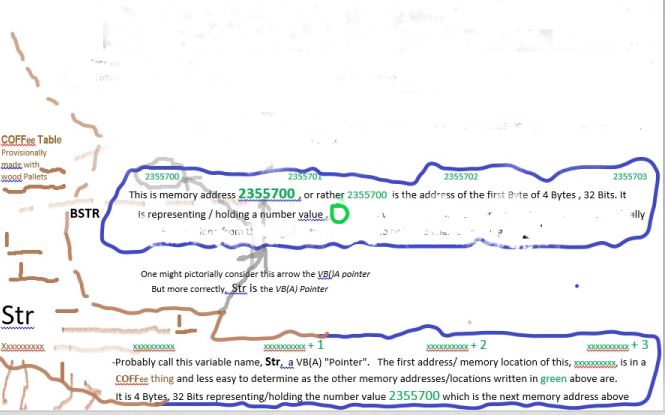
At the point before Let Str = "ABCD" I have no memory at all set aside for any final string value. In crude terms, the final top section from the diagram below does not exist, ( instead I have this situation https://i.postimg.cc/rwGWm2F8/vb-Null-String.jpg ), and the value at memory location 2355700 resembles very similar the situation at code line 4 of the previous coding, having a value of 0. (At this point I could regard this situation as a "vbNullString situation" ## , but that is just something I came up with to help me remember what vbNullString is about )
After Let Str = "ABCD", I have the situation depicted in the diagram below.
As already noted, the final value returned from VarPtr(ByVal Str after we assign the value is not the final, string value , but rather will be the memory address location of the final string.
(##Note in passing that after Let Str = "ABCD" the further thereafter use of Let Str = vbNullString allows us to return to the situation at code line 4)
As for code line 8, I would assume that VB(A) either knows how to navigate along the 2 pointers to get the final value, such as for example going further until it no longer sees a points or some similar innards coding.
The sketch below illustrates the situation after Let Str = "ABCD" , (which remains the situation until the coding ends, since the following lines change nothing: they just get us some information about the situation.)
StrPtr v VarPtr
The strPtr is an mysterious and undocumented as the VarPtr. It may have come at the point where changes involving when Unicorn came about. Some literature suggests this somehow makes sure we go to the memory area in which the Unicorn actual string is stored. Maybe that suggest is safer to use than VarPtr(ByVal Str
vbNullString v ""
I am including this bit of extra info here as it is perhaps easy to understand after the previous stuff, and also it can help consolidate the previous knowledge
The following coding is only slightly different from the previous. The first change is to replace Let Str = "ABCD" with Let Str = ""
After this Let Str = "" we have a situation very similar to the situation after Let Str = "ABCD" in the previous coding. The only difference is that the top chunk of memory has changed to this:Code:Sub VBAandVBStringPointerStuffandvbNullString() ' https://www.excelfox.com/forum/showthread.php/2824-Tests-Copying-Pasting-API-Cliipboard-issues-and-Rough-notes-on-Advanced-API-stuff?p=24948&viewfull=1#post24948 1 Dim strOb As String 2 Debug.Print VarPtr(strOb) ' 2355700 I don't know where this number is held in memory. I don't care 3 Debug.Print VarPtr(ByVal strOb) ' 0 4 Debug.Print StrPtr(ByVal strOb); StrPtr(strOb) ' 0 0 Let strOb = "" 5 Debug.Print VarPtr(strOb) ' 2355700 - makes sense - no reason for this address to change. It is the first Byte of the 4 bytes that holds the VB pointer/ address, whatever value that is 6 Debug.Print VarPtr(ByVal strOb) ' 4028444 7 Debug.Print StrPtr(ByVal strOb); StrPtr(strOb) ' 4028444 4028444 8 Debug.Print Len(strOb) ' 0 9 Let strOb = vbNullString 10 Debug.Print VarPtr(strOb) ' 2355700 I don't know where this number is held in memory. I don't care 11 Debug.Print VarPtr(ByVal strOb) ' 0 12 Debug.Print StrPtr(ByVal strOb); StrPtr(strOb) ' 0 0 End Sub
https://i.postimg.cc/rm68X18P/Zero-length-string.jpg
Effectively the final place we "point" to is the representation of the terminating null character (vbNullChar = Chr(0)) which indicates/ causes the end of any string. So we end where we start, and have a length of zero
After code line 9, the use of vbNullString has brought us back to the situation when we have only done this so far Dim strOb As String , and not gone as far to do anything like Let Str = "" or Let Str = "ABCD", which pictorially can be represented by
https://i.postimg.cc/rwGWm2F8/vb-Null-String.jpg
It should be noted that vbNullString was introduced for API things around the VB4 - VB5 time , and there is no way in VB(A) to tell the difference other than in the pointer ways as done in the coding above.
Ref: VarPtr , StrPtr stuff https://classicvb.net/tips/varptr/ , https://www.vba-tutorial.de/referenz/zeiger.htm
https://www.aivosto.com/articles/stringopt2.html
vbNullString https://eileenslounge.com/viewtopic....323978#p323978


 Reply With Quote
Bookmarks