


This is post https://excelfox.com/forum/showthrea...l/page51#12784
https://excelfox.com/forum/showthread.php/2408-Windows-10-and-Office-Excel/page51#12784
Further here I am looking from approx now ( the July 2021 time ), I will try to look carefully at what happened after this point
On 12 July a large $WindowsSearch.Add_Click( appeared , as did the corresponding button “Search Tweaks”, but the ps1 errors at that new .Add_Click
If I comment out that section the GUI looks like this
Sure enough we see the same Guy responsible for the 12 July doing a correction on 18-19 July 2021, which included the missing curly bracket.
Here is the 19July ps1And here is the $WindowsSearch.Add_Click(Code:Share ‘ChrisSearchTweaks18-19July.ps1 https://app.box.com/s/cbs7go8i2tdxw4wguthgxcviecaxjn6b iex ((New-Object System.Net.WebClient).DownloadString(' https://raw.githubusercontent.com/ChrisTitusTech/win10script/71609526b132f5cd7e3b9167779af60051a80912/win10debloat.ps1'))
https://excelfox.com/forum/showthrea...ll=1#post16473
https://excelfox.com/forum/showthrea...ll=1#post15748
https://excelfox.com/forum/showthrea...ge51#post15748
The two Cortana script bits look to have not changed at this stage.
$WindowsSearch button gone, script still there
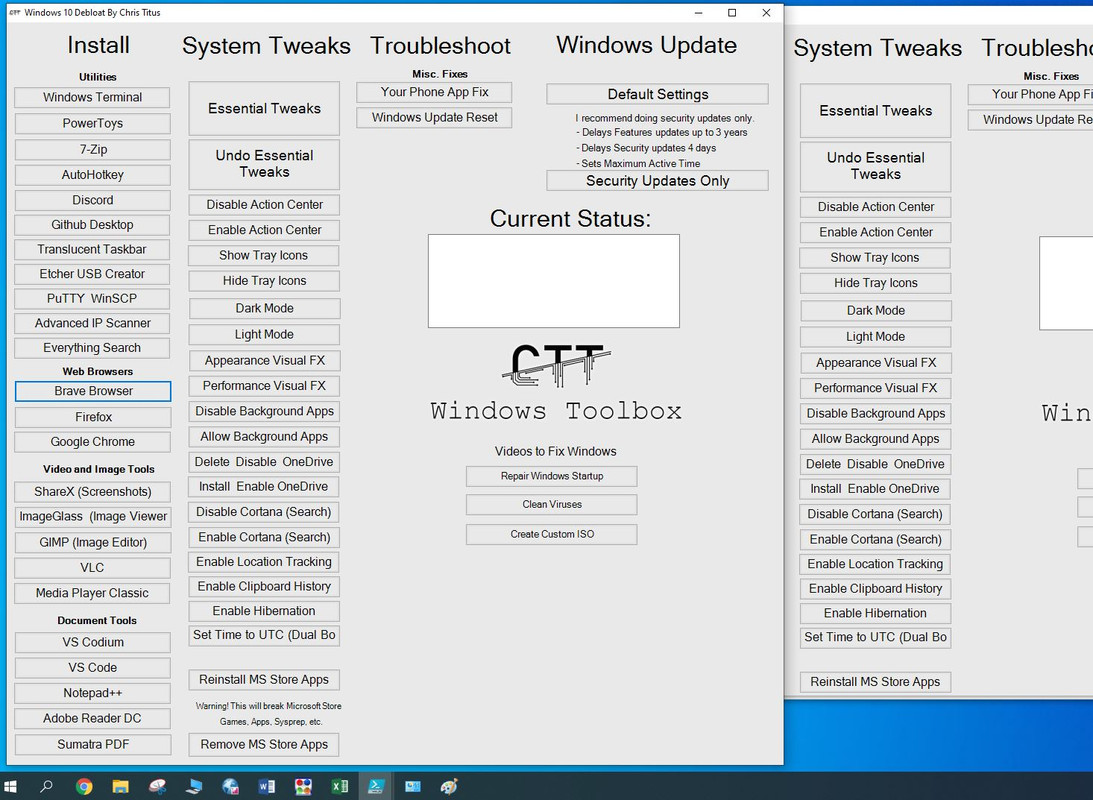
As far as I can tell the $WindowsSearch.Add_Click( scripting is still there and always wassince it was first introdunced mid July, 2021. However, the Button for $WindowsSearch, “Search Tweaks” seems to have vanished for no apparent reason on 4 August. There were two commits, and somehow the button vanished between the first and the second. Here is the two scripts running side by side:
https://i.postimg.cc/0NHht9k8/1st-an...n-vanishes.jpg
As you can see, the change which I expect was wanted is that the remove and reistall App bloat pair has moved down. The Search tweak button vanished, probably by mistake I expect.
https://i.postimg.cc/HLLf4rCZ/1st-an...n-vanishes.jpg
I will take a geuss that a copy and paste went wrong. It certainly wouldn’t be the first time, Lol!
Or, … I note also that Chris never discussed this new search tweaks button anywhere, so another explanation might be he wanted to remove it silently for some reason.
Some big changes were done around the 23 September which included the windows update fix, many of the things for the new look bigger GUI, including the bloating out into it being too big
Its close to just starting again, and a lot of that was discussed in the next normal size video, which at the time that I write this was the last normal size video specifically on the tool
The Ultimate Windows Utility Upgrade 29 09 2021
https://www.youtube.com/watch?v=dKM8ZScbic8
Share ‘9.00 The Ultimate Windows Utility Upgrade-dKM8ZScbic8_29 09 2021.wmv’ https://app.box.com/s/9io0pbsjqmmkzfzep8fjqu09jr6lpmtd
I started looking at scripts in detail at the time they were available from about November. Since the major change reflectes in this video from the end of September, the changes have been fairly well detailed either by Chris’s live stream videos or and my notes starting from the previous page about here: https://excelfox.com/forum/showthrea...e-Excel/page50
a few extra notes a second time around,
Chris seems keen to tell people to google debloat windows 10, to get his site at the top, and click there to get to his site.
winget installs differently..( just to compare https://excelfox.com/forum/showthrea...ll=1#post16508
https://github.com/ChrisTitusTech/wi...770ae56d3b6e85
https://github.com/ChrisTitusTech/wi...b236f3ecf290db
) It installs through Microsoft Store, ( does not install the store)
For full restore if something goes wrong with Essential tweaks , he says Undo first then system restore from the made restore point at start of essential tweaks
He thinks a “local time” thing still in use since introduced as a temporary fix in the y2k time, is a bad idea, for example it might mess things up by Dual booting
He is still not keen on disabling background apps
Enable Hibernation button is there as Essentials tweaks disables it, - Chris thinks its better just to just restart your computer once a week.
At the end of October a live stream added service tweaks and some old control panel type stuff
9.05 Live - Redesigning the Windows Toolbox 29 10 2021
https://www.youtube.com/watch?v=srvz8-5qReo
https://drive.google.com/file/d/1zC3...?usp=drive_web
The scripts and GUI from late September, are basically as in the above last screenshot form where I started looking at everything in detail, as it was happening or shortly after.
So that’s about it,
In the meantime I have just had my accounts at GitHub suspended.
As ever, almost no one is interested in comments at YouTube.
So it’s probably time to move on and do it all myself…
A few miscellaneous things and notes
A quick comparison of the GUIs. There a three main sorts
First GUI, 04.12.2020 The Best Windows 10 Toolbox was the simplest 4 code lines, no colour code line so its at default
Second GUI 06.07.2021 The Best Windows Utility came in all the crap that fucks it up later. But the color was a nice shade of grey, this code line does that
$Form.BackColor = [System.Drawing.ColorTranslator]::FromHtml("#b8b8b8") # Nice grey shade
The third and current GUI , from The Ultimate Windows Utility Upgrade 29 09 2021 is the one with over sized and fucked up sizing. There is a color code line but the color is close to default
$Form.BackColor = [System.Drawing.ColorTranslator]::FromHtml("#e9e9e9")
Here is all three together (on a 1920x1080 Screen Resolution )
A way to fix that Admin warning: some settings are managed by your organization
https://www.youtube.com/watch?v=dO30...zou9_7-HEna_4J



 Reply With Quote
Bookmarks