Code:
' Select top left of where File details should start, usually column D
Private Sub FolderFileDetails()    '    https://www.youtube.com/watch?v=jTmVtPHtiTg&t=612s
Dim Ws As Worksheet: Set Ws = Me
Dim Parf As String
 Let Parf = ThisWorkbook.Path & "\Movie Maker"
Dim objShell As Shell32.Shell: Set objShell = New Shell32.Shell  '    https://i.postimg.cc/Fz9zrnNm/Tools-Referrences-Microsoft-Shell-Controls-And-Automation.jpg     https://i.postimg.cc/sDC9S54h/Tools-Referrences-Microsoft-Shell-Controls-And-Automation.jpg
Dim ObjFolder As Shell32.Folder: Set ObjFolder = objShell.Namespace(Parf)
Dim Fil As Shell32.FolderItem
    For Each Fil In ObjFolder.Items
    Dim Clm As Long: Let Clm = Clm + 1
    Dim Rw As Long: Let Rw = 1
     Let ActiveCell.Offset(Rw, Clm - 1) = ObjFolder.GetDetailsOf(Fil, 0)
     Let ActiveCell.Offset(Rw + 1, Clm - 1) = ObjFolder.GetDetailsOf(Fil, 1)
     Let ActiveCell.Offset(Rw + 2, Clm - 1) = Replace(ObjFolder.GetDetailsOf(Fil, 2), "Anwendungserweiterung", "App Ext", 1, 1, vbBinaryCompare)
     Let ActiveCell.Offset(Rw + 3, Clm - 1) = Left(ObjFolder.GetDetailsOf(Fil, 3), InStr(1, ObjFolder.GetDetailsOf(Fil, 3), " ", vbBinaryCompare))
     Let ActiveCell.Offset(Rw + 4, Clm - 1) = Left(ObjFolder.GetDetailsOf(Fil, 4), InStr(1, ObjFolder.GetDetailsOf(Fil, 4), " ", vbBinaryCompare))
     Let ActiveCell.Offset(Rw + 5, Clm - 1) = ObjFolder.GetDetailsOf(Fil, 31)
     Let ActiveCell.Offset(Rw + 6, Clm - 1) = ObjFolder.GetDetailsOf(Fil, 57)
     Let ActiveCell.Offset(Rw + 7, Clm - 1) = ObjFolder.GetDetailsOf(Fil, 164)
     Let ActiveCell.Offset(Rw + 8, Clm - 1) = ObjFolder.GetDetailsOf(Fil, 165)
     Let ActiveCell.Offset(Rw + 9, Clm - 1) = ObjFolder.GetDetailsOf(Fil, 166)
     Let ActiveCell.Offset(Rw + 10, Clm - 1) = ObjFolder.GetDetailsOf(Fil, 309)
     Let ActiveCell.Offset(Rw + 11, Clm - 1) = ObjFolder.GetDetailsOf(Fil, 311)
     Let ActiveCell.Offset(Rw + 12, Clm - 1) = ObjFolder.GetDetailsOf(Fil, 312)
     Let ActiveCell.Offset(Rw + 13, Clm - 1) = ObjFolder.GetDetailsOf(Fil, 313)
     Let ActiveCell.Offset(Rw + 14, Clm - 1) = ObjFolder.GetDetailsOf(Fil, 314)
     Let ActiveCell.Offset(Rw + 15, Clm - 1) = ObjFolder.GetDetailsOf(Fil, 315)
     Let ActiveCell.Offset(Rw + 16, Clm - 1) = ObjFolder.GetDetailsOf(Fil, 316)
     Let ActiveCell.Offset(Rw + 17, Clm - 1) = ObjFolder.GetDetailsOf(Fil, 317)
     Let ActiveCell.Offset(Rw + 18, Clm - 1) = ObjFolder.GetDetailsOf(Fil, 309)
     Let ActiveCell.Offset(Rw + 19, Clm - 1) = ObjFolder.GetDetailsOf(Fil, 319)
     Let ActiveCell.Offset(Rw + 20, Clm - 1) = ObjFolder.GetDetailsOf(Fil, 320)
    'Stop ' Stop after each file
    Next Fil
End Sub


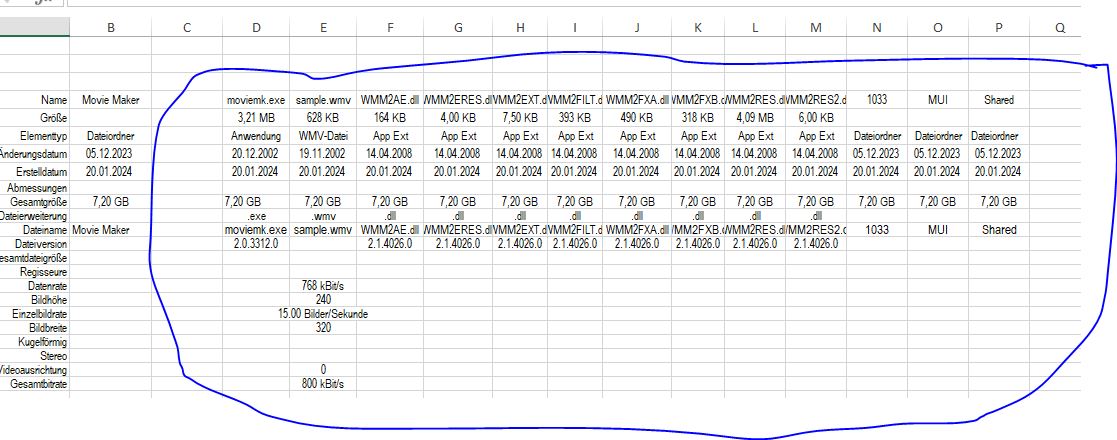
Version 2 simple property macro for Movie Maker files.jpg

 Reply With Quote
Bookmarks