Results 1 to 10 of 112

Thread: Notes tests, string, manipulation of text files and string manipulations

Hybrid View

Previous Post Previous Post   Next Post Next Post
  1. #1
    Fuhrer, Vierte Reich DocAElstein's Avatar
    Join Date
    Aug 2014
    Posts
    10,457
    Rep Power
    10
    Some notes to go with this forum post
    https://eileenslounge.com/viewtopic....314200#p314200
    https://eileenslounge.com/viewtopic....314281#p314281


    Just for fun, the way I might do it.
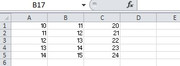
    Same test data, just to help compare offered solutions:
    https://i.postimg.cc/NjzZxy0C/Test-d...n-column-D.jpg
    Test data 5 rows of columns A - C to be summed in column D.jpg

    I want in column D the summed values and also the numbers used in the summation , - I want the numbers used in the summation, for example, for future reference even if I delete columns A - Z

    I would do this ..
    Code:
    Sub My2Euros() '  https://www.excelfox.com/forum/showthread.php/2860-Notes-tests-string-manipulation-of-text-files-and-string-manipulations?p=23991&viewfull=1#post23991
     Let Selection = "=A1+B1+C1 & ""                     "" & A1 & "" "" & B1 & "" "" & C1"   '     This line is like putting this formula in cell D1    =A1+B1+C1 & "          " & A1 & " " & B1 & " " & C1         and dragging it down
     Let Selection = Selection.Value                                                          '     line changes the cell values to the value the formula gives, rather than the formula, ( this is necessary so that I can still everything as I initially do in the sum result column, even if I delete the columns A - C
    End Sub
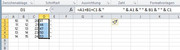
    The first code line is like putting this formula in cell D1
    Code:
    =A1+B1+C1 & "                     " & A1 & " " & B1 & " " & C1
    https://i.postimg.cc/wjvSJ59s/First-...1-A1-B1-C1.jpg
    First code line is like this in D1 A1+B1+C1 & & A1 & & B1 & &.jpg
    , and then dragging it down.

    The second code line changes the cell values to the value the formula gives, rather than the formula, ( this is necessary so that I can still everything as I initially do in the sum result column, even if I delete the columns A - C


    That way is just my preference for a few reasons:
    _ Text and text storage in computers is, as I understand it as a computer Layman, cheap and easy these days, so having a lot of text anywhere idoes no noticeable harm or performance degradation
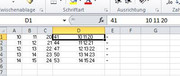
    _ I would probably have things in the next column and my columns are not usually very wide., so I usually only see the results clearly, but if need be, to get full information ,I can extend the column , look in the formula bar or copy cells or a cell, etc.
    https://i.postimg.cc/TPW36LNB/Extend...-full-info.jpg
    Extended column or look in formula bar for full info.jpg
    Last edited by DocAElstein; 02-15-2024 at 11:21 PM.
    ….If you are my competitor, I will try all I can to beat you. But if I do, I will not belittle you. I will Salute you, because without you, I am nothing.
    If you are my enemy, we will try to kick the fucking shit out of you…..
    Winston Churchill, 1939
    Save your Forum..._
    KILL A MODERATOR!!

  2. #2
    Fuhrer, Vierte Reich DocAElstein's Avatar
    Join Date
    Aug 2014
    Posts
    10,457
    Rep Power
    10
    Some extended notes for this main forum post
    https://eileenslounge.com/viewtopic....a7d27b#p315620
    https://eileenslounge.com/viewtopic.php?p=315620&sid=922f8eb190547f727ca48c954aa7d27b#p315620
    This is post
    https://www.excelfox.com/forum/showt...ll=1#post24092
    https://www.excelfox.com/forum/showthread.php/2860-Notes-tests-string-manipulation-of-text-files-and-string-manipulations?p=24092&viewfull=1#post24092


    This particular post is intended just to reproduce , for later clarity , some things in the original main forum post

    At this point in the proceedings I had got to approximately these posts, or thereabouts . https://eileenslounge.com/viewtopic....315596#p315596
    https://eileenslounge.com/viewtopic....315512#p315512
    and the coding I was using was in **essence this following, ( ** changed just slightly to make comparisons with the next two post , ( https://www.excelfox.com/forum/showt...ll=1#post24094 https://www.excelfox.com/forum/showt...ll=1#post24093 ) , easier

    Those last two Eileen’s Lounge links, https://eileenslounge.com/viewtopic....315596#p315596
    https://eileenslounge.com/viewtopic....315512#p315512
    , sum up well what I was doing and this coding version of mine is a good summary of a shortened version of my main coding ideas, ( I have farmed out the BB Code tag making part to another routine, as that is not the main point of the current discussions. The main point of the current discussions is the getting of the appropriate URL to match a highlight key word in Microsoft Word)

    Code:
    Sub BBCodeTagsURL_()  '     https://eileenslounge.com/viewtopic.php?p=315503#p315503  https://www.excelfox.com/forum/showthread.php/2860-Notes-tests-string-manipulation-of-text-files-and-string-manipulations?p=24092&viewfull=1#post24092
    Rem 0  The text you selected
    Dim SelTxt As String
     Let SelTxt = Selection.Text ' A text I highlighted in Word
    
    Rem 1 Some groups of   name, URL,   pairs
    Dim strItAll As String, strEileen As String, strFox As String
     Let strEileen = "Eileen's Lounge, https://eileenslounge.com/app.php/portal, eileenslounge, https://eileenslounge.com/app.php/portal, The Windows Clipboard, https://www.eileenslounge.com/viewtopic.php?p=300947#p300947, "
     Let strFox = "Excel Fox, https://www.excelfox.com/forum/forum.php, excelfox, https://www.excelfox.com/forum/forum.php, "
     
     Let strItAll = strEileen & strFox
    
    Rem 2 Find the URL if there is one
    Dim strURL As String
            If InStr(1, strItAll, SelTxt, vbTextCompare) > 0 Then
         Let strURL = Mid(strItAll, InStr(InStr(1, strItAll, SelTxt, vbTextCompare), strItAll, "http", vbBinaryCompare), InStr(InStr(InStr(1, strItAll, SelTxt, vbTextCompare), strItAll, "http", vbBinaryCompare), strItAll, ",", vbBinaryCompare) - InStr(InStr(1, strItAll, SelTxt, vbTextCompare), strItAll, "http", vbBinaryCompare))
        Else
         Let strURL = ""
        End If
    
    Rem 3 Make the BB Code Tag URL thing
    Call MakeABBCodeTagURL(strURL)
    
    End Sub
    Sub MakeABBCodeTagURL(ByVal strURL As String) ' https://www.excelfox.com/forum/showthread.php/2860-Notes-tests-string-manipulation-of-text-files-and-string-manipulations?p=24092&viewfull=1#post24092
        With Selection
         .Text = "[URL=" & strURL & "] " & .Text & " [/url]"
         .Collapse Direction:=wdCollapseEnd
         .Font.Color = wdColorAutomatic
        End With
    End Sub
    Last edited by DocAElstein; 03-27-2024 at 10:52 PM.

Similar Threads

  1. Replies: 116
    Last Post: 02-23-2025, 12:13 AM
  2. Replies: 4
    Last Post: 10-02-2022, 09:18 PM
  3. Replies: 4
    Last Post: 01-30-2022, 04:05 PM
  4. Replies: 0
    Last Post: 07-08-2020, 04:29 PM
  5. string manipulation
    By kylefoley76 in forum Excel Help
    Replies: 5
    Last Post: 02-20-2014, 12:10 AM

Posting Permissions

  • You may not post new threads
  • You may not post replies
  • You may not post attachments
  • You may not edit your posts
  •