FileSystemObject OpenTextFile ReadAll One liner
_……. Continued from last post
This basic coding does the job, if we know the dimensions of the text file, for example that the rows are 3 and the columns 2
Code:
Sub FileSystemObjectOpenTextFileReadAll() ' https://www.excelfox.com/forum/showthread.php/2559-Notes-tests-text-files-manipulation-of-text-files-in-Excel-and-with-Excel-VBA-CSV-stuff?p=23290&viewfull=1#post23290
Dim vTemp As Variant
Let vTemp = CreateObject("scripting.filesystemobject").opentextfile(ThisWorkbook.Path & "\3Row2ColumnTextFile.txt").readall ' _The entire text file is brought ( into a string ) using the CreateObject("scripting.filesystemobject").opentextfile("TextFile").readall thing
Let vTemp = Replace(vTemp, vbCr & vbLf, ",", 1, -1, vbBinaryCompare) ' _ the line separator ( most likely the invisible character pair, vbCr & vbLf ) will be replaced by the column separator , the thing which most commonly is the comma ,
Let vTemp = Split(vTemp, ",", -1, vbBinaryCompare) ' _ the split of the modified string by the , separator , to give a long single array 1 dimensional array,
Let vTemp = Application.Index(vTemp, 1, Evaluate("=COLUMN(A:B)+((Row(1:3)-1)*2)")) ' _ finally the 2Darray = Index ( 1Darray, Rws , Clms() ) ideas , for example here , https://www.excelfox.com/forum/showt...3287#post23287 , will be used to give us the final array or range of values
' Or
Let vTemp = Application.Index(Split(Replace(CreateObject("scripting.filesystemobject").opentextfile(ThisWorkbook.Path & "\3Row2ColumnTextFile.txt").readall, vbCr & vbLf, ","), ","), 1, Evaluate("=COLUMN(A:B)+((Row(1:3)-1)*2)"))
' Or
Let vTemp = Application.Index(Split(Replace(CreateObject("scripting.filesystemobject").opentextfile(ThisWorkbook.Path & "\3Row2ColumnTextFile.txt").readall, vbCr & vbLf, ","), ","), 1, Evaluate("=COLUMN(A:" & Split(Cells(1, 2).Address, "$")(1) & ")+((Row(1:3)-1)*2)"))
' ' 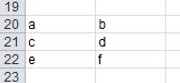 Let Range("A20").Resize(3, 2) = Application.Index(Split(Replace(CreateObject("scripting.filesystemobject").opentextfile(ThisWorkbook.Path & "\3Row2ColumnTextFile.txt").readall, vbCr & vbLf, ","), ","), 1, Evaluate("=COLUMN(A:" & Split(Cells(1, 2).Address, "$")(1) & ")+((Row(1:3)-1)*2)"))
End Sub
Let Range("A20").Resize(3, 2) = Application.Index(Split(Replace(CreateObject("scripting.filesystemobject").opentextfile(ThisWorkbook.Path & "\3Row2ColumnTextFile.txt").readall, vbCr & vbLf, ","), ","), 1, Evaluate("=COLUMN(A:" & Split(Cells(1, 2).Address, "$")(1) & ")+((Row(1:3)-1)*2)"))
End Sub
To make it more flexible, we would need to get the dimensions of the text file from the text file, in the last example that would be to get the column count 2 and row count 3 in the final formula
………..Evaluate("=COLUMN(A:" & Split(Cells(1, 2).Address, "$")(1) & ")+((Row(1:3)-1)*2)"))
This next code gets you there,
Code:
Sub FileSystemObjectOpenTextFileReadAll_()      '  https://www.excelfox.com/forum/showthread.php/2559-Notes-tests-text-files-manipulation-of-text-files-in-Excel-and-with-Excel-VBA-CSV-stuff?p=23290&viewfull=1#post23290
Dim vTemp As Variant
 Let vTemp = Application.Index(Split(Replace(CreateObject("scripting.filesystemobject").opentextfile(ThisWorkbook.Path & "\3Row2ColumnTextFile.txt").readall, vbCr & vbLf, ","), ","), 1, Evaluate("=COLUMN(A:" & Split(Cells(1, 2).Address, "$")(1) & ")+((Row(1:3)-1)*2)"))
Dim RwsCnt As Long, ClmsCnt As Long
 Let RwsCnt = 3: ClmsCnt = 2
 Let vTemp = Application.Index(Split(Replace(CreateObject("scripting.filesystemobject").opentextfile(ThisWorkbook.Path & "\3Row2ColumnTextFile.txt").readall, vbCr & vbLf, ","), ","), 1, Evaluate("=COLUMN(A:" & Split(Cells(1, ClmsCnt).Address, "$")(1) & ")+((Row(1:" & RwsCnt & ")-1)*" & ClmsCnt & ")"))

 ' to get the row count, we look at the (difference in length between the main string and the main string less the vbCr & vbLf pairs) / 2   and then add 1 to that since we have 1 less  vbCr & vbLf pairs  than there are rows
 Let vTemp = CreateObject("scripting.filesystemobject").opentextfile(ThisWorkbook.Path & "\3Row2ColumnTextFile.txt").readall()  '  _The entire text file is brought ( into a string ) using the CreateObject("scripting.filesystemobject").opentextfile("TextFile").readall thing
 Let vTemp = (Len(vTemp) - Len(Replace(vTemp, vbCr & vbLf, "", 1, -1, vbBinaryCompare))) / 2 + 1
' or
 Let RwsCnt = (Len(CreateObject("scripting.filesystemobject").opentextfile(ThisWorkbook.Path & "\3Row2ColumnTextFile.txt").readall) - Len(Replace(CreateObject("scripting.filesystemobject").opentextfile(ThisWorkbook.Path & "\3Row2ColumnTextFile.txt").readall, vbCr & vbLf, ""))) / 2 + 1

' to get the column count get the (difference in length in a line and the line without any seperator) + 1  since there willl be one more columns than there are seperators  ,
 Let vTemp = CreateObject("scripting.filesystemobject").opentextfile(ThisWorkbook.Path & "\3Row2ColumnTextFile.txt").readline()  '
 Let vTemp = (Len(vTemp) - Len(Replace(vTemp, ",", "", 1, -1, vbBinaryCompare))) + 1
' or
 Let ClmsCnt = (Len(CreateObject("scripting.filesystemobject").opentextfile(ThisWorkbook.Path & "\3Row2ColumnTextFile.txt").readline()) - Len(Replace(CreateObject("scripting.filesystemobject").opentextfile(ThisWorkbook.Path & "\3Row2ColumnTextFile.txt").readline(), ",", ""))) + 1

' So
 Let vTemp = Application.Index(Split(Replace(CreateObject("scripting.filesystemobject").opentextfile(ThisWorkbook.Path & "\3Row2ColumnTextFile.txt").readall, vbCr & vbLf, ","), ","), 1, _
 Evaluate("=COLUMN(A:" & Split(Cells(1, (Len(CreateObject("scripting.filesystemobject").opentextfile(ThisWorkbook.Path & "\3Row2ColumnTextFile.txt").readline()) - Len(Replace(CreateObject("scripting.filesystemobject").opentextfile(ThisWorkbook.Path & "\3Row2ColumnTextFile.txt").readline(), ",", ""))) + 1).Address, "$")(1) & ")+((Row(1:" & (Len(CreateObject("scripting.filesystemobject").opentextfile(ThisWorkbook.Path & "\3Row2ColumnTextFile.txt").readall) - Len(Replace(CreateObject("scripting.filesystemobject").opentextfile(ThisWorkbook.Path & "\3Row2ColumnTextFile.txt").readall, vbCr & vbLf, ""))) / 2 + 1 & ")-1)*" & (Len(CreateObject("scripting.filesystemobject").opentextfile(ThisWorkbook.Path & "\3Row2ColumnTextFile.txt").readline()) - Len(Replace(CreateObject("scripting.filesystemobject").opentextfile(ThisWorkbook.Path & "\3Row2ColumnTextFile.txt").readline(), ",", ""))) + 1 & ")"))
' or
 Let Range("A20").Resize(RwsCnt, ClmsCnt) = Application.Index(Split(Replace(CreateObject("scripting.filesystemobject").opentextfile(ThisWorkbook.Path & "\3Row2ColumnTextFile.txt").readall, vbCr & vbLf, ","), ","), 1, _
 Evaluate("=COLUMN(A:" & Split(Cells(1, (Len(CreateObject("scripting.filesystemobject").opentextfile(ThisWorkbook.Path & "\3Row2ColumnTextFile.txt").readline()) - Len(Replace(CreateObject("scripting.filesystemobject").opentextfile(ThisWorkbook.Path & "\3Row2ColumnTextFile.txt").readline(), ",", ""))) + 1).Address, "$")(1) & ")+((Row(1:" & (Len(CreateObject("scripting.filesystemobject").opentextfile(ThisWorkbook.Path & "\3Row2ColumnTextFile.txt").readall) - Len(Replace(CreateObject("scripting.filesystemobject").opentextfile(ThisWorkbook.Path & "\3Row2ColumnTextFile.txt").readall, vbCr & vbLf, ""))) / 2 + 1 & ")-1)*" & (Len(CreateObject("scripting.filesystemobject").opentextfile(ThisWorkbook.Path & "\3Row2ColumnTextFile.txt").readline()) - Len(Replace(CreateObject("scripting.filesystemobject").opentextfile(ThisWorkbook.Path & "\3Row2ColumnTextFile.txt").readline(), ",", ""))) + 1 & ")"))
 Let Range("A20").Resize((Len(CreateObject("scripting.filesystemobject").opentextfile(ThisWorkbook.Path & "\3Row2ColumnTextFile.txt").readall) - Len(Replace(CreateObject("scripting.filesystemobject").opentextfile(ThisWorkbook.Path & "\3Row2ColumnTextFile.txt").readall, vbCr & vbLf, ""))) / 2 + 1, (Len(CreateObject("scripting.filesystemobject").opentextfile(ThisWorkbook.Path & "\3Row2ColumnTextFile.txt").readline()) - Len(Replace(CreateObject("scripting.filesystemobject").opentextfile(ThisWorkbook.Path & "\3Row2ColumnTextFile.txt").readline(), ",", ""))) + 1) = Application.Index(Split(Replace(CreateObject("scripting.filesystemobject").opentextfile(ThisWorkbook.Path & "\3Row2ColumnTextFile.txt").readall, vbCr & vbLf, ","), ","), 1, _
 Evaluate("=COLUMN(A:" & Split(Cells(1, (Len(CreateObject("scripting.filesystemobject").opentextfile(ThisWorkbook.Path & "\3Row2ColumnTextFile.txt").readline()) - Len(Replace(CreateObject("scripting.filesystemobject").opentextfile(ThisWorkbook.Path & "\3Row2ColumnTextFile.txt").readline(), ",", ""))) + 1).Address, "$")(1) & ")+((Row(1:" & (Len(CreateObject("scripting.filesystemobject").opentextfile(ThisWorkbook.Path & "\3Row2ColumnTextFile.txt").readall) - Len(Replace(CreateObject("scripting.filesystemobject").opentextfile(ThisWorkbook.Path & "\3Row2ColumnTextFile.txt").readall, vbCr & vbLf, ""))) / 2 + 1 & ")-1)*" & (Len(CreateObject("scripting.filesystemobject").opentextfile(ThisWorkbook.Path & "\3Row2ColumnTextFile.txt").readline()) - Len(Replace(CreateObject("scripting.filesystemobject").opentextfile(ThisWorkbook.Path & "\3Row2ColumnTextFile.txt").readline(), ",", ""))) + 1 & ")"))
'
End Sub


 Reply With Quote
Bookmarks