


Hello everyone, welcome to my first article in ExcelFox.
The question in the subject is a FAQ for decades, we all struggled about this problem at some time.
And there are different ways to overcome this, most ways I've seen in the past used workarounds.
I would like to show you a way that does not require any detours and to make it very easy to use I have written an AddIn for it, which you can download here:
https://www.dropbox.com/scl/fi/134rl...vib2qfyzz&dl=1
The actual purpose of this AddIn is to allow you to paste data into a filtered range so that only the visible cells are overwritten. This is not possible with Excel itself.
I came here because there was another very similar question: How to paste into empty cells? This thread is here:
https://www.excelfox.com/forum/showt...pty-cells-only
With a slight modification, the data can now also be merged.
The AddIn takes the data from the clipboard and 2 data structures are supported:
- XML Spreadsheet
This structure is located in the clipboard when cells have been copied.- HTML Table
This structure is located in the clipboard when a table (or parts of it) has been copied from a web page.
An installation is not necessary, simply unzip all files into a directory that Excel considers as trusted location and then open the file Paste into AutoFilter.xlam with Excel.
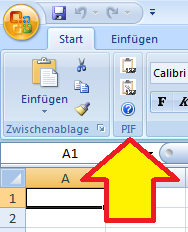
In Excel 2007, a PIF group is created in the ribbon in the Home tab directly next to the Clipboard group, this was intentionally kept as small as possible.
After copying, Excel 2007 users must select another cell so that the paste buttons can be selected.
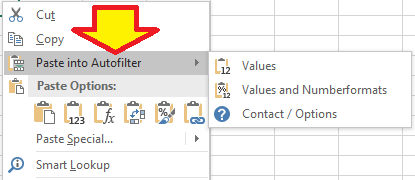
In Excel 2010 and above, you can find this in the context menu when you right-click on a cell.
The default behavior of the AddIn is to overwrite cells, if you want to merge cells you have to choose the appropriate option. Please read the PDF file for the details.
Okay, I think that's enough to get you started if you found this article by chance and you are just looking for a solution.
Yes, the AddIn is free and I do not give any guarantee for anything. If you like it, I would appreciate a tip.
In the next few days I will explain how the code works in the following posts. If you want, you can take a look at the code; the AddIn is not protected.
I've been using the code myself for a long time, but every programmer knows that other users have different ideas. If you encounter any problems, please contact me directly.
Please do not upload the AddIn to any other place, the link above is permanent and gives you the latest version.
Until then, have fun,
Andreas.


 Reply With Quote
Bookmarks