We have a filtered area and in this area a range is selected. Let's take a look at what happens when we just write an array in there.
Code:
Sub MultipleDestinationCells_DontWork()
Dim Dest As Range
Dim r As Long, c As Long
Dim Data
'Create the scenario
ScenarioB
'Get the visible selected cells
Set Dest = SpecialCells(Selection, xlCellTypeVisible)
'Do we have any?
If Dest Is Nothing Then
MsgBox "No visible cells selected"
Exit Sub
End If
'Get the number of rows and columns
RangeCount Dest, r, MaxColumns:=c
'Create an array of that size and fill it:
'11 12
'21 22
'31 32
ReDim Data(1 To r, 1 To c)
For c = 1 To UBound(Data, 2)
For r = 1 To UBound(Data)
Data(r, c) = r * 10 + c
Next
Next
'Write it into
Dest.Value = Data
End Sub
Surprisingly, we don't get an error message and the filtered cells are not overwritten, but the values in the cells are completely wrong.
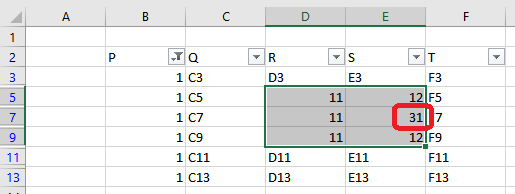
It would still be understandable that we always get an 11 in the first column and always a 12 in the second. However, why a 31 appears in E7 is incomprehensible even to me. It obviously doesn't work that way at all.
We need to traverse the visible area, but not cell by cell. Multiple ranges in a Range object are automatically divided into Areas, and we can write a suitable array into each Area. So, we need a routine that copies the appropriate portion from our data array. Then we just need to execute a counter to get the next portion for the next range.
Code:
Sub MultipleDestinationCells_Works()
Dim Dest As Range, Area As Range
Dim r As Long, c As Long
Dim Data, Part
'Create the scenario
ScenarioB
'Get the visible selected cells
Set Dest = SpecialCells(Selection, xlCellTypeVisible)
'Do we have any?
If Dest Is Nothing Then
MsgBox "No visible cells selected"
Exit Sub
End If
'Get the number of rows and columns
RangeCount Dest, r, MaxColumns:=c
'Create an array of that size
ReDim Data(1 To r, 1 To c)
For c = 1 To UBound(Data, 2)
For r = 1 To UBound(Data)
Data(r, c) = r * 10 + c
Next
Next
'We start at row 1 always!
r = 1
For Each Area In Dest.Areas
'Copy the part of the Data array that fit's into the Area
CopyPart Data, Part, r, 1, Area.Rows.Count, Area.Columns.Count
'Write into
Area.Value = Part
'Increment the row counter
r = r + Area.Rows.Count
Next
End Sub
And that's it.
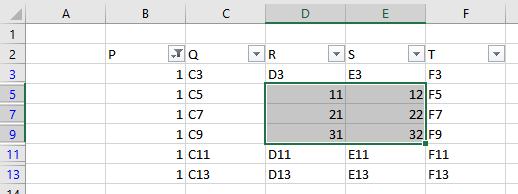
Finally, there is just one more detail to note: If you copy data from an HTML source, you may get several arrays. In order to keep the arrays as small as possible, these arrays are not combined into one, but processed individually one after the other. If you have any questions about the tool or the explanations, please post them here. I'll do my best to explain them to you.
Best regards, Andreas.


 Arrays - Part Four - SpecialCells

 Reply With Quote
 Arrays - Part Five - The Scenario
 Arrays - Part Six - The Final

Bookmarks