Page 8 of 8 FirstFirst ... 678
Results 71 to 74 of 74

Thread: A Semi automated way to note the IP addresses of things viewing us

  1. #71
    Fuhrer, Vierte Reich DocAElstein's Avatar
    Join Date
    Aug 2014
    Posts
    10,466
    Rep Power
    10
    Later

  2. #72
    Fuhrer, Vierte Reich DocAElstein's Avatar
    Join Date
    Aug 2014
    Posts
    10,466
    Rep Power
    10
    Edit. Part of my idea did not work, so I will start again in the next thread

    Quote Originally Posted by DocAElstein View Post
    From Wednesday 10 September until Sunday 14 September there was an insane number of Unknown Location s
    .....
    .....

    From Wednesday 10 September until Sunday 14 September there was an insane number of Unknown Locations seen in UnknownLocations worksheet of file,
    https://i.postimg.cc/k47Cj883/Insane...-September.jpg
    ……
    …………
    , - - - Time to do a quick macro to get an ordered list of those IPs getting "lost" in Unknown Location - - -
    So, …. way back, at about a third the way into September, the UnknownLocations were at a level probably not seen before , or t least I had not noticed …
    So I want a quick way of getting the ordered list of what fucking bots I managed to get fucked into a hole. Then I can decide whether to fuck them, or train them into my Beast of Burden, ( then I can eat them, or fuck them, or both, as it suits me)


    OK, here we go, after a kip and thinking about it… I think a Clipboard solution could be neat…

    Now,
    This is what we start with
    (It is worksheet UnknownLocations in th "Dailys" file SummaryRequestsIPsDailys.xlsm )
    https://i.postimg.cc/wxfpQXCP/Unknow...ailys-File.jpg
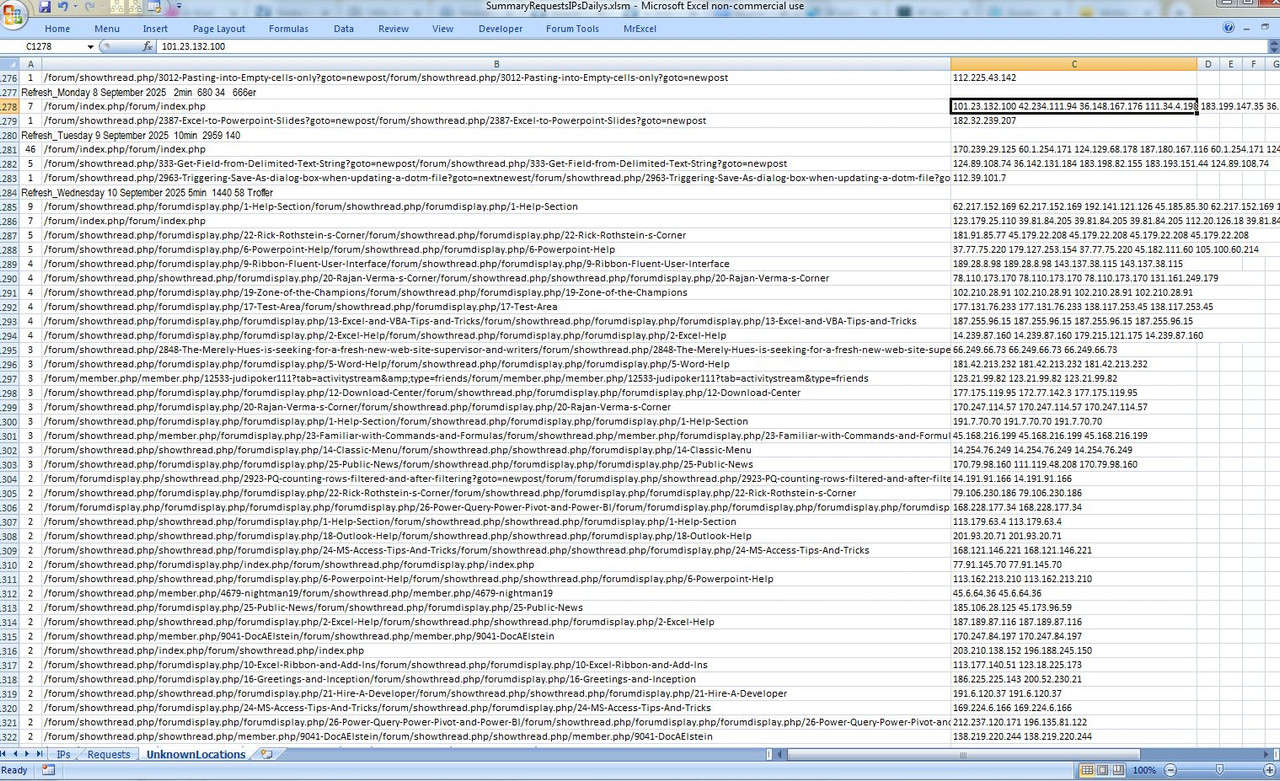

    _ There could be a trend in some or all rows, or one or more high viewed Unknown Location , or some combination. In other words I might want to look at a row or a few of rows together/ consolidated…

    Now, hold on to your Butts, because here is an idea. It comes about from a not so well known "multi in Line cell selection copy phenomena"

    The more general Multi-Cell Selection possibility itself is not so well known, (perhaps as the use of it without VBA is limited).
    I can for example select a cell, then hold down the Ctrl key and select randomly a few more. I end up then with them all selected! ( You can prove that by trying it and then taking a look at what you get returned in VBA for a command like
    Selection.Cells.Count )
    If you were to then try to Copy that, ( to put the cells in the clipboard for example ) , you would usually get an error.

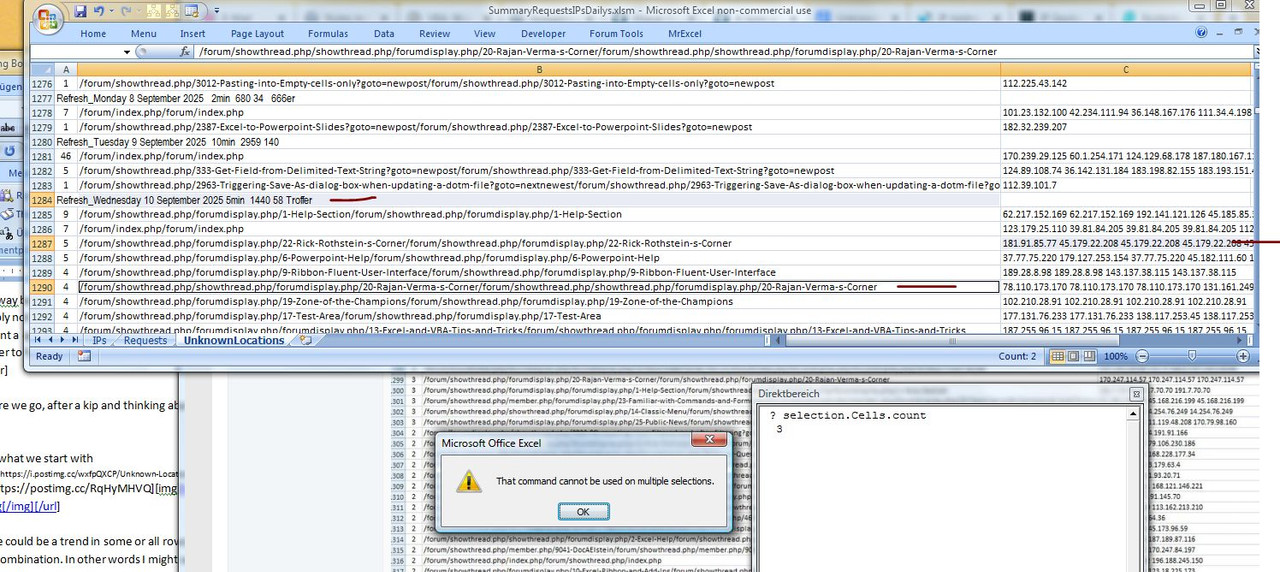
    For example, the next screenshot shows what happened after I followed the procedure for multi selecting 3 cells. I tried to copy, but got the error shown
    https://i.postimg.cc/yYZhsHzP/Multi-...Copy-Error.jpg


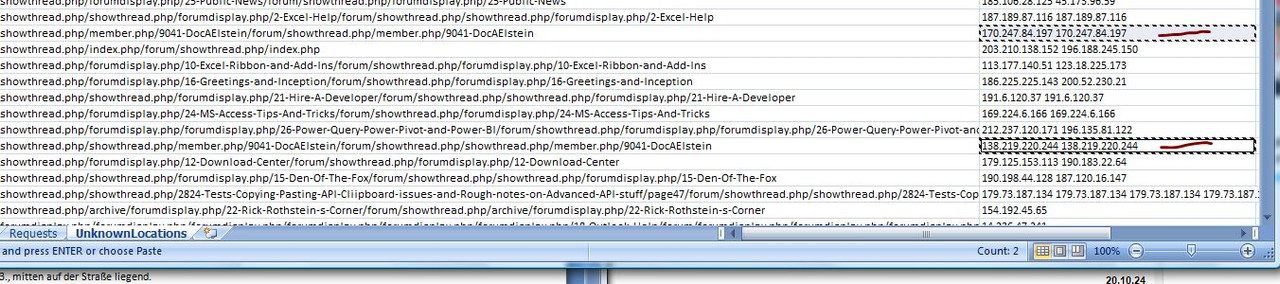
    Now try a similar thing again, but make sure all cells selected are "in line"… You should find that it appears to have worked. Here an example as I selected a couple of cells on the typical third column of a set of results. Those two cells contain some IP addresses

    https://i.postimg.cc/K8LR1G9t/Multi-...Copy-works.jpg


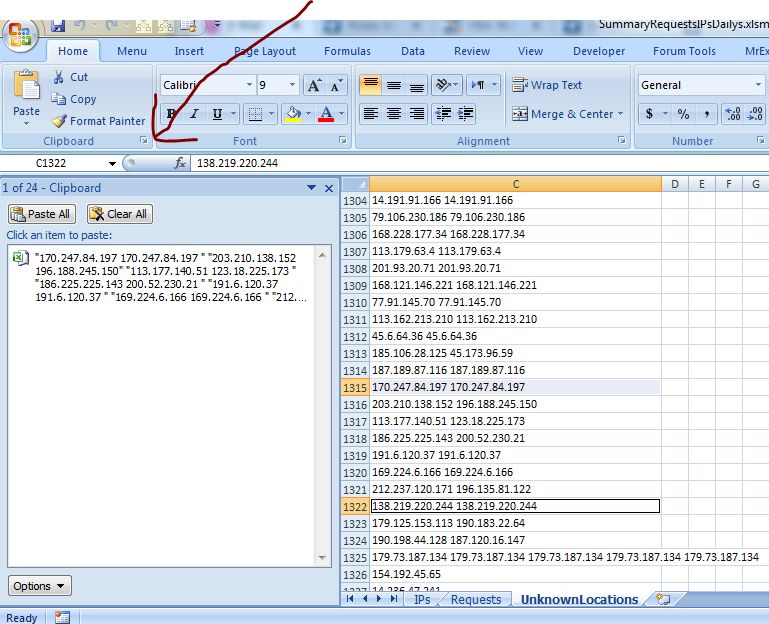
    It appears to have worked, I have something in the clipboard, :-) – I am hoping it is in the windows clipboard in a form I can easily manipulate, - a quick look at the Office Clipboard monitor gives an indication it might be as I am wanting, (and expecting**)

    https://i.postimg.cc/Y9sxjMRK/Office...rd-Monitor.jpg


    I have something in the clipboard, :-) – I think I know what, I think I know what for two reasons:
    _ I am a bit clued up on things clipboard; and
    _ **I wrote the God dammed Mother-Fucker code that put the things in the cells in the bloody first place, and I am not so senile yet that I forgot. In particular I included a vbCr & vbLf to separate IP addresses with some coding of this form.
    ( From coding Sub GetRefreshesIPAddressWatchingThingsAtExcelFox() in worksheet Requests code module of file IPAddressesWatchingExcelFox_Refresh.xls )
    Code:
                               Else
                                Let rngReqErrIn = Request
                                Let rngReqErrIn.Offset(0, -1) = rngReqErrIn.Offset(0, -1).Value + 1
                                Let rngReqErrIn.Offset(0, 1) = rngReqErrIn.Offset(0, 1).Value & vbCr & vbLf  & " " & IPAddress
                               End If
                            End If ' Finished with problem requests here

    I think that vbCr & vbLf could be very useful, ( to a certain extent it was luck I decided to have vbCr & vbLf as part of the separator)
    I am sure it is there
    Never the less, a quick check won't hurt


    A coding like this will get me some results in different forms, from using my function WtchaGot_Unic_NotMuchIfYaChoppedItOff(___
    Code:
    Sub QuickWotchaGot2()
    Rem 1 Get text from clipboard
        With GetObject("New:{1C3B4210-F441-11CE-B9EA-00AA006B1A69}")  '    http://web.archive.org/web/20200124185244/http://excelmatters.com/2013/10/04/late-bound-msforms-dataobject/   ' https://www.eileenslounge.com/viewtopic.php?f=27&t=39784
        Dim StringBack As String ' This is for the entire text held in the windows clipboard after a  Ctrl+c
         .GetFromClipboard: Let StringBack = .GetText()
        End With
    Rem 3 WachaGot
    Call WtchaGot_Unic_NotMuchIfYaChoppedItOff(StringBack)
    End Sub
    https://i.postimg.cc/25HN29rV/Quick-Wtcha-Got2.jpg


    Stop
    Fuck, my idea did not work….

    See here


    I will keep the thread for some possible reference later but will start again in the next thread
    Last edited by DocAElstein; 03-17-2026 at 01:53 AM.

  3. #73
    Fuhrer, Vierte Reich DocAElstein's Avatar
    Join Date
    Aug 2014
    Posts
    10,466
    Rep Power
    10
    Quote Originally Posted by DocAElstein View Post
    From Wednesday 10 September until Sunday 14 September there was an insane number of Unknown Location s
    .....
    .....

    From Wednesday 10 September until Sunday 14 September there was an insane number of Unknown Locations seen in UnknownLocations worksheet of file,
    https://i.postimg.cc/k47Cj883/Insane...-September.jpg
    ……
    …………
    , - - - Time to do a quick macro to get an ordered list of those IPs getting "lost" in Unknown Location - - -
    So, …. way back, at about a third the way into September, the UnknownLocations were at a level probably not seen before , or at least I had not noticed …
    So I want a quick way of getting the ordered list of what fucking bots I managed to get fucked into a hole. Then I can decide whether to fuck them, or train them into my Beast of Burden, ( then I can eat them, or fuck them, or both, as it suits me)


    OK, here we go, after a kip and thinking about it

    Now,
    This is what we start with
    (It is worksheet UnknownLocations in the "Dailys" file SummaryRequestsIPsDailys.xlsm )
    https://i.postimg.cc/wxfpQXCP/Unknow...ailys-File.jpg


    _ There could be a trend in some or all rows, or one or more high viewed Unknown Location , or some combination. In other words I might want to look at a row or a few of rows together/ consolidated…

    Here is an idea. It comes about from a not so well known "multi in Line cell selection copy phenomena"

    The general Multi-Cell Selection possibility is not so well known, (perhaps as the use of it without VBA is limited).
    I can for example select a cell, then hold down the Ctrl key and select randomly a few more. I end up then with them all selected! ( You can prove that by trying it and then taking a look at what you get returned in VBA for a command like
    Selection.Cells.Count )

    Similarly I can do a For Each __ Next on all the cells in a selection. So that is the basis for the coding

    I will use this couple of Cell example

    https://i.postimg.cc/zDsfW94H/2-Cell...-Selection.jpg
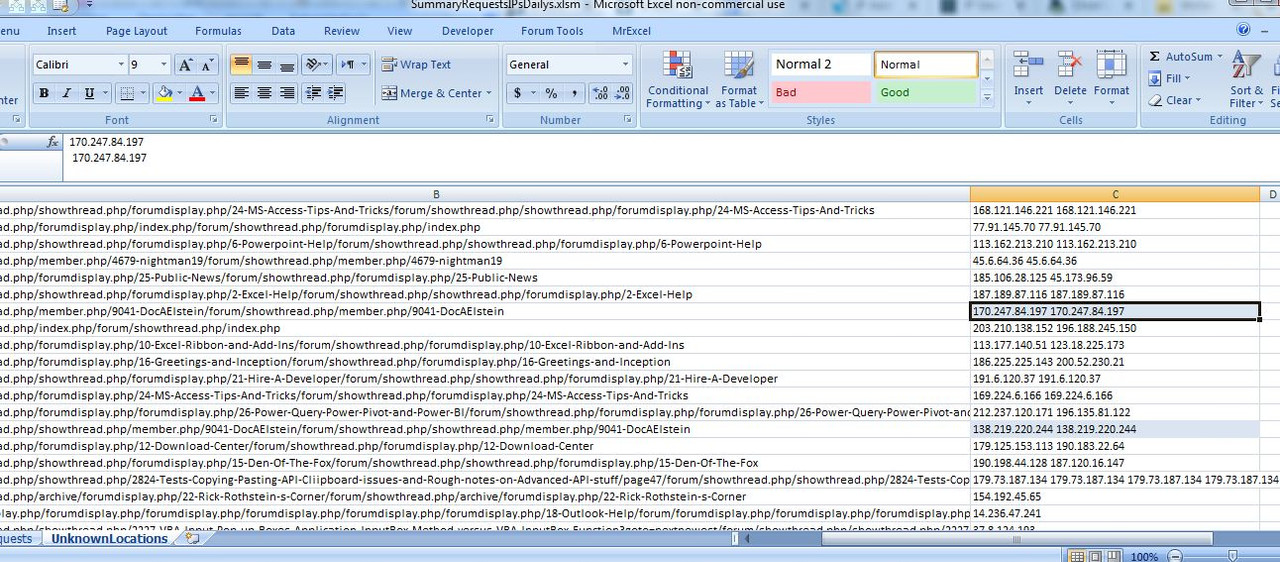

    There are multiple IP addresses in the cell, as there could often be, and I think I know what the format for how they are joined/ separated from this code section ( From coding Sub GetRefreshesIPAddressWatchingThingsAtExcelFox() in worksheet Requests code module of file IPAddressesWatchingExcelFox_Refresh.xls )
    Code:
                               Else
                                Let rngReqErrIn = Request
                                Let rngReqErrIn.Offset(0, -1) = rngReqErrIn.Offset(0, -1).Value + 1
                                Let rngReqErrIn.Offset(0, 1) = rngReqErrIn.Offset(0, 1).Value &  vbCr & vbLf  & " " & IPAddress
                               End If
                            End If ' Finished with problem requests here
    But a check will not do any harm ….
    It was a good idea that I did that, as it reminded me that I sometimes have an extra vbTab or two

    Looking at the example 2 cell non contiguously selection of the last screenshot, I have text something like this
    Code:
     "170.247.84.197	
     170.247.84.197	"


    "138.219.220.244	
     138.219.220.244	"
    ( I am not t always sure why I get some "s sometimes on a paste. I will have to think about that again some other time

    This coding gets me the results below after manually doing the two non contiguously cell selection of the last screenshot
    Code:
    Sub MultiCellsSelection()
    Dim rCel As Range
        For Each rCel In Selection
        Debug.Print
        Debug.Print rCel.Value2
        Call WtchaGot_Unic_NotMuchIfYaChoppedItOff(rCel.Value2)
        Debug.Print
        Next rCel
    End Sub
    Code:
     170.247.84.197  
     170.247.84.197 
    "170.247.84.197" & vbTab & vbCr & vbLf & " 170.247.84.197" & vbTab
    
    
    138.219.220.244 
     138.219.220.244    
    "138.219.220.244" & vbTab & vbCr & vbLf & " 138.219.220.244" & vbTab
    So the next basic code idea will get us a simple 1 dimensional array of the IP addresses
    Code:
    Sub MultiCellsSelectionConglomerates()
    Dim rCel As Range, CelIPs As String, IPs As String
        For Each rCel In Selection
         Let IPs = IPs & rCel.Value2 & " " ' Biuld up the final string. - Multiple IP values in the cell (rCel) are already seperated by a " " , so the " " here adds another so that finally all IP valus are seperated by a " "
        Next rCel
     Let IPs = Replace(IPs, vbTab, "", 1, -1, vbBinaryCompare) ' I will likely have a lot of  vbTab  that I do not want
     Let IPs = Replace(IPs, vbCr & vbLf, "", 1, -1, vbBinaryCompare) ' I have a vbCr & vbLf between multi values in a cell and I do not want them
     Let IPs = Trim(IPs) ' The above loop put an extra last " " on which I do not need
    Dim arrIPs() As String: Let arrIPs() = Split(IPs, " ", -1, vbBinaryCompare) ' Finally I have a string delimited by " " , and hopefully as it is a string and I make a string element array here, we will not have any problems yet of IP addresses getting messed up by trailing 0s getting lost somewhere
    End Sub
    Last edited by DocAElstein; 03-19-2026 at 11:51 PM.

  4. #74
    Fuhrer, Vierte Reich DocAElstein's Avatar
    Join Date
    Aug 2014
    Posts
    10,466
    Rep Power
    10
    https://www.bka.de/DE/Presse/Listens..._Botnetze.html
    I helped them, but I doubt they will admit to that...
    Last edited by DocAElstein; Yesterday at 11:51 PM.
    God, the fucking Chinese Bots and their allies will have a fucking hard time trying to simulating me.

Similar Threads

  1. Replies: 2
    Last Post: 08-10-2016, 04:59 PM
  2. Replies: 1
    Last Post: 01-19-2015, 05:31 AM
  3. Changing Slideshow viewing mode to kiosk using vba
    By Times in forum Powerpoint Help
    Replies: 1
    Last Post: 05-10-2013, 12:37 AM
  4. IE Automated Login/Table Pull
    By mrmmickle1 in forum Hire A Developer
    Replies: 7
    Last Post: 04-04-2013, 04:58 PM
  5. How to create automated planning sheet.
    By Rajesh Kr Joshi in forum Excel Help
    Replies: 1
    Last Post: 03-21-2013, 01:01 PM

Posting Permissions

  • You may not post new threads
  • You may not post replies
  • You may not post attachments
  • You may not edit your posts
  •