Code:
Option Explicit
Sub CopyTLReqToAllReq() ' Copy based on top left selection of range. Pasting in the 3 columns of the selected one and the next 2 columns to the right
' Range from the  Dailys  SummaryRequestsIPsDailys.xlsm
Dim wsIPs As Worksheet, wsReqs As Worksheet
' I assume you have  SummaryRequestsIPsDailys.xlsm   open
 Set wsIPs = Workbooks("SummaryRequestsIPsDailys.xlsm").Worksheets("IPs"): Set wsReqs = Workbooks("SummaryRequestsIPsDailys.xlsm").Worksheets("Requests")
wsReqs.Activate: Dim TL As Range: Set TL = Selection
Dim Lr As Long
 Let Lr = TL.Offset(0, 1).Item(wsReqs.Rows.Count).End(xlUp).Row ' This will error if you have not selected first row so that is a good check.    Offset 1 is so as not to use the first of the three columns, incase I did a  Sum  there
Dim rngReq As Range
 Set rngReq = TL.Offset(1, 0).Resize(Lr - 1, 3)
' rngReq.Copy ' For a quick check


' The merging of a few days workbook ranges into  SummaryRequestsIPAlls.xlsm
Dim wsAllReqs As Worksheet ' , wsAllIPs As Worksheet ' This workbook
 Set wsAllReqs = ThisWorkbook.Worksheets("AllRequests") ' : Set wsAllIPs = ThisWorkbook.Worksheets("AllIPs")
wsAllReqs.Activate
Dim NxtClm As Long ' This assumes I have manualy added some date info, or any info, ONLY in the first column on row 1 of where all the copies ranges go, one on top of the other
 Let NxtClm = wsAllReqs.Cells.Item(1, wsAllReqs.Columns.Count).End(xlToLeft).Column
wsAllReqs.Cells.Item(1, NxtClm).Select
Dim NxtRw As Long: Let NxtRw = wsAllReqs.Cells.Item(wsAllReqs.Rows.Count, NxtClm).End(xlUp).Row + 1
    If NxtRw = 2 Then Let NxtRw = 4 ' For the first range to be pasted in, ( I am saving the first 3 rows for dates, notes, observations   etc

' rngReq.Copy Destination:=wsAllReqs.Range("D" & NxtRw & "")
' rngReq.Copy Destination:=wsAllReqs.Range("J" & NxtRw & "")
 rngReq.Copy Destination:=wsAllReqs.Cells.Item(NxtRw, NxtClm)
wsReqs.Activate
End Sub '
Sub SingleReqListDics()
Dim StTime As Long: Let StTime = Timer
Dim wsAllReqs As Worksheet, wsAllIPs As Worksheet
 Set wsAllReqs = ThisWorkbook.Worksheets("AllRequests"): Set wsAllIPs = ThisWorkbook.Worksheets("AllIPs")
wsAllReqs.Activate
Dim NxtClm As Long ' This assumes I have manualy added some date info, or any info, ONLY in the first column on row 1 of where all the copies ranges go, one on top of the other
 Let NxtClm = wsAllReqs.Cells.Item(1, wsAllReqs.Columns.Count).End(xlToLeft).Column
wsAllReqs.Cells.Item(1, NxtClm).Select

Dim Lr As Long
' Let Lr = wsAllReqs.Range("D" & wsAllReqs.Rows.Count & "").End(xlUp).Row
' Let Lr = wsAllReqs.Range("J" & wsAllReqs.Rows.Count & "").End(xlUp).Row
 Let Lr = wsAllReqs.Cells.Item(wsAllReqs.Rows.Count, NxtClm + 1).End(xlUp).Row '  +1  is just incase I did a  Sum  in the first column, which is unlikely here
Dim rngReqs As Range
' Set rngReqs = wsAllReqs.Range("D2:F" & Lr & "")
 Set rngReqs = wsAllReqs.Cells.Item(4, NxtClm).Resize(Lr - 3, 3)
' rngReqs.Copy ' just to check
Dim DicVw As Object, DicIP As Object
 Set DicVw = CreateObject("Scripting.Dictionary"): Set DicIP = CreateObject("Scripting.Dictionary")
Dim Cnt As Long
Rem Make Dics Item or adds to it
    For Cnt = 4 To Lr Step 1
        If Not DicVw.exists(wsAllReqs.Cells(Cnt, NxtClm + 1).Value) Then ' NxtClm + 1 gives the URL bit
        ' Here the  Key/Item s   pair are made for the first time
        ' The URL part is the  Key     I only need one later for the middle output column, either   DicVw(Keys)  or   DicIP(Keys)  will do
         DicVw.Add Key:=wsAllReqs.Cells(Cnt, NxtClm + 1).Value, Item:=wsAllReqs.Cells(Cnt, NxtClm).Value ' NxtClm, the first of the three output columns,  has the views
         DicIP.Add Key:=wsAllReqs.Cells(Cnt, NxtClm + 1).Value, Item:=wsAllReqs.Cells(Cnt, NxtClm + 2).Value ' NxtClm+2, the third of the three columns, has the IPs
        Else ' Add the infomation of view count and IPAddresses  if the  Key/Item s    already exists.
         Let DicVw(wsAllReqs.Cells(Cnt, NxtClm + 1).Value) = DicVw(wsAllReqs.Cells(Cnt, NxtClm + 1).Value) + wsAllReqs.Cells(Cnt, NxtClm).Value ' add the views to the current view count
         Let DicIP(wsAllReqs.Cells(Cnt, NxtClm + 1).Value) = DicIP(wsAllReqs.Cells(Cnt, NxtClm + 1).Value) & vbCr & vbLf & " " & wsAllReqs.Cells(Cnt, NxtClm + 2).Value ' tack on all the IPs
        End If
NxtCnt:
    'Debug.Print Cnt
    Next Cnt
' Quick range copy - I am slightly nervous about not temporarily keeping the original range. I will copy it to the right - I will delete it manually or perhaops later forget this section
 wsAllReqs.Cells(4, NxtClm).Resize(Lr - 3, 3).Copy Destination:=wsAllReqs.Cells(4, NxtClm).Offset(0, 3)
 wsAllReqs.Cells(4, NxtClm).Resize(Lr - 3, 3).ClearContents
Rem output  Keys NxtClm+1,  View count NxtClm,  IPs NxtClm + 2      , arrReqIP() another possibility for the middle column  Keys (URL bit)
Dim arrReqVw() As Variant, arrVw() As Variant, arrIP() As Variant ' , arrReqIP() As Variant
 Let arrReqVw() = DicVw.keys(): arrVw() = DicVw.items(): arrIP() = DicIP.items() ': arrReqIP() = DicIP.keys()

 Let wsAllReqs.Cells(4, NxtClm + 1).Resize(UBound(arrReqVw()) + 1, 1) = Application.Transpose(arrReqVw())
 Let wsAllReqs.Cells(4, NxtClm).Resize(UBound(arrVw()) + 1, 1) = Application.Transpose(arrVw())
Dim strIPs As String, arrIPsstr() As String ' Problem with string longer than 255 characters in a Transpose (or Index) when variant arrays have any element with a string over 255 characters
 Let strIPs = Join(arrIP(), "|")  '   https://stackoverflow.com/questions/35395789/excel-vba-need-workaround-for-255-transpose-character-limit-when-returning-vari/79775234#79775234
 Let arrIPsstr() = Split(strIPs, "|") ' https://stackoverflow.com/a/79775234/4031841
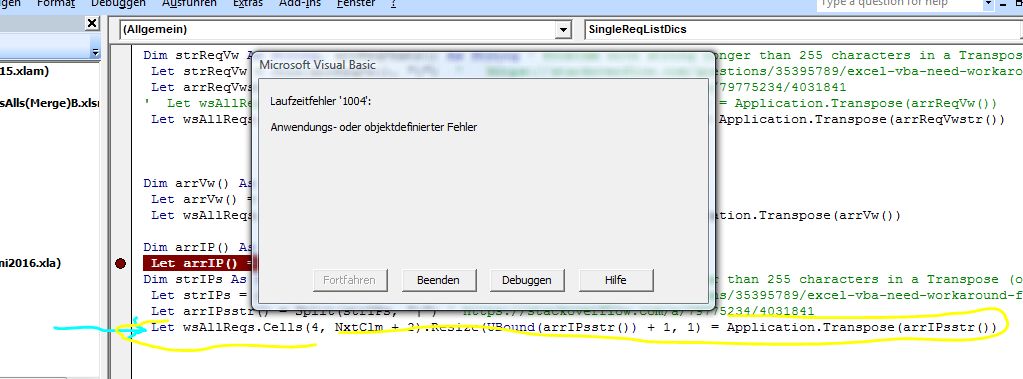
 Let wsAllReqs.Cells(4, NxtClm + 2).Resize(UBound(arrIPsstr()) + 1, 1) = Application.Transpose(arrIPsstr())


' Let wsAllReqs.Range("N2").Resize(UBound(arrReqVw()) + 1, 1) = Application.Transpose(arrReqVw())
' Let wsAllReqs.Range("P2").Resize(UBound(arrReqIP()) + 1, 1) = Application.Transpose(arrReqIP())
' Let wsAllReqs.Range("M2").Resize(UBound(arrVw()) + 1, 1) = Application.Transpose(arrVw())
' Let wsAllReqs.Range("M2").Resize(UBound(arrVw()) + 1, 1) = Application.Index(arrVw(), 1, Evaluate("Row(1:" & UBound(arrVw()) + 1 & ")"))
'Dim strIPs As String, arrIPsstr() As String ' Problem with string longer than 255 characters in a Transpose (or Index) when variant arrays have any element with a string over 255 characters
' Let strIPs = Join(arrIP(), "|")  '   https://stackoverflow.com/questions/35395789/excel-vba-need-workaround-for-255-transpose-character-limit-when-returning-vari/79775234#79775234
' Let arrIPsstr() = Split(strIPs, "|") ' https://stackoverflow.com/a/79775234/4031841
' Let wsAllReqs.Range("O2").Resize(UBound(arrIPsstr()) + 1, 1) = Application.Index(arrIPsstr(), 1, Evaluate("Row(1:" & UBound(arrIPsstr()) + 1 & ")"))
 Let wsAllReqs.Cells.WrapText = False
ExtSb:
Debug.Print Int((Timer - StTime) / 60) & "min  " & Format(Now, "ddd dd mmm yyyy hh:nn")
End Sub '

Sub SortOf()
Dim wsAllReqs As Worksheet ', wsAllIPs As Worksheet ' This workbook
 Set wsAllReqs = ThisWorkbook.Worksheets("AllRequests") ': Set wsAllIPs = ThisWorkbook.Worksheets("AllIPs")
Dim NxtClm As Long ' This assumes I have manualy added some date info, or any info, ONLY in the first column on row 1 of where all the copies ranges go, one on top of the other
 Let NxtClm = wsAllReqs.Cells.Item(1, wsAllReqs.Columns.Count).End(xlToLeft).Column
wsAllReqs.Cells.Item(1, NxtClm).Select
Dim Lr As Long
 Let Lr = wsAllReqs.Cells(wsAllReqs.Rows.Count, NxtClm).End(xlUp).Row
Dim rngReqs As Range

 Set rngReqs = wsAllReqs.Cells(4, NxtClm).Resize(Lr - 3, 3)
 'rngReqs.Copy ' quick check
 rngReqs.Sort Key1:=rngReqs.Columns(1), Order1:=xlDescending
End Sub


 Reply With Quote
 Originally Posted by DocAElstein


Bookmarks