Page 7 of 7 FirstFirst ... 567
Results 61 to 70 of 70

Thread: A Semi automated way to note the IP addresses of things viewing us

  1. #61
    Fuhrer, Vierte Reich DocAElstein's Avatar
    Join Date
    Aug 2014
    Posts
    10,456
    Rep Power
    10
    Stripping/ Splitting up Parts of IP addresses
    Background

    IP Address
    Each network running TCP/IP must have a unique network number, and every machine on it must have a unique IP address. It is important to understand how IP addresses are constructed before you register your network and obtain its network number.
    The IP address is a 32-bit number that uniquely identifies a network interface on a machine. An IP address is typically written in decimal digits, formatted as four 8-bit fields separated by periods. Each 8-bit field represents a byte of the IP address. This form of representing the bytes of an IP address is often referred to as the dotted-decimal format.
    (
    https://docs.oracle.com/cd/E19504-01...471/index.html )
    That means in simple English that we have something somewhere actually like in this sketch below, which is 4 lots of similar 8 digit bits, and each bit, (called a Bit, in computing), can be in either of two states, 0 or 1. ( 8 Bits is often regarded as a fundamental unit in computing and is given the name Byte )
    As is typical in computing, it is organised in a so called "binary" way , meaning that we can make/ realise bigger numbers than 1 or 0. There are a few conventions in how this is done, IP addresses use one of the historically most common
    How that is done, perceptually speaking, demonstrating with emphasis on our IP address explanations, can be best seen with a simple example.

    For example in the below example I am representing an IP address of 255.32.65.2 (I am trying to do it in a way that somehow gives an insight into the deep down 4 Byte 32 Bit representation form of a computer or it's software stuff We may not directly need to know that, but it can be useful indirectly as time goes on as we may get necessarily more into the subject )
    Code:
    '      128 64 32 16 8 4 2 0  |   128 64 32 16 8 4 2 0  |  128 64 32 16 8 4 2 0  |  128 64 32 16 8 4 2 0
    '       1   1  1  1 1 1 1 1       0  0   1  0 0 0 0 0      0   1  0  0 0 0 0 1      0   0  0  0 0 0 1 0
    '    128+64+32+16+8+4+2+1=255    0+0+32+0+0+0+0+0=32      0+64+0++0+0+0+0+1=65        0+0+0+0+0+0+2+0=2
    '              255                      32                        65                          2
    '
    '                     255.32.65.2
    The series of 0s and 1s above is schematically somewhere close to what is actually going on somewhere deep down in the computer innards
    , and the 255.32.65.2 is how we as Humans choose to speak about it in an easy way….


    IP Address Parts
    I prefer to keep it easy in Laymen terms, especially as these things tend to change a bit and we are not always told accurately how etc., and that tendency is certainly increasing. (I think we all know that, but it is a question of whether we choose or are strong enough to believe it.
    My explanation tries to give the general idea or facts that may likely not change too much and therefore come closest to the truth for as long as possible, So….
    In the simplest terms:
    _ Numbers towards the right may identify a specific device such as a computer, or individual;
    _ The numbers towards the left are likely to somehow reveal the larger entity, such as an organisation, or some big thing that is trying to get at you.

    For our purposes here we are wanting to get at the bigger entity, or at least to identify it. ( The final physical individual can easily change, be replaced, or subject to a lot of actual physical violence, possibly by me. I prefer to deal with that personally, usually physically as much as possible, in a more Human and if possible Humane way. )


    So

    I am wanting to develop some coding to help me get at the lefter parts of the IP address. Initially that is to see if it helps me get any useful information quickly.
    Using the above example, getting something like
    255.32.65
    , or
    255.32
    , in an efficient way might be useful.


    I will take a look at doing that in the next post, but here is an important aside
    Aside: Dotty Excel Cells
    We would normally from now on be playing around with numbers and dots in an Excel cell.
    This gives problems, often bad ones. It is not a question of if, but when and how bad.
    There is almost always ways to fix the problem, but it will simplify things a lot if from the start if, at the outset, I change all the dots,
    .
    to a pipe,
    |

    In all lists and analysis I will keep to this convention, or go over to it as it is convenient by updating or writing new codings and only convert back to dots if I have a specific need to.
    It is annoying to have to go backwards and do this. I preferred not to do it, often in the past taking the advice of much smarter people than me, saying we should keep it simpler with the dots and things would be OK, and problems we could get over.
    But this simplification, or rather the absence of and therefore saving of coding etc. for the extra conversions necessary, initially and possibly any thereafter, etc, that all finally turned out to be a false economy for me so far.
    (For me personally this sort of problem of Excel changing formats on things looking somehow like numbers, dates, times etc. has proved never to be 100% possible to overcome fully, without taking some more drastic step such as I am doing from now on with IP address?
    Last edited by DocAElstein; 02-15-2026 at 05:37 PM.

  2. #62
    Fuhrer, Vierte Reich DocAElstein's Avatar
    Join Date
    Aug 2014
    Posts
    10,456
    Rep Power
    10
    Stripping/ Splitting up Parts of IP addresses
    Coding

    Evaluate(Range) solution
    Because I am currently still wanting to have some easily see-able spreadsheet lists, then this could be something that may be a nice neat use of what I Call Evaluate(Range) solutions. These basically work on an existing spreadsheet List, but from within VBA, and can give results knocking the socks off of what is still considered more normal most efficient professional ways. Me and a few others have perfected them in recent years. (They works best on older more stable and reliable Office versions also, - as with most things Microsoft, they have been slowly messing things up over the last 10-20 years)

    The idea is to develop a formula in a spreadsheet, preferably a fairly simple one, and then we use it in VBA to very efficiently work on the spreadsheet to paste in all the final results, only results – No formulas will appear in the spreadsheet.

    The uploaded file shows development of one possible solution, and the following explanations discuss that development and final answer. There are probably lots of possible solutions, maybe some better. But this one will probably do for now
    The main raw data is in column A, although column B could also be taken as the main starting point.

    Preliminary step. Dots to pipes.
    This is not part of the main formula solution idea, but can be incorporated into it.
    At a later stage it may not be necessary.
    For reasons discussed previously we will initially change the dots for pips.
    The Excel SUBSTITUTE function
    The Excel SUBSTITUTE function, in its simplest 3 argument form, works similarly to the VBA Replace in one of its simplest and most commonly used forms. Basically in simplest terms we can work on a given text to replace all occurrences of some sub text with some other sub text. Pictorially something like what is going on in the following sketches –


    _______ "123;456;abC" - - ";" - - > "_-" - - - - - - > "123_-456_-abC"
    _
    ________ 123;456;abC - - - - - - - - - - - - - - - - - > 123_-456_-abC


    _

    _______ "123.456.abC" - - "." - - > "|" - - - - - - > "123|456|abC"
    ________ 123.456.abC - - - - - - - - - - - - - - - - - > 123|456|abC


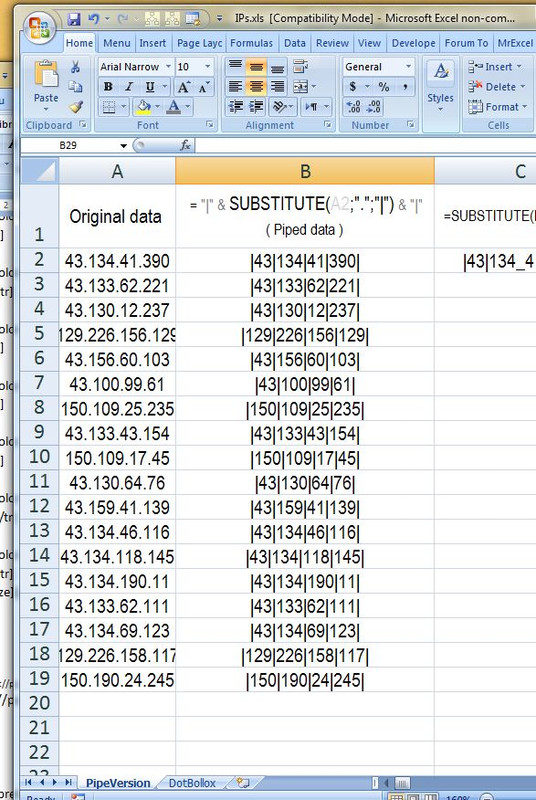
    So in our case, (as in the last example sketched above), we change the data in column A to that in column B. – The dots have been replaced by pipes
    (** I intend doing work later involving trimming parts of things with numbers, so in addition I add initially trailing and leading pipes, ( "|" & ______ & "|" ) just to give some extra safeguard against trimmed parts exposing numbers giving unforeseen similar Excel number in cell problems. I cannot initially think of what extra problems might occur, but it is a bit of an inspired guess )

    Here below pictorially the first two columns in the attached workbook:

    Values
    _____ Workbook: IPs.xls ( Using Excel 2007 32 bit )
    Row\Col A B
    1 Original data = "|" & SUBSTITUTE(A2;".";"|") & "|"
    ( Piped data )
    2 43.134.41.390 |43|134|41|390|
    3 43.133.62.221 |43|133|62|221|
    4 43.130.12.237 |43|130|12|237|
    5 129.226.156.129 |129|226|156|129|
    6 43.156.60.103 |43|156|60|103|
    7 43.100.99.61 |43|100|99|61|
    8 150.109.25.235 |150|109|25|235|
    9 43.133.43.154 |43|133|43|154|
    10 150.109.17.45 |150|109|17|45|
    11 43.130.64.76 |43|130|64|76|
    12 43.159.41.139 |43|159|41|139|
    13 43.134.46.116 |43|134|46|116|
    14 43.134.118.145 |43|134|118|145|
    15 43.134.190.11 |43|134|190|11|
    16 43.133.62.111 |43|133|62|111|
    17 43.134.69.123 |43|134|69|123|
    18 129.226.158.117 |129|226|158|117|
    19 150.190.24.245 |150|190|24|245|
    Worksheet: PipeVersion

    Formulas
    _____ Workbook: IPs.xls ( Using Excel 2007 32 bit )
    Row\Col A B
    1 Original data = "|" & SUBSTITUTE(A2;".";"|") & "|"
    ( Piped data )
    2 43.134.41.390 ="|"&SUBSTITUTE(A2,".","|")&"|"
    3 43.133.62.221 ="|"&SUBSTITUTE(A3,".","|")&"|"
    4 43.130.12.237 ="|"&SUBSTITUTE(A4,".","|")&"|"
    5 129.226.156.129 ="|"&SUBSTITUTE(A5,".","|")&"|"
    6 43.156.60.103 ="|"&SUBSTITUTE(A6,".","|")&"|"
    7 43.100.99.61 ="|"&SUBSTITUTE(A7,".","|")&"|"
    8 150.109.25.235 ="|"&SUBSTITUTE(A8,".","|")&"|"
    9 43.133.43.154 ="|"&SUBSTITUTE(A9,".","|")&"|"
    10 150.109.17.45 ="|"&SUBSTITUTE(A10,".","|")&"|"
    11 43.130.64.76 ="|"&SUBSTITUTE(A11,".","|")&"|"
    12 43.159.41.139 ="|"&SUBSTITUTE(A12,".","|")&"|"
    13 43.134.46.116 ="|"&SUBSTITUTE(A13,".","|")&"|"
    14 43.134.118.145 ="|"&SUBSTITUTE(A14,".","|")&"|"
    15 43.134.190.11 ="|"&SUBSTITUTE(A15,".","|")&"|"
    16 43.133.62.111 ="|"&SUBSTITUTE(A16,".","|")&"|"
    17 43.134.69.123 ="|"&SUBSTITUTE(A17,".","|")&"|"
    18 129.226.158.117 ="|"&SUBSTITUTE(A18,".","|")&"|"
    19 150.190.24.245 ="|"&SUBSTITUTE(A19,".","|")&"|"
    Worksheet: PipeVersion


    https://postimg.cc/hzLYGHWz , https://i.postimg.cc/Y9ZBdHd3/Dot-to-Pipe.jpg


    That was a preliminary step. It has basically changed . separators to pipe, | , separators. It might not always be necessary. ( **I am doing further steps later involving trimming parts of things with numbers, so in addition I add initially trailing and leading pipes, ( "|" & ______ & "|" ) , just to give some extra safeguard against trimmed parts exposing numbers giving unforeseen similar Excel number in cell problems. I cannot initially think of what extra problems might occur, but it is a bit of an inspired guess )


    The main formula development starts in the next post


    Attached Files Attached Files
    Last edited by DocAElstein; 02-10-2026 at 03:48 PM.

  3. #63
    Fuhrer, Vierte Reich DocAElstein's Avatar
    Join Date
    Aug 2014
    Posts
    10,456
    Rep Power
    10
    From here we are basically starting with delimited numbers, or better, more generally, said, dealing with a Delimited Text String.
    That is the main start point of the important stuff, - column B above in last post


    The main formula development
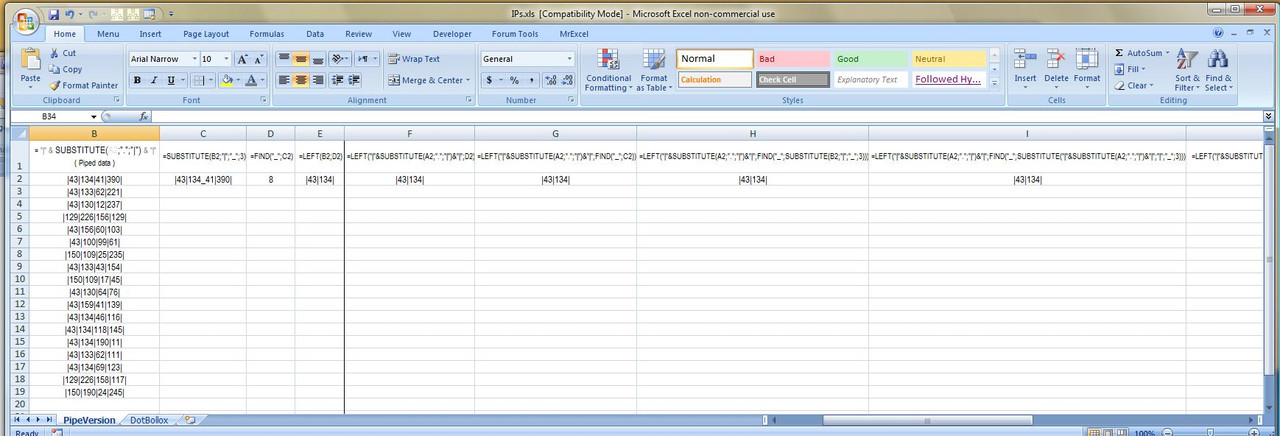
    Some typical formula development steps are shown in the columns across the uploaded file
    https://i.postimg.cc/pVjgS5f0/Formul...ss-columns.jpg


    General idea
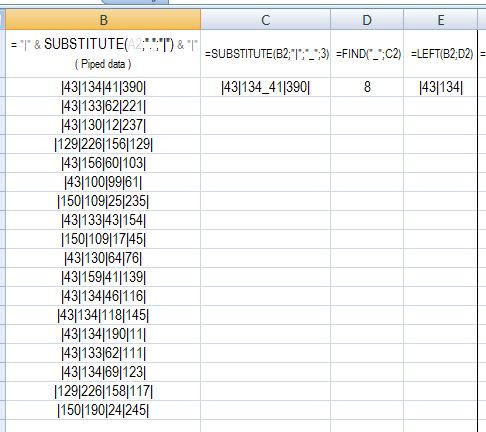
    There are two basic phases. The first, the difficult phase gets a final working formula. It pulls on/ references/ uses the information in the columns to the left, which are sometimes referred to as "helper columns" , as they get the information and/ or numbers required to get to the final required answer. In this example we need just column C and D to finally get the required answer in column E. ( After this, the rest and final phase is simply replacing all cell references in the working formula with the formula that is in the references. This is done until the only references left are to the original first cell data. For the main formula part this would be column B, but we do the extra step discussed in the last post which we incorporate into our final formula by finally reducing the working formula to just references to column A )
    https://i.postimg.cc/xdz1FTtM/Formul...olumns-CDE.jpg


    Detailed explanation
    A good start point is the Excel SUBSTITUTE function in the following sort of form, which is a form using all the arguments, including the last, which is optional. ( So we are using the same function as in the initial step of the last post, but in its extended 4 argument form )
    =SUBSTITUTE("|43|134|41|39","|","_",3)
    The SUBSTITUTE function is one of a few Excel functions doing some helpful things that do not have a direct equivalent in native VBA. The feature I find very useful with the SUBSTITUTE function is the ability to replace a particular occurrence of a character or character set. (A close equivalent in VBA, the Replace function almost does the same – it has the option to replace just a certain number of occurrences so could be fiddled to do effectively the same)

    So, in the way I am using the SUBSTITUTE function above, it effectively puts a _ where the second . was in the IP address,
    , the idea after that being to FIND the poison of that single _ , after which we can take just the LEFT up to the _
    This is a good start point in our case, since the 3 in the SUBSTITUTE has put the _ at the place of the second . , so I can FIND it , then take the LEFT up to it to get 43.134 , but thereafter, in any final formula, if I want to do similar to get, for example 43.134.41, then I simply need to change the 3 to a 4 so as to be dealing with the third .


    Another walk through explanation with example data in second row,
    |43|134|41|39| __________ ( Original IP address 43.134.41.39 )

    In C2 I change the third | to a _
    In D2 I find position along of that _
    I now have the information I need to use the LEFT function to take just the left part of the data that I want. So at this point I have the working formula, but it has various cell references in it. I don't want that, or rather I do, but only the original data reference, in this case A2
    From then on I replace cell references in the formula with the actual formula in the referenced cell. I keep doing this until I finally only am referencing the actual data cell, A2, in this case

    The VBA coding, ( for Evaluate(Range) solution )
    This is usually straight forward, only occasionally requiring some tweaking.
    In principal, in the simplest application of the Evaluate(Range) idea, the idea is the basic idea or way that The VBA Evaluate(" ") works:
    If we put a formula/function that is working in a cell into a code line here, like this
    ___________ = Evaluate("here")
    , then the result returned in the coding is the same result that would usually be returned to the cell(s).
    I say cell(S), because for stable older Office versions, Excel was a well thought out, potentially very efficient tabulation calculation software: Typical computer innards workings have some efficient synchronisation to the screen interface us humans see and use. Using just a single cell puts something of a restriction on this process. However, as a good compromise, the original clever Excel developers came up with a system that allows minimum disturbance, a sort of block of vision across all but the used cell, which can however be removed easily. This is related to the so called CSE "array" formulas.
    How this effects things in the Evaluate(" ") was not so clearly looked at. Possibly it was not envisaged that people like Rick Rothstein and me would take an interest and come up with some rather novel solutions.
    The bottom line is that we can usually get the Evaluate(" ") to return us an array of results for workings over a rectangular range, rather than a single cell, in a similar way to that which the CSE keyboard related actions can.

    Before we go any further with this explanation, it might help us keep a clear head by
    making a start on the final solution….

    This might be the typical development once I have a working solution in the Spreadsheet……

    _ Here is a working formula, as developed in the uploaded file and discussed above
    =LEFT("|"&SUBSTITUTE(A2,".","|")&"|",FIND("_",SUBSTITUTE("|"&SUBSTITUTE(A2,".","|")&"|","|","_",3)))
    That formula takes in A2, the value 43.134.41.39, and gives us |43|134|

    _ We can almost simply put that inside the Evaluate("here")
    But this will error, Evaluate(" LEFT("|"&SUBSTITUTE(A2,".","|")&"|",FIND("_",SUBSTITUTE("|"&SUBSTITUTE(A2,".","|")&"|","|","_",3))) ")
    The snag is that the two outermost quotes, Evaluate(" _____ ") , are acting as an enclosing quote pair in VBA to tell VBA that a literal string is there rather than some coding. So if we simply put the working formula in, then we will get some messy errors as VBA will get a bit confused with all those extra quotes in different places.
    We find that in general doubling the quotes, or rather a pair of quotes with no space between them, in a VBA string, seems to make VBA "see" just a single quote in the final string, which is what we want. This is not documented in detail. My guess, or rather a simple Layman way of thinking about it that helps me "get it", is to think that VBA in a code line is seeing something like this
    _________ " "" "
    , resulting in what is syntaxly OK - two lots of enclosing quotes somehow intimately entwined, and looking from/ in either of them, it sees simultaneously at the same position a quote. – The Purple quote enclosed in the Blue quotes appears at the end of that string, and by virtue of the merged/intertwining, the blue quote which is at the start of the enclosing purple quotes is "seen" at the same place by VBA. The word "seen" in this respect could be though of where VBA holds or places or references the character as the code is executed. Whatever it is doing, it is doing it twice, when once would have done, but the end effect is the same – like writing a character twice in the same place – finally we just have one character.

    So, in simple terms, if you want a quote, somewhere in a string in VBA, then put two quotes there


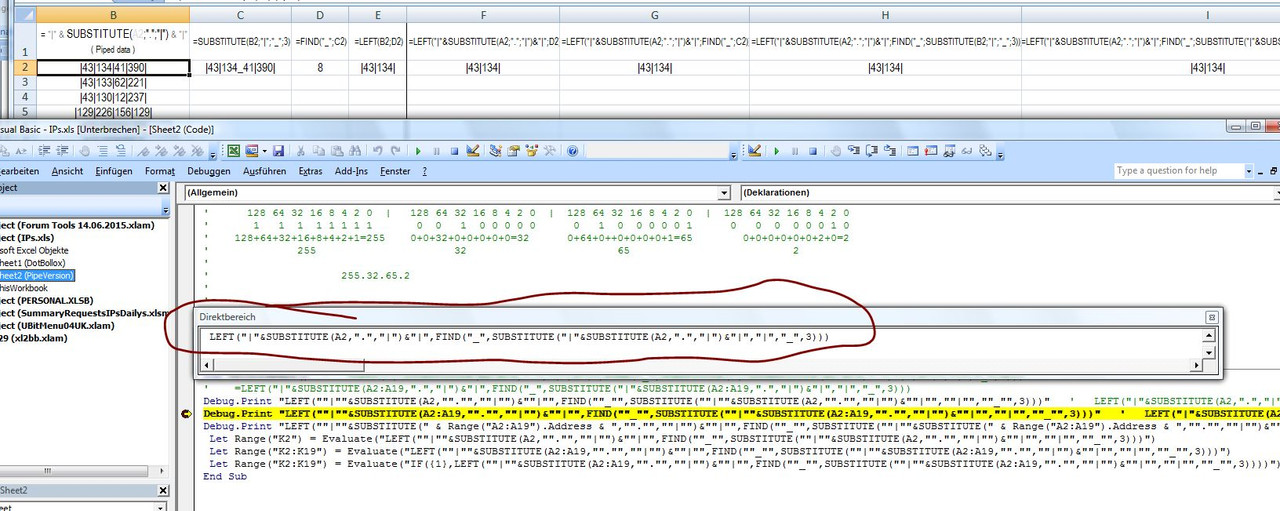
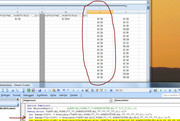
    A very nice and easy way to check you have arranged that VBA sees the formula you want is to get VBA to tell you what it sees.
    The Immediate window can be useful for this, as it is for so much in VBA development. This code line will tell you what is seen by VBA:
    Debug.Print " LEFT(""|""&SUBSTITUTE(A2:A19,""."",""|"")&""|"",FIND(""_"",SUBSTITUTE(""|""&SUBSTITUTE(A2:A19,""."",""|"")&""|"",""|"",""_"",3)))"
    That would give us printed in the Immediate Window
    LEFT("|"&SUBSTITUTE(A2:A19,".","|")&"|",FIND("_",SUBSTITUTE("|"&SUBSTITUTE(A2:A19,".","|")&"|","|","_",3)))
    , which is what we need VBA to "see"

    https://postimg.cc/ZvcHLCJp , https://i.postimg.cc/Th8sfDS7/Debug-Print-it.jpg


    So all looks OK, and indeed, if as example we had in cell A2
    43.134.41.39
    , and then this code line was executed,
    Let Range("I2") = Evaluate("LEFT(""|""&SUBSTITUTE(A2,""."",""|"")&""|"",FIND(""_"",SUBSTITUTE(""|""&SUBSTITUTE(A2,""."",""|"")&""|"",""|"",""_"",3)))")
    , we would get in cell I2
    |43|134|

    Similarly, this
    Let Range("I2") = Evaluate("LEFT(""|""&SUBSTITUTE(A2,""."",""|"")&""|"",FIND(""_"",SUBSTITUTE(""|""&SUBSTITUTE(A2,""."",""|"")&""|"",""|"",""_"",3)))")
    , we would get in cell I2
    |43|134|41|


    So we can use a working spreadsheet formula in VBA to get the result in a spreadsheet, without having the formula itself in the spreadsheet.


    We will deal with getting a range of results in on go into a spreadsheet in the next post
    Last edited by DocAElstein; 02-12-2026 at 12:31 AM.

  4. #64
    Fuhrer, Vierte Reich DocAElstein's Avatar
    Join Date
    Aug 2014
    Posts
    10,456
    Rep Power
    10
    Formula in Evaluate(Range) extended to give array of results.
    Similarity to spreadsheet "CSE" array formulas

    There is no documentation or definite knowledge on a lot of the following explanations. But it seems that we can make Evaluate(Range) things, in other words formulas in Evaluate(" Formula involving ranges here ") , work very similar to the CSE formulas in a spreadsheet


    Extended area expositions.
    Part of the so called CSE "array" formula experience often involves selecting the rectangular contiguous cell area over which the results should go. This also seems to somehow go some way to ensure that multi cell calculations are done. My guess is that the original "Excel makers of", had a good reason for organising that.
    ( But that is debateable. It is often left to opinion or viewpoint based on personal motives and loyalties at the time, and other quirky Human things, for example fear of speaking the truth. You can touch a nerve or twelve, if you discuss it too much ).
    I would further suggest that if we are using such a spreadsheet formula in VBA via Evaluate(Range), then as a result of not having such an action of selecting cells in a spreadsheet, a certain loss of connection to a spreadsheet means that the Evaluate(Range) is working in some situations a bit differently, and therefore may require some tweaking or adjustment in some situations in order to get the same results as would have been almost always problem obtained in the spreadsheet. This particular tweaking has often over the years gone under the wording of coercing, or coercing to return an array of results.

    "CSE" array formula entry
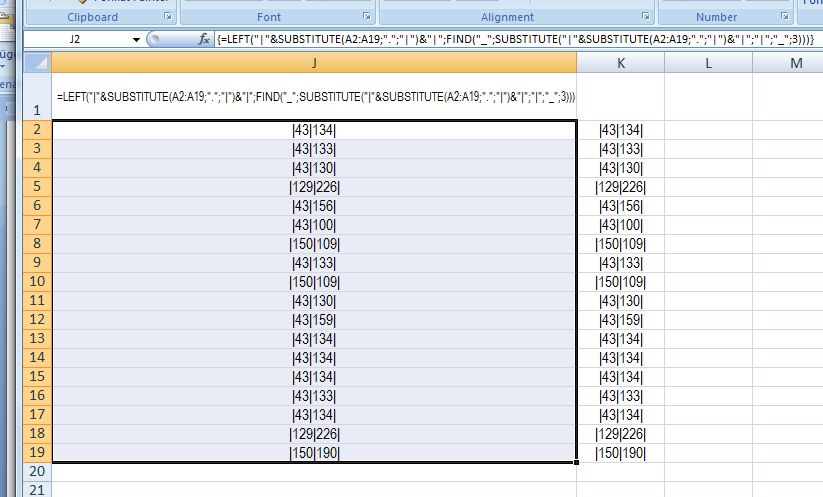
    Coming back to the spreadsheet, in the example in the uploaded file I have a set of data in the range A2:A19.
    If I were to
    _ select the range J2:J19
    _ type in this formula =LEFT("|"&SUBSTITUTE(A2:A19,".","|")&"|",FIND("_",SUBSTITUTE("|"&SUBSTITUTE(A2:A19,".","|")&"|","|","_",3)))
    _ Hold down the Ctrl and Shift Key, Whilst hitting the Enter key,
    , then I should get a full set of results.

    https://postimg.cc/d7nnchb0 , https://i.postimg.cc/Hx1N553b/CSE-ar...preadsheet.jpg


    What we have done there is the classic CSE ( type 2 ) Excel "array formula" , which allows us to get multiple results from a single formula.


    In VBA coding we no longer have this manually made connection to the spreadsheet, but never the less, it is often enough to put such a formula into the Evaluate(" "), and the correct array of results is returned.

    In our example, the VBA code line would be
    Let Range("K2:K19") = Evaluate("LEFT(""|""&SUBSTITUTE(A2:A19,""."",""|"")&""|"",FIND(""_"",SUBSTITUTE(""|""&SUBSTITUTE(A2:A19,""."",""|"")&""|"",""|"",""_"",3)))")

    But we find that we have here one of the occasions when this does not work for us. As is often in these cases, we find that we just get the first result given across the entire output range, , - what is happening is that Evaluate(" ") has returned us an array of results, but they are all the results of the first calculation, Let Range("K2:K19") = Evaluate("LEFT(""|""&SUBSTITUTE(A2,""."",""|"")&""|"",FIND(""_"",SUBSTITUTE(""|""&SUBSTITUTE(A2,""."",""|"")&""|"",""|"",""_"",3)))")
    It is not known for sure what is going on here, but my suggestion is that the original "Excel makers of", had some efficient route for calculations, such that in some cases the default route were doing the restriction to a single cell result, and as we do not have the connection to spreadsheet this restriction has not been removed. My guess is that in such cases as these, changing the route, (or some "redirection" as it is sometimes referred to), may help.

    A well used solution to such cases looks like this idea
    IF(ROW(A2:A19), ___The formula giving us the same (top left) cell result across the range___ )
    , which for our case would look like this
    IF(ROW(A2:A19), LEFT LEFT(""|""&SUBSTITUTE(A2:A19,""."",""|"")&""|"",FIND(""_"",SUBSTITUTE(""|""&SUBSTITUTE(A2:A19,""."",""|"")&""|"",""|"",""_"",3))) )
    , the full code line then being
    Let Range("K2:K19") = Evaluate("IF(ROW(A2:A19), LEFT(""|""&SUBSTITUTE(A2:A19,""."",""|"")&""|"",FIND(""_"",SUBSTITUTE(""|""&SUBSTITUTE(A2:A19,""."",""|"")&""|"",""|"",""_"",3))))")

    This usually works to get us the full correct results, and seems reasonable and intuitive. We seem to be taking a route likely to "coerce" multi cell calculations. Another advantage is that manipulation of the range within ROW(A2:A19), can give extra possibilities due to the way it restricts the output range.
    It is not clear when and who first this came up with this idea.

    Some time from** about 2016 some changes seemed to be made, ( ** not all at once, but gradually from that time on ), to the workings of Excel, finally resulting in some spewing up idea , who’s main effect was removing the need to do the CSE stuff in order to get array results, but which had the side effect of making this tweaking often unnecessary.
    Personally I would tend to think this was a bad idea, for a couple of reasons.
    _ (i) I am pessimistic as to whether the people doing this really knew what they were doing, and might have mistakenly though they were fixing something, that in fact, was not broken. - I tend to think Excel makers of, had a good reason for organising the CSE way. The "new" spewing up idea, seems more the obvious way to do it, so further thoughts may have resulted in a good reason for not doing it.
    _ (ii) Backward compatibility is compromised. It is very debateable what motives could be involved there.

    I can get over the problems by only using stable older Excel versions, which is generally a good idea I subscribe to, but I do not like to completely ignore new versions, and as much as possible would like to encourage solutions that work equally in new and old versions.

    One solution would be to always use the full range in the ROW(_____) , but I found by chance and experimenting something simpler that has no allowance or consideration for the range, and simply causes the full results to be returned, ( the range/array size simply determined by the ranges used in the simple formula )

    It is this sort of idea
    IF({1}, ____ The formula giving us the same result across the range ___ )
    Since I started using this I have seen it more often being used. (But I claim not to have invented or discovered it. I expect in parallel since or before others may have found it independently, as is the nature of these things, there being no central documentation or similar governing patent office for Excel coding, especially these sort of more novel uses. )

    The full final code line would then be something like this
    Let Range("K2:K19") = Evaluate("IF({1},LEFT(""|""&SUBSTITUTE(A2:A19,""."",""|"")&""|"",FIND(""_"",SUBSTITUTE(""|""&SUBSTITUTE(A2:A19,""."",""|"")&""|"",""|"",""_"",3))))")

    ( the number 3 will , as noted previously, result in us getting to the second . , but we can change that to 4 to get to the third . )

    In the next posts we will use this basic idea in codings to apply to existing lists of IP addresses


    Code:
    Option Explicit
    Sub NetworkPart()  '   =LEFT("|"&SUBSTITUTE(A2:A19,".","|")&"|",FIND("_",SUBSTITUTE("|"&SUBSTITUTE(A2:A19,".","|")&"|","|","_",3)))
    '    =LEFT("|"&SUBSTITUTE(A2:A19,".","|")&"|",FIND("_",SUBSTITUTE("|"&SUBSTITUTE(A2:A19,".","|")&"|","|","_",3)))
    Debug.Print "LEFT(""|""&SUBSTITUTE(A2,""."",""|"")&""|"",FIND(""_"",SUBSTITUTE(""|""&SUBSTITUTE(A2,""."",""|"")&""|"",""|"",""_"",3)))"   '   LEFT("|"&SUBSTITUTE(A2,".","|")&"|",FIND("_",SUBSTITUTE("|"&SUBSTITUTE(A2,".","|")&"|","|","_",3)))
    Debug.Print "LEFT(""|""&SUBSTITUTE(A2:A19,""."",""|"")&""|"",FIND(""_"",SUBSTITUTE(""|""&SUBSTITUTE(A2:A19,""."",""|"")&""|"",""|"",""_"",3)))"   '   LEFT("|"&SUBSTITUTE(A2:A19,".","|")&"|",FIND("_",SUBSTITUTE("|"&SUBSTITUTE(A2:A19,".","|")&"|","|","_",3)))
    Debug.Print "LEFT(""|""&SUBSTITUTE(" & Range("A2:A19").Address & ",""."",""|"")&""|"",FIND(""_"",SUBSTITUTE(""|""&SUBSTITUTE(" & Range("A2:A19").Address & ",""."",""|"")&""|"",""|"",""_"",3)))"   '   LEFT("|"&SUBSTITUTE($A$2:$A$19,".","|")&"|",FIND("_",SUBSTITUTE("|"&SUBSTITUTE($A$2:$A$19,".","|")&"|","|","_",3)))
     Let Range("K2") = Evaluate("LEFT(""|""&SUBSTITUTE(A2,""."",""|"")&""|"",FIND(""_"",SUBSTITUTE(""|""&SUBSTITUTE(A2,""."",""|"")&""|"",""|"",""_"",3)))")
     Let Range("K2:K19") = Evaluate("LEFT(""|""&SUBSTITUTE(A2:A19,""."",""|"")&""|"",FIND(""_"",SUBSTITUTE(""|""&SUBSTITUTE(A2:A19,""."",""|"")&""|"",""|"",""_"",3)))")
     Let Range("K2:K19") = Evaluate("IF({1},LEFT(""|""&SUBSTITUTE(A2:A19,""."",""|"")&""|"",FIND(""_"",SUBSTITUTE(""|""&SUBSTITUTE(A2:A19,""."",""|"")&""|"",""|"",""_"",3))))")
    End Sub


    In the next post we go back slightly to a previous coding because,
    Quote Originally Posted by DocAElstein View Post
    Bollox, Excel going Dotty in a cell fucked me up again
    aka. Improved IP address manipulating and analysing in Excel, avoiding dotty problems


    I had some problems with Excel changing some IP addresses as a result of the combination of numbers and dots. Such things are common and was not unexpected, but I mistakenly thought I had got over them, or not seen them in the particular coding and data I was using. But I was wrong. For example, if I had this, 43.130.141.85 , then the stripped value would be 43.13 rather than 43.130

    So, what I am doing here is to go back a bit to limit the damage, but I note that some of the ideas here, in particular getting away from dots from the start, may be a sensible thing to do if I eventually re write many of the first original codings that deal with any IP addresses.

    At the outset I will change all the dots,
    .
    to a pipe,
    |

    In all lists and analysis I will keep to this convention, or go over to it as it is convenient by updating or writing new codings and only convert back to dots if I have a specific need to.
    Attached Files Attached Files
    Last edited by DocAElstein; 02-15-2026 at 06:31 PM.

  5. #65
    Fuhrer, Vierte Reich DocAElstein's Avatar
    Join Date
    Aug 2014
    Posts
    10,456
    Rep Power
    10
    from last post
    Quote Originally Posted by DocAElstein View Post
    Bollox, Excel going Dotty in a cell fucked me up again
    aka. Improved IP address manipulating and analysing in Excel, avoiding dotty problems


    ….I had some problems with Excel changing some IP addresses as a result of the combination of numbers and dots. Such things are common and was not unexpected, ……
    So, what I am doing here is to go back a bit to limit the damage, but I note that some of the ideas here, in particular getting away from dots from the start, may be a sensible thing to do if I eventually re write many of the first original codings that deal with any IP addresses.

    At the outset I will change all the dots,
    .
    to a pipe,
    |

    In all lists and analysis I will keep to this convention, or go over to it as it is convenient by updating or writing new codings and only convert back to dots if I have a specific need to.
    I need to go back to approximately here
    https://www.excelfox.com/forum/showt...ll=1#post27705
    https://www.excelfox.com/forum/showt...ll=1#post27706
    , slightly modifying the coding already used
    Sub HighViewThreadIPsConsolodated()
    Sub HighViewThreadIPs()

    , and a few others I was doing in the middle of writing before I noticed my fuck up, or rather the problems caused by Excel changing things looking like numbers.
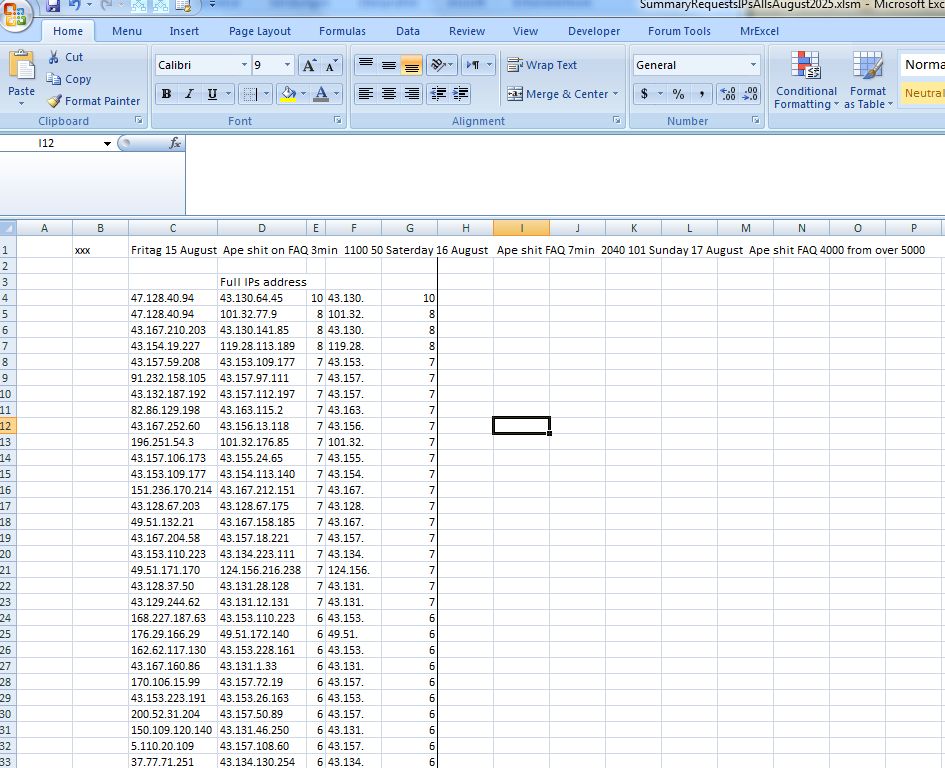
    I did not get too far, so I will start again with the high viewings of FAQ, around August, 2025, starting again from pasting in from Column H

    https://i.postimg.cc/KcKfJgBk/Ape-sh...st-attempt.jpg


    Worded summary of what is going on/ Recap
    The initial simplest explanation, the general ideas: The codings that we will be updating take a cell with a lot of IP addresses in, ( specifically all IP addresses looking at a specific thing and make a list of them all and a list based on part of them, the left part, which are then ordered in terms of how often used, (having been consolidated as well: If for example an IP address appears 3 times then it will be given once and a neighbouring cell in another column will be given the value of 3)

    More detail

    The titles and uses of the first two codings
    Sub HighViewThreadIPsConsolodated()
    Sub HighViewThreadIPs()

    , may lead to some confusion, so to clarify

    Sub HighViewThreadIPsConsolodated()
    This might be used for a cell from the third column in on of two workbooks, (**at least for now)
    _ in worksheets AllRequests in workbook SummaryRequestsIPsAllsAugust2025.xlsm
    , or
    _ the first of two or more cells from worksheet Requests in workbook SummaryRequestsIPsDailys.xlsm

    In this latter case, the second similar coding, Sub HighViewThreadIPs() is then used to add to the 2 column list created by Sub HighViewThreadIPsConsolodated()
    **This may be changed later if the main coding , Sub GetRefreshesIPAddressWatchingThingsAtExcelFox() , in the daily template file , IPAddressesWatchingExcelFox_Refresh.xls, is modified to get away from the string length limit , 32767 , in a cell which causes truncation, that is to say missing IP addresses in the cells used especially in the SummaryRequestsIPsAllsAugust2025.xlsm file


    The main change in both these coding is when making a vertical array to, paste in of the raw unconsolidated IPs as a single column list, we add the trailing and leading "|"s

    Code:
        For Cnt = 0 To UBound(arrIPsH())
         Let arrIPsV(Cnt + 1, 1) =  "|" & Trim(Replace(arrIPsH(Cnt), vbTab, "", 1, -1, vbBinaryCompare)) & "|"
        Next Cnt
    
    So in the redo of the work done so far I am selecting I select a cell in from worksheet Requests in workbook SummaryRequestsIPsDailys.xlsm , run Sub HighViewThreadIPsConsolodated() after which I do something similar after selecting two other cells but run Sub HighViewThreadIPs()

    The word consolidate in the first coding really refers to that we select cell that has already got the combined IP addresses from a few measurements as that has had the number of views added ( in the first cell of a column), and the IP addresses doing that is then added to the third cell of a column
    ** In this example the third cell has a very large number of IP address such that the 32767 limit has been reached , so this solution is also not satisfactory, and only temporary.

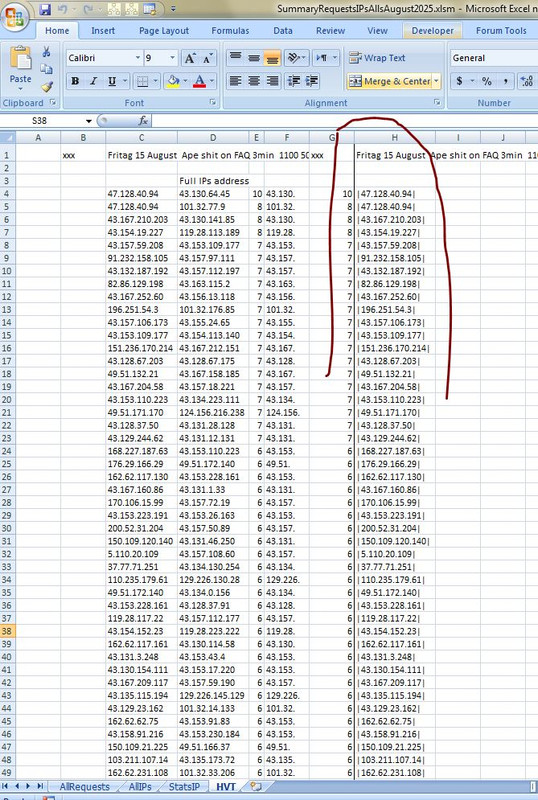
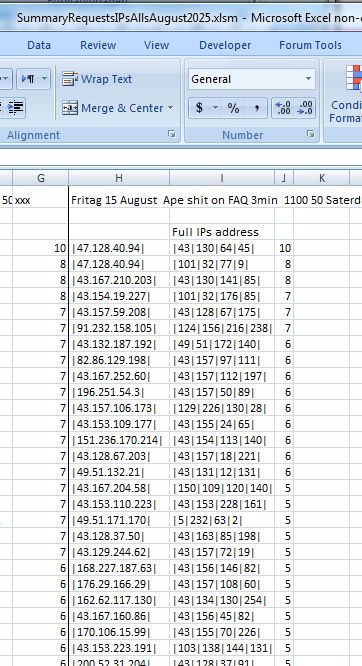
    In this redo example we have got the single column H now in worksheet HVT, in workbook SummaryRequestsIPsAllsAugust2025.xlsm
    ( I had selected three cells of IP addresses, corresponding to measurements titled
    Fritag 15 August Ape shit on FAQ 3min 1100 50
    Saterday 16 August Ape shit FAQ 7min 2040 101
    Sunday 17 August Ape shit FAQ 4000 from over 5000 .
    and as we are doing multi ( 3 in this case cells ), they came from SummaryRequestsIPsDailys.xlsm
    )

    https://i.postimg.cc/0r1KCTBZ/single...ksheet-HVT.jpg


    Sub FullIPconsolidationHVT()
    There is almost nothing to change here, just an extra line, which probably could be put in this coding or others at different places, but for now it will do here, towards the end of the coding and its purpose is to change all the inner dots to pipes, like
    |43.130.64.45| - - - > |43|130|64|45|
    Let rngOut = Me.Evaluate("IF({1},SUBSTITUTE(" & rngOut.Address & ",""."",""|""))")


    Sub PartIPconsolidationHVT()
    This is the EvaluateRange coding that basically truncates to give us the first part of the IP addresses, like
    |43|130|64|45| - - - > |43|130|
    |43|80|64|45| - - - > |43|80|
    |43|130|88|104| - - - > |43|130|

    , then the list will be (re) consolidated, since, for example in the last example, I have two |43|130| values.
    There is very little to change here, other than the EvaluateRange formula,

    From the history, that has gone on so far, which has got a bit muddled , this following might summarise a progression of something related [code][color=black][color=darkgreen]' From the history, that has gone on so far, which has got a bit muddled , this following might summarise a progression of something related
    Code:
    ' Let rngCpyd.Columns(1) = Evaluate("IF({1},LEFT(" & rngCpyd.Columns(1).Address & ",FIND(""_"",SUBSTITUTE(" & rngCpyd.Columns(1).Address & ",""."",""_"",2))-1))") ' This caused error if for example we had,  43.130.141.85  , then the stripped value would be  43.13  , so .....
    ' Let rngCpyd.Columns(1) = Evaluate("IF({1},LEFT(" & rngCpyd.Columns(1).Address & ",FIND(""_"",SUBSTITUTE(" & rngCpyd.Columns(1).Address & ",""."",""_"",2))))")   '    ..... better to be  43.130.
     Let rngCpyd.Columns(1) = Evaluate("IF({1},LEFT(" & rngCpyd.Columns(1).Address & ",FIND(""_"",SUBSTITUTE(" & rngCpyd.Columns(1).Address & ",""|"",""_"", 3))))")   '    ..... better to be  |43|130| 
    
    , but I think I may have another think at this stage of updating as I go along.

    So I will break off here with the corrections and make some notes, for my general later reference – in a post or two later I will do a brief description of Sub PartIPconsolidationHVT()
    Last edited by DocAElstein; 03-01-2026 at 06:57 PM.

  6. #66
    Fuhrer, Vierte Reich DocAElstein's Avatar
    Join Date
    Aug 2014
    Posts
    10,456
    Rep Power
    10
    ____ Spare post
    Last edited by DocAElstein; 03-01-2026 at 09:53 PM.

  7. #67
    Fuhrer, Vierte Reich DocAElstein's Avatar
    Join Date
    Aug 2014
    Posts
    10,456
    Rep Power
    10
    Consolidated lists of Part IP addresses
    Sub PartIPconsolidationHVT()

    The start point of this is when we got as far as in the sketch below.
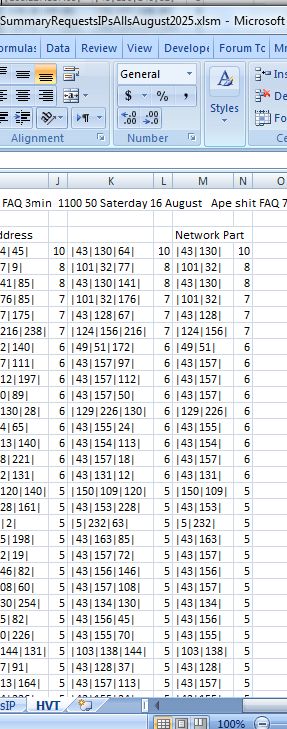
    _ We have a single column list ( column H here ), in worksheet HVT , which comes from one or more cells containing many IP addresses, ( from a High Viewed Thread , ( or high viewed whatever ) )
    , and
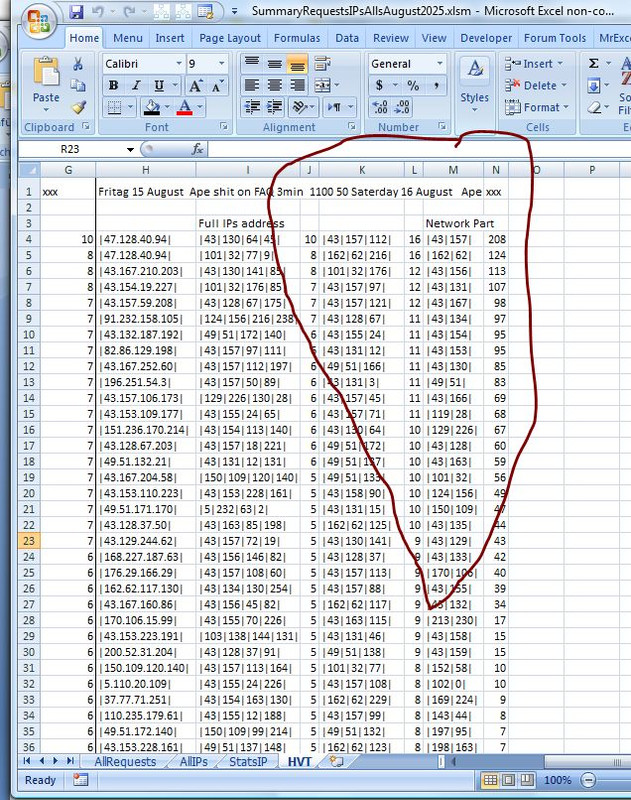
    _ Then we have a consolidated list of that, showing the number of times a particular IP is used for that high viewed Thread or thing, so we have two columns more, I and J in this case. ( It is sorted by order of views as well, and the code line Me.Evaluate("IF({1},SUBSTITUTE(" & rngOut.Address & ",""."",""|""))") also tidies up to get all pies | rather than dots . )

    https://i.postimg.cc/mkzTmSQQ/single...-addresses.jpg


    Initially I will take
    _ the full IP addresses of this full form, |43|130|64|45| , along with their occurrence count ( the existing 2 columns, I and J in this case )
    , and give a couple of part form IP addresses, along with their occurrence, this sort of thing
    |43|130|64 ( so another two columns here )
    |43|130| ( so another two columns here )

    I may change that later, depending on the first few results analysis. I may not be doing it in the most efficient way either, but for now we will just move on


    Brief overview of coding, Sub PartIPconsolidationHVT()
    This will give us the two columns, which are identical columns, which are also at this stage identical to the consolidated full part IP addresses
    Code:
    rngIn.Offset(3, 0).Resize(Lr - 3, 2).Copy
    WsHVT.Paste Destination:=WsHVT.Cells.Item(4, Lc + 2)
    WsHVT.Paste Destination:=WsHVT.Cells.Item(4, Lc + 2 + 2)
    
    This will do the business to get the part IP addresses
    Code:
     Dim rngCpyd As Range: Set rngCpyd = WsHVT.Cells.Item(4, Lc + 2).Resize(Lr - 3, 2)
    ' Let rngCpyd.Columns(1) = Evaluate("IF({1},LEFT(" & rngCpyd.Columns(1).Address & ",FIND(""_"",SUBSTITUTE(" & rngCpyd.Columns(1).Address & ",""."",""_"",2))-1))") ' This caused error if for example we had,  43.130.141.85  , then the stripped value would be  43.13  , so .....
    ' Let rngCpyd.Columns(1) = Evaluate("IF({1},LEFT(" & rngCpyd.Columns(1).Address & ",FIND(""_"",SUBSTITUTE(" & rngCpyd.Columns(1).Address & ",""."",""_"",2))))")   '    ..... better to be  43.130.
     Let rngCpyd.Columns(1) = Evaluate("IF({1},LEFT(" & rngCpyd.Columns(1).Address & ",FIND(""_"",SUBSTITUTE(" & rngCpyd.Columns(1).Address & ",""|"",""_"",4))))")   ' .. better to be  |43|130|64
     Let rngCpyd.Columns(3) = Evaluate("IF({1},LEFT(" & rngCpyd.Columns(3).Address & ",FIND(""_"",SUBSTITUTE(" & rngCpyd.Columns(3).Address & ",""|"",""_"",3))))")   '      |43|130|      rngCpyd  only has 2 columns, but the  .Columns propety extends further
     rngCpyd.Columns("A:D").AutoFit
      rngCpyd.Offset(-1, 2).Resize(1, 1) = "Network Part"   ' We can use this Heading ,  "Network Part"   ,  (in the third row) later to get the next free column 
    https://i.postimg.cc/hG39w3cX/2-Copi...IP-columns.jpg


    We just need to double the typical Dictionary coding now to consolidate the 2 pairs of columns. Consolidating here means the occurrences of the part IP addresses are reduced to a list of unique part IP addresses, and the corresponding integer value on the next column on the same row gives the total number of times that this part IP address was involved.
    Code:
    Rem 4 Dictionaries for unique Part IP addresses List
    '4a Make dictionaries
    Dim Dic43IP As Object: Set Dic43IP = CreateObject("Scripting.Dictionary")
    Dim Dic32IP As Object: Set Dic32IP = CreateObject("Scripting.Dictionary") ' Network Part
    
    '4b Fill dictionary
    Dim Cnt As Long
        For Cnt = 1 To UBound(arrIn43(), 1) ' Both have same size ranges at this stage, so  arrIn32()  would have done just as well
        '4b(i)  arrIn43()    4 pipes 3 parts
            If Not Dic43IP.Exists(arrIn43(Cnt, 1)) Then '
             Dic43IP.Add Key:=arrIn43(Cnt, 1), Item:=arrIn43(Cnt, 2) ' The  Key  is the IP address,  the Item is the times it was used and as it is consolodated, the next column is the first counted number
            Else '  Else  here we Add             to the item, which counts the times it was used   if the  Key    already exists.
             '  referring to Item with this key value       add the views for this row - change its value to what it was plus the views for this row
             Let Dic43IP(arrIn43(Cnt, 1)) = Dic43IP(arrIn43(Cnt, 1)) + arrIn43(Cnt, 2)
            End If
        '4b(ii)  arrIn32()    3 pipes 2 parts -  "Network Part"
            If Not Dic32IP.Exists(arrIn32(Cnt, 1)) Then '
             Dic32IP.Add Key:=arrIn32(Cnt, 1), Item:=arrIn32(Cnt, 2) ' The  Key  is the IP address,  the Item is the times it was used and as it is consolodated, the next column is the first counted number
            Else '  Else  here we Add             to the item, which counts the times it was used   if the  Key    already exists.
             '  referring to Item with this key value       add the views for this row - change its value to what it was plus the views for this row
             Let Dic32IP(arrIn32(Cnt, 1)) = Dic32IP(arrIn32(Cnt, 1)) + arrIn32(Cnt, 2)
            End If
        Next Cnt
    Application.Wait (Now() + TimeValue("00:00:01"))
    '4c Dictionaries output arrays
    '4c(i) 4 pipes 3 parts
    Dim Keys43() As Variant, Itms43() As Variant
     Let Keys43() = Dic43IP.Keys(): Itms43() = Dic43IP.items()
    '4d(ii) Output array from dictionary output arrays
    Dim arrOut43() As Variant: ReDim arrOut43(0 To UBound(Keys43()), 1 To 2)
        For Cnt = 0 To UBound(Keys43())
         Let arrOut43(Cnt, 1) = Keys43(Cnt): arrOut43(Cnt, 2) = Itms43(Cnt)
        Next Cnt
    '4c(ii) 3 pipes 2 parts  "Network Part"
    Dim Keys32() As Variant, Itms32() As Variant
     Let Keys32() = Dic32IP.Keys(): Itms32() = Dic32IP.items()
    '4d(ii) Output array from dictionary output arrays
    Dim arrOut32() As Variant: ReDim arrOut32(0 To UBound(Keys32()), 1 To 2)
        For Cnt = 0 To UBound(Keys32())
         Let arrOut32(Cnt, 1) = Keys32(Cnt): arrOut32(Cnt, 2) = Itms32(Cnt)
        Next Cnt
    
    Then we output and sort by the highest views, nothing special there.
    We end up with something like this, when all is said and done


    https://i.postimg.cc/SQG4Cfvs/Finall...tion-HVT().jpg


    Full coding in next post.
    (In the other next post, I maybe need to summarise what as been going on over the last few posts…)
    Last edited by DocAElstein; 03-03-2026 at 12:47 AM.

  8. #68
    Fuhrer, Vierte Reich DocAElstein's Avatar
    Join Date
    Aug 2014
    Posts
    10,456
    Rep Power
    10
    Code discussed in last post
    Coding Sub PartIPconsolidationHVT() in worksheet HVT code module, in workbook SummaryRequestsIPsAllsAugust2025.xlsm


    Code:
    Sub PartIPconsolidationHVT()
    Rem 0 Worksheets data info
    Dim WsHVT As Worksheet, Lc As Long
     Set WsHVT = ThisWorkbook.Worksheets("HVT")
     Let Lc = WsHVT.Cells.Item(3, WsHVT.Columns.Count).End(xlToLeft).Column
        If WsHVT.Cells.Item(3, WsHVT.Columns.Count).Value2 <> "Full IPs address" And WsHVT.Cells.Item(4, Lc + 2).Value2 <> "" Then MsgBox prompt:="Not found a  ""Full IPs address""  to left of empty columns": Exit Sub
    Dim Lr As Long: Let Lr = WsHVT.Cells.Item(WsHVT.Rows.Count, Lc).End(xlUp).Row
    Dim Nc As Long: Let Nc = Lc + 2
    Dim rngIn As Range
     Set rngIn = WsHVT.Cells.Item(1, Lc).Resize(Lr, 2)
    
    Rem 1 Copy data range and Paste to right
    rngIn.Offset(3, 0).Resize(Lr - 3, 2).Copy
    WsHVT.Paste Destination:=WsHVT.Cells.Item(4, Lc + 2)
    WsHVT.Paste Destination:=WsHVT.Cells.Item(4, Lc + 2 + 2)
    
    Rem 2 Change IP address to just left bits ( 3/4 of it  and  1/2 of it, (Network Part)  )    https://www.excelfox.com/forum/showthread.php/3007-A-Semi-automated-way-to-note-the-IP-addresses-of-things-viewing-us?p=27704&viewfull=1#post27704
    Dim rngCpyd As Range: Set rngCpyd = WsHVT.Cells.Item(4, Lc + 2).Resize(Lr - 3, 2)
    ' Let rngCpyd.Columns(1) = Evaluate("IF({1},LEFT(" & rngCpyd.Columns(1).Address & ",FIND(""_"",SUBSTITUTE(" & rngCpyd.Columns(1).Address & ",""."",""_"",2))-1))") ' This caused error if for example we had,  43.130.141.85  , then the stripped value would be  43.13  , so .....
    ' Let rngCpyd.Columns(1) = Evaluate("IF({1},LEFT(" & rngCpyd.Columns(1).Address & ",FIND(""_"",SUBSTITUTE(" & rngCpyd.Columns(1).Address & ",""."",""_"",2))))")   '    ..... better to be  43.130.
     Let rngCpyd.Columns(1) = Evaluate("IF({1},LEFT(" & rngCpyd.Columns(1).Address & ",FIND(""_"",SUBSTITUTE(" & rngCpyd.Columns(1).Address & ",""|"",""_"",4))))")   ' .. better to be  |43|130|64
     Let rngCpyd.Columns(3) = Evaluate("IF({1},LEFT(" & rngCpyd.Columns(3).Address & ",FIND(""_"",SUBSTITUTE(" & rngCpyd.Columns(3).Address & ",""|"",""_"",3))))")   ' Network part like |43|130|      rngCpyd  only has 2 columns, but the  .Columns propety extends further allowing us to referrence extended columns
     rngCpyd.Columns("A:D").AutoFit  ' Once again extending the columns outside the 2 columns of  rngCpyd
     rngCpyd.Offset(-1, 2).Resize(1, 1) = "Network Part"   ' We can use this Heading ,  "Network Part"   ,  (in the third row) later to get the next free column
     '  watch out for like        |/forum/faq|php|    1   #VALUE! 1   |/forum/faq|php|    1
    'Stop
    Rem 3 new ranges inputs,  the copied and pasted ranges which have had their first column trimmed
    Dim arrIn43() As Variant: Let arrIn43() = rngCpyd.Value2  '  4 pipes 3 parts
    Dim arrIn32() As Variant: Let arrIn32() = rngCpyd.Offset(0, 2).Value2 '  3 pipes 2 parts -  "Network Part"
    
    Rem 4 Dictionaries for unique Part IP addresses List
    '4a Make dictionaries
    Dim Dic43IP As Object: Set Dic43IP = CreateObject("Scripting.Dictionary")
    Dim Dic32IP As Object: Set Dic32IP = CreateObject("Scripting.Dictionary") ' Network Part
    
    '4b Fill dictionary
    Dim Cnt As Long
        For Cnt = 1 To UBound(arrIn43(), 1) ' Both have same size ranges at this stage, so  arrIn32()  would have done just as well
        '4b(i)  arrIn43()    4 pipes 3 parts
            If Not Dic43IP.Exists(arrIn43(Cnt, 1)) Then '
             Dic43IP.Add Key:=arrIn43(Cnt, 1), Item:=arrIn43(Cnt, 2) ' The  Key  is the IP address,  the Item is the times it was used and as it is consolodated, the next column is the first counted number
            Else '  Else  here we Add             to the item, which counts the times it was used   if the  Key    already exists.
             '  referring to Item with this key value       add the views for this row - change its value to what it was plus the views for this row
             Let Dic43IP(arrIn43(Cnt, 1)) = Dic43IP(arrIn43(Cnt, 1)) + arrIn43(Cnt, 2)
            End If
        '4b(ii)  arrIn32()    3 pipes 2 parts -  "Network Part"
            If Not Dic32IP.Exists(arrIn32(Cnt, 1)) Then '
             Dic32IP.Add Key:=arrIn32(Cnt, 1), Item:=arrIn32(Cnt, 2) ' The  Key  is the IP address,  the Item is the times it was used and as it is consolodated, the next column is the first counted number
            Else '  Else  here we Add             to the item, which counts the times it was used   if the  Key    already exists.
             '  referring to Item with this key value       add the views for this row - change its value to what it was plus the views for this row
             Let Dic32IP(arrIn32(Cnt, 1)) = Dic32IP(arrIn32(Cnt, 1)) + arrIn32(Cnt, 2)
            End If
        Next Cnt
    Application.Wait (Now() + TimeValue("00:00:01"))
    '4c Dictionaries output arrays
    '4c(i) 4 pipes 3 parts
    Dim Keys43() As Variant, Itms43() As Variant
     Let Keys43() = Dic43IP.Keys(): Itms43() = Dic43IP.items()
    '4d(ii) Output array from dictionary output arrays
    Dim arrOut43() As Variant: ReDim arrOut43(0 To UBound(Keys43()), 1 To 2)
        For Cnt = 0 To UBound(Keys43())
         Let arrOut43(Cnt, 1) = Keys43(Cnt): arrOut43(Cnt, 2) = Itms43(Cnt)
        Next Cnt
    '4c(ii) 3 pipes 2 parts  "Network Part"
    Dim Keys32() As Variant, Itms32() As Variant
     Let Keys32() = Dic32IP.Keys(): Itms32() = Dic32IP.items()
    '4d(ii) Output array from dictionary output arrays
    Dim arrOut32() As Variant: ReDim arrOut32(0 To UBound(Keys32()), 1 To 2)
        For Cnt = 0 To UBound(Keys32())
         Let arrOut32(Cnt, 1) = Keys32(Cnt): arrOut32(Cnt, 2) = Itms32(Cnt)
        Next Cnt


    Application.Wait (Now() + TimeValue("00:00:01"))
     
    Rem 6 Output parts
    rngCpyd.Clear
    Dim rngOut43 As Range: Set rngOut43 = rngCpyd.Resize(UBound(arrOut43(), 1), 2) ' Effctively   rngCpyd___  here just gives us the top left
     Let rngOut43 = arrOut43()
     ' sort it
    Application.Wait (Now() + TimeValue("00:00:01"))
     rngOut43.Sort Key1:=rngOut43.Columns(2), Order1:=xlDescending
    Application.Wait (Now() + TimeValue("00:00:01"))
     
    rngCpyd.Offset(0, 2).Clear
    Dim rngOut32 As Range: Set rngOut32 = rngCpyd.Offset(0, 2).Resize(UBound(arrOut32(), 1), 2) ' Effctively   rngCpyd.Offset(0, 2)  here just gives us the top left
     Let rngOut32 = arrOut32()
     ' sort it
    Application.Wait (Now() + TimeValue("00:00:01"))
     rngOut32.Sort Key1:=rngOut32.Columns(2), Order1:=xlDescending
    Application.Wait (Now() + TimeValue("00:00:01"))
     
    rngCpyd.Columns("A:D").AutoFit
     
     Let rngOut32.Offset(-3, 1).Resize(1, 1) = "xxx" ' This is helpful for next runnings  to get output position correct
    
    
    End Sub
    
    Last edited by DocAElstein; 03-03-2026 at 12:55 AM.

  9. #69
    Fuhrer, Vierte Reich DocAElstein's Avatar
    Join Date
    Aug 2014
    Posts
    10,456
    Rep Power
    10
    Quote Originally Posted by DocAElstein View Post
    We end up with something like this, when all is said and done


    https://i.postimg.cc/SQG4Cfvs/Finall...tion-HVT().jpg


    Full coding in next post.

    (In the other next post, I maybe need to summarise what as been going on over the last few posts…)
    So this is what we do when we have a high an unusually viewed thread

    We do not frequently do this.
    But once in a while, as I plod through the one or more measurements of a day or more, a Thread may appear to have been viewed a lot. It will typically come up as the top viewed thread in a 3 column measuring set in either

    Worksheet Requests in SummaryRequestsIPsDailys.xlsm


    , or
    worksheet AllRequests in SummaryRequestsIPsAllsAugust2025.xlsm


    If I take it from the Alls file, that would likely be then from just one cell,
    , and if I Take it from the Dailys file then it will likely be from multiple cells in the Dailys file.
    The two alternatives are shown above for the same example.
    The problem with using just a single cell from the Alls file , is the truncation due to the 32767 text in a cell limit.

    ( I may change later the main daily monitoring coding, Sub GetRefreshesIPAddressWatchingThingsAtExcelFox() ( in workbook IPAddressesWatchingExcelFox_Refresh.xls ) , to somehow catch and record this high view Thread or High View thing phenomena so as to save me this extra occasional code running )


    Summary, what to do
    This short Calling coding will be used, and a quick walk through it may help to summaries, and remember later, what to do.
    Untypically, it is not to be run simply consecutively in the first 2 of 4 Called codings
    Code:
    Option Explicit
    ' https://www.excelfox.com/forum/showthread.php/3007-A-Semi-automated-way-to-note-the-IP-addresses-of-things-viewing-us?p=27980&viewfull=1#post27980
    Sub IPsFromHVT()
    ' Select the cell ( in third column ) with lots of IP addresses in  worksheet  AllRequests  in  SummaryRequestsIPsAlls_____.xlsm    or Worksheet  Requests  in  SummaryRequestsIPsDailys.xlsm
    1 Call HighViewThreadIPsConsolodated   '  This always done once
    Stop ' Select the cell ( in third column ) with lots of IP addresses in  most likely Worksheet  Requests  in  SummaryRequestsIPsDailys.xlsm
    ' You may or may not skip the next coding
    2 Call HighViewThreadIPs   ' this may be done once or more to tack on more IPs to the last list
    Stop ' So you may need to go back do  Sub HighViewThreadIPs()  again
    ' The next two you will always do, it works on the single column list made above from some combination of the last two codings (after selecting one or more single cells then running one or other of the above codings)
    3 Call FullIPconsolidationHVT ' Make a 2 column consolidated list of the IPs with their number of occurrences alongside
    Stop
    4 Call PartIPconsolidationHVT ' Make 2 lots of 2 columns, list of the part IPs with their number of occurrences alongside
    End Sub
    
    The first coding,
    1 Call HighViewThreadIPsConsolodated, will
    always be used after selecting an appropriate cell in either Worksheet Requests in SummaryRequestsIPsDailys.xlsm
    , or
    worksheet AllRequests in SummaryRequestsIPsAllsAugust2025.xlsm

    The second coding ,
    2 Call HighViewThreadIPs may or may not be run 1 or more times, and that run will likely be after selecting a cell in Worksheet Requests in SummaryRequestsIPsDailys.xlsm

    Then the next two codings, 3rd and 4th
    3 Call FullIPconsolidationHVT
    4 Call PartIPconsolidationHVT

    , are run sequentially. They produce the final required results:
    https://i.postimg.cc/G2x8VD9s/Final-...rt-results.jpg , https://postimg.cc/gXr26nVY/cc12c849


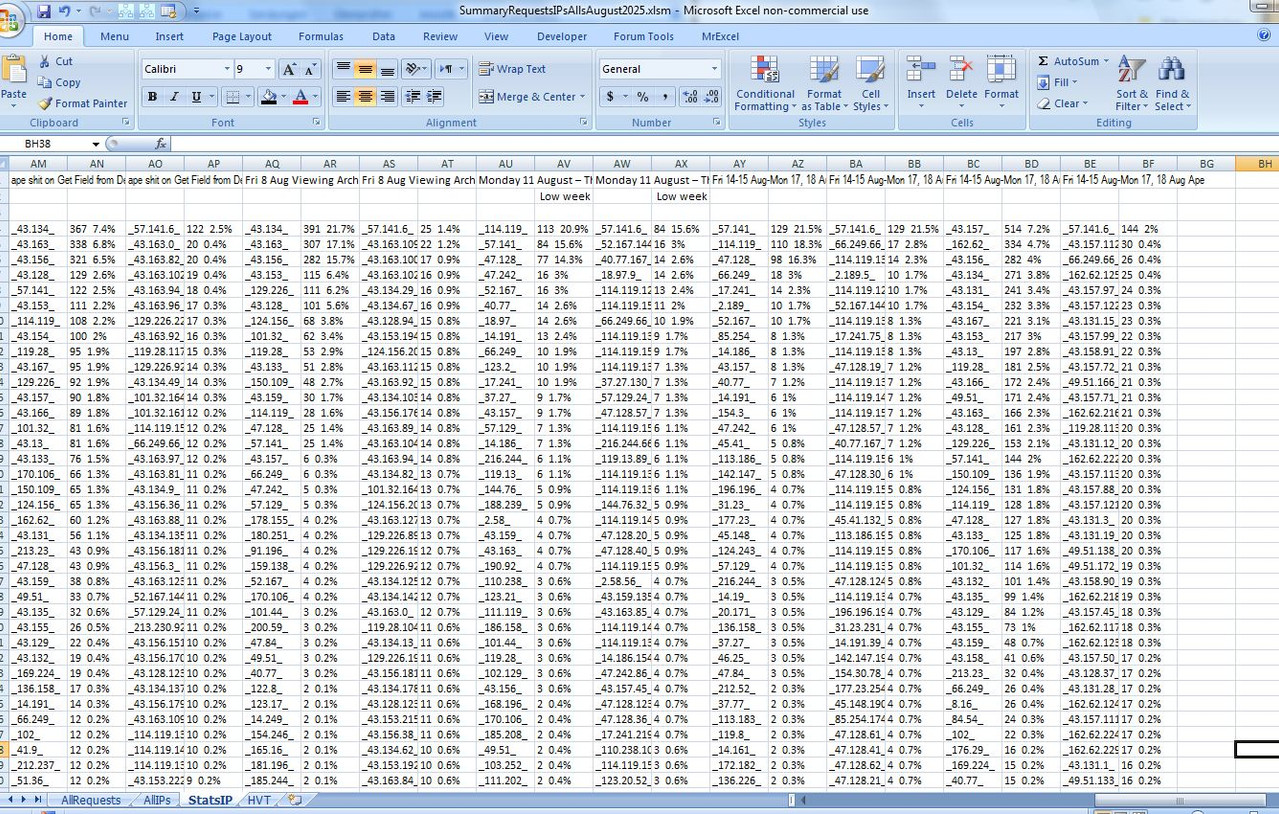
    At this point I probably want to go back to the penultimate works with a penultimate new worksheet, StatsIP , in workbook SummaryRequestsIPsAllsAugust2025.xlsm

    We ended up with some results like
    _43.157_ 514 7.2% _57.141.6_ 144 2%
    , and what we probably want to do is get that converted to the pipe, | , convention


    We need to slightly modify the coding here I think
    https://www.excelfox.com/forum/showt...ll=1#post27707
    https://www.excelfox.com/forum/showt...ll=1#post27706
    Last edited by DocAElstein; 03-04-2026 at 02:23 AM.

  10. #70
    Fuhrer, Vierte Reich DocAElstein's Avatar
    Join Date
    Aug 2014
    Posts
    10,456
    Rep Power
    10
    So we are back to the point of some analysis as we go along building up the Alls workbook, SummaryRequestsIPsAllsAugust2025.xlsm , whereby we are
    taking a column from the AllIPs worksheet , (where the full IP addresses list is) , in ther words we select a top left there ,


    , and then the coding Sub PartsIP() in worksheet StatsIP code module is run, resulting in some columns in that worksheet, StatsIP
    ,
    https://i.postimg.cc/pLsLkdJd/Some-Stats-IP.jpg


    There probably is not so much technically good reason for changing the IP address format to show just pipes, |
    It is more of a consistent view. ( Note that in the original AllIPS, as well as the Dailys IPs there may be an error from Excel causing the last/ forth digit section to have lost, for example, a trailing zero. This will need to be corrected at some later point such as in the main daily monitoring coding, Sub GetRefreshesIPAddressWatchingThingsAtExcelFox() ( in workbook IPAddressesWatchingExcelFox_Refresh.xls. In which case some modificatio0n of later run codings such as those we have recently been developing will need to be done )

    The changes required for the viewing consistency at this stage are fairly simple, and there are a few ways to do it.
    One way:
    _ I could change the EvaluateRange formulas in one go, but to simplify and allow better development and debugging, I will do it in two stages, adding a new first formula to do the blanket change from dots to pipes, which in turn requires a change to the existing EvaluateRange formula to catch the pipes rather than dots, and we also leave the last thing, ( pipe now ) on.
    Code:
    ' Let rngC1 = Evaluate("IF({1},LEFT(" & rngC1.Address & ",FIND(""_"",SUBSTITUTE(" & rngC1.Address & ",""."",""_"",2))-1))")
    ' Let rngC3 = Evaluate("IF({1},LEFT(" & rngC3.Address & ",FIND(""_"",SUBSTITUTE(" & rngC3.Address & ",""."",""_"",3))-1))")
     Let rngC1 = Me.Evaluate("IF({1},""|"" & SUBSTITUTE(" & rngC1.Address & ",""."",""|"") & ""|"")")
     Let rngC3 = Me.Evaluate("IF({1},""|"" & SUBSTITUTE(" & rngC3.Address & ",""."",""|"") & ""|"")")
     Let rngC1 = Me.Evaluate("IF({1},LEFT(" & rngC1.Address & ",FIND(""_"",SUBSTITUTE(" & rngC1.Address & ",""|"",""_"",3))-0))")
     Let rngC3 = Me.Evaluate("IF({1},LEFT(" & rngC3.Address & ",FIND(""_"",SUBSTITUTE(" & rngC3.Address & ",""|"",""_"",4))-0))") 
    _ The dictionary section is simplified now, as we simply use the cell values for the keys, rather than adding the enclosing pipes, in other words, throughout the dictionary coding something of this form,
    "_" & arrIn(Cnt, 1) & "_"
    , simply reduces to
    arrIn(Cnt, 1)


    Code:
    Sub PartsIP() '         *****   Select Top left of range to be used in worksheet  AllIPs
    Rem 0 Worksheets and data range info
    Dim wsAllIPs As Worksheet, WsSts As Worksheet
     Set wsAllIPs = ThisWorkbook.Worksheets("AllIPs"): Set WsSts = Me  '  ThisWorkbook.Worksheets("StatsIP")
    Dim TLa As Range, Lra As Long, TLs As Range, Lcs As Long, Lrs As Long
     Set TLa = Selection '  *****   Select Top left of range to be used in worksheet  AllIPs
     Let Lra = wsAllIPs.Cells.Item(wsAllIPs.Rows.Count, Selection.Column).End(xlUp).Row
     Let Lcs = WsSts.Cells.Item(1, WsSts.Columns.Count).End(xlToLeft).Column
    Dim NxtClm As Long: Let NxtClm = Lcs + 2 ' Top left of where the new column pair will go
    
    Rem 1 Copy data to  Stats  worksheet, ( twice )
    wsAllIPs.Cells.Item(1, TLa.Column).Resize(Lra, 2).Copy
    Application.Wait (Now() + TimeValue("00:00:01"))
    WsSts.Activate
    WsSts.Cells(1, NxtClm).Select
    WsSts.Paste Destination:=WsSts.Cells(1, NxtClm)
     Let WsSts.Cells(1, NxtClm) = Left(WsSts.Cells(1, NxtClm).Value, 32)
    Dim rngC1 As Range: Set rngC1 = WsSts.Cells(4, NxtClm).Resize(Lra - 3, 1) '  : rngC1.Copy ' quick check
    WsSts.Paste Destination:=WsSts.Cells(1, NxtClm + 2)
     Let WsSts.Cells(1, NxtClm + 2) = Left(WsSts.Cells(1, NxtClm).Value, 32)
    Dim rngC3 As Range: Set rngC3 = WsSts.Cells(4, NxtClm + 2).Resize(Lra - 3, 1)
    Application.Wait (Now() + TimeValue("00:00:01"))
    Rem 2 Trim IPs columns from the right   https://www.excelfox.com/forum/showthread.php/3007-A-Semi-automated-way-to-note-the-IP-addresses-of-things-viewing-us?p=27704&viewfull=1#post27704    https://www.excelfox.com/forum/showthread.php/3007-A-Semi-automated-way-to-note-the-IP-addresses-of-things-viewing-us?p=27705&viewfull=1#post27705
    ' Let rngC1 = Evaluate("IF({1},LEFT(" & rngC1.Address & ",FIND(""_"",SUBSTITUTE(" & rngC1.Address & ",""."",""_"",2))-1))")
    ' Let rngC3 = Evaluate("IF({1},LEFT(" & rngC3.Address & ",FIND(""_"",SUBSTITUTE(" & rngC3.Address & ",""."",""_"",3))-1))")
     Let rngC1 = Me.Evaluate("IF({1},""|"" & SUBSTITUTE(" & rngC1.Address & ",""."",""|"") & ""|"")")
     Let rngC3 = Me.Evaluate("IF({1},""|"" & SUBSTITUTE(" & rngC3.Address & ",""."",""|"") & ""|"")")
     Let rngC1 = Me.Evaluate("IF({1},LEFT(" & rngC1.Address & ",FIND(""_"",SUBSTITUTE(" & rngC1.Address & ",""|"",""_"",3))-0))")
     Let rngC3 = Me.Evaluate("IF({1},LEFT(" & rngC3.Address & ",FIND(""_"",SUBSTITUTE(" & rngC3.Address & ",""|"",""_"",4))-0))")
    Application.Wait (Now() + TimeValue("00:00:01"))
    Rem 3 Consolidated lists in Dictionary
    '3a) make Dics
    Dim DicIP2 As Object, DicIP3 As Object
     Set DicIP2 = CreateObject("Scripting.Dictionary"): Set DicIP3 = CreateObject("Scripting.Dictionary")
    '3b) fill them
    Dim rngC1234 As Range: Set rngC1234 = WsSts.Cells(1, NxtClm).Resize(Lra, 4) ' The full 4 column data range, (including title/ comment lines at the top)
    Dim arrIn() As Variant: Let arrIn() = rngC1234.Value2
    Dim Cnt As Long
        For Cnt = 4 To Lra
        '3b)(i) The one with first two number groups ( Network Part )
            If Not DicIP2.Exists(arrIn(Cnt, 1)) Then  '
            ' Here the  Key/Item s   pair are made for the first time if this  Key  dos not exist
             DicIP2.Add Key:=arrIn(Cnt, 1), Item:=arrIn(Cnt, 2)  ' The  Key  is the IP address (part of),  the Item is the times it was used
            Else '  Else  here we Add the infomation of times used   if the  Key    already exists.
             '  referring to the Item with this key value           change its value to what it was     added    to the value in this next row
             Let DicIP2(arrIn(Cnt, 1)) = DicIP2(arrIn(Cnt, 1)) + arrIn(Cnt, 2)
            End If
        '3b)(ii) The one with first three number groups
            If Not DicIP3.Exists(arrIn(Cnt, 3)) Then  '
            ' Here the  Key/Item s   pair are made for the first time if this  Key  dos not exist
             DicIP3.Add Key:=arrIn(Cnt, 3), Item:=arrIn(Cnt, 4)  ' The  Key  is the IP address (part of),  the Item is the times it was used
            Else '  Else  here we Add the infomation of times used   if the  Key    already exists.
             '  referring to the Item with this key value           change its value to what it was     added    to the value in this next row
             Let DicIP3(arrIn(Cnt, 3)) = DicIP3(arrIn(Cnt, 3)) + arrIn(Cnt, 4)
            End If
        
        Next Cnt
    Application.Wait (Now() + TimeValue("00:00:01"))
    Rem 4 Output arrays
    '4a Output array
    '4a(i) The one with first two number groups ( Network Part )
    Dim Keys2() As Variant, Itms2() As Variant
     Let Keys2() = DicIP2.Keys(): Itms2() = DicIP2.items()
    Dim arrOut2() As Variant: ReDim arrOut2(0 To UBound(Keys2()), 1 To 2)
        For Cnt = 0 To UBound(Keys2())
         Let arrOut2(Cnt, 1) = Keys2(Cnt): arrOut2(Cnt, 2) = Itms2(Cnt)
        Next Cnt
    Application.Wait (Now() + TimeValue("00:00:01"))
    '4a(ii) The one with first three number groups
    Dim Keys3() As Variant, Itms3() As Variant
     Let Keys3() = DicIP3.Keys(): Itms3() = DicIP3.items()
    Dim arrOut3() As Variant: ReDim arrOut3(0 To UBound(Keys3()), 1 To 2)
        For Cnt = 0 To UBound(Keys3())
         Let arrOut3(Cnt, 1) = Keys3(Cnt): arrOut3(Cnt, 2) = Itms3(Cnt)
        Next Cnt
    Application.Wait (Now() + TimeValue("00:00:01"))
    Rem 5 Outputs
    '5a Output ranges
    '5a(i) The one with first two number groups ( Network Part )
    Dim rngOut12 As Range: Set rngOut12 = WsSts.Cells.Item(4, NxtClm).Resize(UBound(Keys2()) + 1, 2)
    '5a(ii) The one with first three number groups
    Dim rngOut34 As Range: Set rngOut34 = WsSts.Cells.Item(4, NxtClm + 2).Resize(UBound(Keys3()) + 1, 2)
    
    '5b 0utputs
    rngC1234.Offset(3, 0).Resize(Lra - 3, 4).ClearContents
     Let rngOut12 = arrOut2()
     Let rngOut34 = arrOut3()
    Application.Wait (Now() + TimeValue("00:00:01"))
    Rem 6 Sort of
    rngOut12.Sort Key1:=rngOut12.Columns(2), Order1:=xlDescending
    rngOut34.Sort Key1:=rngOut34.Columns(2), Order1:=xlDescending
    Application.Wait (Now() + TimeValue("00:00:01"))
    Rem 7 Some stats
    Dim Sum2 As Long: Let Sum2 = Application.WorksheetFunction.Sum(rngOut12.Columns(2))
     Let rngOut12.Offset(rngOut12.Rows.Count, 1).Resize(1, 1) = Sum2
     Let arrOut2() = rngOut12.Value2
        For Cnt = 1 To UBound(arrOut2(), 1)
         Let arrOut2(Cnt, 2) = arrOut2(Cnt, 2) & "  " & Application.WorksheetFunction.Round((arrOut2(Cnt, 2) / Sum2) * 100, 1) & "%"
        Next Cnt
     Let rngOut12 = arrOut2()
    Application.Wait (Now() + TimeValue("00:00:01"))
    Dim Sum3 As Long: Let Sum3 = Application.WorksheetFunction.Sum(rngOut34.Columns(2))
     Let rngOut34.Offset(rngOut34.Rows.Count, 1).Resize(1, 1) = Sum3
     Let arrOut3() = rngOut34.Value2
        For Cnt = 1 To UBound(arrOut3(), 1)
         Let arrOut3(Cnt, 2) = arrOut3(Cnt, 2) & "  " & Application.WorksheetFunction.Round((arrOut3(Cnt, 2) / Sum3) * 100, 1) & "%"
        Next Cnt
     Let rngOut34 = arrOut3()
    
    'Application.Wait (Now() + TimeValue("00:00:01"))
    
    
    End Sub


    It likely will be more efficient on a major rewrite to do a lot of things referring to the IP addresses format at different stages, in particular the whole addresses recorded anywhere having their dots replaced to pipes to start with along with the enclosing pipes
    Last edited by DocAElstein; 03-05-2026 at 01:45 AM.

Similar Threads

  1. Replies: 2
    Last Post: 08-10-2016, 04:59 PM
  2. Replies: 1
    Last Post: 01-19-2015, 05:31 AM
  3. Changing Slideshow viewing mode to kiosk using vba
    By Times in forum Powerpoint Help
    Replies: 1
    Last Post: 05-10-2013, 12:37 AM
  4. IE Automated Login/Table Pull
    By mrmmickle1 in forum Hire A Developer
    Replies: 7
    Last Post: 04-04-2013, 04:58 PM
  5. How to create automated planning sheet.
    By Rajesh Kr Joshi in forum Excel Help
    Replies: 1
    Last Post: 03-21-2013, 01:01 PM

Posting Permissions

  • You may not post new threads
  • You may not post replies
  • You may not post attachments
  • You may not edit your posts
  •