


Rough Notes on VBA Windows API Introduction Part 2 Handles, hwnd numberArguably one of the most important things in VBA Windows API to get familiar with is this number, the number that gets given to a window when it opens**, or probably better said, most windows associated with a software get given their own one of these unique identifying numbers, - note: - they get a new one every time the software starts
The subject we are considering here is controlling windows, and in order to do this, the API functions we are using will almost certainly need this number, and sometimes a few of them. Typically, the Long type variable used is given the name hwnd - It is very common to see this variable name, but only because it is often used, - it is not some reserved word, or it might be somewhere other than VBA. (So in writings, even mine, it may be referring specifically to a variable, or just a handle(s) in general ,so it might get carelessly written like hwnd or hwnd, although generally I try to keep the hwnd format for coding
Perhaps 3 important points should be made clear right from the start
1_ Whilst this number can, for any window, be used in our coding, ( or anything else communicating with windows ), to refer to / get / communicate etc. with that window directly, the particular number used is not fixed forever for that window. **It is given when the window comes into existence, and if the software creating it is then closed and re-opened, a new number will be given. It can be thought of as a semi random number given when the window is created, ( semi because the process giving the number follows certain rules ), and that particular number will only be valid for the duration of the software running. So generally, we cannot get that number somehow and then have a fixed number in our coding to always use. Instead we must either
__ use a third party software to get the number, and then each time we run our VBA coding we must enter that in
, or
__ the coding itself will need to get/find that number by some means, ( for example using a API function that uses some other property of the window to return the hwnd, or using some combination of API functions to loop through some windows and use some criteria to select the one we want)
2_ Similarly again, whilst this number can, for any window, be used in our coding, ( or anything else communicating with windows ), to refer to / get / communicate etc. with that window directly, point 2_ is that windows are generally organised in a explorer/ hierarchical way, and for some low level windows software innards reasons, if we want to get the handle with our VBA coding, we may need to "walk the tree" or go in steps to get it. This means that we often see a hwnd argument in a API function that we might use to get the handle, and the handle in that variable will likely be that of a window somewhere "near" the one which is being found by that API function. So if we were wanting the handle of a window that is a few "levels down" in the hierarchy, we would likely have a few API function lines, and the handle got from one line would be fed to the next, pseudo like
hwnd2 = Function(hwnd1, arga, argb)
hwnd3 = Function(hwnd2, argx, argy)
hwnd4 = Function(hwnd3, argz, argy)
( Since a VBA coding works from right to left, and because we are usually only interested in the final hwnd, you will often see such code lines simplified to use the same variable, hwnd, pseudo like
hwnd = Function(hwnd, arga, argb)
hwnd = Function(hwnd, argx, argy)
hwnd = Function(hwnd, argz, argy) )
It is important not to get those last two points mixed up: We don’t have to delve into the hierarchy to reference a window if we have the hwnd; but we may need to do so if we want to get that hwnd with our coding. This latter point is often missed when learning or initially using simple API codings, since we may be just working at the same "level" on our desktop, ( although this "level" word needs to be used lightly/ carefully , - we may conceive it to be things we "see", whereas we may have "invisible" windows and also there may be other "level -type" organisations of the windows not strictly part of the hierarchical windows structure, for example the "z – order" which is the order in which windows are "seen on top of eachother" ). In some blogs and documentation we would sometimes say we usually begin at the top-level window if writing coding, although smart people with good deep down knowledge of computers might not like the sound of that.
I think in most all day use we can generally regard, at least in Layman terms, that the desktop is "where we mostly are" and that this desktop is the top level, so the hierarchical nature and this strange need to "walk the tree" is often over looked. Its perhaps worth noting that one of the few simple APi functions taking no arguments, that the average user may come across is the GetDesktopWindow which returns the handle of the desktop. Most other handle getting API functions require arguments that often need some thinking about
3_ I forgot the third point, I will add it later
The hierarchical structure, Spy software and other third party software/ lists/ explanations
Before getting into some demonstrative coding, we can look at some useful third party tools
_ API function lists and explanations:
https://eileenslounge.com/viewtopic....322050#p322050
ApiViewer 2004 https://app.box.com/s/qbz657wp505n4vdgp3rg67dltksma5wx
https://eileenslounge.com/viewtopic....322151#p322151
http://allapi.mentalis.org/apilist/apilist.php http://allapi.mentalis.org/apilist/apilist.php
API-Gude 3.7
https://app.box.com/s/3orl65g0rzwktbi39ser8qdu46rshp0y
https://app.box.com/s/bufdyf643jujd86iuloztwhscvicwb34
https://app.box.com/s/ckt6a0p57245j879wvuit7s4vi9n0oxt
https://app.box.com/s/jr5aoc3nsdzziqb2spgmtxnyinuxseui
_Spys
These crawl the operating system: It gives a view of your systems processes, Threads, Windows and other messages
The main thing the commonly called spy programs are used for is a graphical view of the window things and window like things, - remember the term is not restricted to the obvious rectangular things we experience:
There are a few. You have a graphical view of your systems processes, Threads, Windows and other messages
( https://youtu.be/C43btudYyzA?list=PL...fDnMdnOs&t=178 )
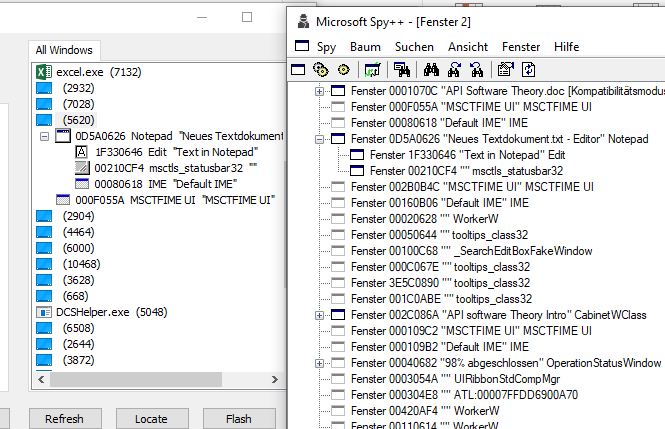
The standard one is Microsoft Spy++. I have not figured out yet how to get it working without Visual Studio bloat. (I will try later). It does give nice view of the Hierarchical structure.
At the other extreme there is a small portable, winspy, ( https://app.box.com/s/kmkjg0djef8je9lpcrp2ufm80sjv5l4y ) , with a slightly different view.
https://i.postimg.cc/nhPrHqYr/winspy...rosoft-Spy.jpg winspy and Microsoft Spy++.JPG
https://i.postimg.cc/k5R4DDfc/winspy...rosoft-Spy.jpg
I am not sure yet of advantages / disadvantages, of either, but I have a feeling that Microsoft Spy++ and some of the installable larger alternatives my sometimes cause some problems / crashes.
It can be useful to use the Spys ++ initially early on so as to see the hierarchical structure, as a self made coding for that might come at a later intermediate level or advanced level. However for an intermediate / beginner level, we can look at the top-level window, as long as we bear in mind the points made about the hierarchical structure and the likely need to "walk the tree", we can get some useful beginner information and understanding if we write a coding for that. The danger can be doing this simple codings before the points about the hierarchical structure and the likely need to "walk the tree", as I did originally, but 6 years later, 2024, I am making better progress, amongst other reasons due to some better more enlightened help. ( https://eileenslounge.com/viewtopic....322075#p322075 )
A "Top level" window handle getting program
This one has had a few discussions and versions
https://eileenslounge.com/viewtopic.php?f=30&t=41610
https://www.excelfox.com/forum/showt...ll=1#post24921
https://www.excelfox.com/forum/showt...ll=1#post24925
Here is another version
https://www.excelfox.com/forum/showt...ll=1#post24926
The main new or changed features of this version are a few more explaining comments, and in the first column, the hwnd number is additionally given in Hexagonorrhoea and (2' compliment) binary. For the normal column width these extra numbers are not visible, but they are there for reference because:
_ Spy's typically have Hexagonorrhoea so it is convenient for comparisons
_ I want to jeep my eye on the binary to see if there are any typical values / patterns
If I run that coding at a time and conditions on my computer, similar to those as I made those Screenshots above, and compare for example the numbers for an open Notepad text file, then we can see some good correlation with the top level results
https://i.postimg.cc/BbtGWnqr/Good-c...-my-coding.jpg ( Full handle numbers: 224003622 D5A0626 00001101010110100000011000100110 )
Good correlation with Spys and my coding.JPG
The window Title also seems in agreement
_____ Workbook: GetHwndClassNameCaptionHwnd.xls ( Using Excel 2013 32 bit )
Worksheet: GetDesktopClassNames
224003622 D5A0626 00001101010110100000011000100110 Notepad Neues Textdokument.txt - Editor
We can see however that the coding only gets us the top level information. We can often get at that information with coding, we must just remember the important point that in coding we must do it in steps, "walking the tree"
In the coding and associated forum Thread posts there is some general top level coding with explanations.
In the next post we will do some shorter simple coding, getting and using handles for that text file


 Reply With Quote
Bookmarks