This is post https://www.excelfox.com/forum/showt...ll=1#post25011
https://www.excelfox.com/forum/showthread.php/2986-Version-Info-using-VBA-and-registry-quirks-InterRegional-Settings-GmbH?p=25011&viewfull=1#post25011
Another look at the abortion , 2024
I decided to risk it and went through all the squiggly bracket , { } things in the macro that tries to make an object from them like CreateObject("New:" & squiggly bracket { } thing & "")
It wasn’t so bad, - no new strange things appeared permanently
There were a few crashes which I either let Excel restart itself or I tanked the crashed Excel with the Task Manage r and restarted. ( It happened so much that I got the thing you get after a lot of crashes https://i.postimg.cc/t4w5CTYY/Wir-be...e-Crashing.jpg )
A few other things I noticed.
There were a few hangs, not many
The OLE wait thing ( https://i.postimg.cc/Vkdg8Msx/OLE-waiting.jpg ) popped up few times. Hitting the OK usually moved it on. Occasionally once was enough but 3 times was most commonly required
Excel 2003 tried to install or configure a few times.
Some strange Xceed Encryption Library also appeared a few times https://i.postimg.cc/NGkp7BPz/Xceed-...on-Library.jpg
I was not quite so brilliant with VBA coding as I am now back when I wrote that first abortion coding, and also I thought it might be good to get some error messages. So I did another
Code:
Sub CLSIDsValueNames2() ' https://www.excelfox.com/forum/showthread.php/2824-Tests-Copying-pasting-Cliipboard-issues/page54#post24118
Dim Ws As Worksheet: Set Ws = Me ' Set Ws = ActiveSheet
Dim RngSel As Range:  Set RngSel = Selection
'    If RngSel.Cells.Count = 1 Then MsgBox prompt:="Please select at least 2 cells in column A": Exit Sub
    If RngSel.Cells.Columns.Count <> 1 Then MsgBox prompt:="Please select only in column A": Exit Sub
    If Not RngSel.Cells.Column = 1 Then MsgBox prompt:="Please select at least 1 cell in column A": Exit Sub
Dim stearCel As Range
    For Each stearCel In RngSel
     Let Ws.Range("D" & stearCel.Row & "") = ""
     Let Ws.Range("B" & stearCel.Row & "") = "Tried" ' To indicate I tried - this can be useful to see where it crashed
    Dim OOPObj  As Object
    On Error GoTo Bed
     Set OOPObj = CreateObject("New:" & stearCel.Value & "")
    On Error GoTo 0
    On Error GoTo Bed2
     Let Ws.Range("D" & stearCel.Row & "") = Ws.Range("D" & stearCel.Row & "") & TypeName(OOPObj)
    On Error GoTo 0
Skipper:
    On Error Resume Next
    OOPObj.Close
    On Error GoTo 0
    Set OOPObj = Nothing
    Next stearCel
Exit Sub
Bed:  '    Error on create object
 Let Application.DisplayAlerts = False
 ThisWorkbook.Save ' This is done to save all got so far in the case of an error
 Let Application.DisplayAlerts = True
 Let Ws.Range("D" & stearCel.Row & "") = "Error on creat object    " & Err.Description & "  " & Err.Number
Resume Next
Bed2: '    Error on TypeName
 Let Ws.Range("D" & stearCel.Row & "") = Ws.Range("D" & stearCel.Row & "").Value & "  Error on type name    " & Err.Description & "  " & Err.Number
On Error GoTo -1
On Error GoTo 0
GoTo Skipper
End Sub

Sub SpeakEasy()
    Dim objIE As Object
    Set objIE = GetObject("new:{D5E8041D-920F-45e9-B8FB-B1DEB82C6E5E}")
    MsgBox TypeName(objIE)
End Sub
Sub RegyRead()
Dim key As String, RegRead As String
Let key = "{1C3B4210-F441-11CE-B9EA-00AA006B1A69}"
Dim Ws As Object

Set Ws = CreateObject("WScript.Shell")
RegRead = Ws.RegRead(key)

Set Ws = Nothing

End Sub
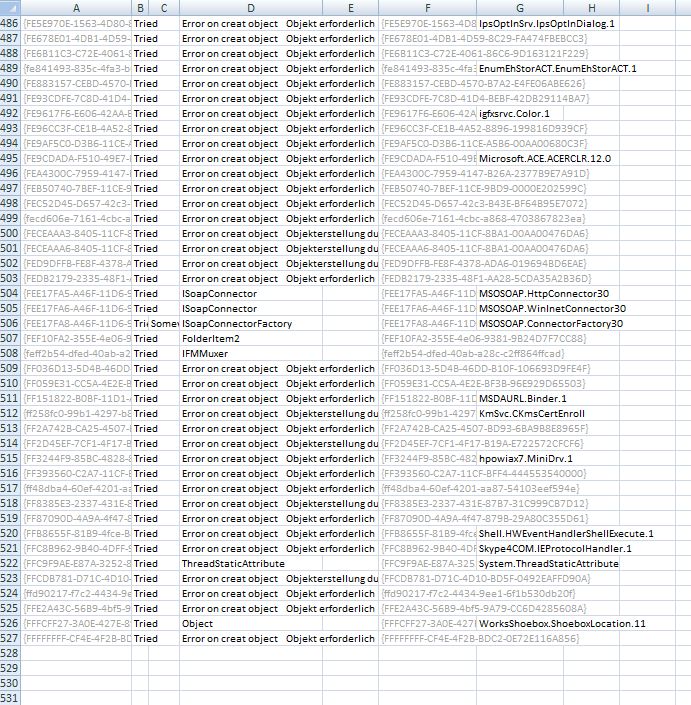
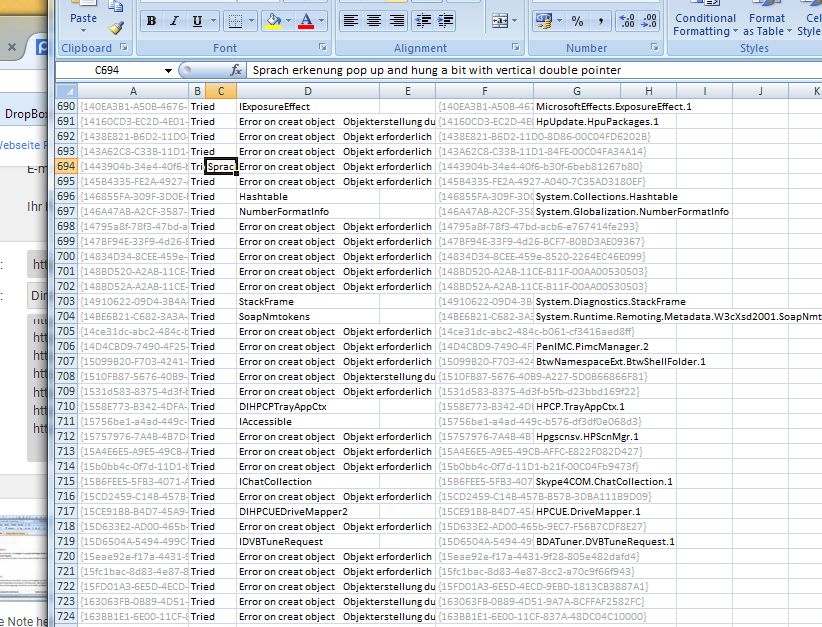
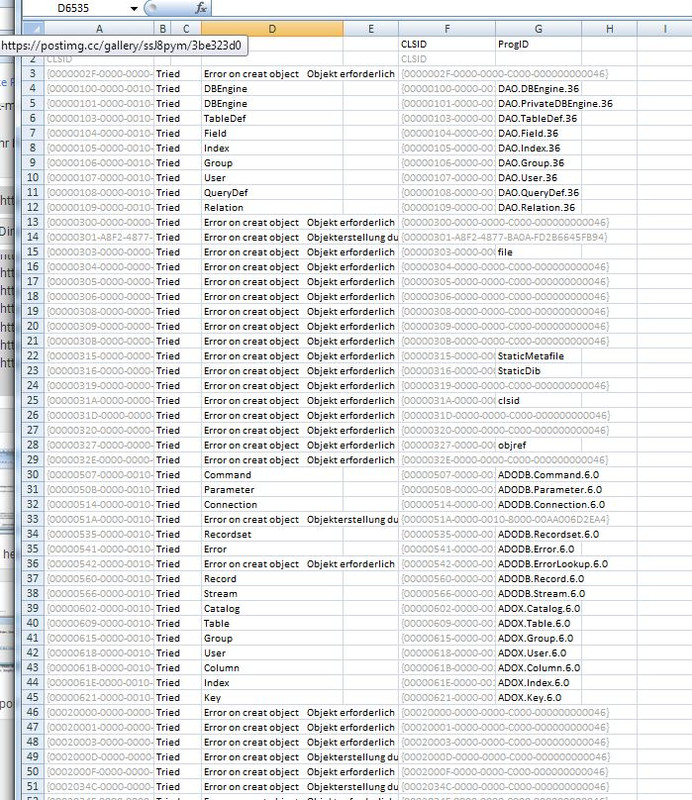
It tells me the error if the object could not be made (if the CreateObject("New:" & squiggly bracket { } thing & "") line errors ) , ( as well if the object making seemed ok, but then the TypeName(object) errors - that situation occurs rarely)
( Also in column C, I added some extra notes about things that happened. I may be a cell or two out on when it happened, but if that is the case, I mention that I am not sure )
Here are the things that happened
https://i.postimg.cc/BQfvbmK9/OLE-waiting.jpg
https://i.postimg.cc/mgb2Nhjm/One-Note-help.jpg
https://i.postimg.cc/50Z2w3Kz/Other-...v2-0-50727.jpg
https://i.postimg.cc/Kv78MtPK/Progra...-festlegen.jpg
https://i.postimg.cc/pdcTdxDq/Research-task-pane.jpg
https://i.postimg.cc/0Q6NM3nx/Speech-pop-up.jpg
https://i.postimg.cc/SQMsmBjf/Unable...ice-Driver.jpg
https://i.postimg.cc/1Xw5Mqbj/Videoimport.jpg
https://i.postimg.cc/9QJXxVNC/Xceed-...on-Library.jpg
The version thing is inconsistent, not always happening , as are both some of the crashes , and some of the number of times an "OLE" pop up needs to be clicked on to move on . But I think I have a 90% good report of what would happen.
https://i.postimg.cc/wvhhP0yX/Result...lue-Names2.jpg
https://i.postimg.cc/nhPYQsfD/Result...lue-Names2.jpg
https://i.postimg.cc/76v3mp6P/Result...lue-Names2.jpg
Attachment 5822Attachment 5823Attachment 5824


 Reply With Quote
Bookmarks