Code:
Option Explicit
Dim Clm As Long, Reocopy As Long ' variable for column number to put file or folder details in, number representin the copy of the second macro

' Select the cell where a main folder(s) last bit of its  Parf  will go. This macro will list, starting with the folder name under that patf bit, a few property names. In the naxt column the corresponding property value will be given
'
Sub PassFolderForReocursing1()
'Sub SchellFolderDetails2() '  Jan 2024  https://www.excelfox.com/forum/showthread.php/2936-YouTube-Video-making-and-editing-etc-coupled-to-excelfox-(-windows-Movie-Maker-)/page2#post23775
Rem 0
 Let Clm = 0: Reocopy = -1
Rem 1
Dim Ws As Worksheet: Set Ws = Me   '   G:\YouTubeVideos&Anaslysis&HackingTricks\VideoRecordingEditing\Windows (Live) Movie Maker\Movie Maker Versions.xls
' 1b
Dim Parf As String
 Let Parf = ThisWorkbook.Path & "\Versions  Downloads Exes\Verson 2, 2 1 2 5 Downloads 2,1\50 Euro Keks"
 Let Parf = ThisWorkbook.Path & "\50 Euro Keks"
' 1c
    If Len(Parf) - Len(Replace(Parf, "\", "", 1, -1, vbBinaryCompare)) >= 2 Then
     Let ActiveCell = Mid(Parf, InStrRev(Parf, "\", InStrRev(Parf, "\", -1, vbBinaryCompare) - 1, vbBinaryCompare))
    Else
     Let ActiveCell = Parf
    End If
Rem 2  Windows Shell object
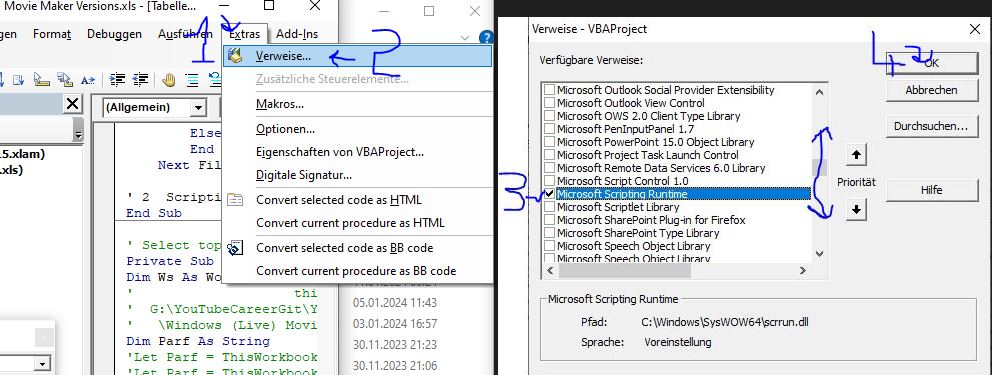
Dim objShell As Shell32.Shell: Set objShell = New Shell32.Shell            '    https://i.postimg.cc/Fz9zrnNm/Tools-Referrences-Microsoft-Shell-Controls-And-Automation.jpg     https://i.postimg.cc/sDC9S54h/Tools-Referrences-Microsoft-Shell-Controls-And-Automation.jpg
Dim objFolder As Shell32.Folder: Set objFolder = objShell.Namespace(Parf)  '
Rem 3 Movie Maker Folder Property names and Property values.
Dim Fil As Shell32.FolderItem
    For Each Fil In objFolder.Items  '  We loop through all items to find the Movie Maker folder ' =======
        If Fil.Name = "Movie Maker" Then
        Dim Rw As Long: Let Rw = 1
         'Let ActiveCell.Offset(Rw, 0) = "Name": Let ActiveCell.Offset(Rw, 1) = objFolder.GetDetailsOf(Fil, 0)
         Let ActiveCell.Offset(Rw, 0) = objFolder.GetDetailsOf("Goolies", 0): Let ActiveCell.Offset(Rw, 1) = objFolder.GetDetailsOf(Fil, 0)
         'Let ActiveCell.Offset(Rw + 1, 0) = "Größe": Let ActiveCell.Offset(Rw + 1, 1) = objFolder.GetDetailsOf(Fil, 1)
         Let ActiveCell.Offset(Rw + 1, 0) = objFolder.GetDetailsOf(71, 1): Let ActiveCell.Offset(Rw + 1, 1) = objFolder.GetDetailsOf(Fil, 1)
         'Let ActiveCell.Offset(Rw + 2, 0) = "Elementtyp": Let ActiveCell.Offset(Rw + 2, 1) = objFolder.GetDetailsOf(Fil, 2)
         Let ActiveCell.Offset(Rw + 2, 0) = objFolder.GetDetailsOf(Parf, 2): Let ActiveCell.Offset(Rw + 2, 1) = objFolder.GetDetailsOf(Fil, 2)
         'Let ActiveCell.Offset(Rw + 3, 0) = "Änderungsdatum": Let ActiveCell.Offset(Rw + 3, 1) = Left(objFolder.GetDetailsOf(Fil, 3), InStr(1, objFolder.GetDetailsOf(Fil, 3), " ", vbBinaryCompare))
         Let ActiveCell.Offset(Rw + 3, 0) = objFolder.GetDetailsOf(Ws, 3): Let ActiveCell.Offset(Rw + 3, 1) = Left(objFolder.GetDetailsOf(Fil, 3), InStr(1, objFolder.GetDetailsOf(Fil, 3), " ", vbBinaryCompare))
         'Let ActiveCell.Offset(Rw + 4, 0) = "Erstelldatum": Let ActiveCell.Offset(Rw + 4, 1) = Left(objFolder.GetDetailsOf(Fil, 4), InStr(1, objFolder.GetDetailsOf(Fil, 4), " ", vbBinaryCompare))
         Let ActiveCell.Offset(Rw + 4, 0) = objFolder.GetDetailsOf(Left("gh", 2), 4): Let ActiveCell.Offset(Rw + 4, 1) = Left(objFolder.GetDetailsOf(Fil, 4), InStr(1, objFolder.GetDetailsOf(Fil, 4), " ", vbBinaryCompare))
    '     Let ActiveCell.Offset(Rw + 9, 0) = "Dateiversion": Let ActiveCell.Offset(Rw + 9, 1) = objFolder.GetDetailsOf(Fil, 166)
         Let ActiveCell.Offset(Rw + 5, 0) = objFolder.GetDetailsOf("Bum", 166): Let ActiveCell.Offset(Rw + 5, 1) = objFolder.GetDetailsOf(Fil, 166)

         Rem 4
         ActiveCell.Offset(0, 2).Activate
         ' 4b
         Call ReoccurringFileFolderProps(Parf & "\Movie Maker")
         Exit For ' Once we have passed on the full path of the folder,  Movie Maker  , then we are finished with this macro, so we don't need loop further looking fot the Movie Maker folder
        Else
        End If
    Next Fil ' ===========================================================================================
End Sub

'    https://www.excelfox.com/forum/showthread.php/2936-YouTube-Video-making-and-editing-etc-coupled-to-excelfox-(-windows-Movie-Maker-)/page2#post23774
Private Sub ReoccurringFileFolderProps(ByVal Pf As String)
Rem 0
 Let Reocopy = Reocopy + 1 ' Originally the variable  Reocopy  is zero.  It will become 1 on first entering the macro.  Every time we leave this macro, this number is reduced by 1   So in simple use it will be 1 or zero indicating that a copy is in use.  However, should this macro "Call itself", before its finished , ( the recursion idea ) then the vallue will be 2  and so on.  So effectively it tells us which copy is running at any time
Rem 1
Dim objShell As Shell32.Shell: Set objShell = New Shell32.Shell            '    https://i.postimg.cc/Fz9zrnNm/Tools-Referrences-Microsoft-Shell-Controls-And-Automation.jpg     https://i.postimg.cc/sDC9S54h/Tools-Referrences-Microsoft-Shell-Controls-And-Automation.jpg
Dim objFolder As Shell32.Folder: Set objFolder = objShell.Namespace(Pf)  '
Rem 2
Dim Fil As Shell32.FolderItem
    For Each Fil In objFolder.Items ' ======= Main Loop ==================================================|
    ' Dim Clm As Long: ' Global variable
     Let Clm = Clm + 1
    Dim Rw As Long: Let Rw = 1
         Let ActiveCell.Offset(Rw, Clm) = objFolder.GetDetailsOf(Fil, 0)
         Let ActiveCell.Offset(Rw + 1, Clm) = objFolder.GetDetailsOf(Fil, 1)
         Let ActiveCell.Offset(Rw + 2, Clm) = objFolder.GetDetailsOf(Fil, 2)
         Let ActiveCell.Offset(Rw + 3, Clm) = Left(objFolder.GetDetailsOf(Fil, 3), InStr(1, objFolder.GetDetailsOf(Fil, 3), " ", vbBinaryCompare))
         Let ActiveCell.Offset(Rw + 4, Clm) = Left(objFolder.GetDetailsOf(Fil, 4), InStr(1, objFolder.GetDetailsOf(Fil, 4), " ", vbBinaryCompare))
    '                                     Let ActiveCell.Offset(Rw + 9, 0) = "Dateiversion": Let ActiveCell.Offset(Rw + 9, 1) = objFolder.GetDetailsOf(Fil, 166)
         Let ActiveCell.Offset(Rw + 5, Clm) = objFolder.GetDetailsOf(Fil, 166)
        '_________________________________________________________________________________________________
        ' 2b  Here we may pause the macro, whilst another copy of it is started
        If objFolder.GetDetailsOf(Fil, 2) = "Dateiordner" Then Call ReoccurringFileFolderProps(Pf & "\" & objFolder.GetDetailsOf(Fil, 0))
        '_________________________________________________________________________________________________
    '   If we did pause whilst the abobe code line set off another copy, then when that is finished we will come here and resume the paused previous copy
    Next Fil ' ============================== Main Loop  =================================================|


 Let Reocopy = Reocopy - 1  ' We are finished at this point with this running copy of the macro.  This code line will reduce the v
End Sub


 Reply With Quote










Bookmarks