


l https://i.postimg.cc/qRfGpY00/XL-201...-2-windows.jpg https://i.postimg.cc/cHQBCm43/XL-201...ws-1-and-2.jpg
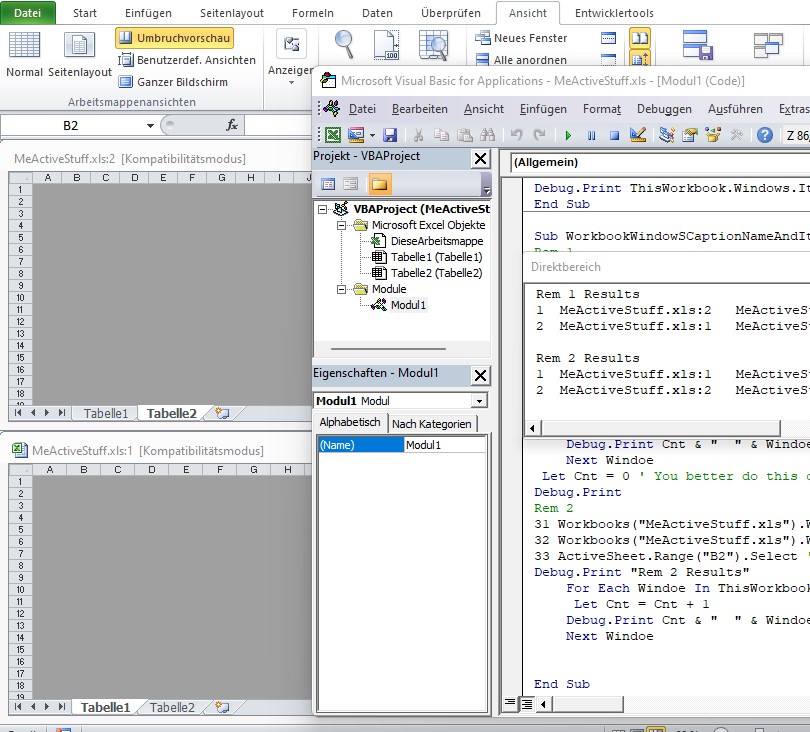
Code:Sub WorkbookWindowSCaptionNameAndItems() ' https://eileenslounge.com/viewtopic.php?p=313747#p313747 Rem 1 ' 1a) Make a ActiveCell in B2 of the first worksheet 11 Workbooks("MeActiveStuff.xls").Windows.Item("MeActiveStuff.xls:1").Activate 12 Workbooks("MeActiveStuff.xls").Worksheets.Item(1).Activate 13 ActiveSheet.Range("B2").Select ' Effectively this will Make the ActiveCell in Workbooks("MeActiveStuff.xls"), Windows.Item("MeActiveStuff.xls:1") range B2 in the first worksheet ' 1b) Make a ActiveCell in A2 of the second worksheet 21 Workbooks("MeActiveStuff.xls").Windows.Item("MeActiveStuff.xls:2").Activate 22 Workbooks("MeActiveStuff.xls").Worksheets.Item(2).Activate 23 ActiveSheet.Range("A2").Select ' Effectively this will Make the ActiveCell in Workbooks("MeActiveStuff.xls"), Windows.Item("MeActiveStuff.xls:2") range A2 in the second worksheet Debug.Print "Rem 1 Results" Dim Windoe As Object, Cnt As Long For Each Windoe In ThisWorkbook.Windows Let Cnt = Cnt + 1 Debug.Print Cnt & " " & Windoe.Caption & " " & ThisWorkbook.Windows.Item(Cnt).Caption & " " & ThisWorkbook.Windows.Item(Cnt).ActiveCell.Address(, , , External:=True) Next Windoe Let Cnt = 0 ' You better do this or else in the next loop you will be trying to get at Item numbers above 2, and we aint got any Debug.Print Rem 2 repeat the first 3 lines - remake the first ActiveCell in B2 of the first worksheet 31 Workbooks("MeActiveStuff.xls").Windows.Item("MeActiveStuff.xls:1").Activate 32 Workbooks("MeActiveStuff.xls").Worksheets.Item(1).Activate 33 ActiveSheet.Range("B2").Select ' Effectively this will Make the ActiveCell in Workbooks("MeActiveStuff.xls"), Windows.Item("MeActiveStuff.xls:1") range B2 in the first worksheet Debug.Print "Rem 2 Results" For Each Windoe In ThisWorkbook.Windows Let Cnt = Cnt + 1 Debug.Print Cnt & " " & Windoe.Caption & " " & ThisWorkbook.Windows.Item(Cnt).Caption & " " & ThisWorkbook.Windows.Item(Cnt).ActiveCell.Address(, , , External:=True) Next Windoe End Sub
Results
The important thing to note is that the window Item number is reflecting the order of a ActiveCell being made, - you can see the order has swapped around. That can perhaps be related vaguely to Item number order in worksheets: If you remade the first worksheet or swapped around physically the tabs, you see a similar change in the Item number.Code:Rem 1 Results 1 MeActiveStuff.xls:2 MeActiveStuff.xls:2 [MeActiveStuff.xls]Tabelle2!$A$2 2 MeActiveStuff.xls:1 MeActiveStuff.xls:1 [MeActiveStuff.xls]Tabelle1!$B$2 Rem 2 Results 1 MeActiveStuff.xls:1 MeActiveStuff.xls:1 [MeActiveStuff.xls]Tabelle1!$B$2 2 MeActiveStuff.xls:2 MeActiveStuff.xls:2 [MeActiveStuff.xls]Tabelle2!$A$2
In other words, the Window with the caption name and the ActiveCell is fixed, but the window item number can change: The item number is somehow related to the order of the things, the item number is not a number like a serial number/ string name using number characters


 Reply With Quote
Bookmarks