Code:
Option Explicit
'  "Global" variables that must be declared here
Dim Clm As Long, Reocopy As Long ' variable for column number to put file or folder details in, number representing the copy of the second macro running at any time
'  Variables useful/ efficient to declare here as "Global" variables
Dim objWSO As Shell32.Shell                 ' Early Binding          ' Set objShell = New Shell32.Shell             '    https://i.postimg.cc/Fz9zrnNm/Tools-Referrences-Microsoft-Shell-Controls-And-Automation.jpg     https://i.postimg.cc/sDC9S54h/Tools-Referrences-Microsoft-Shell-Controls-And-Automation.jpg
Dim objFSO As Scripting.FileSystemObject    ' Early Binding          ' Set objFSO = New Scripting.FileSystemObject  ' https://i.postimg.cc/d1GHPGxJ/Microsoft-Scripting-Runtime-Library.jpg
Dim MeActiveCell As Range                   ' For convenience all output will be referred to a start point. The user should make a selection in the workbook window that has the worksheet for output showing in it.  We will then be able to get the ramge object into VBA from the  ActiveCell  property of that workbook window
Sub PassFolderForReocursing3()  '
Rem 0
 Let Clm = 1: Reocopy = 0                                         ' When this macro starts we have not started any output so our column number for output should not yet have been set, and no copies of the next macro will be running so the variable keeping track of the copy number of that macro should not have a number >= 1
Rem 1
Dim Ws As Worksheet: Set Ws = Me                                  ' This is and the next bits are a personal preferrence. I like to fully explicitly tell VBA where things are, and I also have a habit of putting coding intended for a worksheet in that particular worksheets code module. Many people work on whatever worksheet is active, so they may prefer to change this to   Set Ws = Application.ActiveSheet, and use that in the next bit.
Me.Activate: Set MeActiveCell = Workbooks(Me.Parent.Name).Windows.Item(1).ActiveCell ' https://eileenslounge.com/viewtopic.php?p=313747#p313747
' 1b
Dim Parf As String:  Let Parf = ThisWorkbook.Path                 ' This should be given the path to the folder where the folder of interest is, so theere is a good chance this will need to be changed to suit quit often.
' 1c  A short string part of the path put top left, not necerssary but just useful for later referrence to give indication of where the main folder was got from
    If Len(Parf) - Len(Replace(Parf, "\", "", 1, -1, vbBinaryCompare)) >= 2 Then ' For a longer path it may be convenient to shorten the output given to the last bit
     Let MeActiveCell = Mid(Parf, InStrRev(Parf, "\", InStrRev(Parf, "\", -1, vbBinaryCompare) - 1, vbBinaryCompare))
    Else ' For a shorter path we can give the full path
     Let MeActiveCell = Parf
    End If
Rem 2  Windows Shell object
 Set objWSO = New Shell32.Shell                            '    https://i.postimg.cc/Fz9zrnNm/Tools-Referrences-Microsoft-Shell-Controls-And-Automation.jpg     https://i.postimg.cc/sDC9S54h/Tools-Referrences-Microsoft-Shell-Controls-And-Automation.jpg
Dim objWSOFolder As Shell32.Folder: Set objWSOFolder = objWSO.Namespace(Parf)

Rem 3 Movie Maker Folder Property names and Property values.
Dim FldItm As Shell32.FolderItem
    For Each FldItm In objWSOFolder.Items  '  We loop through all items to find the Movie Maker folder ' =======
        If FldItm.Name = "Movie Maker" Then
        Dim Rw As Long: Let Rw = 1
        ' Property   Name of file or folder
         Let MeActiveCell.Offset(Rw, 0) = objWSOFolder.GetDetailsOf("Willy", 0)
         Let MeActiveCell.Offset(Rw, Clm) = objWSOFolder.GetDetailsOf(FldItm, 0)       '   Name of folder or file  using the WSO way
        ' Property   File or folder size. I use the FSO for this to get a better precision and also because it seems to be broken for a folder item in WSO
         Let MeActiveCell.Offset(Rw + 1, 0) = objWSOFolder.GetDetailsOf("Wonka", 1)
            If objWSOFolder.GetDetailsOf(FldItm, 2) = "Dateiordner" Then                '   GetDetailsOf(FldItm, 2)   tells me the type of the WSO item
            Set objFSO = New Scripting.FileSystemObject     ' https://i.postimg.cc/d1GHPGxJ/Microsoft-Scripting-Runtime-Library.jpg
            'Dim objFSOFolder As Scripting.Folder: Set objFSOFolder = objFSO.GetFolder(ThisWorkbook.Path & "\MMPropertyTest\" & objWSOFolder.GetDetailsOf(FldItm, 0))
            Dim objFSOFolder As Scripting.Folder: Set objFSOFolder = objFSO.GetFolder(ThisWorkbook.Path & "\" & objWSOFolder.GetDetailsOf(FldItm, 0))
             Let MeActiveCell.Offset(Rw + 1, Clm) = objFSOFolder.Size
            Else ' If the item is not a folder, then I assume it will be a file?
            Dim ObjFSOFile As Scripting.File: Set ObjFSOFile = objFSO.GetFile(ThisWorkbook.Path & "\" & objWSOFolder.GetDetailsOf(FldItm, 0))
             Let MeActiveCell.Offset(Rw + 1, Clm) = ObjFSOFile.Size
            End If
         ' Property   Date Last Modified   Änderungsdatum
          Let MeActiveCell.Offset(Rw + 2, 0) = objWSOFolder.GetDetailsOf(42, 3)
          Let MeActiveCell.Offset(Rw + 2, Clm) = Format(objWSOFolder.GetDetailsOf(FldItm, 3), "dd,mmm,yy")
         ' Property   Date Created         Erstelldatum
          Let MeActiveCell.Offset(Rw + 3, 0) = objWSOFolder.GetDetailsOf(42, 4)
          Let MeActiveCell.Offset(Rw + 3, Clm) = Format(objWSOFolder.GetDetailsOf(FldItm, 4), "dd,mmm,yy")
         ' Property   Version
          Let MeActiveCell.Offset(Rw + 4, Clm) = objWSOFolder.GetDetailsOf(666, 166)
          Let MeActiveCell.Offset(Rw + 4, Clm) = objWSOFolder.GetDetailsOf(FldItm, 166)
         Rem 4
         Let Clm = 0
         MeActiveCell.Offset(0, 2).Select: Set MeActiveCell = Workbooks(Me.Parent.Name).Windows.Item(1).ActiveCell ' https://eileenslounge.com/viewtopic.php?p=313747#p313747
         ' 4b
         Call ReoccurringFldItmeFolderProps3(Parf & "\Movie Maker")
         Exit For ' Once we have passed on the full path of the folder,  Movie Maker  , then we are finished with this macro, so we don't need loop further looking fot the Movie Maker folder
        Else
        End If
    Next FldItm ' ===========================================================================================
End Sub

Private Sub ReoccurringFldItmeFolderProps3(ByVal Pf As String)
Rem 0
 Let Reocopy = Reocopy + 1 ' Originally the variable  Reocopy  is zero.  It will become 1 on first entering the macro.  Every time we leave this macro, this number is reduced by 1   So in simple use it will be 1 or zero indicating that a copy is in use.  However, should this macro "Call itself", before its finished , ( the recursion idea ) then the value will be 2  and so on.  So effectively it tells us which copy is running at any time
Rem 1
 Set objWSO = New Shell32.Shell            '    https://i.postimg.cc/Fz9zrnNm/Tools-Referrences-Microsoft-Shell-Controls-And-Automation.jpg     https://i.postimg.cc/sDC9S54h/Tools-Referrences-Microsoft-Shell-Controls-And-Automation.jpg
Dim objWSOFolder As Shell32.Folder: Set objWSOFolder = objWSO.Namespace(Pf)  '
Rem 2
Dim FldItm As Shell32.FolderItem
    For Each FldItm In objWSOFolder.Items ' ======= Main Loop ==================================================|
    ' Dim Clm As Long: ' Global variable
     Let Clm = Clm + 1
    Dim Rw As Long: Let Rw = Reocopy + 1
         Let MeActiveCell.Offset(Rw, Clm) = objWSOFolder.GetDetailsOf(FldItm, 0)
            If objWSOFolder.GetDetailsOf(FldItm, 2) = "Dateiordner" Then                '   GetDetailsOf(FldItm, 2)   tells me the type of the WSO item
            Set objFSO = New Scripting.FileSystemObject     ' https://i.postimg.cc/d1GHPGxJ/Microsoft-Scripting-Runtime-Library.jpg
            'Dim objFSOFolder As Scripting.Folder: Set objFSOFolder = objFSO.GetFolder(ThisWorkbook.Path & "\MMPropertyTest\" & objWSOFolder.GetDetailsOf(FldItm, 0))
            Dim objFSOFolder As Scripting.Folder: Set objFSOFolder = objFSO.GetFolder(Pf & "\" & objWSOFolder.GetDetailsOf(FldItm, 0))
             Let MeActiveCell.Offset(Rw + 1, Clm) = objFSOFolder.Size
            Else ' If the item is not a folder, then I assume it will be a file?
            Dim ObjFSOFile As Scripting.File: Set ObjFSOFile = objFSO.GetFile(Pf & "\" & objWSOFolder.GetDetailsOf(FldItm, 0))
             Let MeActiveCell.Offset(Rw + 1, Clm) = ObjFSOFile.Size
            End If
         Let MeActiveCell.Offset(Rw + 2, Clm) = Format(objWSOFolder.GetDetailsOf(FldItm, 3), "dd,mmm,yy")
         Let MeActiveCell.Offset(Rw + 3, Clm) = Format(objWSOFolder.GetDetailsOf(FldItm, 4), "dd,mmm,yy")
         Let MeActiveCell.Offset(Rw + 4, Clm) = objWSOFolder.GetDetailsOf(FldItm, 166)
        '_________________________________________________________________________________________________
        ' 2b  Here we may pause the macro, whilst another copy of it is started
        If objWSOFolder.GetDetailsOf(FldItm, 2) = "Dateiordner" Then Call ReoccurringFldItmeFolderProps3(Pf & "\" & objWSOFolder.GetDetailsOf(FldItm, 0))
        '_________________________________________________________________________________________________
    '   If we did pause whilst the abobe code line set off another copy, then when that is finished we will come here and resume the paused previous copy
    Next FldItm ' ============================== Main Loop  =================================================|


 Let Reocopy = Reocopy - 1  ' We are finished at this point with this running copy of the macro. (The next code line ends it). This code line here will reduce the value used to keep track of the  copy number being run
End Sub



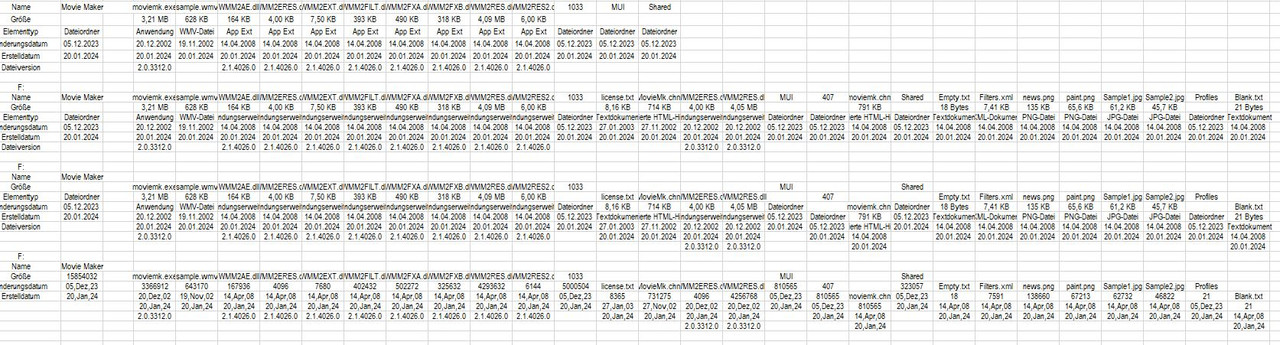

 Reply With Quote
Bookmarks