


_________________


_________________
….If you are my competitor, I will try all I can to beat you. But if I do, I will not belittle you. I will Salute you, because without you, I am nothing.
If you are my enemy, we will try to kick the fucking shit out of you…..
Winston Churchill, 1939
Save your Forum..._
KILL A MODERATOR!!
Page 3 https://excelfox.com/forum/showthread.php/2769-P2P-Cloud-DVR-remote-Access-via-a-(remote)-PC-Using-Guarding-Vision-PC-Client-Software?p=15910&viewfull=1#post15910 https://excelfox.com/forum/showthread.php/2769-P2P-Cloud-DVR-remote-Access-via-a-(remote)-PC-Using-Guarding-Vision-PC-Client-Software?p=15910&viewfull=1#post15910
https://excelfox.com/forum/showthrea...ll=1#post15910 https://excelfox.com/forum/showthread.php/2769-P2P-Cloud-DVR-remote-Access-via-a-(remote)-PC-Using-Guarding-Vision-PC-Client-Software?p=15910&viewfull=1#post15910
https://excelfox.com/forum/showthrea...5910#post15910 https://excelfox.com/forum/showthread.php/2769-P2P-Cloud-DVR-remote-Access-via-a-(remote)-PC-Using-Guarding-Vision-PC-Client-Software?p=15910#post15910
Step 2b: P2P Access
2b) Remote ( Cloud P2P ) Access of DVR over the internet with a PC using Guarding Vision Windows PC Client Software
Step 2b: P2P AccessRemote ( Cloud P2P ) Access of DVR over the internet with a PC using Guarding Vision Windows PC Client SoftwareMost published instructions for Remote ( Cloud P2P ) Access of the Sannce DVR over the internet with a PC using Guarding Vision Windows PC Client Software are incomplete or incorrect. ( Example the section from Step 2b: P2P Access at the following Sannce article is wrong and incomplete, https://support.sannce.com/hc/en-us/...arding-Vision-
Similarly the Sannce article here , https://help.annke.com/hc/en-us/articles/4405215514905 , is incorrect
2b)Remote ( Cloud P2P ) Access of DVR over the internet with a PC using Guarding Vision Windows PC Client Software,https://excelfox.com/forum/showthrea...ll=1#post15912
2b) -A- ______ Following on from previously obtaining LAN local access, and
Adding ( making available ) DVR for remote Cloud use for the first time: DVR is not yet Registered for P2P remote Access
2b) -B- Cloud P2P remote access if you know the password and username of Sannce registered account holding DVR P2P relevant informationhttps://excelfox.com/forum/showthrea...ll=1#post15918
2b) -C- Cloud P2P remote access if no Sannce registered account holds DVR informationhttps://excelfox.com/forum/showthrea...ll=1#post15919
Possible Problem! Need to remove details of DVR from Sannce registered devices
Advise of preparations for encountering 4th username/ password pair for the first time,
( the Sannce P2P account Registering process )
Sannce organise something like a central register/ data storage facility, making it possible for various technical details required for remote P2P type internet usage of you DVR to be stored and accessed. P2P technology: https://en.wikipedia.org/wiki/Peer-to-peer
https://en.wikipedia.org/wiki/Peer-to-peer_file_sharing
https://en.wikipedia.org/wiki/Anonymous_P2P
The Sannce DVR model in use with the Guarding Vision Software on a PC, insists that you use such an account if you wish to use the P2P remote access possibility with your DVR to get access to your DVR over the internet ( from anywhere in the world ) using the world wide web internet.
You necessarily need to register such an account, and typically you will be asked to register such an account when using the Guarding Vision Software on your computer.
It’s free and there is no limit to how many account you can have. But the registering is full of problems and bugs. Many of these problems and bugs seem to get worse if you do not do the registering quickly. Hence one of the main reasons for this post is to prepare all you need before hand so as to improve your chances of a successful registration.
If for any reason your registration fails , you will most likely not be able to use the username and Email address that you tried to Register with ever again in a Sannce P2P Registration. Therefore I recommend preparing at least two full sets of the three things you need. Put them in a text file or in some other place where you can get at them easily and quickly when you are using your computer for the registration. These three things are
[color=black]_Username
_Password
_ Email address[/color]
For reasons of which I do not yet fully understand, some character combinations and Email addresses work better than others.
I would recommend therefore using similar ones to the example that I give.
I would further recommend using gmail Email address.
I would recommend keeping the gmail username as short as possible. I would recommend making at least 2 spare new gmail accounts initially.
I would recommend using a Username and gmail username that is not important to you, at least in your first attempts. - The main reason why I recommend this is that if for any reason your registration fails , which it often does, then you will most likely not be able to use the username and Email address that you tried to Register with ever again in a Sannce P2P Registration. Possibly later, once you are more comfortable and have possibly mastered the registering successfully, you could then risk using a preferred Username and gmail address.
I would recommend you register beforehand at least 2 gmail Email accounts ( https://accounts.google.com/signup/v...owEntry=SignUp ) , and then prepare a text file , .txt , or Word file , .doc , looking something like the following example. In this following example I have two complete lists of the info needed to register , and in addition I have also included the 2nd username and password pair. There are no great problems associated with using this other pair, but as they are often needed shortly after registering, it is convenient to have them at hand along with the other information
Code:Register Account ( Annke Sannce Registered Vision Guarding Vision Cloud P2P App Sannce Home Account User Name and Password by Email Address ) User Name cloudplop Password SangyP2P.!* Confirm Password SangyP2P.!* Email Address poo2peey@gmail.com Register Account ( Annke Sannce Registered Vision Guarding Vision Cloud P2P App Sannce Home Account User Name and Password by Email Address ) User Name cloudpooh Password SangyP2P.!* Confirm Password SangyP2P.!* Email Address plop2pee@gmail.com Remote Enabled DVR serial No.Sannce Home Verification Code2 Username DVR SN. F12345678 Enabled Password verification code Sanky2
So when prompted to register, this would be the relevant things to write in or paste in
cloudplop
SangyP2P.!*
SangyP2P.!*
poo2peey@gmail.com
If anything went wring, then I would not attempt to use the Username or Email address again , ( there is no problem in trying the password again ) , so I would start again with this
cloudpooh
SangyP2P.!*
SangyP2P.!*
plop2pee@gmail.com
Here are three screenshots of the typical Registration process: Initially a window indicates the 4 main full width fields that need to be filled in , the username, the password ( twice ) and an Email address. After filling in all 4 fields, you should click on Send Message. This should send an Email to the Email address containing a number. That number should be entered in the bottom left half width field, and then finally you click on Register https://i.postimg.cc/15QXxWV4/3-pics...ter-window.jpg
Attachment 3780
Often after registering, I would be doing something requiring me to do a so called “ + Adding” of a device ( usually the device would be my DVR ). I would then be asked to fill in one or more of two fields ( in some situations the first field would be already filled in )
The information I would then need to give would either be the second or both of these
F12345678
Sanky2
Some typical problems
In the next screenshot, the all the usernames and Email addresses are known to have never resulted in a successful Register of an account. Originally they ere accepted but the final registration failed, for example due to the not being able to be completed within a certain time. So no registered account uses any of the usernames and Email addresses.
Despite trying different computers, Browsers, waiting several days, deleting cookies , Browser history, etc, attempting to use the usernames and Email addresses always resulted in rejection
https://i.postimg.cc/rydPvrDP/Userna...ng-account.jpg
The next screenshot shows that the length of an accepted Email address is limited. A valid gmail Email address was pasted in , but the field only took a limited number of characters, which did not include those containing the email provider, and hence an invalid Email address was indicated
https://i.postimg.cc/Fz35mdH3/Does-n...EMail-name.jpg
The next screenshot is an example of the software not recognising some Email providers: I have tried many different names, that is to say, many different valid Email addresses using the provider t-online.de ( German Telekom ) , but they are never accepted as valid Email addresses.
https://i.postimg.cc/y8wm3D1k/Does-n...-online-de.jpg
2015
Code:* Fixed a button label issue when starting/stopping streaming * Added a check to make sure if adapter still exists; if not, use default * Added option to advanced settings to allow full color range encoding (partial by default for compatibility purposes) * Added option to allow the ability to set the YUV color space and color range for video devices * Added support for IPv6 * Fixed bug where warnings for CBR/keyint/etc wouldn't display for certain services (like hitbox) * Fixed NVenc CBR to actually be constant bitrate 0.64 Beta - 2015-01-23 * Fixed a few issues with Elgato devices and made sure that buffering is always enabled for them as the default * Fixed a bug with animated gif handling * Fixed a bug with with game capture potentially causing crashes in 64bit games * Updated x264 to the latest revision * Added Opacity option to slide show source * Added the scene switcher plugin as an OBS default plugin 0.65 Beta - 2015-03-06 * Updated server list * Fixed debug files * Minor Bug fixes 0.651 Beta - 2015-03-25 * Fixed a potential crash with gif files * Fixed a bug where transitions set to under 3 seconds would get stuck * Added ability to add custom services * Added ability to add folders to image slideshow source rather than individual files 0.652 Beta - 2015-07-10 * Fixed a bug where adding folders to the image slideshow wouldn't work properly 0.653 Beta - 2015-07-21 * Fixed an issue with log files not reporting the correct windows version * Fixed windows 10 slowdown capturing DirectX 9 games with game capture 0.654 Beta - 2015-08-02 * Fixed a windows 10 slowdown capturing DirectX 9 games with game capture (due to a recent windows update that invalidated the last patch) 0.655 Beta - 2015-08-09 * Fix outdated DirectX installer link * Fix FLV format bug that affected some video file players/demuxers * Add support for more quicksync CPUs * Save scenes/sources when windows itself is shutting down the program * Don't deselect when ctrl-clicking empty space * Don't snap crop when resizing a source 0.656 Beta - 2015-10-02 * Updated game capture for latest windows 10 update * Fixed a bug where certain devices (particularly elgato devices) could cause a crash when they change resolution or when starting up 0.657 Beta - 2015-11-24
2016
* Updated NVENC
* Fixed a bug where game capture could crash certain games if the device had to reset for whatever reason
* Fixed game capture performance issue for DirectX 9 games on the latest windows 10 update
0.658 Beta - 2016-07-28 (from Aug 2016 Log text)
Get OBS Classic Sept 03 2016 https://i.postimg.cc/cL7Nt36W/Get-OB...-Sept-2016.jpg
https://i.postimg.cc/02Y8DFHh/Get-OB...6-redirect.jpg
Summary again
OBS Studio started out as a small project created by Lain Bailey, but quickly grew with the help of many online collaborators working both to improve OBS and to share knowledge about the program. The first version was released in August 2012. In 2013, development started on a rewritten version known as OBS Multiplatform (later renamed OBS Studio) for multi-platform support, a more thorough feature set, and a more powerful API. In 2016, OBS "Classic" OBS Classic (Open Broadcaster Software) lost support and OBS Studio became the primary version
https://obsproject.com/forum/threads...7/#post-585351 Sep 18, 2022 #3 not true. I been running OBS 0.659b With Browser Installer for years on Vista records and streams no problem.
I have also got OBS-Studio-21.0.1-Full-Installer to install but uninstalled right away because i like 0.659b better.
0.6 Feb 16, 2014 obs_0_659b_installer.exe
https://i.postimg.cc/bY9JWTnX/Get-OB...-2016-2016.jpg
https://i.postimg.cc/CLM1gqCR/Get-OB...6-redirect.jpg
https://i.postimg.cc/FzNK1f2n/Get-OB...6-redirect.jpg
https://i.postimg.cc/gjs2hzpc/OBS-0-...ck-Machine.jpg
Share ‘OBS_0_659b_With_Browser_Installer_From Wayback Machine.exe’ https://app.box.com/s/i3n4bxhuadp77ziqfyxl54xbeg01mmmm
Thread 2936 https://www.excelfox.com/forum/showt...-Movie-Maker-)
https://www. excelfox.com/forum/showthread.php/2936-YouTube-Video-making-and-editing-etc-coupled-to-excelfox-(-windows-Movie-Maker-)
This is post #post23586
https://www.excelfox.com/forum/showt...ll=1#post23586
https://www. excelfox.com/forum/showthread.php/2936-YouTube-Video-making-and-editing-etc-coupled-to-excelfox-(-windows-Movie-Maker-)?p=23586&viewfull=1#post23586
https://www.excelfox.com/forum/showt...er-)#post23586
https://www.excelfox.com/forum/showthread.php/2936-YouTube-Video-making-and-editing-etc-coupled-to-excelfox-(-windows-Movie-Maker-)#post23586
Movie maker History
Summarised History, (Not Complete) Initial versions History, 1 - 6
There is a bit of overlap, and as often with Microsoft Version Histories, there is confusion and disagreement. The following is the best average I have so far. The (date stamps) are my best average so far and are intended as an approximate time line
(2000) - Version 1.0 https://i.postimg.cc/8csCfWf2/Movie-Maker-Version-1.jpg
The first release of Windows Movie Maker was included with Windows Me on September 14, 2000 (ME build 2416 https://betawiki.net/wiki/Windows_Me_build_2416 ) . Windows 2000 did not have it, but it could be copied** successfully to it. (** see xxxxxxx )
(2001) - Version 1.1 https://i.postimg.cc/NMdM0bF8/Movie-...ersion-1-1.jpg
Version 1.1 was included in Windows XP a year later, 25 October 2001 as part of Windows XP, and included support for creating DV AVI and WMV 8 files.
(2002) - Version 2.0 ( Sometimes regarded as XP version ) https://i.postimg.cc/2886gsHH/Movie-Maker-version-2.jpg
Version 2.0 was released as a free update to 1.1, in November 2002, and added a number of new features. It went some way to answering critic on the first version, and often the Classic/Start of Movie Maker around close to XP start time is regarded as the 2.1 era. –
(2004) - Version 2.1 ( Windows XP Service Pack 2 ) https://i.postimg.cc/L4V5C9VY/Movie-...ersion-2-1.jpg
Version 2.1, a minor update, is included in, so coming from installing, Windows XP Service Pack 2
(2001-2006 overlap) ( Windows Vista development time from before XP in 2001 to final release of Vista in 2006 )
The overlap and confusion may have resulted from the design teams being drunk in between times: Microsoft originally expected to ship Vista sometime late in 2003 as a minor step between Windows XP (codenamed "Whistler") and the next planned major release of Windows, code-named "Blackcomb". Vista's original codename, "Longhorn", was an allusion to this plan, a sort of inbetween idea: While Whistler and Blackcomb are large ski resorts in British Columbia, Longhorn is the name of a bar between the two mountains that Whistler's visitors pass to reach Blackcomb.
2004
A Windows Presentation Foundation (WPF) version of Windows Movie Maker was also included in some development builds of Vista (at the time codenamed "Longhorn"), but was removed in the development reset in August 2004. ( After the development reset, the interface for the WPF-based Windows Movie Maker was retained in Windows Vista later)
(2005) - Version 2.5 https://i.postimg.cc/NjK0j1vm/Version-2-5.jpg , https://i.postimg.cc/3JSRhtV3/Versio...ransitions.jpg
The Movie Maker in Windows XP Media Center Edition 2005 had more transitions and support for DVD burning.
(2006) - Version 6.0 ( 2.7 )
The next main version is Windows Movie Maker 6.0 which had both a 64-bit version and GPU rendering of effects and transitions. It was released as part of Windows Vista, https://www.youtube.com/watch?v=GqzeFYWjTxI&t=17s (Vista started in 2006), and – like most Windows components – reported version number 6.0.6000, same as Windows Vista itself.
So that was an introduction, going up to around the Vista time. Up to this time Movie Maker was generally a version bundled into an operating system, (although as mentioned, it could often be easily added too operating system’s not having a particular version)
From windows 7, it was mostly something to download.
We have approximately got to the point at this stage , typical in Microsoft, an intermediate period stage, where things got newer and in many user’s opinions, worse.
But, as mentioned, in the case of Movie Maker, things are a bit blurred. Not criticising necessarily, just saying. If you keep your wits about you , then you can pick out good stuff from around this period
Attempt to order into Windows Versions
The following 3 posts order Movie Maker approximately into the three main Windows versions which officially supported Movie Maker
XP era
Vista era
Windows 7 + era
This post is https://www.excelfox.com/forum/showt...ll=1#post23587 https://www.excelfox.com/forum/showthread.php/2936-YouTube-Video-making-and-editing-etc-coupled-to-excelfox-(-windows-Movie-Maker-)?p=23587&viewfull=1#post23587
https://www.excelfox.com/forum/showt...er-)#post23587 https://www.excelfox.com/forum/showthread.php/2936-YouTube-Video-making-and-editing-etc-coupled-to-excelfox-(-windows-Movie-Maker-)#post23587
XP era versions
(2001) - Version 1.1 https://i.postimg.cc/NMdM0bF8/Movie-...ersion-1-1.jpg
Version 1.1 was included in Windows XP, 25 October 2001 as part of Windows XP, and included support for creating DV AVI and WMV 8 files.
(2002) - Version 2.0 ( Sometimes regarded as XP version ) https://i.postimg.cc/2886gsHH/Movie-Maker-version-2.jpg
Version 2.0 was released as a free update to 1.1, in November 2002, and added a number of new features. It went some way to answering critic on the first version, and often the Classic/Start of Movie Maker around close to XP start time is regarded as the version 2 – version 2.1 era. –
(2004) - Version 2.1 ( Windows XP Service Pack 2 ) https://i.postimg.cc/L4V5C9VY/Movie-...ersion-2-1.jpg
(2001-2006 overlap) ( Windows Vista development time from before XP in 2001 to final release of Vista in 2006 )
The overlap and confusion may have resulted from the design teams being drunk in between times: Microsoft originally expected to ship Vista sometime late in 2003 as a minor step between Windows XP (codenamed "Whistler") and the next planned major release of Windows, code-named "Blackcomb". Vista's original codename, "Longhorn", was an allusion to this plan, a sort of inbetween idea: While Whistler and Blackcomb are large ski resorts in British Columbia, Longhorn is the name of a bar between the two mountains that Whistler's visitors pass to reach Blackcomb.
2004
A Windows Presentation Foundation (WPF) version of Windows Movie Maker was also included in some development builds of Vista (at the time codenamed "Longhorn"), but was removed in the development reset in August 2004. After the development reset, (the interface for the WPF-based Windows Movie Maker was retained in Windows Vista later)
(2005) - Version 2.5 https://i.postimg.cc/NjK0j1vm/Version-2-5.jpg , https://i.postimg.cc/3JSRhtV3/Versio...ransitions.jpg
The Movie Maker in Windows XP Media Center Edition 2005 had more transitions and support for DVD burning.
( (2006) - Version 6.0 ( 2.7 )
The next main version is Windows Movie Maker 6.0 which had both a 64-bit version and GPU rendering of effects and transitions. It was released as part of Windows Vista, https://www.youtube.com/watch?v=GqzeFYWjTxI&t=17s (Vista started in 2006), and – like most Windows components – reported version number 6.0.6000, same as Windows Vista itself.
It included new effects and transitions, support for playback on the Xbox 360,and support for the DVR-MS file format that Windows Media Center records television in. The HD version in Premium and Ultimate editions of Windows Vista also added support for capturing from HDV camcorders. The capture wizard also created DVR-MS type files from HDV tapes. However, the Windows Vista version of Windows Movie Maker removed support for importing video from an analog video source such as an analog camcorder, VCR or from a webcam. There is no "2.7 XP version". People may incorrectly be referring to the Windows Vista version of Windows Movie Maker 2.6 that is basically a CPU-only version using the XP code for those on Vista that didn't have a powerful enough GPU. As some older systems might not be able to run the new version of Windows Movie Maker. Vista at the end of the final pre-release development stages may also have been code-named 2.7 )
(2007) - Version 2.6 https://i.postimg.cc/HLxZ8ksq/Version-2-6.jpg

So, Microsoft also released an updated older version 2.6 for Windows Vista on Microsoft Download Centre, possibly around 2007-2009. This version is basically the same as Windows Movie Maker 2.1 and included all of the old effects and transitions, but it excludes the ability to capture video. It can only be installed on Windows Vista and is only intended for use on computers where the hardware-accelerated version cannot run. 2.6 is very similar to 2.5, as it was, or at least is often referred to as, a refurbished XP version 2.5
(2008) - Version 2009
Around 2008-2009, when windows 7 started, it seems that some further development was done on windows movie maker. The word Live started to crop up…
(2008) - Version 2009
Windows Live Movie Maker. Windows Live Essentials
As for the "Windows Live" version, A new version of the software, renamed Windows Live Movie Maker 2009, was released as a beta on September 17, 2008, and officially released as a standalone product through Windows Live Essentials suite on August 19, 2009. Windows Live Movie Maker 2009 is officially the last version to support Windows XP, ( Windows Live Photo Gallery version 14.0.8117.416 )
This post is https://www.excelfox.com/forum/showt...ll=1#post23587 https://www.excelfox.com/forum/showthread.php/2936-YouTube-Video-making-and-editing-etc-coupled-to-excelfox-(-windows-Movie-Maker-)?p=23587&viewfull=1#post23587
https://www.excelfox.com/forum/showt...er-)#post23587 https://www.excelfox.com/forum/showthread.php/2936-YouTube-Video-making-and-editing-etc-coupled-to-excelfox-(-windows-Movie-Maker-)#post23587
XP era versions
(2001) - Version 1.1 https://i.postimg.cc/NMdM0bF8/Movie-...ersion-1-1.jpg
Version 1.1 was included in Windows XP, 25 October 2001 as part of Windows XP, and included support for creating DV AVI and WMV 8 files.
(2002) - Version 2.0 ( Sometimes regarded as XP version ) https://i.postimg.cc/2886gsHH/Movie-Maker-version-2.jpg
Version 2.0 was released as a free update to 1.1, in November 2002, and added a number of new features. It went some way to answering critic on the first version, and often the Classic/Start of Movie Maker around close to XP start time is regarded as the version 2 – version 2.1 era. –
(2004) - Version 2.1 ( Windows XP Service Pack 2 ) https://i.postimg.cc/L4V5C9VY/Movie-...ersion-2-1.jpg
(2001-2006 overlap) ( Windows Vista development time from before XP in 2001 to final release of Vista in 2006 )
The overlap and confusion may have resulted from the design teams being drunk in between times: Microsoft originally expected to ship Vista sometime late in 2003 as a minor step between Windows XP (codenamed "Whistler") and the next planned major release of Windows, code-named "Blackcomb". Vista's original codename, "Longhorn", was an allusion to this plan, a sort of inbetween idea: While Whistler and Blackcomb are large ski resorts in British Columbia, Longhorn is the name of a bar between the two mountains that Whistler's visitors pass to reach Blackcomb.
2004
A Windows Presentation Foundation (WPF) version of Windows Movie Maker was also included in some development builds of Vista (at the time codenamed "Longhorn"), but was removed in the development reset in August 2004. After the development reset, (the interface for the WPF-based Windows Movie Maker was retained in Windows Vista later)
(2005) - Version 2.5 https://i.postimg.cc/NjK0j1vm/Version-2-5.jpg , https://i.postimg.cc/3JSRhtV3/Versio...ransitions.jpg
The Movie Maker in Windows XP Media Center Edition 2005 had more transitions and support for DVD burning.
( (2006) - Version 6.0 ( 2.7 )
The next main version is Windows Movie Maker 6.0 which had both a 64-bit version and GPU rendering of effects and transitions. It was released as part of Windows Vista, https://www.youtube.com/watch?v=GqzeFYWjTxI&t=17s (Vista started in 2006), and – like most Windows components – reported version number 6.0.6000, same as Windows Vista itself.
It included new effects and transitions, support for playback on the Xbox 360,and support for the DVR-MS file format that Windows Media Center records television in. The HD version in Premium and Ultimate editions of Windows Vista also added support for capturing from HDV camcorders. The capture wizard also created DVR-MS type files from HDV tapes. However, the Windows Vista version of Windows Movie Maker removed support for importing video from an analog video source such as an analog camcorder, VCR or from a webcam. There is no "2.7 XP version". People may incorrectly be referring to the Windows Vista version of Windows Movie Maker 2.6 that is basically a CPU-only version using the XP code for those on Vista that didn't have a powerful enough GPU. As some older systems might not be able to run the new version of Windows Movie Maker. Vista at the end of the final pre-release development stages may also have been code-named 2.7 )
(2007) - Version 2.6 https://i.postimg.cc/HLxZ8ksq/Version-2-6.jpg
So, Microsoft also released an updated older version 2.6 for Windows Vista on Microsoft Download Centre, possibly around 2007-2009. This version is basically the same as Windows Movie Maker 2.1 and included all of the old effects and transitions, but it excludes the ability to capture video. It can only be installed on Windows Vista and is only intended for use on computers where the hardware-accelerated version cannot run. 2.6 is very similar to 2.5, as it was, or at least is often referred to as, a refurbished XP version 2.5
(2008) - Version 2009
Around 2008-2009, when windows 7 started, it seems that some further development was done on windows movie maker. The word Live started to crop up…
(2008) - Version 2009
Windows Live Movie Maker. Windows Live Essentials
As for the "Windows Live" version, A new version of the software, renamed Windows Live Movie Maker 2009, was released as a beta on September 17, 2008, and officially released as a standalone product through Windows Live Essentials suite on August 19, 2009. Windows Live Movie Maker 2009 is officially the last version to support Windows XP, ( Windows Live Photo Gallery version 14.0.8117.416 )
Thread 2935 was original first post https://www.excelfox.com/forum/showt...ed-to-excelfox https://www.excelfox.com/forum/showthread.php/2935-Testing-Videos-YouTube-Video-making-and-editing-etc-coupled-to-excelfox
This is post 23584
https://www.excelfox.com/forum/showt...ll=1#post23426 https://www.excelfox.com/forum/showthread.php/2935-Testing-Videos-YouTube-Video-making-and-editing-etc-coupled-to-excelfox?p=23584viewfull=1#post23584
https://www.excelfox.com/forum/showt...lfox#post23426 https://www.excelfox.com/forum/showthread.php/2935-Testing-Videos-YouTube-Video-making-and-editing-etc-coupled-to-excelfox#post23584
2013 January - May
Code:* Fixed some more minor memory leaks * Fixed a bug with MP4 audio/video sync * Fixed a bug with game capture not being properly movable * Fixed a bug with stream keys/play paths failing * Fixed more issues related to mic syncing * Fixed a bug with frequent disconnects * Made it so that windows won't go into an idle state while streaming * Added improved volume meters courtesy of Bill Hamilton once again * Added a new and improved installer courtesy of R1CH * Added an auto-updater courtesy of R1CH * Added options to adjust microphone and capture card audio timing * Finally implemented capture card audio output options 0.465 Alpha - 2013-01-02 * Added goodgame.ru to services.xconfig after mistakenly taking it out at some point * Fixed mic crash 0.466 Alpha - 2013-01-04 * Added support for Elgato capture cards (many thanks to the Elgato team) * Added a "profiles" menu to quickly switch between multiple profiles * Added the command line option -multi to allow multiple instances of the app to be opened at the same time * Made numerous changes to the text output, you may need to adjust your text settings or reset the size (coded by HomeWorld) * Changed the "sub-region" selection window so that it's partly transparent (fixed by HomeWorld) * Removed the "timestamp" crash and improved compatibility with VAC and many headphones which were having problems * Added an option to select the desktop sound device (coded by Resonant) * Added an option for CFR (constant framerate encoding) in advanced for more compatibility with editing programs * Fixed some more issues with MP4s and improved their compatibility with many editing programs * Inverted the source list so that sources that are top most are actually at the top and so forth * Added checkboxes to the sources box so that sources can be disabled while streaming (coded by Bill Hamilton) * Added an option in advanced to adjust all audio time * Added an option "Force audio to sync to video time" in advanced settings (just in case there are still any lingering sync issues for anyone) * Fixed some more issues with mic/audio timing and sync * Added "low latency mode" which reduces ping issues with multiplayer games and other network applications (coded by r1ch) 0.47 Alpha - 2013-02-04 * Made is so that the scene is periodically saved, can also be saved in the file menu, loading/saving/exporting/importing will probably be added in the future * Fixed a bug where preset=[preset] or tune=[tune] in custom x264 settings would cause x264 to fail to initialize * Fixed a few bugs with text * Fixed a bug where sources would still be active even when disabled * Fixed a bug with the UYV chroma key shader * Fixed a bug where the checkboxes in the sources box wouldn't always show up in windows 7 classic theme * Fixed a bug with new sources being created at the back of the scene instead of the front * Fixed a crash that could happen while mp4s are building * Updated x264 dll to the "stable" x264 branch build rather than the latest development master branch, which should hopefully fix the crashes people have been having with it * Made it so game capture 64bit works with 32bit games and vise versa without having to switch between versions * Added gamma options to software capture and game capture 0.471 Beta - 2013-02-17 * Added Hashd.tv to the services list * Fixed a bug with how game capture inject helper was compiled that could cause it to fail under certain circumstances 0.472 Beta - 2013-02-18 * Numerous other bug fixes and crash fixes * Added a Microphone Noise Gate plugin [Lucas Murray] * Changed the settings menu and plugin API to allow plugins to have their settings in the main settings window [Lucas Murray] * Added right click option to the preview area to switch between 1:1 view or stretch to fit [Lucas Murray] * Added right click option to the preview area to hide the OBS controls [Lucas Murray] * Added right click option to the preview area to fullscreen it [Lucas Murray] * Added a message when not previewing or streaming to indicate such [Lucas Murray] * Updated a number of translations * Updated x264 to the latest branch * Updated the help file * Made a workaround for those buggy homebrew PSeye drivers (I think. ugh.) * Fixed a number of bugs in the audio subsystem, devices with audio playback issues should now play correctly (Ex. Blackmagic and certain microphones) * Fixed image sources rendering at 99% opacity when opacity is set to 100 * Fixed a few minor issues with MP4/FLV files * Fixed issue with CBR transmission in general, should now properly insert the correct SEI data * Fixed issues with CBR not padding data correctly to make it fully constant bitrate * Fixed a bug causing the first keyframe not being properly sent with the transmission * Fixed a couple memory leaks * Fixed some minor issues with 64-bit Game Capture * Fixed a bug in advanced with global audio offset * Fixed a crash related to cursors changing sizes (moving users on teamspeak and mumble. ugh.) * Fixed a bug where some cursors wouldn't properly display in Game Capture and Windows 8 Software Capture * Fixed some anti-viruses flagging game capture as a false positive (due to the nature of game capture having to intercept frames directly in the game itself this is always a possibility) * Added a "use buffering" option to devices. Allows you to specify a buffer duration to delay the device, and will also sync the audio/video. This is a fix especially for Elgato devices and webcams and such. * Added a hotkey to Game Capture the currently focused window * Added the ability to delay video capture device sources * Added a -portable launch option to save settings within the OBS folder instead of in the normal directory. Alternatively, you can also use an empty file named "obs_portable_mode" in the directory to automatically enable it. * Added the bitrate estimation in the bottom right corner to previewing * Added a selection of Audio Input Device to the Video Capture Device source. Used for capture cards or forcing a microphone to sync to a video device. * Added point filtering to Window, Monitor and Video Capture * Added an opacity setting to the outline option in Text source * Added a "Defaults" button to the Advanced settings section * Added a "Video Adapter" dropdown to the video settings to select the video card for OBS * Added an optimization to the DirectX pipeline * Added some lower audio bitrate options * Added "Desktop audio boost" to audio settings, allows boosting of desktop audio sound (in multiples) * Added an audio filter API for plugins * Added more downscale options, such as 1.25, 1.75, 2.5, 2.75 * Added Bicubic and Lanczos downscale filters for sharper and more detailed downscaling * Added an option to use microphone QPC timestamps in advanced settings * Added an option to adjust the scene buffering time in advanced settings * Added a compatibility mode option to software capture (renders to RAM first to prevent issues with multiple GPUs) * Added the ability to duplicate a scene [partouf] * Added an optional tray notification icon (Configured via general settings) [foxx1338] * Added right-click options to sources to move to each of the four edges [ThoNohT] * Added right-click options to sources to center just horizontally or vertically [ThoNohT] * Added stream start and stop time to log files [ThoNohT] * Added color key functionality to Image sources [paibox] * Added a second Push-To-Talk hotkey to audio settings [paibox] * Added crossbar options to video capture device sources [paibox] * Made MP4 audio fully seamless as well to reduce editing issues * Seamless audio data should now fix sync bugs with twitch transcoders for their youtube uploading and the partnered transcoder resolution drop-down * Fixed audio data so that all audio segments are seamless * Changed frame timing to a much higher precision technique, should reduce frame jitter * Changed sources so they don't reset size when you change settings while previewing or streaming * Changed the network code a bit to remove nearly all of the delay that was caused by internal buffering * Changed how the frame drop code works * Split Software Capture into Window Capture and Monitor Capture for clarity, old software capture sources still work * Removed most of the compile time for MP4 recordings, was getting really annoying. * Various optimizations to the application itself 0.50 Beta - 2013-04-22 * Added basic cropping support (Hold Alt and drag the edge of the source while editing a scene) * Fixed a potential mic bug where mic audio can go out of sync (blasphemous sync issues) * Fixed a bug with the window capture dialog and sub-region selection numbers resetting * Fixed an issue where capturing would slow to a crawl in certain rare circumstances and computer configurations * Fixed a bug where game capture would shut down before it had a chance to start on some machines, resulting in black capture or frozen frame 0.51 Beta - 2013-04-26 * Improved error reporting of network and RTMP errors * Including microsoft's dbghelp.dll in order to ensure proper crash logs are generated * Fixed an issue where initial disconnects would trigger the reconnect dialog instead of reporting the issue * Made CBR default for new users * Increased frame drop thresholds slightly because lower bitrate connections could often drop more frames than desired * Fixed bug with games such as natural selection 2 not capturing with game capture properly in windowed mode * Fixed various other minor bugs with game capture * Improved game capture logging in %appdata%\obs\pluginData\captureHookLog.txt * Added timestamps to all log entries * Fixed an issue where OBS would not have required access for game capture to capture certain games even when run as administrator (war thunder, many MMOs) * Fixed another potential crash hazard that I can't actually remember * Fixed a crash in directshow * Made some minor improvements to gif files * Made is so that unchcked sources are internally destroyed when disabled instead of always active * Improved optimization for any code that can make use of SSE2 0.520 Beta - 2013-05-07 * Fixed a game capture crash 0.521 Beta - 2013-05-07 * Fixed a crash that could occur with some gif files * Fixed another game capture crash with certain games (such as guild wars 2) 0.522 Beta - 2013-05-08
 Posting Permissions


 Reply With Quote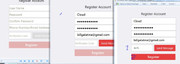


Bookmarks