Results 1 to 10 of 51

Thread: VBA - Count filtered rows in the table

Hybrid View

Previous Post Previous Post   Next Post Next Post
  1. #1
    Sir Moderator sandy666's Avatar
    Join Date
    May 2018
    Posts
    240
    Rep Power
    8

    Cool


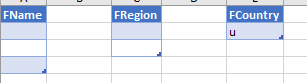
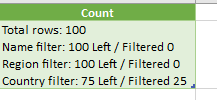
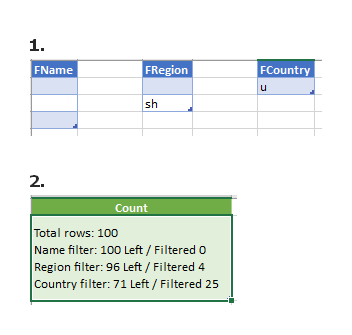
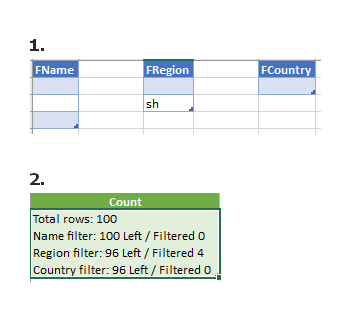
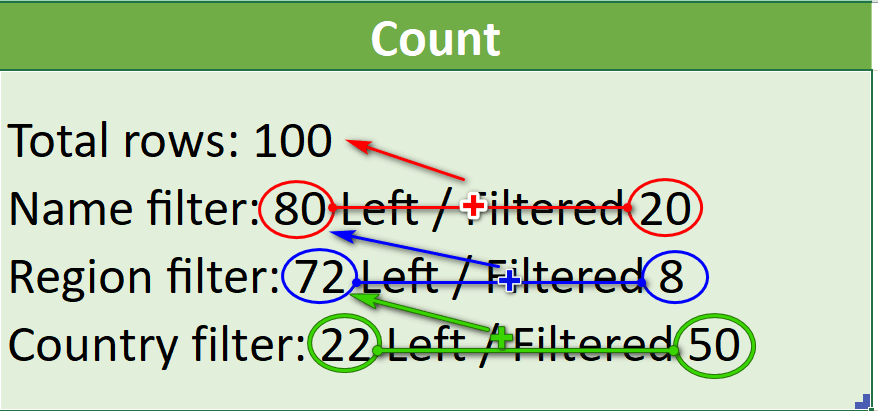
    each filter filters the values of the remaining rows and not all, only the first filter filters the total (100).
    you can test it using only the last filter with the rest left blank (don't know if it will work on xl2013)


    hope it's clear now

    more options


    or


    you insisted on showing the filter results and I don't want it, maybe this description will be better: filter1 - show count filtered1 rows AND count left rows after filter1, then filter2 shows count rows from left rows after filter1 - it will be count2 filtered and left2 after filter2 , and etc
    Last edited by sandy666; 08-22-2023 at 04:10 AM.
    sandy
    I know you know but I forgot my Crystal Ball and don't know what you know also I may not remember what I did weeks, months or years ago so answer asap. Thinking doesn't hurt

  2. #2
    Fuhrer, Vierte Reich DocAElstein's Avatar
    Join Date
    Aug 2014
    Posts
    10,457
    Rep Power
    10
    Quote Originally Posted by sandy666 View Post
    ....you can test it using only the last filter with the rest left blank (don't know if it will work on xl2013)....
    As far as I am aware, nothing does anything on your file if I download it as you said and then open it. But maybe I don’t know what to do to make anything happen if it has something to do with making PQ do something.
    But that is not important.
    I think I am closer now to understanding . ( Probably some of the problem for me was/ is that I never did anything with filters so I did not know that for example “filter by rr” or “filtered by rr” means “remove all lines in table where in column name, the name contains rr
    - It’s obvious with hindsight, but then usually everything is.)


    I will have another go and post again later with it.

    _ (I will always need the table, the full table, and also the filtered tables as I go along. Maybe the full table and all the others could be put in a spare third worksheet. I can get the full table from the csv file with VBA, but I expect you can get it better with PQ)

    _ The table can be any size, any number of rows and columns.

    _ You don’t want the full table at all. And I don’t particularly want it on the first worksheet.
    I suggest
    First worksheet is for filter tables
    Second worksheet is Results
    Third worksheet has full table and any other shit that my coding would need. (But maybe later we can do without it.**)

    But you can suggest something else if you like.
    I could get the coding to work on the csv file, and so the full table would never be in the Excel file, but that would be more complicated and it would also make it difficult to develop the coding and check and fix any mistakes initially.
    **Maybe later when you are happy that everything is working as you want, then later I could modify the code to work only on the csv file, so then you would never see the full table or filtered tables ever in Excel

Similar Threads

  1. Replies: 101
    Last Post: 06-11-2020, 02:01 PM
  2. Delete Filtered Rows Excluding The Header
    By xander1981 in forum Excel Help
    Replies: 5
    Last Post: 04-01-2014, 11:44 PM
  3. Replies: 1
    Last Post: 07-30-2013, 11:08 PM
  4. Lookup and Count Using Pivot Table
    By RobExcel in forum Excel Help
    Replies: 2
    Last Post: 12-21-2012, 11:08 AM
  5. Unique Count on a Filtered Range
    By Admin in forum Excel and VBA Tips and Tricks
    Replies: 0
    Last Post: 08-14-2011, 04:29 AM

Posting Permissions

  • You may not post new threads
  • You may not post replies
  • You may not post attachments
  • You may not edit your posts
  •