


Here is another, forth, version, FilTit4.xlsm
Detailed explanation is here https://www.excelfox.com/forum/showt...ll=1#post23247
https://www.excelfox.com/forum/showt...ll=1#post23262
These are the main three differences, summarised.
_1) I have used the dictionary object a bit more cleverly, and so have reduced the amount of manipulation with VBA arrays. There are two reasons for this:
_ one reason is simply doing it a bit better after a few tries so far at a final coding, so in other words I just got better as I went along; but also,
_ the other reason is that in this version I omit the TemporaryWorksheet worksheet which pasted out the reduced size tables as we went along, which required an extra array to be made as I went along in order to do that extra output.
_2) All the extended output information that is useful in development and fault finding, is now Debug.Printed out to the Immediate window, and all the extra worksheets are omitted. The only seen output for the user is what was originally wanted
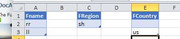
For example, using the example used in the last few posts of this
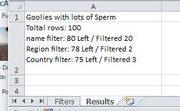
, then we will only see this
, unless we look in the Immediate window, and then we can see the extended output:
Code:Using Filter Fname,rr,ll -----|---- -_- Filterd out by "rr" Pascale Murray Harrison Irwin Sierra Howe Curran Herring Blake Herring Jarrod Mccarthy Filtered Out 6 Left is: 94 Filterd out by "ll" Katell Whitaker Phillip Hunter Brett Blackwell Julian Castillo Kelly Ware Jin Mcmillan Yasir Rollins Yeo Allen Hilel Marshall Dillon Dunlap Jin Gilliam Petra Sellers Chancellor Ratliff Halla Hodges Filtered Out 14 Left is: 80 Total rows/lines removed for filter Fname was 20 Using Filter FRegion,sh -----|---- -_- Filterd out by "sh" Azad Kashmir Andhra Pradesh Filtered Out 2 Left is: 78 Total rows/lines removed for filter FRegion was 2 Using Filter FCountry,us -----|---- -_- Filterd out by "us" Russian Federation Australia Russian Federation Filtered Out 3 Left is: 75 Total rows/lines removed for filter FCountry was 3
_3) The table (from the text file) is held only in memory and is also not put or used in any temporary worksheets.
To test, then similar process to previously ,
_ download both files. They can be anywhere but both files should be in the same folder
_ open the excel workbook file only
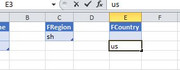
_ In the first worksheet, type something in any filter, …. for example: type us in cell E3 of the first worksheet , and then hit Enter,
That should result in getting the results indicated above

 Reply With Quote
Bookmarks