


Now let’s move on to the more practical use
To recap:
We had the idea that we might be able to use the in-built Excel stuff ISTEXT or ISNUMBER to sort out our Number stored as text issue.
So far it looks unlikely………………, (but as a spoiler – maybe I don’t need to!)
Now, in a spare range, C12:D13, in the spreadsheet I did this CSE type 2 thing {=IF(ISNUMBER(A6:B7),1*A6:B7,A6:B7)}, and got this https://i.postimg.cc/PfWKPgtj/ISNUMB...iour-in-IF.jpg
ISTEXT and ISNUMBER behaviour in IF( , , ).JPG
It appeared that we got the 1* done on the 55, but not on the 44, which was also thought a possibility, so making the ISNUMBER less useful to recognise that 44 as a number. But we noted it went half way, it’s doing half the job, sort of. We further noted that this rather means that the simple = A6 is doing half the job, sort of. This half the job, that is to say the half not yet finished, is something going on in the spreadsheet. Maybe that tells us what is going to happen next
So here we go:
'_________________
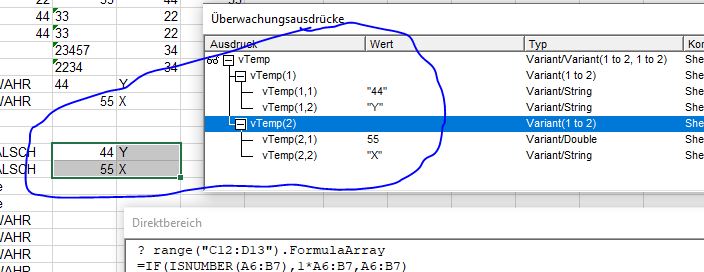
Code:'_________________ ' THE MORE PRACTICAL USE..... IT APPEARED THAT WE GOT THE 1* DONE ON THE 55, BUT NOT ON THE 44, WHICH WAS ALSO THOUGHT A POSSIBILITY, SO MAKING THE ISNUMBERLESS USEFUL TO RECOGNISE THAT 44 AS A NUMBER. BUT WE NOTED IT WENT HALF WAY, IT’S DOING HALF THE JOB, SORT OF. WE FURTHER NOTED THAT THIS RATHER MEANS THAT THE SIMPLE = A6 IS DOING HALF THE JOB, SORT OF. THIS HALF THE JOB, THAT IS TO SAY THE HALF NOT YET FINISHED, IS SOMETHING GOING ON IN THE SPREADSHEET. MAYBE THAT TELLS US WHAT IS GOING TO HAPPEN NEXT DIM STREVAL AS STRING LET STREVAL = "=IF(ISNUMBER(A6:B7),1*A6:B7,A6:B7)" LET VTEMP = EVALUATE("" & STREVAL & "") ' Attachment 5121LET RANGE("C12:D13").VALUE = VTEMP ' AHH, ITS WORKING SOMEHOW UNEXPECTIDLY IN EVALUATE ( IF(ISNUMBER( ), ,) THEN PUT THAT IN CELL
Strange , it works fully.
, and a quick check with strEval = "=IF(ISNUMBER(A6:B7),1*A6:B7,2*A6:B7)" confirms we are selecting the “ else ” part from the IF( , , else ) for the 44
So what is going on, next post is ….' Text strings in and out of spreadsheet and effect on Text held as number thing
Code:Option Explicit Sub IstTextIstNumber() ' https://www.excelfox.com/forum/showthread.php/2345-Appendix-Thread-(-Codes-for-other-Threads-HTML-Tables-etc-)?p=21970&viewfull=1#post21970 Dim Ws12 As Worksheet: Set Ws12 = ThisWorkbook.Worksheets.Item("Sheet1 (2)") Dim Rng As Range: Set Rng = Ws12.Range("A6:B7") Dim vTemp As Variant Let vTemp = Evaluate("=IF({1},ISTEXT(A6:B7))") ' Let Ws12.Range("A16:B17").Value = vTemp Let Ws12.Range("A16:B17").Value = Evaluate("=IF({1},ISTEXT(A6:B7))") Let vTemp = Evaluate("=IF(ISTEXT(A6:B7),""True"",""False"")") ' Let Ws12.Range("A18:B19").Value = vTemp Let Ws12.Range("A18:B19").Value = Evaluate("=IF(ISTEXT(A6:B7),""True"",""False"")") Let vTemp = Evaluate("=IF({1},ISNUMBER(A6:B7))") ' Let Ws12.Range("A20:B21").Value = vTemp Let Ws12.Range("A20:B21").Value = Evaluate("=IF({1},ISNUMBER(A6:B7))") Let vTemp = Evaluate("=IF(ISNUMBER(A6:B7),""True"",""False"")") ' Let Ws12.Range("A22:B23").Value = vTemp Let Ws12.Range("A22:B23").Value = Evaluate("=IF(ISNUMBER(A6:B7),""True"",""False"")") '_________________ ' The more practical use..... It appeared that we got the 1* done on the 55, but not on the 44, which was also thought a possibility, so making the ISNUMBERless useful to recognise that 44 as a number. But we noted it went half way, it’s doing half the job, sort of. We further noted that this rather means that the simple = A6 is doing half the job, sort of. This half the job, that is to say the half not yet finished, is something going on in the spreadsheet. Maybe that tells us what is going to happen next Dim strEval As String Let strEval = "=IF(ISNUMBER(A6:B7),1*A6:B7,A6:B7)" Let vTemp = Evaluate("" & strEval & "") 'Let Range("C12:D13").Value = vTemp ' Ahh, its working somehow unexpectidly in Evaluate ( IF(ISNUMBER( ), ,) then put that in cell '
' Let strEval = "=IF(ISNUMBER(A6:B7),1*A6:B7,2*A6:B7)" Let vTemp = Evaluate("" & strEval & "") ' Let Range("C12:D13").Value = vTemp '
End Sub


 Reply With Quote
Bookmarks