


Number stored as text, alignment of numeric values in cells
Improved/ Extended Evaluate Range solution.
Problem 1 text produces error in output.
Is it text or is it a number. Not as simple a question as you might think.
Initially a Layman might expect this problem, since multiplying a text by a number sounds dodgy. But we never know exactly how the makers of Excel program things, so we might just as well have thought it might return one of the text, or just recognise the text and so decide to do nothing but return it. But it appears that it errors.
So what to do.
The point of using these Evaluate Range ideas is to get a simple single code line that appears to do all in one go what more conventionally would be done in classic looping techniques. So initial we would usually see if we can solve the problem in the spreadsheet formula / expression.
We need something to help us distinguish between text and numbers, bearing in mind we have the complication of some numbers held as text. We want something that will distinguish between what we see as numbers and text, regardless of how Excel is holding anything we see as a number.
We have an ISTEXT and ISNUMBER function in Excel.
If we do some simple testing on the test data range we find that the ISTEXT will return true for our cells with a number stored as text, but not for cells with a simple number. So that looks perhaps less useful to us. Initially I did not expect the ISNUMBER to be useful either, since the Microsoft documentation say something like ISNUMBER("19") will return False.
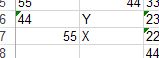
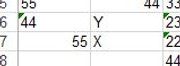
Initial experiments confirm this. Take a small sample of our test range, A6:B7
https://i.postimg.cc/jdBJLVDM/Range-A6-B7.jpg
Attachment 5117

 Reply With Quote
Bookmarks