this is post #595
https://www.excelfox.com/forum/showt...ll=1#post24055
https://www.excelfox.com/forum/showthread.php/2909-Appendix-Thread-Evaluate-Range-(-Codes-for-other-Threads-HTML-Tables-etc-)?p=24055&viewfull=1#post24055
https://www.excelfox.com/forum/showt...ge60#post24055
https://www.excelfox.com/forum/showthread.php/2909-Appendix-Thread-Evaluate-Range-(-Codes-for-other-Threads-HTML-Tables-etc-)/page60#post24055
Problems with vbCr & vbLf in formulas and Evaluate(" ")
Review/ Introduction of what we are doing
In this post we will consider the first parts of the demo coding from the last post, or rather Sub CarriageReturnLineFeedExcelVBAText()
This will take us up to the point of the issue of vbCr & vbLf in formulas and Evaluate(" "), and so serve as an introduction and review of relevant concepts required to be understood before tacking the issue one step further into formulas
Rem 1 Puts stuff in a cell, fairly straight forward,
Range("B3") = "a" & vbCr & vbLf & "b"
( but even that is not so well understood. I understand it better than anyone at the moment. https://www.excelfox.com/forum/showt...-Value-Anomaly ). We can best say that the simplest syntax of the LHS, as we have there, says "put in the cell, what is on the RHS, like wot we might do via writing something in a spreadsheet cell and then hitting Enter". That tends to imply putting text, (and / or numbers) in a cell. But I think if we want to learn quicker and better Excel and VBA, then it is advisable not to think like that too much, and rather to leave it a bit open in the mind at "put in the cell, what is on the RHS, as example, as you might do via writing something in and then hitting Enter". Best not tie the thinking down too much on that one, or further revelations I give may not get so easily in the brain )
As far as the RHS is concerned, it is what we put in the cell : In Excel spreadsheets, we can simply write in text
In a formula, we would enclose text we wanted to appear as text, in a quote pair, as this signalises to Excel that we want a literal text, rather than that the text is a name, function or some other specific thing that the text represents in Spreadsheet syntax.
For VBA it is the same: In other words, what is within a quote, will not be regarded directly as part of the coding, but rather refers to some actual text that will be used in some way, depending on what the coding associated with it is about. For us here, the text within the quotes is the text that we finally want to see
But already, we perhaps need to think a bit more carefully about exactly what is happening: VBA made some determination of what "a" & vbCr & vbLf & "b" is. It decided it was a 4 character piece of text. In VBA we represent that something like a vbCr vbLf b, but inside the whatever calculated/ evaluated thing, (bucket, section of pipe or bit of text string, etc) is: The character a; the character feed character; the line feed character; and the character b
' 1b Range("C3") = "a" & Evaluate("Char(13)&Char(10)") & "b"
This gives an initial indication that
_____ = ____ Evaluate("Char(13)&Char(10)")
and
_____ = ______ vbCr & vbLf
may be equivalent. The Evaluate(" ") is presumably returning into VBA what VBA also sees in vbCr & vbLf
' 1c(i) Range("D3") = "a" & Evaluate(vbCr & vbLf) & "b"
This gives an initial indication that
_____ = ____ Evaluate("Char(13)&Char(10)")
and
_____ = ______ vbCr & vbLf
may not be equivalent
' 1c(ii) Range("E3") = "a" & Evaluate("""" & vbCr & vbLf & """") & "b"
This is our first dealing with the issue this Post and the next few Posts is about: We seem to have got over the problem of ' 1c(i)
The issue of this Post and the next few Posts is about that I am trying to explain that.
But first we will do some similar experiments, putting a formula in, ( but that also requires some careful consideration of Quotes in VBA , ( or an Excel cell, for that matter )
But before we go let’s have a Results Summary Conclusion attempt
https://i.postimg.cc/pddjNp40/Sub-Ca...el-VBAText.jpg
Sub CarriageReturnLineFeedExcelVBAText().jpg 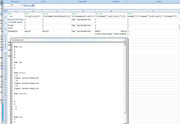
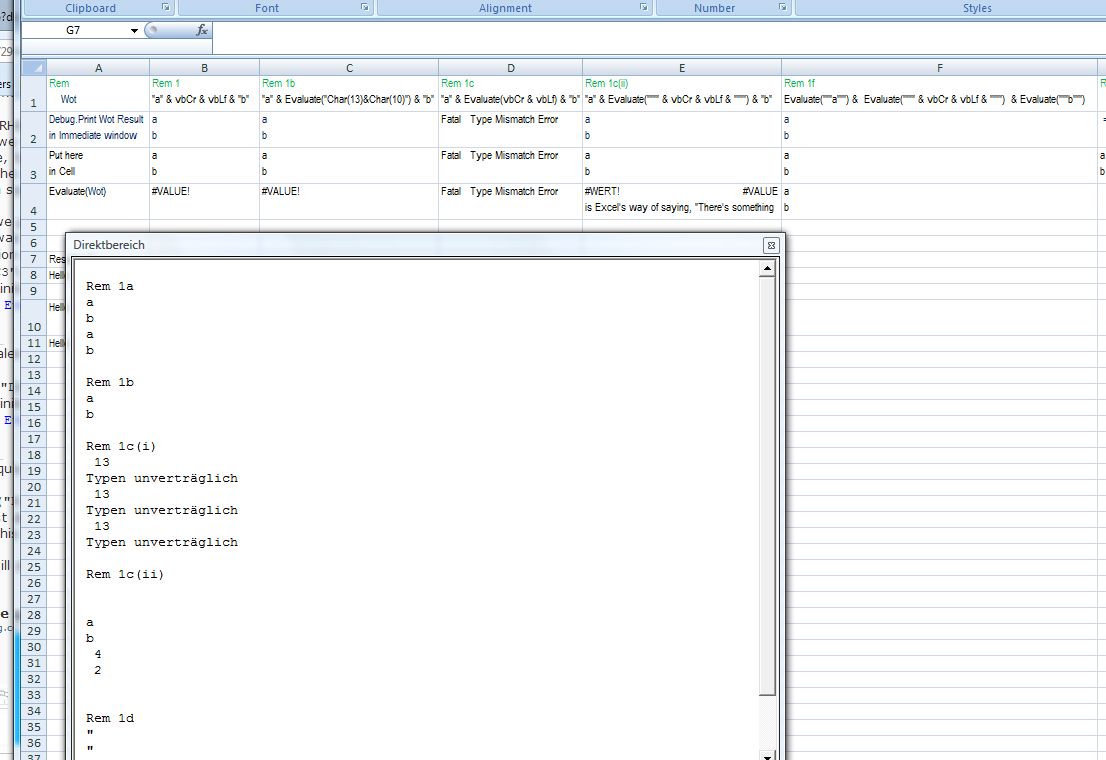
Rem 1d(i) Some conclusions
Perhaps it’s not so unexpected that Evaluate(vbCr & vbLf) gives us problems. Lets say Evaluate() looks for a valid Excel syntax, or perhaps let say Evaluate() looks for a valid Excel name initially, failing that it does the other sort of evaluation based on adding a = at the start. We can consider vbCr and vbLf as variables containing text characters. As such they are not much different from a x and a y
Now Evaluate(" ") was designed to take a string to allow us to build up a final text within the " " __ I think that is put in the cell , and if that is not recognised, then an = is put in front of it and that is tried. Unless, in this example, xy is recognised, such as for a named range, only there after it puts an = at the start. In a cell =xy wont work. ="xy" will work. The " " is a VBA string. For that to give me like in the returned Debug.Print string a leading quote, for example, I need to add a """"
Rem 1d(ii) Some advanced stab in the dark conclusions (Actually with a bit of hindsight from later)
Maybe….
It is likely that if you have got as far as reading this, then you will likely be familiar with the Range(" ")
There are some similarities with Evaluate(" ") and this more familiar Range(" ") _ So that can be a good start point.
These both return something to VBA when the text inside the " " is some recognised Excel spreadsheet syntax convention thing. I suggest there is some sort of flexible/ dynamic = feature wired in which may be used after some attempt without it. Some extra check is then perhaps added to Range(" ") to ensure that a range object is returned. Assuming this idea is correct, then Evaluate(" ") is the same but without this restriction.
( For Range(" ") this can explain the interesting feature we tripped over here , since a formula is allowed, but only if it returns a range object reference, in other words a name recognised in Excel spreadsheet syntax convention. This last bit sets the limitation of Range(" ")
However, I think the Evaluate(" ") does not share this limitation, and so allows a value, text or numeric to be returned).
Perhaps the Evaluate(" ") can be regarded as doing this pseudo coding
_ If the text is some recognised name or excel reference , Then Return the object, Expose it, run it, or some similar action doing something, Exit
Put a = in front of it.
_ If with the = it is not recognised by Excel spreadsheet syntax convention Then Error
_ If it is a closed workbook reference, then error, since it allows Alan to do things better than most complicated data base stuff, and that’s embarrassing , Error Exit
Return anything that a Variant variable will return.
Evaluate Formula Value)
We are not quite finished.
Evaluate Formula Value(s)
For the case of Evaluate(" ") effectively doing a formula in the " " we end up effective doing an Excel type evaluation, but we are not tied to a worksheet, so we are not necessarily restricted to a single values. But we do end up with value(s) in the range in the LHS. We do the same calculation as if we ended up with a formula in the cell. But it’s a false statement, often given when explaining what Evaluate(" ") is doing, to say it fundamentally does a mathematical calculation, gets a value(s) or fundamentally "evaluates". It can "do formulas"
Ref
https://eileenslounge.com/viewtopic....280997#p280997
https://www.myonlinetraininghub.com/...#comment-84892


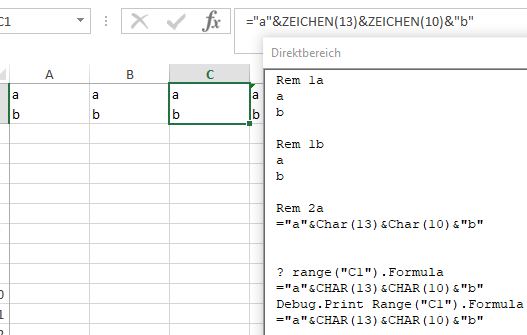

 Reply With Quote
Bookmarks