


In support of these forum posts
https://www.excelfox.com/forum/showt...ll=1#post23981
https://eileenslounge.com/viewtopic....313971#p313971
Developing an Evaluate Range solution
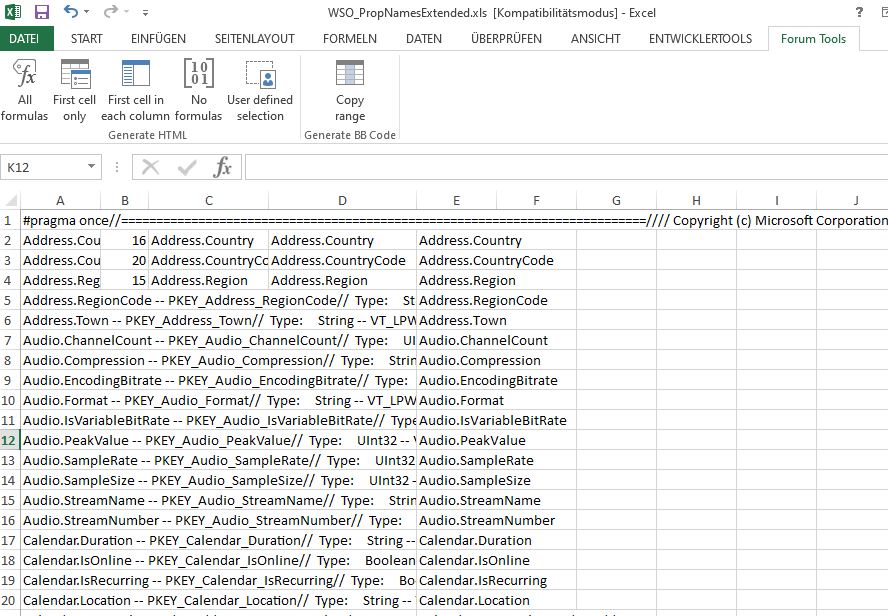
In column A we have things like this: (just showing the first few words in each row for clarity )
Shell.OmitFromView -- PKEY_Shell_Omi …..
SimpleRating -- PKEY_SimpleRating // Type: UInt32 – VT…..
Size -- PKEY_Size ……….// Type: UInt64 – VT
SoftwareUsed -- PKEY_SoftwareUsed// Type: Strin …
SourceItem -- PKEY_SourceItem // Typ …….
I only want this sort of thing
Shell.OmitFromView
SimpleRating
Size
SoftwareUsed
SourceItem
, so the first character set before any spaces
Spreadsheet Formula
So lets try to get those character sets in the fourth column ( Column D ) ,.
Building up a spreadsheet formula to do that is easy. Here is an example:
_____ Workbook: WSO_PropNamesExtended.xls ( Using Excel 2013 32 bit )
Worksheet: Ext(Hidden)proph
Row\Col A B C 2 Address.Country -- PKEY_Address_Country
// Type: String -- VT_LPWSTR (For variants: VT_BSTR)
// FormatID: {C07B4199-E1DF-4493-B1E1-DE5946FB58F8}, 100
DEFINE_PROPERTYKEY(PKEY_Address_Country, 0xC07B4199, 0xE1DF, 0x4493, 0xB1, 0xE1, 0xDE, 0x59, 0x46, 0xFB, 0x58, 0xF8, 100);
#define INIT_PKEY_Address_Country { { 0xC07B4199, 0xE1DF, 0x4493, 0xB1, 0xE1, 0xDE, 0x59, 0x46, 0xFB, 0x58, 0xF8 }, 100 }=SEARCH(" -- PKEY",A2) =LEFT(A2,B2-1) 3 Address.CountryCode -- PKEY_Address_CountryCode
// Type: String -- VT_LPWSTR (For variants: VT_BSTR)
// FormatID: {C07B4199-E1DF-4493-B1E1-DE5946FB58F8}, 101
DEFINE_PROPERTYKEY(PKEY_Address_CountryCode, 0xC07B4199, 0xE1DF, 0x4493, 0xB1, 0xE1, 0xDE, 0x59, 0x46, 0xFB, 0x58, 0xF8, 101);
#define INIT_PKEY_Address_CountryCode { { 0xC07B4199, 0xE1DF, 0x4493, 0xB1, 0xE1, 0xDE, 0x59, 0x46, 0xFB, 0x58, 0xF8 }, 101 }=SEARCH(" -- PKEY",A3) =LEFT(A3,B3-1) 4 Address.Region -- PKEY_Address_Region
// Type: String -- VT_LPWSTR (For variants: VT_BSTR)
// FormatID: {C07B4199-E1DF-4493-B1E1-DE5946FB58F8}, 102
DEFINE_PROPERTYKEY(PKEY_Address_Region, 0xC07B4199, 0xE1DF, 0x4493, 0xB1, 0xE1, 0xDE, 0x59, 0x46, 0xFB, 0x58, 0xF8, 102);
#define INIT_PKEY_Address_Region { { 0xC07B4199, 0xE1DF, 0x4493, 0xB1, 0xE1, 0xDE, 0x59, 0x46, 0xFB, 0x58, 0xF8 }, 102 }=SEARCH(" -- PKEY",A4) =LEFT(A4,B4-1)
_____ Workbook: WSO_PropNamesExtended.xls ( Using Excel 2013 32 bit )
Worksheet: Ext(Hidden)proph
Row\Col A B C 2 Address.Country -- PKEY_Address_Country
// Type: String -- VT_LPWSTR (For variants: VT_BSTR)
// FormatID: {C07B4199-E1DF-4493-B1E1-DE5946FB58F8}, 100
DEFINE_PROPERTYKEY(PKEY_Address_Country, 0xC07B4199, 0xE1DF, 0x4493, 0xB1, 0xE1, 0xDE, 0x59, 0x46, 0xFB, 0x58, 0xF8, 100);
#define INIT_PKEY_Address_Country { { 0xC07B4199, 0xE1DF, 0x4493, 0xB1, 0xE1, 0xDE, 0x59, 0x46, 0xFB, 0x58, 0xF8 }, 100 }16 Address.Country 3 Address.CountryCode -- PKEY_Address_CountryCode
// Type: String -- VT_LPWSTR (For variants: VT_BSTR)
// FormatID: {C07B4199-E1DF-4493-B1E1-DE5946FB58F8}, 101
DEFINE_PROPERTYKEY(PKEY_Address_CountryCode, 0xC07B4199, 0xE1DF, 0x4493, 0xB1, 0xE1, 0xDE, 0x59, 0x46, 0xFB, 0x58, 0xF8, 101);
#define INIT_PKEY_Address_CountryCode { { 0xC07B4199, 0xE1DF, 0x4493, 0xB1, 0xE1, 0xDE, 0x59, 0x46, 0xFB, 0x58, 0xF8 }, 101 }20 Address.CountryCode 4 Address.Region -- PKEY_Address_Region
// Type: String -- VT_LPWSTR (For variants: VT_BSTR)
// FormatID: {C07B4199-E1DF-4493-B1E1-DE5946FB58F8}, 102
DEFINE_PROPERTYKEY(PKEY_Address_Region, 0xC07B4199, 0xE1DF, 0x4493, 0xB1, 0xE1, 0xDE, 0x59, 0x46, 0xFB, 0x58, 0xF8, 102);
#define INIT_PKEY_Address_Region { { 0xC07B4199, 0xE1DF, 0x4493, 0xB1, 0xE1, 0xDE, 0x59, 0x46, 0xFB, 0x58, 0xF8 }, 102 }15 Address.Region
Now, in column D we simply paste the last working formula , ( from column C ) , and then look from the left of column C so as to get the formula only referring to the first column. That way we can do away with the columns B and C
_____ Workbook: WSO_PropNamesExtended.xls ( Using Excel 2013 32 bit )
Worksheet: Ext(Hidden)proph
Row\Col D 2 =LEFT(A2,SEARCH(" -- PKEY",A2)-1) 3 =LEFT(A3,SEARCH(" -- PKEY",A3)-1) 4 =LEFT(A4,SEARCH(" -- PKEY",A4)-1)
VBA Evaluate Range solution.
The simple direct Evaluate Range implementation would be
Evaluate("LEFT(A2:A1055,SEARCH("" -- PKEY"",A2:A1055)-1)")
As sometimes happens we find that this needs a little trick to get all the available values, since otherwise just the first value is returned.
This final working Evaluate Range line does the trick,
Evaluate("IF({1},LEFT(A2:A1055,SEARCH("" -- PKEY"",A2:A1055)-1))")
Here is a full coding to get the property name words in column E in the uploaded file
Code:Option Explicit ' https://www.excelfox.com/forum/showthread.php/2559-Notes-tests-text-files-manipulation-of-text-files-in-Excel-and-with-Excel-VBA-CSV-stuff?p=23979&viewfull=1#post23979 Sub ExtendedPropertiesList() ' Rem 1 Get the text file as a long single string Dim FileNum As Long: Let FileNum = FreeFile(1) ' https://msdn.microsoft.com/en-us/vba/language-reference-vba/articles/freefile-function Dim PathAndFileName As String, TotalFile As String Let PathAndFileName = ThisWorkbook.Path & Application.PathSeparator & "propkey h.txt" ' Open PathAndFileName For Binary As #FileNum 'Open Route to data. Binary is a fundamental type data input... ' Let TotalFile = Space(LOF(FileNum)) '....and wot receives it has to be a string of exactly the right length 'Get #FileNum, , TotalFile ' Or http://www.eileenslounge.com/viewtopic.php?p=295782&sid=f6dcab07c4d24e00e697fe4343dc7392#p295782 Let TotalFile = Input(LOF(FileNum), FileNum) Close #FileNum ' Rem 2 Split the Prophs Dim arrProphs() As String: Let arrProphs() = Split(TotalFile, "// Name: System.", -1, vbBinaryCompare) ' 2a) Quick look at list Dim LCnt As Long: Let LCnt = UBound(arrProphs()) Dim Rws() As Variant, Clms() As Variant, VertList() As Variant Let Rws() = Evaluate("ROW(1:" & LCnt + 1 & ")/ROW(1:" & LCnt + 1 & ")") Let Clms() = Evaluate("ROW(1:" & LCnt + 1 & ")") Let VertList() = Application.Index(arrProphs(), Rws(), Clms()) Let Me.Range("A1:A" & LCnt & "") = VertList() Me.Cells.WrapText = False '' 2b) Look at some example props using function WtchaGot_Unic_NotMuchIfYaChoppedItOff '' The next text is copied from cell A 350 '' "Size -- PKEY_Size '' // Type: UInt64 -- VT_UI8 '' // FormatID: (FMTID_Storage) {B725F130-47EF-101A-A5F1-02608C9EEBAC}, 12 (PID_STG_SIZE) '' // '' // '' DEFINE_PROPERTYKEY(PKEY_Size, 0xB725F130, 0x47EF, 0x101A, 0xA5, 0xF1, 0x02, 0x60, 0x8C, 0x9E, 0xEB, 0xAC, 12); '' #define INIT_PKEY_Size { { 0xB725F130, 0x47EF, 0x101A, 0xA5, 0xF1, 0x02, 0x60, 0x8C, 0x9E, 0xEB, 0xAC }, 12 } '' '' " '' The next text is copied from watch window at arrProphs()(349) '' : arrProphs()(349) : "Size -- PKEY_Size '' // Type: UInt64 -- VT_UI8 '' // FormatID: (FMTID_Storage) {B725F130-47EF-101A-A5F1-02608C9EEBAC}, 12 (PID_STG_SIZE) '' // '' // '' DEFINE_PROPERTYKEY(PKE" ' Call WtchaGot_Unic_NotMuchIfYaChoppedItOff(arrProphs()(349), "Size349") Rem 3 Evaluate Range to get just the property to use in like .ExtendedProperty("System.Size") Dim arrExtProps() As Variant ' Let arrExtProps() = Me.Evaluate("IF({1},LEFT(A2:A1055,SEARCH("" -- PKEY"",A2:A1055)-1))") ' 3b) Paste into a worksheet column Let Me.Range("E2:E1055") = arrExtProps() 'Stop End Sub
https://i.postimg.cc/90Znck96/Ext-Pr...n-Column-E.jpg
ExtPropListInColumnE.jpg

 Reply With Quote
Bookmarks