Results 1 to 10 of 604

Thread: Appendix-Thread-Evaluate-Range-(-Codes-for-other-Threads-HTML-Tables-etc-)

Hybrid View

Previous Post Previous Post   Next Post Next Post
  1. #1
    Fuhrer, Vierte Reich DocAElstein's Avatar
    Join Date
    Aug 2014
    Posts
    10,457
    Rep Power
    10
    General all purpose version of our final Evaluate Range solution Range variable, The left hand side, LHS, of a general purpose code line.
    The left hand side, LHS, of a general purpose code line.
    _....... This Rng is referring to the test data range.
    We want to modify/ correct that, so up until now that was the thing on the LHS.
    But, it is convenient in test and development not to replace the original range, but perhaps rather, if you have space, put the output from the coding calculations somewhere alongside. That way if something goes wrong, you don’t have to try and find the original data in order to try again. For example this would be the LHS to place the result alongside to the right. _Let Rng.Offset(0, Rng.Columns.Count).Value =

    That is a good choice to use as we are sure to place to the right, since we offset the output a number of column equal to the number of columns that the range has. Personally, I might do this
    _Let Rng.Offset(0, Rng.Columns.Count + 1).Value =
    , since an extra empty column in between can have later advantages.


    https://www.youtube.com/channel/UCnxwq2aGJRbjOo_MO54oaHA
    https://www.youtube.com/watch?v=jdPeMPT98QU
    https://www.youtube.com/watch?v=QdwDnUz96W0&lc=Ugx3syV3Bw6bxddVyBx4AaABAg
    https://www.youtube.com/watch?v=U76ZRIzBhOA&lc=UgxsozCmRd3RAmIPO5B4AaABAg.9fxrOrrvTln9g9wr8mv2 CS
    https://www.youtube.com/watch?v=U76ZRIzBhOA&lc=Ugw6zxOMtNCfmdllKQl4AaABAg
    https://www.youtube.com/watch?v=U76ZRIzBhOA&lc=UgyT1lo2YMUyZ50bLeR4AaABAg.9fz3_oaiUeK9g96yGbAX 4t
    https://www.youtube.com/watch?v=U76ZRIzBhOA&lc=Ugx5d-LrmoMM_hsJK2N4AaABAg.9fyL20jCtOI9g7pczEpcTz
    https://www.youtube.com/watch?v=U76ZRIzBhOA&lc=UgyT1lo2YMUyZ50bLeR4AaABAg.9fz3_oaiUeK9g7lhoX-ar5
    https://www.youtube.com/watch?v=U76ZRIzBhOA&lc=Ugx5d-LrmoMM_hsJK2N4AaABAg.9fyL20jCtOI9gD0AA-sfpl
    https://www.youtube.com/watch?v=U76ZRIzBhOA&lc=Ugx5d-LrmoMM_hsJK2N4AaABAg.9fyL20jCtOI9gECpsAVGbh
    https://www.youtube.com/watch?v=U76ZRIzBhOA&lc=Ugw6zxOMtNCfmdllKQl4AaABAg.9g9wJCunNRa9gJGhDZ4R I2
    https://www.youtube.com/channel/UCnxwq2aGJRbjOo_MO54oaHA
    Last edited by DocAElstein; 07-22-2023 at 04:37 PM.

  2. #2
    Fuhrer, Vierte Reich DocAElstein's Avatar
    Join Date
    Aug 2014
    Posts
    10,457
    Rep Power
    10
    Number stored as text, alignment of numeric values in cells

    Improved/ Extended Evaluate Range solution.

    Based on all the posts so far on this page, we have got this far,
    Code:
    Sub Number_stored_as_text()  '    https://www.excelfox.com/forum/showthread.php/2909-Appendix-Thread-Evaluate-Range-(-Codes-for-other-Threads-HTML-Tables-etc-)?p=21967&viewfull=1#post21967
    Dim Ws1 As Worksheet, Rng As Range
     Set Ws1 = ThisWorkbook.Worksheets.Item("Sheet1")
     Set Rng = Ws1.Range("A1:F7")
    Dim strEval As String
     Let strEval = "=1*" & Rng.Address & ""
    Debug.Print strEval '  gives =1*$A$1:$F$7
    
     Let Rng.Offset(0, Rng.Columns.Count + 1).Value = Evaluate(strEval)
    End Sub
    This is our test data, https://i.postimg.cc/KvhPVN44/Test-Data.jpg
    https://i.postimg.cc/8PkRNCBV/Test-Data.jpg
    Test Data.JPG
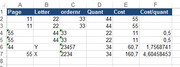
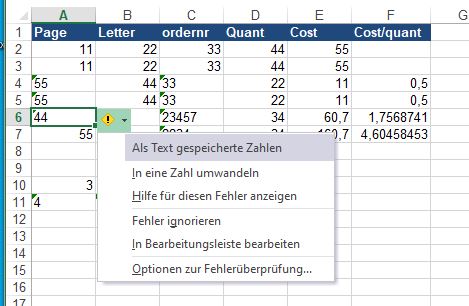
    _____ Workbook: Number stored as text, alignment of numeric values in cells.xls ( Using Excel 2013 32 bit )
    Row\Col A B C D E F
    1 Page Letter ordernr Quant Cost Cost/quant
    2 11 22 33 44 55
    3 11 22 33 44 55
    4 55 44 33 22 11 0,5
    5 55 44 33 22 11 0,5
    6 44 Y 23457 34 60,7 1,7568741
    7 55 X 2234 34 160,7 4,60458453
    Worksheet: Sheet1

    This is the result after running the macro

    _____ Workbook: Number stored as text, alignment of numeric values in cells.xls ( Using Excel 2013 32 bit )
    Row\Col A B C D E F G H I J K L M
    1 Page Letter ordernr Quant Cost Cost/quant #WERT! #WERT! #WERT! #WERT! #WERT! #WERT!
    2 11 22 33 44 55 11 22 33 44 55 0
    3 11 22 33 44 55 11 22 33 44 55 0
    4 55 44 33 22 11 0,5 55 44 33 22 11 0,5
    5 55 44 33 22 11 0,5 55 44 33 22 11 0,5
    6 44 Y 23457 34 60,7 1,7568741 44 #WERT! 23457 34 60,7 1,756874
    7 55 X 2234 34 160,7 4,60458453 55 #WERT! 2234 34 160,7 4,604585
    Worksheet: Sheet1


    Oh bollox, a couple of problems
    We see a couple of problems. An empty cell comes out as a 0 in the output, and text in any cell results in an error in the output.

    In the next post, we look at overcoming these two problems
    Last edited by DocAElstein; 07-22-2023 at 07:23 PM.

Similar Threads

  1. Testing Concatenating with styles
    By DocAElstein in forum Test Area
    Replies: 2
    Last Post: 12-20-2020, 02:49 AM
  2. testing
    By Jewano in forum Test Area
    Replies: 7
    Last Post: 12-05-2020, 03:31 AM
  3. Replies: 18
    Last Post: 03-17-2019, 06:10 PM
  4. Concatenating your Balls
    By DocAElstein in forum Excel Help
    Replies: 26
    Last Post: 10-13-2014, 02:07 PM
  5. Replies: 1
    Last Post: 12-04-2012, 08:56 AM

Posting Permissions

  • You may not post new threads
  • You may not post replies
  • You may not post attachments
  • You may not edit your posts
  •
