


In support of the forum post:
NOT POSTED YET – DRAFT COPY
Hi
I am new to PowerShell script since a few weeks
I hit my first major coding problem, I have got over some smaller ones.
I have a GUI with lots of buttons on it. Each Button has some various things behind it. Some do some quite major things to the computer, such as registry changes, others download stuff. With one exception all is working as it should**.
Problem Summary
This coding does what it should. I checked it on a few computers with different Windows 10 versions. It checks for installed winget on the computer, and if not there attempts to download it. ( That download might not work for other reasons, but that is a separate issue which I am not concerned with here – as it happens I have it installed on all my computers )
On all my current computers that have winget, the message comes up saying 'winget already installed', and the coding moves on. All is well
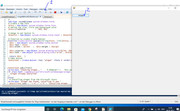
I put that same coding behind a button on a GUI. It seems to work initially, the GUI comes up,Code:Write-Host "Checking winget..." if (Test-Path ~\AppData\Local\Microsoft\WindowsApps\winget.exe){ # Check if winget is installed 'Winget Already Installed' } else{ # Installing winget from the Microsoft Store Write-Host "Winget not found, installing it now." $ResultText.text = "`r`n" +"`r`n" + "Installing Winget... Please Wait" Start-Process "ms-appinstaller:?source=https://aka.ms/getwinget" # If I paste that link in Browser URL I get this offered as if I hit the download button somewhere Microsoft.DesktopAppInstaller_8wekyb3d8bbwe.msixbundle $nid = (Get-Process AppInstaller).Id Wait-Process -Id $nid Write-Host Winget Installed $ResultText.text = "`r`n" +"`r`n" + "Winget Installed - Ready for Next Task" } # })
, and on clicking the button it appears initially to start OK, , but on the same computers, the coding always hangs at
"checking winget…"
On this same GUI I can put lots of other buttons, all doing different things, and they always do what they should**Code:# Add-Type -AssemblyName System.Windows.Forms # Create a new form $Form = New-Object system.Windows.Forms.Form # Define the size $Form.ClientSize = '800, 600' # Range to put button in $Panel10 = New-Object system.Windows.Forms.Panel ; $Panel10.height = 50 ; $Panel10.width = 250 ; $Panel10.location = New-Object System.Drawing.Point(1, 25) # function to create sinple botton function Create-Button {param([string]$Text, [int]$FntSz, [int]$Width, [int]$Height, [int]$ClmX, [int]$RwY)#As Object ' This function allows us to make a buttons in one line. (Those later single lines do not make the button appear) $Btn = New-Object System.Windows.Forms.Button # $Btn.Text = $Text # $Btn.Width = $Width ; $Btn.Height = $Height # # $Btn.Location = New-Object System.Drawing.Point($ClmX, $RwY) # $Btn.Font = New-Object System.Drawing.Font('Arial', $FntSz) # ('Microsoft Sans Serif', 9) # return $Btn } # # Make button $GetWinGet = Create-Button -Text "winget" -FntSz 9 -Width 117 -Height 21 -ClmX 3 -RwY 1 $GetWinGet.Add_Click({ Write-Host "Checking winget..." # PROBLEM!!!! This wont work in a button - it freezes here? if (Test-Path ~\AppData\Local\Microsoft\WindowsApps\winget.exe){ # Check if winget is installed 'Winget Already Installed' } else{ # Installing winget from the Microsoft Store Write-Host "Winget not found, installing it now." $ResultText.text = "`r`n" +"`r`n" + "Installing Winget... Please Wait" Start-Process "ms-appinstaller:?source=https://aka.ms/getwinget" # If I paste that link in Browser URL I get this offered as if I hit the download button somewhere Microsoft.DesktopAppInstaller_8wekyb3d8bbwe.msixbundle $nid = (Get-Process AppInstaller).Id Wait-Process -Id $nid Write-Host Winget Installed $ResultText.text = "`r`n" +"`r`n" + "Winget Installed - Ready for Next Task" } }) # Add Button to range $Panel10.controls.AddRange(@($GetWinGet)) # Add ranbge to Form $Form.controls.AddRange(@($Panel10)) # Display the form [void]$Form.ShowDialog()
What am I missing?
Alan

 Reply With Quote
Bookmarks