


Copy from here https://www.excelforum.com/excel-pro...ml#post4545938
For help in this post
https://eileenslounge.com/viewtopic....289070#p289070
Yep Rob Bovey’s sledgehammer is the Doggy’s Nut‘s. Once again saved a lot of frustration. Just now my Immediate Window got “swallowed” and “eaten” as I moved over it whilst moving the position of my VB Editor Window. All I could do was open or close it after that. The problem was that on opening it, it took up all the entire space in the VB Editor but refused to let me reduce its size or move it in any of the ways that it usually is possible to do. ( So maybe the Immediate Window had sort of swallowed the VB Editor ?? ). In any case something had its knickers in a twist, and all the other ways to get the problem sorted had no effect !!
Following the instructions from Rob Bovey sorted it Out
Absolutely spiffing, Jolly Billy Ho! IMO
Alan
P.s. The thread is a bit Old so the exact steps may be a bit different..
Here is one ( almost) current example...
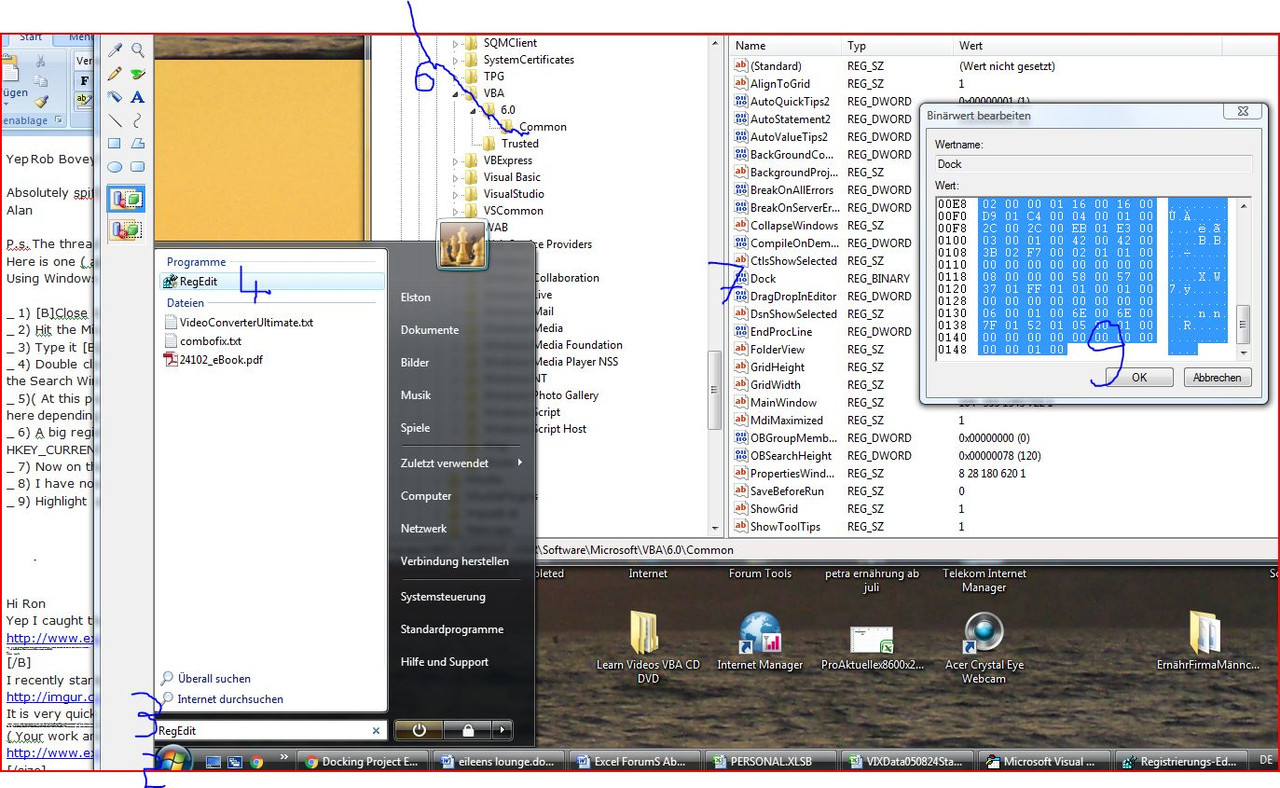
( Using Windows Vista )
_ 1) Close Excel ***
_ 2) Hit the Microsoft symbol bottom left
_ 3) Type in RegEdit in the small search Window
_ 4) Double click on the RegEdit which should now be offered in the larger window just above the Search Window
( _ 5)( At this point I got an “Administrator Rights” type window pop Up – So you might not get past here depending on your “rights” – I got past by just clicking OK in this pop Up ) )
_ 6) A big registry Window pops up – I navigate through HKEY_CURRENT_USER\Software\Microsoft\VBA\6.0\Commo n
_ 7) Now on the right side of the Registry, I see a Dock . I double click on Dock
_ 8) I have now an Edit Window. It has a large “Value:” Box full with Numbers and letters in it.
_ 9) I Highlight all those Numbers and delete them, ( All but 0000 should then vanish ) , then Hit OK
_ 10) – “Jolly Ruddy Spiffing Billy Merry Ho Wonks Bingo !!” . – On opening Excel I find if I hit Ctrl+G from the VB Editor ( Alt+11 ), my immediate Window appears at the bottom of the VB Editor, but I can drag it in and out of the VB Editor anywhere where I Jolly well like!
(*** Do not forget that Excel must be closed or it will not work )
RegEditDockingWonks.JPG http://i.imgur.com/V0qttoA.jpg https://i.postimg.cc/X7qkfYdG/Reg-Ed...king-Wonks.jpg
Attachment 494178
Attachment 3652
P.P.s. May be this Thread could do with being in the Tips and Tutorials Sub Forum?


 Reply With Quote
Bookmarks