


Following on from posts,
https://excelfox.com/forum/showthrea...ll=1#post16530 https://excelfox.com/forum/showthrea...ll=1#post16529
http://www.eileenslounge.com/viewtop...294692#p294692
,
The header row,
Group Amount1 Amount2 Amount3 Amount4 Notes1 Notes2 Notes3 Notes4 Name
, we could make partially dynamic, as is needed, since we don’t know the maximum number of amounts ( = maximum number of Notes ) , before seeing the data.
We do have the information needed, since Mx contains, in our current example, the required value of 4
Evaluate Range techniques are a convenient way to get these sort of things.
We start by considering spreadsheet formulas such as this,
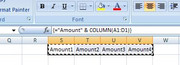
={"Amount" & COLUMN(A1:D1)}
, which returns us an array, which applied across a range , would give us like
Amount1 Amount2 Amount3 Amount4
Taking that general idea and a few other steps we can finally get at our heading like in this demo coding
Code:' https://excelfox.com/forum/showthread.php/2345-Appendix-Thread-(-Codes-for-other-Threads-HTML-Tables-etc-)?p=16532&viewfull=1#post16532 Sub MakeHeadings() Dim Mx As Long: Let Mx = 4 Dim Amounts() As Variant Let Amounts() = Evaluate("=""Amount"" & COLUMN(A1:D1)") Let Amounts() = Evaluate("=""Amount"" & COLUMN(A:D)") Let Amounts() = Evaluate("=""Amount"" & COLUMN(A:" & "D" & ")") ' We need to get D from what we know, Mx Dim vTemp As Variant vTemp = Cells(1, 4).Address vTemp = Split(vTemp, "$", 3, vbBinaryCompare) vTemp = vTemp(1) ' Or vTemp = Split(Cells(1, 4).Address, "$", 3, vbBinaryCompare)(1) ' Or vTemp = Split(Cells(1, 4).Address, "$")(1) vTemp = Split(Cells(1, Mx).Address, "$")(1) Let Amounts() = Evaluate("=""Amount"" & COLUMN(A:" & vTemp & ")") Let Amounts() = Evaluate("=""Amount"" & COLUMN(A:" & Split(Cells(1, Mx).Address, "$")(1) & ")") ' ' We want this array as a string with vbTabs seperating the array elements Dim strAmounts As String Let strAmounts = Join(Amounts(), vbTab) Let strAmounts = Join(Evaluate("=""Amount"" & COLUMN(A:" & Split(Cells(1, Mx).Address, "$")(1) & ")"), vbTab) ' similarly for the notes Dim strNotes As String Let strNotes = Join(Evaluate("=""Note"" & COLUMN(A:" & Split(Cells(1, Mx).Address, "$")(1) & ")"), vbTab) ' To get our final heading string, Dim strHd As String Let strHd = "Group" & vbTab & Join(Evaluate("=""Amount"" & COLUMN(A:" & Split(Cells(1, Mx).Address, "$")(1) & ")"), vbTab) & vbTab & Join(Evaluate("=""Note"" & COLUMN(A:" & Split(Cells(1, Mx).Address, "$")(1) & ")"), vbTab) & vbTab & "Notes" Dim objDataObject As Object: Set objDataObject = GetObject("New:{1C3B4210-F441-11CE-B9EA-00AA006B1A69}") ' http://web.archive.org/web/20200124185244/http://excelmatters.com/2013/10/04/late-bound-msforms-dataobject/ objDataObject.SetText Text:=strHd objDataObject.PutInClipboard Dim Ws1 As Worksheet: Set Ws1 = ThisWorkbook.Worksheets("Sheet1") Ws1.Paste Destination:=Ws1.Range("G1") End Sub
In the next post , https://excelfox.com/forum/showthrea...ll=1#post16533 , is that integrated into the main coding in Rem 3

 Reply With Quote
Bookmarks