


Some notes to go with this forum post
https://eileenslounge.com/viewtopic....314200#p314200
Thanks to ErikJan for this solution
Simple non VBA way to have in a single column the result of a multicolumn summation, and the numbers used in the summation formula, without having to keep the columns with the numbers used in the summation formula,
What we want
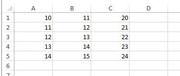
Let's say as example, I have this, some numbers in columns A – C, and I want to sum them.
https://i.postimg.cc/zDpr9TKJ/Number...n-column-D.jpg
Row\Col A B C 1 10 11 20 2 11 12 21 3 12 13 22 4 13 14 23 5 14 15 24
I want to see the final summed result, but I also want to see the numbers I used to get the final sum. Preferably I want to see
_ the final summed result
and
_ the numbers used to get the result,
all in the same column, even if I delete columns A - C
So for example in the first row, I could do something like this in cell D1
= 10 + 11 + 20, which is a bit tedious,
or
= A1 + A2 + A3
Etc, That is OK, but if I delete columns A – C, then I’m fucked. I could copy column D and then Paste values back, so that when I delete columns A – C, I still have my result. But I have lost the information of what numbers were used in the summation, (assuming I had deleted columns A – C ) .
A solution, ( as done by ErikJan )
Here is a simple non VBA way to have in a single column the result of a multicolumn summation, and the numbers used in the summation formula, without having to keep the columns with the numbers used in the summation formula.
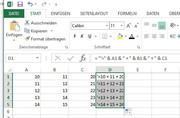
_ 1) Put this formula in column D
= "'=" & A1 & " + " & B1 & " + " & C1
( note the extra '), and
_2) then drag it down formula A1 & B1 & C1 in column D and drag down.JPG
https://i.postimg.cc/15tQP4rD/formul...-drag-down.jpg
Row\Col D 1 = "'=" & A1 & " + " & B1 & " + " & C1 2 = "'=" & A2 & " + " & B2 & " + " & C2 3 = "'=" & A3 & " + " & B3 & " + " & C3 4 = "'=" & A4 & " + " & B4 & " + " & C4 5 = "'=" & A5 & " + " & B5 & " + " & C5
_3) Now Copy the column D
https://i.postimg.cc/C5vpkVSZ/Copy-column-D.jpgCopy column D.JPG
_4) , and paste it back as values
https://i.postimg.cc/50SV9CrS/Paste-back-as-values.jpg
Paste back as values.JPG
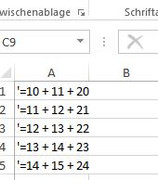
_5) At this point, you could delete columns A- C if you wish
https://i.postimg.cc/QM0ytJbm/Delete-Columns-A-C.jpg Delete Columns A-C.JPG
Row\Col A 1 '=10 + 11 + 20 2 '=11 + 12 + 21 3 '=12 + 13 + 22 4 '=13 + 14 + 23 5 '=14 + 15 + 24
So now you see the values you want summed.
_6) To get the values, do an Excel Find and Replace to remove the apostrophe'
https://i.postimg.cc/nzJxtk3L/Find-a...Apostrophe.jpg https://i.postimg.cc/cC1NvJyy/Founde...Apostrophe.jpg
Find and Replace to remove the Apostrophe.JPG
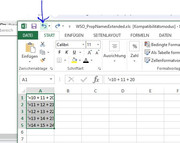
_7) If you wish to see the numbers used again, then you can hit the back button
https://i.postimg.cc/t48yByPW/Hit-ba...-summation.jpg
( Note: you could use any character, or characters rather than the apostrophe ' , but the apostrophe may have the advantage, depending on your settings or Excel versions, of not showing in the cells. I must investigate that further )


 Reply With Quote
Bookmarks