Page 10 of 12 FirstFirst ... 89101112 LastLast
Results 91 to 100 of 112

Thread: Notes tests, string, manipulation of text files and string manipulations

Hybrid View

Previous Post Previous Post   Next Post Next Post
  1. #1
    Fuhrer, Vierte Reich DocAElstein's Avatar
    Join Date
    Aug 2014
    Posts
    10,457
    Rep Power
    10
    hhhhkh


    https://www.youtube.com/channel/UCnxwq2aGJRbjOo_MO54oaHA
    https://www.youtube.com/watch?v=pkhazgI3LAo&lc=UgxesLhWNr_zNP0GUdh4AaABAg.9hI1CQJMLLo9hWn2pGBe SS
    https://www.youtube.com/watch?v=pkhazgI3LAo&lc=UgzkRujoMw9PblmXDQ14AaABAg.9hJRnEjxQrd9hJoCjomN I2
    https://www.youtube.com/watch?v=pkhazgI3LAo&lc=UgzPZbG7OvUkh35nXDd4AaABAg.9hJOZEEZa6p9hJqLC7El-w
    https://www.youtube.com/watch?v=pkhazgI3LAo&lc=UgwUcEpm8u6ZW3uOHXx4AaABAg.9hIlxxGY7t49hJsB2PWx C4
    https://www.youtube.com/watch?v=pkhazgI3LAo&lc=UgyvDj6NWT1Gxyy2JyR4AaABAg.9hIKlNPeqDn9hJskm92n p6
    https://www.youtube.com/watch?v=pkhazgI3LAo&lc=Ugwy7qx_kG9iUmMVO_F4AaABAg.9hI2IGUdmTW9hJuyaQaw qx
    https://www.youtube.com/watch?v=pkhazgI3LAo&lc=UgxesLhWNr_zNP0GUdh4AaABAg.9hI1CQJMLLo9hJwTB9Jl ob
    https://www.youtube.com/watch?v=pkhazgI3LAo&lc=UgyyQWYVP1OnCqavb-x4AaABAg
    https://www.youtube.com/watch?v=pkhazgI3LAo&lc=UgwJKKmExZ1FdZVDJf54AaABAg
    https://www.youtube.com/watch?v=pkhazgI3LAo&lc=Ugz_p0kVGrLntPtYzCt4AaABAg
    https://www.youtube.com/channel/UCnxwq2aGJRbjOo_MO54oaHA


    https://www.youtube.com/channel/UCnxwq2aGJRbjOo_MO54oaHA
    https://www.youtube.com/watch?v=pkhazgI3LAo&lc=UgxesLhWNr_zNP0GUdh4AaABAg.9hI1CQJMLLo9hWn2pGBe SS
    https://www.youtube.com/watch?v=pkhazgI3LAo&lc=UgzkRujoMw9PblmXDQ14AaABAg.9hJRnEjxQrd9hJoCjomN I2
    https://www.youtube.com/watch?v=pkhazgI3LAo&lc=UgzPZbG7OvUkh35nXDd4AaABAg.9hJOZEEZa6p9hJqLC7El-w
    https://www.youtube.com/watch?v=pkhazgI3LAo&lc=UgwUcEpm8u6ZW3uOHXx4AaABAg.9hIlxxGY7t49hJsB2PWx C4
    https://www.youtube.com/watch?v=pkhazgI3LAo&lc=UgyvDj6NWT1Gxyy2JyR4AaABAg.9hIKlNPeqDn9hJskm92n p6
    https://www.youtube.com/watch?v=pkhazgI3LAo&lc=Ugwy7qx_kG9iUmMVO_F4AaABAg.9hI2IGUdmTW9hJuyaQaw qx
    https://www.youtube.com/watch?v=pkhazgI3LAo&lc=UgxesLhWNr_zNP0GUdh4AaABAg.9hI1CQJMLLo9hJwTB9Jl ob
    https://www.youtube.com/watch?v=pkhazgI3LAo&lc=UgyyQWYVP1OnCqavb-x4AaABAg
    https://www.youtube.com/watch?v=pkhazgI3LAo&lc=UgwJKKmExZ1FdZVDJf54AaABAg
    https://www.youtube.com/watch?v=pkhazgI3LAo&lc=Ugz_p0kVGrLntPtYzCt4AaABAg
    https://www.youtube.com/channel/UCnxwq2aGJRbjOo_MO54oaHA

    https://www.youtube.com/channel/UCnxwq2aGJRbjOo_MO54oaHA
    https://eileenslounge.com/viewtopic.php?p=317218#p317218
    https://eileenslounge.com/viewtopic.php?p=316955#p316955
    https://eileenslounge.com/viewtopic.php?p=316955#p316955
    https://eileenslounge.com/viewtopic.php?p=316940#p316940
    https://eileenslounge.com/viewtopic.php?p=316927#p316927
    https://eileenslounge.com/viewtopic.php?p=317014#p317014
    https://eileenslounge.com/viewtopic.php?p=317006#p317006
    https://eileenslounge.com/viewtopic.php?p=316935#p316935
    https://eileenslounge.com/viewtopic.php?p=316875#p316875
    https://eileenslounge.com/viewtopic.php?p=316254#p316254
    https://eileenslounge.com/viewtopic.php?p=316280#p316280
    https://eileenslounge.com/viewtopic.php?p=315915#p315915
    https://eileenslounge.com/viewtopic.php?p=315512#p315512
    https://eileenslounge.com/viewtopic.php?p=315744#p315744
    https://www.eileenslounge.com/viewtopic.php?p=315512#p315512
    https://eileenslounge.com/viewtopic.php?p=315680#p315680
    https://eileenslounge.com/viewtopic.php?p=315743#p315743
    https://www.eileenslounge.com/viewtopic.php?p=315326#p315326
    https://www.eileenslounge.com/viewtopic.php?f=30&t=40752
    https://eileenslounge.com/viewtopic.php?p=314950#p314950
    https://www.eileenslounge.com/viewtopic.php?p=314940#p314940
    https://www.eileenslounge.com/viewtopic.php?p=314926#p314926
    https://www.eileenslounge.com/viewtopic.php?p=314920#p314920
    https://www.eileenslounge.com/viewtopic.php?f=30&t=40533&p=314837#p314837
    https://www.youtube.com/channel/UCnxwq2aGJRbjOo_MO54oaHA
    Last edited by DocAElstein; 05-20-2024 at 04:01 PM.
    ….If you are my competitor, I will try all I can to beat you. But if I do, I will not belittle you. I will Salute you, because without you, I am nothing.
    If you are my enemy, we will try to kick the fucking shit out of you…..
    Winston Churchill, 1939
    Save your Forum..._
    KILL A MODERATOR!!

  2. #2
    Fuhrer, Vierte Reich DocAElstein's Avatar
    Join Date
    Aug 2014
    Posts
    10,457
    Rep Power
    10
    In support of this main forum post
    https://eileenslounge.com/viewtopic.php?f=30&t=39654


    Convert VBA Mathematical Expression to Excel spreadsheet form


    Proposed solution type.
    I would describe this solution type as very unclever. Its simple but tedious and complicated. Its just using simple string manipulation to change a VBA code mathematical string into the equivalent in Excel spreadsheet form.
    The specific example given here would be a very limited solution only applicable to some specific forms, such as in the OPs given example:
    s = "((7 > 5) And (10 < 15)) Or (Not (20 = 30))"
    Here is the Excel spreadsheet form given by Hans
    s = "OR(AND(7>5,10<15),NOT(20=30))"
    , ( and also BigBen over at scrapoverflow
    Evaluate("OR(AND(7>5,10<15),NOT(20=30))")
    )


    Here a full solution rambling development, then later a simplified function

    This example type solution will be limited to a general form that will have one or more Ors applying to some mathematical logic that my include some Ands. This sort of form
    ( …… And …… ) Or ( ……. ) Or ( …… )
    So similar to the OPs
    ((7 > 5) And (10 < 15)) Or (Not (20 = 30))

    Coding description ( Coding here: https://www.excelfox.com/forum/showt...ll=1#post20038 )
    In Rem 0 is some initial investigating into what we can and we cannot get away with in terms of having the final Excel spreadsheet form slightly different to the actual required one. Specifically we are looking at the effects of extra spaces in the Excel spreadsheet form. This is because the VBA string code line differs in some places to the Excel spreadsheet form in that it has some extra spaces.
    We find that in some situations the extra spaces have no effect on the final calculation, so that is helpful in simplifying the conversion changes necessary.
    The conclusion is then, we need to get rid of spacers after expressions as Excel does not seem to like those, so that is done in Rem 1

    Rem 2
    The crux of this limited solution is to first split by the Ors in the VBA string code line.
    '2a) we then examine each of the Or bits, by that I mean the Or elements , or in other words Each of the OrbIts are the bracket bits from the general form
    ( …… And …… ) Or ( ……. ) Or ( …… )
    In this limited solution example, we check for convert any Ands to the Excel spreadsheet form. The converted form is then used to overwrite the original VBA code line form.

    Finally, in '2b) , the modified Or bits are reJoined

    In the example we end up with
    OR(AND((7 > 5) ,(10 < 15)) ,AND(NOT(20 = 30)))
    , which is close enough to the actual required
    OR(AND (7>5,10<15),NOT(20=30))
    , such that in Rem 3 , it gives the correct result in Evaluate(" ")

    That’s it!

    Full coding and simplified function form in next post


    https://www.youtube.com/channel/UCnxwq2aGJRbjOo_MO54oaHA
    https://www.youtube.com/watch?v=v_1iqtOnUMg&lc=UgxUbeYSvsBH2Gianox4AaABAg.9VYH-07VTyW9gJV5fDAZNe
    https://www.youtube.com/watch?v=v_1iqtOnUMg&lc=UgxLtKj969oiIu7zNb94AaABAg
    https://www.youtube.com/watch?v=v_1iqtOnUMg&lc=UgyhQ73u0C3V4bEPhYB4AaABAg
    https://www.youtube.com/watch?v=v_1iqtOnUMg&lc=UgzIElpI5OFExnUyrk14AaABAg.9fsvd9zwZii9gMUka-NbIZ
    https://www.youtube.com/watch?v=jdPeMPT98QU
    https://www.youtube.com/watch?v=QdwDnUz96W0&lc=Ugx3syV3Bw6bxddVyBx4AaABAg
    https://www.youtube.com/channel/UCnxwq2aGJRbjOo_MO54oaHA
    Last edited by DocAElstein; 07-12-2023 at 05:00 PM.

  3. #3
    Fuhrer, Vierte Reich DocAElstein's Avatar
    Join Date
    Aug 2014
    Posts
    10,457
    Rep Power
    10
    Code:
    '  https://eileenslounge.com/viewtopic.php?f=30&t=39654
    Sub EvaluateVBAStringConversionConfusions()
    Rem 0 some initial  investigating into what we can and we cannot get away with in terms of having the final Excel spreadsheet form slightly different to the actual required one. Specifically we are looking at the effects of extra spaces in the Excel spreadsheet form. This is because the VBA string code line differs in some places to the Excel spreadsheet form in that it has some extra spaces.
    Dim EsVBA As String, EsExcel As String
     Let EsVBA = "((7 > 5) And (10 < 15)) Or (Not (20 = 30))"
     Let EsExcel = "OR(AND(7>5,10<15),NOT(20=30))"
    Dim Res As Variant: Let Res = Evaluate(EsExcel)   '   Wahr  - OK
     Let EsExcel = "OR(AND(  7 >  5,10<15)  ,NOT(  20 =  30))"
     Let Res = Evaluate(EsExcel)                      '   Wahr  - OK
     Let EsExcel = "OR(AND(  7 >  5,10<15)  ,AND(NOT(  20 =  30)))"
     Let Res = Evaluate(EsExcel)                      '   Wahr  - OK
     
     Let EsExcel = "OR(AND (7>5,10<15),NOT(20=30))"
     Let Res = Evaluate(EsExcel)                      '  Error    .....   we need to get rid of spacers after expressions as Excel does not like those
    
    Rem 1 we need to get rid of spacers after expressions as Excel does not seem to like those
    Dim EsVBAinExcel As String
     Let EsVBAinExcel = Replace(EsVBA, "Or ", "OR", 1, -1, vbTextCompare) ' Note - TextCompare is important to make it not case sensitive
     Let EsVBAinExcel = Replace(EsVBAinExcel, "NOT ", "NOT", 1, -1, vbTextCompare)
     Let EsVBAinExcel = Replace(EsVBAinExcel, "and ", "AND", , , vbTextCompare)
    ' Or
     Let EsVBAinExcel = Replace(Replace(Replace(EsVBA, "Or ", "OR", , , vbTextCompare), "NOT ", "NOT", , , vbTextCompare), "and ", "AND", , , vbTextCompare)
    
    Rem 2 Do the  Or   conversion
    Dim SptOr() As String
     Let SptOr() = Split(EsVBAinExcel, "OR", -1, vbBinaryCompare)
    ' Or
     Let SptOr() = Split(EsVBAinExcel, "OR")  '    Binary compare is excact and it is default
    
    '2a) Convert  And s  in each  Or
    Dim OrbIt As Variant, CntOr As Long: Let CntOr = -1                              '  -1  allows us to tart at the indicie of zero when we increase by 1 at the start of each loop
        For Each OrbIt In SptOr()
         Let CntOr = CntOr + 1
        Dim SptAnd() As String
         Let SptAnd() = Split(OrbIt, "AND")
        Dim AndIt As Variant, strAnds As String, CntAnd As Long: Let CntAnd = -1     '  -1  allows us to tart at the indicie of zero when we increase by 1 at the start of each loop
             For Each AndIt In SptAnd()
              Let strAnds = strAnds & AndIt & ","
             Next AndIt
         Let strAnds = Left(strAnds, (Len(strAnds) - 1)) '  take off last comma
         Let strAnds = "AND" & strAnds
         Let SptOr(CntOr) = strAnds ' Change the OrbIt to the form that will work in Excel spreadsheet
         Let strAnds = "" '   Empty  strAnds  so that I can use the variable again in the next loop
        Next OrbIt
    '    '2b) ' build up the final or
     Let EsVBAinExcel = Join(SptOr(), ",")
     Let EsVBAinExcel = "OR(" & EsVBAinExcel & ")"
    ' At this point we have                       OR(AND((7 > 5) ,(10 < 15)) ,AND(NOT(20 = 30)))
    ' , which is close enought to what we want      OR(AND (7>5,10<15),NOT(20=30))
    Rem 3
     Debug.Print EsVBAinExcel
     Let Res = Evaluate(EsVBAinExcel)
    End Sub
    
    
    Sub FuncIt()
    Dim Es As String: Let Es = "((7 > 5) And (10 < 15)) Or (Not (20 = 30))"   '    Yasser's example
    Debug.Print VBAMathStringToSpreadsheetString(Es)                          '    OR(AND((7 > 5) ,(10 < 15)) ,AND(NOT(20 = 30)))
    Debug.Print Evaluate(VBAMathStringToSpreadsheetString(Es))                '    True
    End Sub
    
    '  https://eileenslounge.com/viewtopic.php?f=30&t=39654
    Function VBAMathStringToSpreadsheetString(ByVal EsVBA As String) As String
     Let EsVBA = Replace(Replace(Replace(EsVBA, "Or ", "OR", , , vbTextCompare), "NOT ", "NOT", , , vbTextCompare), "and ", "AND", , , vbTextCompare)
    Dim SptOr() As String
     Let SptOr() = Split(EsVBA, "OR")
    Dim OrbIt As Variant, CntOr As Long: Let CntOr = -1
        For Each OrbIt In SptOr()
         Let CntOr = CntOr + 1
        Dim AndIt As Variant, strAnds As String, CntAnd As Long: Let CntAnd = -1
             For Each AndIt In Split(OrbIt, "AND")
              Let strAnds = strAnds & AndIt & ","
             Next AndIt
         Let SptOr(CntOr) = "AND" & Left(strAnds, (Len(strAnds) - 1))
         Let strAnds = "" '
        Next OrbIt
     Let VBAMathStringToSpreadsheetString = "OR(" & Join(SptOr(), ",") & ")"
    End Function

    https://www.youtube.com/channel/UCnxwq2aGJRbjOo_MO54oaHA
    https://www.youtube.com/watch?v=jTmVtPHtiTg&lc=Ugy_RiNN_kAqUvZ8W994AaABAg
    https://www.youtube.com/watch?v=QjEWAJ3d-jw&lc=UgxJLVpwY8fIla7G-pN4AaABAg.9BLeCWVhxdG9wgNsaS3Lp1
    https://www.youtube.com/watch?v=QjEWAJ3d-jw&lc=UgxJLVpwY8fIla7G-pN4AaABAg.9BLeCWVhxdG9wgR1EPUkhw
    https://www.youtube.com/watch?v=QjEWAJ3d-jw&lc=UgxJLVpwY8fIla7G-pN4AaABAg.9BLeCWVhxdG9wgNe_XC-jK
    https://www.youtube.com/watch?v=QjEWAJ3d-jw&lc=UgxJLVpwY8fIla7G-pN4AaABAg.9BLeCWVhxdG9wgNPOdiDuv
    https://www.youtube.com/watch?v=QjEWAJ3d-jw&lc=UgxJLVpwY8fIla7G-pN4AaABAg.9BLeCWVhxdG9wgN7AC7wAc
    https://www.youtube.com/watch?v=bs-urI_o8jo&lc=UgyBACXgNY4j_cHgH5J4AaABAg.9oTkVdzfqfm9wlhQrYJP 3M
    https://www.youtube.com/watch?v=bs-urI_o8jo&lc=UgxYgiEZuS9I3xkjJv54AaABAg
    https://www.youtube.com/watch?v=DVFFApHzYVk&lc=Ugyi578yhj9zShmhuPl4AaABAg
    https://www.youtube.com/watch?v=GqzeFYWjTxI&lc=UgxvxlnuTRWiV6MUZB14AaABAg
    https://www.youtube.com/watch?v=_8i1fVEi5WY&lc=Ugz0ptwE5J-2CpX4Lzh4AaABAg
    https://www.youtube.com/watch?v=0ltJS7uHfK4&lc=UgxoHAw8RwR7VmyVBUt4AaABAg.9C-br0lEl8V9xI0_6pCaR9
    https://www.youtube.com/watch?v=0ltJS7uHfK4&lc=Ugz5DDCMqmHLeEjUU8t4AaABAg.9bl7m03Onql9xI-ar3Z0ME
    https://www.youtube.com/watch?v=0ltJS7uHfK4&lc=UgxYnpd9leriPmc8rPd4AaABAg.9gdrYDocLIm9xI-2ZpVF-q
    https://www.youtube.com/watch?v=0ltJS7uHfK4&lc=UgyjoPLjNeIAOMVH_u94AaABAg.9id_Q3FO8Lp9xHyeYSuv 1I
    https://www.reddit.com/r/windowsxp/comments/pexq9q/comment/k81ybvj/?utm_source=reddit&utm_medium=web2x&context=3
    https://www.youtube.com/watch?v=bs-urI_o8jo&lc=UgxYgiEZuS9I3xkjJv54AaABAg
    https://www.youtube.com/watch?v=bs-urI_o8jo&lc=UgyBACXgNY4j_cHgH5J4AaABAg.9oTkVdzfqfm9wlhQrYJP 3M
    ttps://www.youtube.com/watch?v=LP9fz2DCMBE
    https://www.youtube.com/watch?v=LP9fz2DCMBE&lc=UgzbPgJUMCztIOQDym14AaABAg
    https://www.youtube.com/watch?v=LP9fz2DCMBE&lc=UgzbPgJUMCztIOQDym14AaABAg.9wdo_rWgxSH9wdpcYqrv p8
    ttps://www.youtube.com/watch?v=bFxnXH4-L1A
    https://www.youtube.com/watch?v=bFxnXH4-L1A&lc=UgxuODisjo6cvom7O-B4AaABAg.9w_AeS3JiK09wdi2XviwLG
    https://www.youtube.com/watch?v=bFxnXH4-L1A&lc=UgxBU39bTptFznDC1PJ4AaABAg
    ttps://www.youtube.com/watch?v=GqzeFYWjTxI
    https://www.youtube.com/watch?v=GqzeFYWjTxI&lc=UgwJnJDJ5JT8hFvibt14AaABAg
    https://www.youtube.com/channel/UCnxwq2aGJRbjOo_MO54oaHA
    Last edited by DocAElstein; 11-30-2023 at 03:07 PM.

  4. #4
    Fuhrer, Vierte Reich DocAElstein's Avatar
    Join Date
    Aug 2014
    Posts
    10,457
    Rep Power
    10
    for later use


    https://www.youtube.com/watch?v=LuAipOW8BNQ&lc=UgwplzlpYpmRqjGZem14AaABAg.9hrvbYRwXvg9ht4b7z00 X0
    https://www.youtube.com/watch?v=LuAipOW8BNQ&lc=UgyOGlCElBSbfPIzerF4AaABAg.9hrehNPPnBu9ht4us7Tt Pr
    https://www.youtube.com/watch?v=LuAipOW8BNQ&lc=UgwHjKXf3ELkU4u4j254AaABAg.9hr503K8PDg9ht5mfLcg pR
    https://www.youtube.com/watch?v=LuAipOW8BNQ&lc=Ugw1-OyZiDDxCHM2Rmp4AaABAg.9hqzs_MlQu-9ht5xNvQueN
    https://www.youtube.com/watch?v=LuAipOW8BNQ&lc=Ugz0Uy2bCSCTb1W-0_14AaABAg
    https://www.youtube.com/watch?v=LuAipOW8BNQ&lc=Ugz0Uy2bCSCTb1W-0_14AaABAg.9htChVuaX9W9htG01cKBzX
    https://www.youtube.com/watch?v=LuAipOW8BNQ&lc=Ugw6UrV69zpeKvLOeOV4AaABAg.9ht16tzryC49htJ6TpIO XR
    https://www.youtube.com/watch?v=LuAipOW8BNQ&lc=UgwMKwGZpDjv7vi7pCx4AaABAg
    https://www.youtube.com/watch?v=LuAipOW8BNQ&lc=Ugw6UrV69zpeKvLOeOV4AaABAg.9ht16tzryC49htOKs4jh 3M
    https://www.youtube.com/watch?v=LuAipOW8BNQ&lc=UgxVW-am20rQ5GFuJ9F4AaABAg
    https://www.youtube.com/watch?v=LuAipOW8BNQ&lc=Ugygb0YiLOI7fG1zQSx4AaABAg
    https://www.youtube.com/watch?v=LuAipOW8BNQ&lc=Ugygb0YiLOI7fG1zQSx4AaABAg.9htWqRrSIfP9i-fyT84gqd
    https://www.youtube.com/watch?v=LuAipOW8BNQ&lc=Ugygb0YiLOI7fG1zQSx4AaABAg.9htWqRrSIfP9i-kIDl-3C9
    https://www.youtube.com/watch?v=LuAipOW8BNQ&lc=Ugz0Uy2bCSCTb1W-0_14AaABAg.9htChVuaX9W9i57J9GEOUB
    https://www.youtube.com/watch?v=LuAipOW8BNQ&lc=Ugz0Uy2bCSCTb1W-0_14AaABAg.9htChVuaX9W9i58MGeM8Lg
    https://www.youtube.com/watch?v=LuAipOW8BNQ&lc=Ugz0Uy2bCSCTb1W-0_14AaABAg.9htChVuaX9W9i59prk5atY
    https://www.youtube.com/watch?v=LuAipOW8BNQ&lc=UgwaWs6XDXdQybNb8tZ4AaABAg.9i5yTldIQBn9i7NB1gjy Bk
    https://www.youtube.com/watch?v=LuAipOW8BNQ&lc=UgxV9eNHvztLfFBGsvZ4AaABAg.9i5jEuidRs99i7NUtNNy 1v
    https://www.youtube.com/watch?v=LuAipOW8BNQ&lc=Ugx2zSXUtmLBSDoNWph4AaABAg.9i3IA0y4fqp9i7NySrZa md
    https://www.youtube.com/watch?v=LuAipOW8BNQ&lc=Ugz4oMZ09MKcExYlWf94AaABAg.9hwsCHaKX6A9i7Qs8kxE qH
    https://www.youtube.com/watch?v=LuAipOW8BNQ&lc=Ugz4oMZ09MKcExYlWf94AaABAg.9hwsCHaKX6A9i7TqGQYq Tz
    https://www.youtube.com/watch?v=LuAipOW8BNQ&lc=Ugz4oMZ09MKcExYlWf94AaABAg.9hwsCHaKX6A9iAJSNws8 Zz
    https://www.youtube.com/watch?v=LuAipOW8BNQ&lc=Ugz4oMZ09MKcExYlWf94AaABAg.9hwsCHaKX6A9iAJvZ6km lx
    https://www.youtube.com/watch?v=LuAipOW8BNQ&lc=Ugz4oMZ09MKcExYlWf94AaABAg.9hwsCHaKX6A9iAK0g1dU 7i
    https://www.youtube.com/watch?v=LuAipOW8BNQ&lc=Ugz4oMZ09MKcExYlWf94AaABAg.9hwsCHaKX6A9iAKCDqNm nF
    https://www.youtube.com/watch?v=LuAipOW8BNQ&lc=Ugz4oMZ09MKcExYlWf94AaABAg.9hwsCHaKX6A9iAKHVSTG Hy
    https://www.youtube.com/watch?v=LuAipOW8BNQ&lc=Ugz4oMZ09MKcExYlWf94AaABAg.9hwsCHaKX6A9iAKSBKPc J6
    https://www.youtube.com/watch?v=LuAipOW8BNQ&lc=Ugz4oMZ09MKcExYlWf94AaABAg.9hwsCHaKX6A9iAKgL6lr cT
    https://www.youtube.com/watch?v=LuAipOW8BNQ&lc=Ugz4oMZ09MKcExYlWf94AaABAg.9hwsCHaKX6A9iAKlts8h KZ
    https://www.youtube.com/watch?v=LuAipOW8BNQ&lc=Ugz4oMZ09MKcExYlWf94AaABAg.9hwsCHaKX6A9iAKrX7UP P0
    https://www.youtube.com/watch?v=LuAipOW8BNQ&lc=Ugz4oMZ09MKcExYlWf94AaABAg.9hwsCHaKX6A9iAL5MSjW pA


    https://www.youtube.com/channel/UCnxwq2aGJRbjOo_MO54oaHA
    https://www.youtube.com/watch?v=2oT4qrHmDMY&lc=UgwviLabd7r_3KpP6wh4AaABAg.9h5lFRmix1R9h78GftO_ iE
    https://www.youtube.com/watch?v=2oT4qrHmDMY&lc=UgyG714V_k7odQMrTz14AaABAg.9h740K6COOA9h77HSGDH 4A
    https://www.youtube.com/watch?v=2oT4qrHmDMY&lc=UgyG714V_k7odQMrTz14AaABAg.9h740K6COOA9h76fafzc EJ
    https://www.youtube.com/watch?v=2oT4qrHmDMY&lc=UgyG714V_k7odQMrTz14AaABAg.9h740K6COOA9h759YIjl aG
    https://www.youtube.com/watch?v=2oT4qrHmDMY&lc=UgyG714V_k7odQMrTz14AaABAg.9h740K6COOA9h74pjGcb Eq
    https://www.youtube.com/watch?v=2oT4qrHmDMY&lc=UgyG714V_k7odQMrTz14AaABAg
    https://www.youtube.com/watch?v=2oT4qrHmDMY&lc=UgzJJUDVv2Mb6YGkPYh4AaABAg.9h5uPRbWIZl9h7165DZd jg
    https://www.youtube.com/channel/UCnxwq2aGJRbjOo_MO54oaHA
    Last edited by DocAElstein; 07-10-2023 at 07:07 PM.

  5. #5
    Fuhrer, Vierte Reich DocAElstein's Avatar
    Join Date
    Aug 2014
    Posts
    10,457
    Rep Power
    10

    non VBA way to have in a column the result of a multicolumn summation, and the numbers summed

    Some notes to go with this forum post
    https://eileenslounge.com/viewtopic....314200#p314200
    Thanks to ErikJan for this solution


    Simple non VBA way to have in a single column the result of a multicolumn summation, and the numbers used in the summation formula, without having to keep the columns with the numbers used in the summation formula,

    What we want


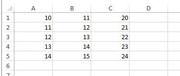
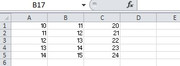
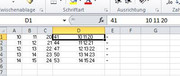
    Let's say as example, I have this, some numbers in columns A – C, and I want to sum them.
    https://i.postimg.cc/zDpr9TKJ/Number...n-column-D.jpg
    Row\Col A B C
    1 10 11 20
    2 11 12 21
    3 12 13 22
    4 13 14 23
    5 14 15 24

    I want to see the final summed result, but I also want to see the numbers I used to get the final sum. Preferably I want to see
    _ the final summed result
    and
    _ the numbers used to get the result,
    all in the same column, even if I delete columns A - C

    So for example in the first row, I could do something like this in cell D1
    = 10 + 11 + 20, which is a bit tedious,
    or
    = A1 + A2 + A3
    Etc, That is OK, but if I delete columns A – C, then I’m fucked. I could copy column D and then Paste values back, so that when I delete columns A – C, I still have my result. But I have lost the information of what numbers were used in the summation, (assuming I had deleted columns A – C ) .


    A solution, ( as done by ErikJan )
    Here is a simple non VBA way to have in a single column the result of a multicolumn summation, and the numbers used in the summation formula, without having to keep the columns with the numbers used in the summation formula.

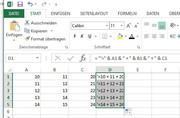
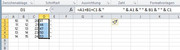
    _ 1) Put this formula in column D
    = "'=" & A1 & " + " & B1 & " + " & C1
    ( note the extra '), and
    _2) then drag it down formula A1 & B1 & C1 in column D and drag down.JPG
    https://i.postimg.cc/15tQP4rD/formul...-drag-down.jpg
    Row\Col D
    1 = "'=" & A1 & " + " & B1 & " + " & C1
    2 = "'=" & A2 & " + " & B2 & " + " & C2
    3 = "'=" & A3 & " + " & B3 & " + " & C3
    4 = "'=" & A4 & " + " & B4 & " + " & C4
    5 = "'=" & A5 & " + " & B5 & " + " & C5


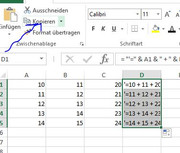
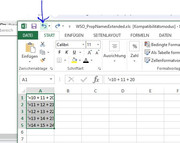
    _3) Now Copy the column D
    https://i.postimg.cc/C5vpkVSZ/Copy-column-D.jpg Copy column D.JPG

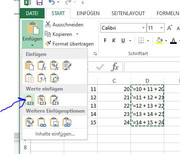
    _4) , and paste it back as values
    https://i.postimg.cc/50SV9CrS/Paste-back-as-values.jpg
    Paste back as values.JPG

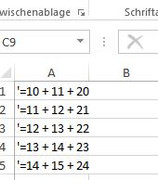
    _5) At this point, you could delete columns A- C if you wish
    https://i.postimg.cc/QM0ytJbm/Delete-Columns-A-C.jpg Delete Columns A-C.JPG
    Row\Col A
    1 '=10 + 11 + 20
    2 '=11 + 12 + 21
    3 '=12 + 13 + 22
    4 '=13 + 14 + 23
    5 '=14 + 15 + 24


    So now you see the values you want summed.


    _6) To get the values, do an Excel Find and Replace to remove the apostrophe'
    https://i.postimg.cc/nzJxtk3L/Find-a...Apostrophe.jpg https://i.postimg.cc/cC1NvJyy/Founde...Apostrophe.jpg
    Find and Replace to remove the Apostrophe.JPG

    _7) If you wish to see the numbers used again, then you can hit the back button
    https://i.postimg.cc/t48yByPW/Hit-ba...-summation.jpg

    ( Note: you could use any character, or characters rather than the apostrophe ' , but the apostrophe may have the advantage, depending on your settings or Excel versions, of not showing in the cells. I must investigate that further )


    Last edited by DocAElstein; 02-14-2024 at 03:45 AM.

  6. #6
    Fuhrer, Vierte Reich DocAElstein's Avatar
    Join Date
    Aug 2014
    Posts
    10,457
    Rep Power
    10
    Some notes to go with this forum post
    https://eileenslounge.com/viewtopic....314200#p314200
    https://eileenslounge.com/viewtopic....314281#p314281


    Just for fun, the way I might do it.
    Same test data, just to help compare offered solutions:
    https://i.postimg.cc/NjzZxy0C/Test-d...n-column-D.jpg
    Test data 5 rows of columns A - C to be summed in column D.jpg

    I want in column D the summed values and also the numbers used in the summation , - I want the numbers used in the summation, for example, for future reference even if I delete columns A - Z

    I would do this ..
    Code:
    Sub My2Euros() '  https://www.excelfox.com/forum/showthread.php/2860-Notes-tests-string-manipulation-of-text-files-and-string-manipulations?p=23991&viewfull=1#post23991
     Let Selection = "=A1+B1+C1 & ""                     "" & A1 & "" "" & B1 & "" "" & C1"   '     This line is like putting this formula in cell D1    =A1+B1+C1 & "          " & A1 & " " & B1 & " " & C1         and dragging it down
     Let Selection = Selection.Value                                                          '     line changes the cell values to the value the formula gives, rather than the formula, ( this is necessary so that I can still everything as I initially do in the sum result column, even if I delete the columns A - C
    End Sub
    The first code line is like putting this formula in cell D1
    Code:
    =A1+B1+C1 & "                     " & A1 & " " & B1 & " " & C1
    https://i.postimg.cc/wjvSJ59s/First-...1-A1-B1-C1.jpg
    First code line is like this in D1 A1+B1+C1 & & A1 & & B1 & &.jpg
    , and then dragging it down.

    The second code line changes the cell values to the value the formula gives, rather than the formula, ( this is necessary so that I can still everything as I initially do in the sum result column, even if I delete the columns A - C


    That way is just my preference for a few reasons:
    _ Text and text storage in computers is, as I understand it as a computer Layman, cheap and easy these days, so having a lot of text anywhere idoes no noticeable harm or performance degradation
    _ I would probably have things in the next column and my columns are not usually very wide., so I usually only see the results clearly, but if need be, to get full information ,I can extend the column , look in the formula bar or copy cells or a cell, etc.
    https://i.postimg.cc/TPW36LNB/Extend...-full-info.jpg
    Extended column or look in formula bar for full info.jpg
    Last edited by DocAElstein; 02-15-2024 at 11:21 PM.
    ….If you are my competitor, I will try all I can to beat you. But if I do, I will not belittle you. I will Salute you, because without you, I am nothing.
    If you are my enemy, we will try to kick the fucking shit out of you…..
    Winston Churchill, 1939
    Save your Forum..._
    KILL A MODERATOR!!

  7. #7
    Fuhrer, Vierte Reich DocAElstein's Avatar
    Join Date
    Aug 2014
    Posts
    10,457
    Rep Power
    10
    Some extended notes for this main forum post
    https://eileenslounge.com/viewtopic....a7d27b#p315620
    https://eileenslounge.com/viewtopic.php?p=315620&sid=922f8eb190547f727ca48c954aa7d27b#p315620
    This is post
    https://www.excelfox.com/forum/showt...ll=1#post24092
    https://www.excelfox.com/forum/showthread.php/2860-Notes-tests-string-manipulation-of-text-files-and-string-manipulations?p=24092&viewfull=1#post24092


    This particular post is intended just to reproduce , for later clarity , some things in the original main forum post

    At this point in the proceedings I had got to approximately these posts, or thereabouts . https://eileenslounge.com/viewtopic....315596#p315596
    https://eileenslounge.com/viewtopic....315512#p315512
    and the coding I was using was in **essence this following, ( ** changed just slightly to make comparisons with the next two post , ( https://www.excelfox.com/forum/showt...ll=1#post24094 https://www.excelfox.com/forum/showt...ll=1#post24093 ) , easier

    Those last two Eileen’s Lounge links, https://eileenslounge.com/viewtopic....315596#p315596
    https://eileenslounge.com/viewtopic....315512#p315512
    , sum up well what I was doing and this coding version of mine is a good summary of a shortened version of my main coding ideas, ( I have farmed out the BB Code tag making part to another routine, as that is not the main point of the current discussions. The main point of the current discussions is the getting of the appropriate URL to match a highlight key word in Microsoft Word)

    Code:
    Sub BBCodeTagsURL_()  '     https://eileenslounge.com/viewtopic.php?p=315503#p315503  https://www.excelfox.com/forum/showthread.php/2860-Notes-tests-string-manipulation-of-text-files-and-string-manipulations?p=24092&viewfull=1#post24092
    Rem 0  The text you selected
    Dim SelTxt As String
     Let SelTxt = Selection.Text ' A text I highlighted in Word
    
    Rem 1 Some groups of   name, URL,   pairs
    Dim strItAll As String, strEileen As String, strFox As String
     Let strEileen = "Eileen's Lounge, https://eileenslounge.com/app.php/portal, eileenslounge, https://eileenslounge.com/app.php/portal, The Windows Clipboard, https://www.eileenslounge.com/viewtopic.php?p=300947#p300947, "
     Let strFox = "Excel Fox, https://www.excelfox.com/forum/forum.php, excelfox, https://www.excelfox.com/forum/forum.php, "
     
     Let strItAll = strEileen & strFox
    
    Rem 2 Find the URL if there is one
    Dim strURL As String
            If InStr(1, strItAll, SelTxt, vbTextCompare) > 0 Then
         Let strURL = Mid(strItAll, InStr(InStr(1, strItAll, SelTxt, vbTextCompare), strItAll, "http", vbBinaryCompare), InStr(InStr(InStr(1, strItAll, SelTxt, vbTextCompare), strItAll, "http", vbBinaryCompare), strItAll, ",", vbBinaryCompare) - InStr(InStr(1, strItAll, SelTxt, vbTextCompare), strItAll, "http", vbBinaryCompare))
        Else
         Let strURL = ""
        End If
    
    Rem 3 Make the BB Code Tag URL thing
    Call MakeABBCodeTagURL(strURL)
    
    End Sub
    Sub MakeABBCodeTagURL(ByVal strURL As String) ' https://www.excelfox.com/forum/showthread.php/2860-Notes-tests-string-manipulation-of-text-files-and-string-manipulations?p=24092&viewfull=1#post24092
        With Selection
         .Text = "[URL=" & strURL & "] " & .Text & " [/url]"
         .Collapse Direction:=wdCollapseEnd
         .Font.Color = wdColorAutomatic
        End With
    End Sub
    Last edited by DocAElstein; 03-27-2024 at 10:52 PM.

  8. #8
    Fuhrer, Vierte Reich DocAElstein's Avatar
    Join Date
    Aug 2014
    Posts
    10,457
    Rep Power
    10
    Some extended notes for this main forum post
    https://eileenslounge.com/viewtopic....a7d27b#p315620
    https://eileenslounge.com/viewtopic.php?p=315620&sid=922f8eb190547f727ca48c954aa7d27b#p315620
    This is post
    https://www.excelfox.com/forum/showt...l=1#post240923
    https://www.excelfox.com/forum/showthread.php/2860-Notes-tests-string-manipulation-of-text-files-and-string-manipulations?p=24093&viewfull=1#post24093


    snb's offerings, for Word VBA / VBA alternative for App Match of Excel VBA


    Code:
    'Option Explicit
    Sub M_snb() ' https://eileenslounge.com/viewtopic.php?f=26&t=40789&p=315620#p315620
       c00 = "aa bb cc dd ee ff gg hh ii jj kk"           '  Word(s) Keys like       "Excel Fox, Eilen's Lounge
       sp = Split("mm nn oo pp qq rr ss tt uu vv ww")     '  1 D array of URLs like    "https://eileenslounge.com, https://www.excelfox.com
       
       c01 = "dd"                   '  an example word key
       MsgBox sp(UBound(Split(Split(c00, c01)(0))))
    End Sub
    It don’t work quite as I wanted it to:-
    _ It is not case insensitive on the key word, - my fault I did not make that clear. I can get over that by doing some UCase( )
    _ It returns a (wrong) answer instead of a "" if it does not find the word key. I will have to add a check for that. Probably the way my coding does that, something of this form will do, and make comparing of the codings easier,
    If InStr(1, strItAll, SelTxt, vbTextCompare) > 0 Then

    What’s the basic idea
    There are some useful ideas hidden in it.
    The main one is that splitting a text string by the thing you are looking for, ( along with a few other things ), as another way to get the position of it, so like a sort of alternative to InStr way to get at position something in a string

    This is an opened up version of Sub M_snb()

    Code:
    Sub SplitytySplit_M_snb_()   '    https://www.excelfox.com/forum/showthread.php/2860-Notes-tests-string-manipulation-of-text-files-and-string-manipulations?p=24093&viewfull=1#post24093
    Dim WdEileen As String, WdFox As String
     Let WdEileen = "Eileen's Lounge,eileenslounge,The Windows Clipboard,"
     Let WdFox = "Excel Fox,excelfox,"
    Dim Wdkey As String
     Let Wdkey = UCase(WdEileen & WdFox)                   '  word(s) Keys like       "Excel Fox, Eilen's Lounge
    
    Dim URLEileen As String, URLFox As String
     Let URLEileen = "https://eileenslounge.com/app.php/portal,https://eileenslounge.com/app.php/portal,https://www.eileenslounge.com/viewtopic.php?p=300947#p300947,"
     Let URLFox = "https://www.excelfox.com/forum/forum.php,https://www.excelfox.com/forum/forum.php,"
    Dim URLs As String
     Let URLs = URLEileen & URLFox
    Dim SptURLs() As String
     Let SptURLs() = Split(URLs, ",", -1, vbBinaryCompare)  ' 1 D array of URLs like    "https://eileenslounge.com, https://www.excelfox.com
     
    Dim Excample As String
     Let Excample = UCase("Excel fox")   '  an example  word key
    
    Dim SptOff As String    '  The next few lines give a sort of  InStr  alternative way  to "get at position something in a string"
     Let SptOff = Split(Wdkey, Excample, -1, vbBinaryCompare)(0)
    Dim nth As Long '  This effectively gives us a number which is the Index of both the word key and the URL
     Let nth = UBound(Split(SptOff, ",", -1, vbBinaryCompare))
     Let nth = Len(SptOff) - Len(Replace(SptOff, ",", "", 1, -1, vbBinaryCompare))
     
    Dim wantedURL As String
     Let wantedURL = SptURLs(nth): Debug.Print wantedURL ' gives https://www.excelfox.com/forum/forum.php
    End Sub
    This next version puts it in a form more comparable with my full instr version, Sub InstrIt()


    Code:
    Sub SplitytySplit__()    '    https://www.excelfox.com/forum/showthread.php/2860-Notes-tests-string-manipulation-of-text-files-and-string-manipulations?p=24093&viewfull=1#post24093
    Rem 0  The text you selected
    Dim SelTxt As String
     Let SelTxt = Selection.Text ' A text I highlighted in Word
     Let SelTxt = UCase(SelTxt)
    
    Rem 1 Some groups of   name, URL,   pairs
    Dim WdEileen As String, WdFox As String
     Let WdEileen = "Eileen's Lounge,eileenslounge,The Windows Clipboard,"
     Let WdFox = "Excel Fox,excelfox,"
    Dim Wdkey As String
     Let Wdkey = UCase(WdEileen & WdFox)                   '  word(s) Keys like       "Excel Fox, Eilen's Lounge
    
    Dim URLEileen As String, URLFox As String
     Let URLEileen = "https://eileenslounge.com/app.php/portal,https://eileenslounge.com/app.php/portal,https://www.eileenslounge.com/viewtopic.php?p=300947#p300947,"
     Let URLFox = "https://www.excelfox.com/forum/forum.php,https://www.excelfox.com/forum/forum.php,"
    Dim URLs As String
     Let URLs = URLEileen & URLFox
    Dim SptURLs() As String
     Let SptURLs() = Split(URLs, ",", -1, vbBinaryCompare)  ' 1 D array of URLs like    "https://eileenslounge.com, https://www.excelfox.com
     
    Rem 2 Find the URL , but only  works  if there is one
    Dim SptOff As String    '  The next few lines give a sort of  InStr  alternative way  to "get at position something in a string"
     Let SptOff = Split(Wdkey, SelTxt, -1, vbBinaryCompare)(0)
    Dim nth As Long '  This effectively gives us a number which is the Index of both the word key and the URL
     Let nth = UBound(Split(SptOff, ",", -1, vbBinaryCompare))
     Let nth = Len(SptOff) - Len(Replace(SptOff, ",", "", 1, -1, vbBinaryCompare))
     Let strURL = SptURLs(nth)
    Rem 3 Make the BB Code Tag URL thing
    Call MakeABBCodeTagURL(strURL)
    End Sub
    And here is TLDR version to try and make a better comparison to my shortest version so far, Sub BBCodeTagsURL()
    Code:
    Sub SplitytySplit_TLDR()   '  https://www.excelfox.com/forum/showthread.php/2860-Notes-tests-string-manipulation-of-text-files-and-string-manipulations?p=24093&viewfull=1#post24093
    Rem 0  The text you selected
    Dim SelTxt As String
     Let SelTxt = UCase(Selection.Text) ' A text I highlighted in Word in  UCase  as part of way to get the key text search case insensitive
    
    Rem 1 Some groups of   name, URL,   pairs
    Dim WdEileen As String, WdFox As String
     Let WdEileen = "Eileen's Lounge,eileenslounge,The Windows Clipboard,"
     Let WdFox = "Excel Fox,excelfox,"
    Dim Wdkey As String
     Let Wdkey = UCase(WdEileen & WdFox)                   '  word(s) Keys like       "Excel Fox, Eilen's Lounge
    
    Dim URLEileen As String, URLFox As String
     Let URLEileen = "https://eileenslounge.com/app.php/portal,https://eileenslounge.com/app.php/portal,https://www.eileenslounge.com/viewtopic.php?p=300947#p300947,"
     Let URLFox = "https://www.excelfox.com/forum/forum.php,https://www.excelfox.com/forum/forum.php,"
    Dim URLs As String
     Let URLs = URLEileen & URLFox
                                'Dim SptURLs() As String
                                ' Let SptURLs() = Split(URLs, ",")  ' 1 D array of URLs like    "https://eileenslounge.com, https://www.excelfox.com
     
    Rem 2 Find the URL if there is one, or make   ""   if no match
    Dim strURL As String
        If InStr(1, Wdkey, SelTxt, vbTextCompare) > 0 Then
         Let strURL = Split(URLs, ",")(UBound(Split(Split(Wdkey, SelTxt)(0), ",")))
        Else
         Let strURL = ""
        End If
    Rem 3 Make the BB Code Tag URL thing
    Call MakeABBCodeTagURL(strURL)
    End Sub
    Conclusion
    Rem 2 is probably the best part to compare. The main coding line
    Split(URLs, ",")(UBound(Split(Split(Wdkey, SelTxt)(0), ",")))
    looks a bit better in snb’s than mine,
    Mid(strItAll, InStr(InStr(1, strItAll, SelTxt, vbTextCompare), strItAll, "http", vbBinaryCompare), InStr(InStr(InStr(1, strItAll, SelTxt, vbTextCompare), strItAll, "http", vbBinaryCompare), strItAll, ",", vbBinaryCompare) - InStr(InStr(1, strItAll, SelTxt, vbTextCompare), strItAll, "http", vbBinaryCompare))


    A lesser point possibly is that adding more pairs is slightly more difficult, and prone to mistakes in snb’s as the key word and the URL go in different places.

    (I noticed something new, or better said something I overlooked: Both mine and snb’s coding here will get you a URL string likely to be the one you want if you select only part of the text and then run the coding.
    In these examples, for example, if selecting
    Excel FoX
    , and running the coding got you this in the Microsoft Word document,
    [URL=https://www.excelfox.com/forum/forum.php] Excel FoX [/url]
    (, so in the final forum post you would get this Excel FoX )

    , then selecting
    oX
    , and running the coding would get you this in the Microsoft Word document
    Excel F[URL=https://www.excelfox.com/forum/forum.php]oX [/url]
    (, and in the final forum post you would get this
    Excel FoX
    I suspect that would be more useful than not, but I might change my opinion as time goes on and the number of key word , URL link pairs increases, as that might increase the occurrence of the coding getting the wrong URL, as there will be more likelyhood of a short text being found in more key words
    )
    Last edited by DocAElstein; 03-28-2024 at 03:12 AM.

  9. #9
    Fuhrer, Vierte Reich DocAElstein's Avatar
    Join Date
    Aug 2014
    Posts
    10,457
    Rep Power
    10
    Some extended notes for replies to these main forum posts
    https://eileenslounge.com/viewtopic....315849#p315849
    https://eileenslounge.com/viewtopic....315754#p315754
    This is post
    https://www.excelfox.com/forum/showt...ll=1#post24094
    https://www.excelfox.com/forum/showthread.php/2860-Notes-tests-string-manipulation-of-text-files-and-string-manipulations?p=24094&viewfull=1#post24094


    Another snb offering , ( a couple ),- so lets take a look at snb’s dic first, not necessarily a pretty sight, but never mind.
    Code:
     Sub snb_dic()  '      To use a dictionary I would write it this way:  https://eileenslounge.com/viewtopic.php?p=315849#p315849
      c00 = Selection
      With CreateObject("scripting.dictionary")
        .Item(UCase("Eileen's Lounge")) = "https://eileenslounge.com/app.php/portal"
        .Item(UCase("eileenslounge")) = "https://eileenslounge.com/app.php/portal"
        .Item(UCase("The Windows Clipboard")) = "https://www.eileenslounge.com/viewtopic.php?p=300947#p300947"
        .Item(UCase("Excel Fox")) = "https://www.excelfox.com/forum/forum.php"
        .Item(UCase("excelfox")) = "https://www.excelfox.com/forum/forum.php"
          
         MsgBox .Item(UCase(c00))
      End With
    End Sub
    
    Sub snb_docv()  '      In Word you can also use the docvariables:    https://eileenslounge.com/viewtopic.php?p=315849#p315849
        c00 = Selection  
       With ThisDocument
        .Variables(UCase("Eileen's Lounge")) = "https://eileenslounge.com/app.php/portal"
        .Variables(UCase("eileenslounge")) = "https://eileenslounge.com/app.php/portal"
        .Variables(UCase("The Windows Clipboard")) = "https://www.eileenslounge.com/viewtopic.php?p=300947#p300947"
        .Variables(UCase("Excel Fox")) = "https://www.excelfox.com/forum/forum.php"
        .Variables(UCase("excelfox")) = "https://www.excelfox.com/forum/forum.php"
          
         MsgBox .Variables(UCase(c00))
      End With
    End Sub
    First, snb either noticed, or didn’t, that a If dic.Exists(SelTxt) Then is never needed. The same goes for SpeakEasy’s dic, so let’s first get those two up in a better comparison for, snb’s and SpeakEasy’s dic
    Code:
    '      https://eileenslounge.com/viewtopic.php?p=315849#p315849
    Sub snb_dicc_TLDR()  '  https://www.excelfox.com/forum/showthread.php/2860-Notes-tests-string-manipulation-of-text-files-and-string-manipulations?p=24094&viewfull=1#post24094
    Rem 0  The text you selected
     Let SelTxt = UCase(Trim$(Selection.Text)) ' A text I highlighted in Word
        
    Rem 1 Some groups of   name, URL,   pairs
        With CreateObject("scripting.dictionary")
    ' Eileen's Lounge
        .Item(UCase("Eileen's Lounge")) = "https://eileenslounge.com/app.php/portal"
        .Item(UCase("eileenslounge")) = "https://eileenslounge.com/app.php/portal"
        .Item(UCase("The Windows Clipboard")) = "https://www.eileenslounge.com/viewtopic.php?p=300947#p300947"
    ' Excel Fox stuff
        .Item(UCase("Excel Fox")) = "https://www.excelfox.com/forum/forum.php"
        .Item(UCase("excelfox")) = "https://www.excelfox.com/forum/forum.php"
        
    Rem 2 Find the URL if there is one
    Dim strURL As String
         Let strURL = .Item(SelTxt)
      End With
    Rem 3 Make the BB Code Tag URL thing
    Call MakeABBCodeTagURL(strURL)
    End Sub
    
    Code:
    Sub BBCodeTagsURLDictionaryd()
        Rem 0  The text you selected
    Dim mydic As New Scripting.Dictionary  ' Early Binding referrence   https://i.postimg.cc/mgKt2QgN/Microsoft-Scripting-Runtime.jpg
    Dim SelTxt As String, strURL As String
     Let SelTxt = UCase(Trim$(Selection.Text)) ' A text I highlighted in Word
        
    Rem 1 Some groups of   name, URL,   pairs
    ' Eileen's Lounge
        mydic.Add Key:=UCase("Eileen's Lounge"), Item:="https://eileenslounge.com/app.php/portal"
        mydic.Add Key:=UCase("eileenslounge"), Item:="https://eileenslounge.com/app.php/portal"
        mydic.Add Key:=UCase("The Windows Clipboard"), Item:="https://www.eileenslounge.com/viewtopic.php?p=300947#p300947"
    ' Excel Fox stuff
        mydic.Add Key:=UCase("Excel Fox"), Item:="https://www.excelfox.com/forum/forum.php"
        mydic.Add Key:=UCase("excelfox"), Item:="https://www.excelfox.com/forum/forum.php"
         
    Rem 2 Find the URL if there is one
    Dim strURL As String
         Let strURL = mydic(SelTxt)
        
    Rem 3 Make the BB Code Tag URL thing
    Call MakeABBCodeTagURL(strURL)
    End Sub
    Maybe the main diffference now is that the filling looks just slightly tidier

    _.________________________________________________ _________________________________________________
    Code:
    Sub snb_docv()  '      In Word you can also use the docvariables:    https://eileenslounge.com/viewtopic.php?p=315849#p315849
        c00 = Selection  
       With ThisDocument
        .Variables(UCase("Eileen's Lounge")) = "https://eileenslounge.com/app.php/portal"
        .Variables(UCase("eileenslounge")) = "https://eileenslounge.com/app.php/portal"
        .Variables(UCase("The Windows Clipboard")) = "https://www.eileenslounge.com/viewtopic.php?p=300947#p300947"
        .Variables(UCase("Excel Fox")) = "https://www.excelfox.com/forum/forum.php"
        .Variables(UCase("excelfox")) = "https://www.excelfox.com/forum/forum.php"
          
         MsgBox .Variables(UCase(c00))
      End With
    End Sub
    The document variable looked initially interesting. It seems to be like a simplified dictionary. The disadvantage here seems to be that if the document variable does not exist, then attempting to get that non-existent variable, will error. There is no simple way, for example there is no equivalent of the dictionary If dic.Exists(SelTxt) Then
    Probably error handling would be the only simple way to do a check. We usually all frown a bit on error handling, if we can do without it. So unless this document variable way has significant other advantages that I don’t know about, then, whilst it certainly is interesting to know about it, I think, for now, it does not get on my short list, or at least low down the list. Shame as my initial thoughts were that it might be some sort of word dedicated and optimised type of dictionary. So then I would have had it all neatly in in word.
    I wonder if possibly Error handling in VBA has a different reputation in Word as Excel? My opinion of it as a bad thing comes from partly from the average smarter Excel person than me in who more often than not says it’s a bad thing if you can find a way to do without it.

    Anyway, this would be the equivalent short coding equivalent for the document variable way
    Code:
    '      https://eileenslounge.com/viewtopic.php?p=315849#p315849
    Sub snb_docvc_TLDR()  '  https://www.excelfox.com/forum/showthread.php/2860-Notes-tests-string-manipulation-of-text-files-and-string-manipulations?p=24094&viewfull=1#post24094
    Dim strURL As String, SelTxt As String
    Rem 0  The text you selected
     Let SelTxt = UCase(Trim$(Selection.Text)) ' A text I highlighted in Word
        
    Rem 1 Some groups of   name, URL,   pairs
        With ThisDocument
    ' Eileen's Lounge
        .Variables(UCase("Eileen's Lounge")) = "https://eileenslounge.com/app.php/portal"
        .Variables(UCase("eileenslounge")) = "https://eileenslounge.com/app.php/portal"
        .Variables(UCase("The Windows Clipboard")) = "https://www.eileenslounge.com/viewtopic.php?p=300947#p300947"
    ' Excel Fox stuff
        .Variables(UCase("Excel Fox")) = "https://www.excelfox.com/forum/forum.php"
        .Variables(UCase("excelfox")) = "https://www.excelfox.com/forum/forum.php"
        
    Rem 2 Find the URL if there is one
        On Error Resume Next
         Let strURL = .Variables(SelTxt)
        On Error GoTo 0
        End With
    Rem 3 Make the BB Code Tag URL thing
    Call MakeABBCodeTagURL(strURL)
    End Sub


    Something like this would add the two latest snb offerings to the main bit to make comparisons from, at least as regards the main working bit of the coding ( correcting SpeakEasy’s dic to remove the If mydic.Exists( bit

    Code:
        If InStr(1, strItAll, SelTxt, vbTextCompare) > 0 Then
         Let strURL = Mid(strItAll, InStr(InStr(1, strItAll, SelTxt, vbTextCompare), strItAll, "http", vbBinaryCompare), InStr(InStr(InStr(1, strItAll, SelTxt, vbTextCompare), strItAll, "http", vbBinaryCompare), strItAll, ",", vbBinaryCompare) - InStr(InStr(1, strItAll, SelTxt, vbTextCompare), strItAll, "http", vbBinaryCompare))
    
        If InStr(1, Wdkey, SelTxt, vbTextCompare) > 0 Then
         Let strURL = Split(URLs, ",")(UBound(Split(Split(Wdkey, SelTxt)(0), ",")))
    
        If InStr(1, strItAll, SelTxt, vbTextCompare) > 0 Then
      '  If UBound(Filter(Split(strItAll, ", "), SelTxt, True, vbTextCompare)) > -1 Then
         Let strURL = Split(Filter(Split(strItAll, ", "), SelTxt, True, vbTextCompare)(0), "_")(1)
    
         Let strURL = mydic(SelTxt)    '   SpeakEasy dic
    
         Let strURL = .Item(SelTxt)     '   snb dic
    
        On Error Resume Next
         Let strURL = .Variables(SelTxt)  '   document variable way
        On Error GoTo 0
    Not so much difference with Speakeasy’s dic or snb’s dic. People’s opinions differ a bit about the With CreateObject( being good because you do away with an object variable. Personally I am less keen most of the time with the With and End With pair, but in some uses I quite like it, the With CreateObject( being one of them

    The document variable way is new to me, so I will reserve judgment on that one just now. Perhaps smarter Word experts passing might at some time have a comment on it or advice about it?
    Attached Files Attached Files
    Last edited by DocAElstein; 04-03-2024 at 01:15 AM.

  10. #10
    Fuhrer, Vierte Reich DocAElstein's Avatar
    Join Date
    Aug 2014
    Posts
    10,457
    Rep Power
    10
    hhhhkh


    https://www.youtube.com/channel/UCnxwq2aGJRbjOo_MO54oaHA
    https://www.youtube.com/watch?v=pkhazgI3LAo&lc=UgxesLhWNr_zNP0GUdh4AaABAg.9hI1CQJMLLo9hWn2pGBe SS
    https://www.youtube.com/watch?v=pkhazgI3LAo&lc=UgzkRujoMw9PblmXDQ14AaABAg.9hJRnEjxQrd9hJoCjomN I2
    https://www.youtube.com/watch?v=pkhazgI3LAo&lc=UgzPZbG7OvUkh35nXDd4AaABAg.9hJOZEEZa6p9hJqLC7El-w
    https://www.youtube.com/watch?v=pkhazgI3LAo&lc=UgwUcEpm8u6ZW3uOHXx4AaABAg.9hIlxxGY7t49hJsB2PWx C4
    https://www.youtube.com/watch?v=pkhazgI3LAo&lc=UgyvDj6NWT1Gxyy2JyR4AaABAg.9hIKlNPeqDn9hJskm92n p6
    https://www.youtube.com/watch?v=pkhazgI3LAo&lc=Ugwy7qx_kG9iUmMVO_F4AaABAg.9hI2IGUdmTW9hJuyaQaw qx
    https://www.youtube.com/watch?v=pkhazgI3LAo&lc=UgxesLhWNr_zNP0GUdh4AaABAg.9hI1CQJMLLo9hJwTB9Jl ob
    https://www.youtube.com/watch?v=pkhazgI3LAo&lc=UgyyQWYVP1OnCqavb-x4AaABAg
    https://www.youtube.com/watch?v=pkhazgI3LAo&lc=UgwJKKmExZ1FdZVDJf54AaABAg
    https://www.youtube.com/watch?v=pkhazgI3LAo&lc=Ugz_p0kVGrLntPtYzCt4AaABAg
    https://www.youtube.com/channel/UCnxwq2aGJRbjOo_MO54oaHA


    https://www.youtube.com/channel/UCnxwq2aGJRbjOo_MO54oaHA
    https://www.youtube.com/watch?v=pkhazgI3LAo&lc=UgxesLhWNr_zNP0GUdh4AaABAg.9hI1CQJMLLo9hWn2pGBe SS
    https://www.youtube.com/watch?v=pkhazgI3LAo&lc=UgzkRujoMw9PblmXDQ14AaABAg.9hJRnEjxQrd9hJoCjomN I2
    https://www.youtube.com/watch?v=pkhazgI3LAo&lc=UgzPZbG7OvUkh35nXDd4AaABAg.9hJOZEEZa6p9hJqLC7El-w
    https://www.youtube.com/watch?v=pkhazgI3LAo&lc=UgwUcEpm8u6ZW3uOHXx4AaABAg.9hIlxxGY7t49hJsB2PWx C4
    https://www.youtube.com/watch?v=pkhazgI3LAo&lc=UgyvDj6NWT1Gxyy2JyR4AaABAg.9hIKlNPeqDn9hJskm92n p6
    https://www.youtube.com/watch?v=pkhazgI3LAo&lc=Ugwy7qx_kG9iUmMVO_F4AaABAg.9hI2IGUdmTW9hJuyaQaw qx
    https://www.youtube.com/watch?v=pkhazgI3LAo&lc=UgxesLhWNr_zNP0GUdh4AaABAg.9hI1CQJMLLo9hJwTB9Jl ob
    https://www.youtube.com/watch?v=pkhazgI3LAo&lc=UgyyQWYVP1OnCqavb-x4AaABAg
    https://www.youtube.com/watch?v=pkhazgI3LAo&lc=UgwJKKmExZ1FdZVDJf54AaABAg
    https://www.youtube.com/watch?v=pkhazgI3LAo&lc=Ugz_p0kVGrLntPtYzCt4AaABAg
    https://www.youtube.com/channel/UCnxwq2aGJRbjOo_MO54oaHA
    ….If you are my competitor, I will try all I can to beat you. But if I do, I will not belittle you. I will Salute you, because without you, I am nothing.
    If you are my enemy, we will try to kick the fucking shit out of you…..
    Winston Churchill, 1939
    Save your Forum..._
    KILL A MODERATOR!!

Similar Threads

  1. Replies: 116
    Last Post: 02-23-2025, 12:13 AM
  2. Replies: 4
    Last Post: 10-02-2022, 09:18 PM
  3. Replies: 4
    Last Post: 01-30-2022, 04:05 PM
  4. Replies: 0
    Last Post: 07-08-2020, 04:29 PM
  5. string manipulation
    By kylefoley76 in forum Excel Help
    Replies: 5
    Last Post: 02-20-2014, 12:10 AM

Posting Permissions

  • You may not post new threads
  • You may not post replies
  • You may not post attachments
  • You may not edit your posts
  •