


Hi Liviu
This is fairly easy with VBA.
Excel itself is not much more than a lot of VBA coding that automatically does things when you type stuff.
In VBA we have 2 sorts of possibilities to do coding to do stuff
Either
_ (i) we can write a macro from scratch and then run it ourselves when we want to. Those complete macros we put typically in a normal code module. We make those code modules as we need them
or
_ (ii) we can add some more coding into the existing coding written by Microsoft which automatically run when something is done. ( Often here we talk about Event Coding ). Microsoft have alredy put those code modules in.
Microsoft don’t usually let us look at the macros they wrote to make Excel work, but they do give us a way to add coding in the same place, so that way it can also be run when something is done.
so, we want to tap into the coding that runs when something is done in worksheet database. There are a few such macros. As an initial attempt, I will try the one which runs when something is changed in worksheet database.
Here is one way to get at it:
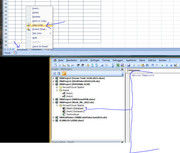
_ First, right click on the tab and select View Code :
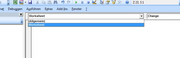
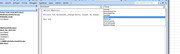
_ Then fiddle around with both of the two drop down lists until you get the coding to do with worksheet change :
It’s this oneYou don’t see all the coding that is already there because Microsoft don’t want us to and so they have made it invisible. That does not worry us. We just add our coding in there and it will be done when all the other stuff is done by Microsoft when you change anything in a worksheet, (specifically worksheet database in this case)Code:Private Sub Worksheet_Change(ByVal Target As Range) End Sub
After that, its just normally VBA coding stuff
I will help get you started with some coding that runs when you change something in column H (column 8 )
That may not be the final required macro. It does work with your test data and give the correct results. But it might need some final tweaking to make sure it works correctly with all possible data.Code:Private Sub Worksheet_Change(ByVal Target As Range) ' the next few lines arange when excactly our coding is done If Target.Cells.Count <> 1 Then Exit Sub ' So I will ignore any multi cell changes If Target.Column <> 8 Then Exit Sub ' So I will ignore any changes not in column H ' If we get this far then we changed something in column H (column 8) Dim WsD1 As Worksheet: Set WsD1 = ThisWorkbook.Worksheets("Database1") ' I need to have some way to tell Excel when i am referring to the other worksheet, or else Excel will by default think I am referencing this workseet Rem 1 try to match the name & Activity & Sub-activity Dim arrD1() As Variant: Let arrD1() = WsD1.Evaluate("=A1:A25 & B1:B25 & C1:C25") ' This is a convenient way to get an array of the three things for all rows Dim strSrch As String ': Let strSrch = Range("E2").Value & Range("F2").Value & Range("G2").Value ' This gives for example, "JohnA.1A.1.1" Dim TgRw As Long: Let TgRw = Target.Row ' the changed target row Let strSrch = Range("E" & TgRw & "").Value & Range("F" & TgRw & "").Value & Range("G" & TgRw & "").Value Dim MtchRw As Long Let MtchRw = Application.Match(strSrch, arrD1(), 0) ' this tries to match the correct row in Database1 Rem 2 try now to match the dates Dim arrDts() As Variant: Let arrDts() = WsD1.Evaluate("=IF({1},A1:K1)") Dim DteV2 As Long: Let DteV2 = Range("D" & TgRw & "").Value2 ' Value 2 gives us the number used by excel for a date Dim MtchClm As Long Let MtchClm = Application.Match(DteV2, arrDts(), 1) ' this tries to match the correct row in Database1 using a 1 as the third argument im match will get the neartest next date match Rem 3 use the found row and column to get the final wanted result Let WsD1.Cells.Item(MtchRw, MtchClm).Value = Range("H" & TgRw & "").Value End Sub
Its intended to get you started on the sort of coding that you need.
See how you get on, and we can then take it further when I have more time, if you need more help.
Alan
https://www.youtube.com/channel/UCnxwq2aGJRbjOo_MO54oaHA
https://www.youtube.com/channel/UCnxwq2aGJRbjOo_MO54oaHA
https://www.youtube.com/channel/UCnxwq2aGJRbjOo_MO54oaHA
https://www.youtube.com/watch?v=xLCWtC6UYrM&lc=UgxzpgHWTLGj0C3q3gx4AaABAg. 9gxsUMU53al9k5c8W6QGE8
https://www.youtube.com/watch?v=xLCWtC6UYrM&lc=Ugz2PzvZTJyxHz70eVF4AaABAg. 9gxDYq2iiZ89h4ISxLD17d
https://www.youtube.com/watch?v=xLCWtC6UYrM&lc=Ugz2PzvZTJyxHz70eVF4AaABAg. 9gxDYq2iiZ89h4LdsDETim
https://www.youtube.com/watch?v=xLCWtC6UYrM&lc=Ugz2PzvZTJyxHz70eVF4AaABAg. 9gxDYq2iiZ89h32czjtyR_
https://www.youtube.com/watch?v=xLCWtC6UYrM&lc=UgxzpgHWTLGj0C3q3gx4AaABAg
https://www.youtube.com/watch?v=xLCWtC6UYrM&lc=Ugw_smEwvNffCPr_nrB4AaABAg. 9gvyL53lI1l9gxwd_9-V6z
https://www.youtube.com/watch?v=xLCWtC6UYrM&lc=Ugy7vmiHsQ0oUt2QCPZ4AaABAg. 9gvoy4OW6lU9gxwxC5-rL9
https://www.youtube.com/watch?v=xLCWtC6UYrM&lc=UgzuX3uYmqJRtsZIbqF4AaABAg. 9gth61YhXKB9gxxCMdRLA0
https://www.youtube.com/watch?v=xLCWtC6UYrM&lc=UgxcPC64RQGmXwO5rft4AaABAg. 9gtQLXaeg0e9gxxNuc5CCM
https://www.youtube.com/watch?v=xLCWtC6UYrM&lc=UgwCY8vOs1DFHgYSJwF4AaABAg. 9godrFcyWYw9gxy1odpiRj
https://www.youtube.com/watch?v=xLCWtC6UYrM&lc=UgyL5nh_j8w70-YBoUt4AaABAg.9goMcRjwjtc9gxyslvuZKx
https://www.youtube.com/watch?v=xLCWtC6UYrM&lc=UgwwWRgmRZNqJKptHR14AaABAg. 9go-DbayTZa9gxzPbefHXf
https://www.youtube.com/watch?v=xLCWtC6UYrM&lc=UgwF3wECwc8tVoRmz6B4AaABAg. 9go-5xLQM8P9gxzmB7nkVQ
https://www.youtube.com/watch?v=xLCWtC6UYrM&lc=UgyRDmGTHnMdT7dl_qx4AaABAg
https://www.youtube.com/channel/UCnxwq2aGJRbjOo_MO54oaHA
https://www.youtube.com/channel/UCnxwq2aGJRbjOo_MO54oaHA
https://www.youtube.com/watch?v=v_1iqtOnUMg&lc=UgxUbeYSvsBH2Gianox4AaABAg. 9VYH-07VTyW9gJV5fDAZNe
https://www.youtube.com/watch?v=v_1iqtOnUMg&lc=UgxLtKj969oiIu7zNb94AaABAg
https://www.youtube.com/watch?v=v_1iqtOnUMg&lc=UgyhQ73u0C3V4bEPhYB4AaABAg
https://www.youtube.com/watch?v=v_1iqtOnUMg&lc=UgzIElpI5OFExnUyrk14AaABAg. 9fsvd9zwZii9gMUka-NbIZ
https://www.youtube.com/watch?v=jdPeMPT98QU
https://www.youtube.com/watch?v=QdwDnUz96W0&lc=Ugx3syV3Bw6bxddVyBx4AaABAg
https://www.youtube.com/channel/UCnxwq2aGJRbjOo_MO54oaHA


 Reply With Quote
Bookmarks