


Part 2
Get the 4vcAvCLMyUY type bit for use in like https://www.youtube.com/watch?v=4vcAvCLMyUY
I decided to get out all 11 digit unique YouTube bits ( like WDCmlmylNm8 ) you have in a typical YouTube video link, like https://www.youtube.com/watch?v=WDCmlmylNm8
I find by inspection that there seems to be all these 11 digit unique YouTube bits, (sometimes duplicated**) in some text ending with like hqdefault.jpg. So that is what is looked for, then a bit of text manipulation is done to pick out the 11 digit unique YouTube bit
I used a macro like this next one, to get all the 11 digit bits from the 9 files got in the last post.
That code above checks for duplicates of that 11 digit bit in each text file**, but there may be duplicates for the list from each text file as I click a bit above the last link, say on 76th link ,rather than the typical last 79th link, ( if I clicked on the 79th link I would get the unique 11 digit bit for the 79th video twice from the first two text files, by clicking on the 76th link I will get in both the first two text files the 11 digit bit for the 76th 77th 78th and 79th )Code:Sub GetPlayListLinksFromTextFileUsinghqdefaultjpg() ' look fo this - hqdefault.jpg Rem 0 Dim Ws1 As Worksheet: ' Set Ws1 = ThisWorkbook.Worksheets.Item(1) Set Ws1 = ThisWorkbook.Worksheets.Item("RoughNotes") ' Rem 1 Get the text file as a long single string Dim FileNum As Long: Let FileNum = FreeFile(1) ' https://msdn.microsoft.com/en-us/vba/language-reference-vba/articles/freefile-function Dim PathAndFileName As String, TotalFile As String ' Let PathAndFileName = ThisWorkbook.Path & Application.PathSeparator & "WieGehtsYouTubeServerChrome.txt" ' Let PathAndFileName = ThisWorkbook.Path & Application.PathSeparator & "WieGehtsYouTubeServerChrome601.txt" ' "WieGehtsYouTubeServerChrome526.txt" ' "WieGehtsYouTubeServerChrome451.txt" ' "WieGehtsYouTubeServerChrome376.txt" ' "WieGehtsYouTubeServerChrome301.txt" ' "WieGehtsYouTubeServerChrome226.txt" ' "WieGehtsYouTubeServerChrome151.txt" ' "WieGehtsYouTubeServerChrome76.txt" ' '"WieGehtsYouTubeServerChrome1.txt" ' Open PathAndFileName For Binary As #FileNum 'Open Route to data. Binary is a fundamental type data input... ' Let TotalFile = Space(LOF(FileNum)) '....and wot receives it has to be a string of exactly the right length 'Get #FileNum, , TotalFile ' Or http://www.eileenslounge.com/viewtopic.php?p=295782&sid=f6dcab07c4d24e00e697fe4343dc7392#p295782 Let TotalFile = Input(LOF(FileNum), FileNum) Close #FileNum ' Rem 2 Get all links based on the unique bit of index=x, where x is 1 2 3 4 ...... etc Dim Cnt As Long: Let Cnt = 1 Dim TextBit As String: Let TextBit = TotalFile Dim posJpg As Long: Let posJpg = InStr(1, TextBit, "hqdefault.jpg", vbBinaryCompare) Do While posJpg <> 0 Dim strURL As String: Let strURL = Mid(TextBit, posJpg - 12, 11) Dim Unics As String If InStr(1, Unics, strURL, vbBinaryCompare) = 0 Then Let Unics = Unics & " " & strURL Dim Lr1 As Long: Let Lr1 = Ws1.Range("B" & Ws1.Rows.Count & "").End(xlUp).Row Dim Nr As Long If Ws1.Range("B1").Value = "" Then Let Nr = 1 Else Let Nr = Lr1 + 1 End If Let Ws1.Range("B" & Nr & "").Value = strURL Else ' Got a dup Let Ws1.Range("C" & Nr & "").Value = Ws1.Range("C" & Nr & "").Value + 1 ' for count of dups End If Let TextBit = Mid(TextBit, posJpg + 1) Let posJpg = InStr(1, TextBit, "hqdefault.jpg", vbBinaryCompare) Loop End Sub
That outputs to a spare sheet.
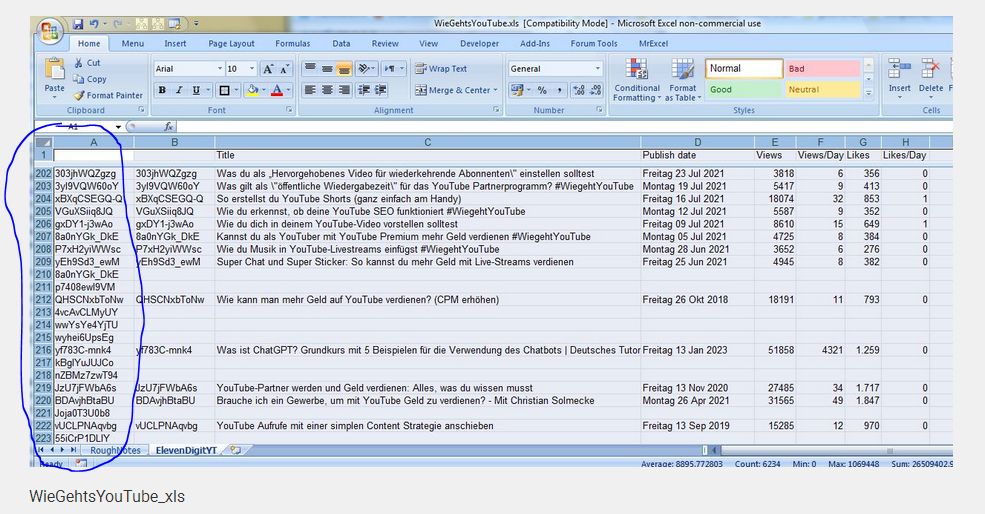
For now I manually copy that output 9 times and stick it all in column A of my main file, WieGehtsYouTube.xls ( https://app.box.com/s/97fnm2hhhbiwcnz4nte700pp9sqy79uy ).
(There are a few extra videos that seems to be advertisements or some video he recommends from someone else. Doesn’t matter – its obvious usually from the title wots wot. I also have the duplicates mentioned, but I take them out at the start of the next macro
I do it all like this for no special reason – its just the way it came out the first time as I went along. )

 Reply With Quote
Bookmarks