


This is post https://www.excelfox.com/forum/showt...ll=1#post19568
https://www.excelfox.com/forum/showthread.php/2837-Appendix-Thread-App-Index-Rws()-Clms()-Majic-code-line-Codings-for-other-Threads-Tables-etc-)?p=19568&viewfull=1#post19568
https://www.excelfox.com/forum/showt...ge53#post19568
https://www.excelfox.com/forum/showthread.php/2837-Appendix-Thread-App-Index-Rws()-Clms()-Majic-code-line-Codings-for-other-Threads-Tables-etc-)/page53#post19568
Some further explaining notes for this Thread answer
https://eileenslounge.com/viewtopic.php?f=27&t=40371
https://eileenslounge.com/viewtopic....312533#p312533
https://eileenslounge.com/viewtopic....312533#p312533
Part 2
Re-alignment of data
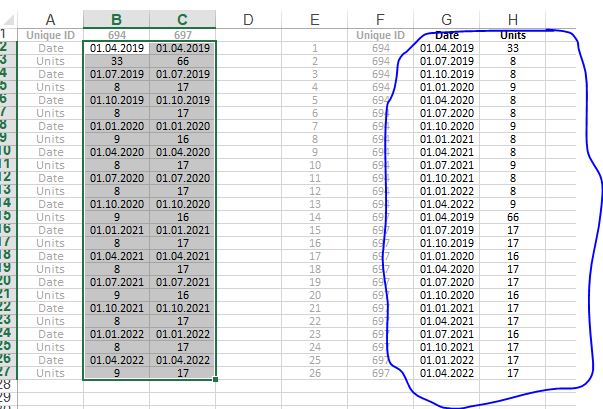
This is what we have:
This is what we want
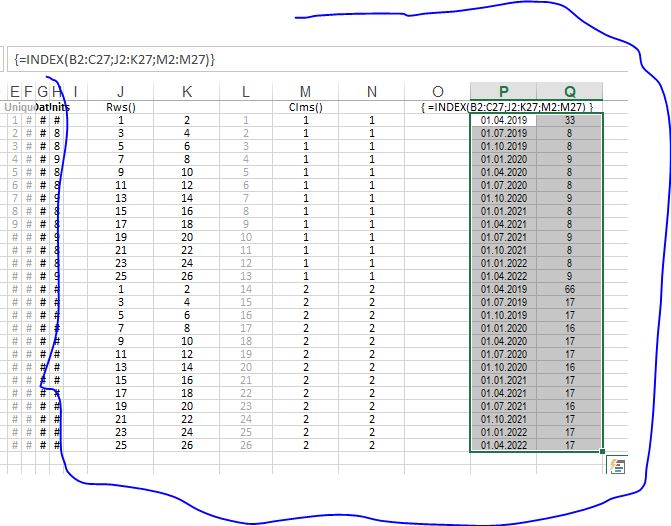
We can get the results in the Excel spreadsheet CSE "Array" Type 2 way sort of way like this
We want to do that in VBA in the magical code line way of
arrOut() = Index(arrIn(), Rws(), Clms())
arrIn() is our Range B2:C27
Column Indicia array, Clms()
We note first that we have two identical columns. This helps simplify things, as Interception and Implicit Intersection theory tells us that using a single column in such ways will give us the same results as if we used two identical columns. So we only need to get a single "vertical" column of indicia like this
1
1
1
1
1
1
1
1
1
1
1
1
1
2
2
2
2
2
2
2
2
2
2
2
2
2
We did this in Part 1
Clms() = Evaluate("IF({1},INT((ROW(1:26)-1)/13)+1)")
Rws()
We need to get this 2 column x 26 row type array of the form
1 2
3 4
5 6
7 8
9 10
11 12
13 14
15 16
17 18
19 20
21 22
23 24
25 26
1 2
3 4
5 6
7 8
9 10
11 12
13 14
15 16
17 18
19 20
21 22
23 24
25 26
(Note that we have a repeating pattern there**)
A common way I do this is some combination of:
_ the Excel Spreadsheet ROW() and COLUMN() functions, since they can return arrays
and
_ some mathematical manipulation to get the correct indicia values
You can mess about a lot and come up with a few different ways. This is the first I came up with:
This , (Row(1:26)-1) , gives me
0
1
2
.
.
.
25
(The -1 is initially a bit of a guess on my behalf, based on my experience that a typical problem in these sort of things when we are wanting to do some sort of repeating pattern**, is that most usually without it, the repeating is slightly off by a single row, ( or column ), and this adjustment brings things back into wack as we want them. So it is a bit of an intuitive guess that this is a good start point).
Now, if I multiply those numbers so far 2, and then add that to the column numbers, given in a horizontal form, like
1 2
, then I get this sort of thing
0*2+1=1 0*2+2=2
1*2+1=3 1*2+2=4
5 6
7 8
etc.
.
.
49 50
51 52
In Excel spreadsheet syntax we can do that with
(Row(1:26)-1)*2
So we almost have what we want. The problem is that instead of the repeating pattern we just have kept going up in numbers
We need to take off some multiple of 26. For the first half of the numbers that multiple is actually zero, and then for the second half it is 1. We almost have the indicia array we want for the multiplier from the work we did with Clms(). That work got us this
1
1
1
1
1
1
1
1
1
1
1
1
1
2
2
2
2
2
2
2
2
2
2
2
2
2
Subtracting 1 from all those gives us
0
0
0
0
0
0
0
0
0
0
0
0
0
1
1
1
1
1
1
1
1
1
1
1
1
1
So we take our result for Clms() and subtract 1 from it,
(IF({1},INT((ROW(1:26)-1)/13)+1))-1
The last 2 things to do is to
multiply that last result by 26, ((IF({1},INT((ROW(1:26)-1)/13)+1))-1)*26
,then having done that
, that result is subtracted from the numbers that went up to 52
Finally then, we have something like this
(((Row(1:26)-1)*2)+COLUMN(A:B))-((IF({1},INT((ROW(1:26)-1)/13)+1))-1)*26
In VBA we will have
Evaluate("(((Row(1:26)-1)*2)+COLUMN(A:B))-((IF({1},INT((ROW(1:26)-1)/13)+1))-1)*26")
This makroo demos the results in worksheet Part2 in the attached file, Schedule re-alignment Demo makroos.xls
Code:Sub makrooPart2() ' https://eileenslounge.com/viewtopic.php?f=27&t=40371 ' Clms() Dim Clms() As Variant Let Clms() = Evaluate("IF({1},INT((ROW(1:26)-1)/13)+1)") ' Rws() Dim Rws() As Variant Let Rws() = Evaluate("(((Row(1:26)-1)*2)+COLUMN(A:B))-((IF({1},INT((ROW(1:26)-1)/13)+1))-1)*26") Dim arrOut() As Variant Let arrOut() = Application.Index(Range("B2:C27"), Rws(), Clms()) Let Range("S2:T27") = arrOut() Let Range("S2:T27") = Application.Index(Range("B2:C27"), Evaluate("(((Row(1:26)-1)*2)+COLUMN(A:B))-((IF({1},INT((ROW(1:26)-1)/13)+1))-1)*26"), Evaluate("IF({1},INT((ROW(1:26)-1)/13)+1)")) End Sub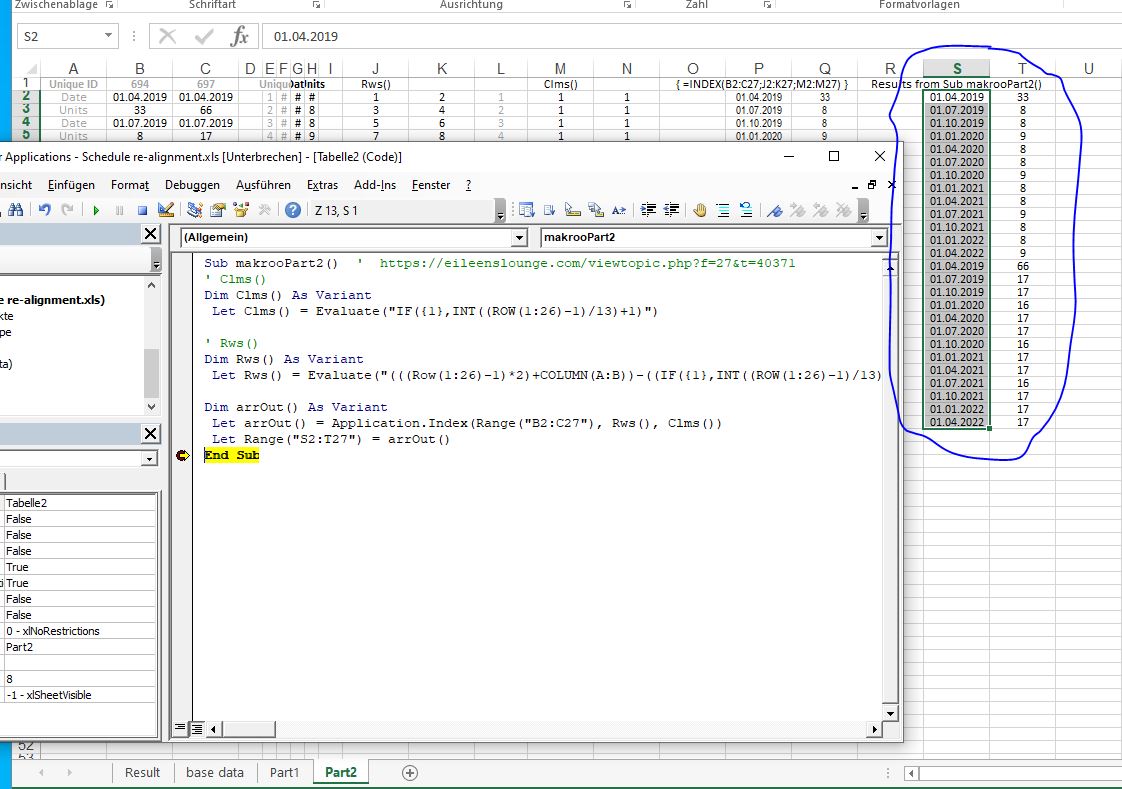

 Reply With Quote
Bookmarks