


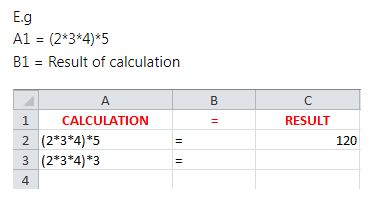
Question from the Web: Excel calculation in one cell result in another
https://i.postimg.cc/MHQpWvXX/Calc-i...in-another.jpg
Answer from Alan
What I am doing is taking the text of the formula in column A, putting the result of an Excel calculation into another cell.
So I am coming very close to answering the actual Thread title, especially as I will do it in a form of the suggested example.
Now, the thing is, that I am doing it with a UDF.
Depending on how you view things, a UDF could be thought of as a VBA solution using a function that you would primarily call from an Excel Spreadsheet.
On the other hand, sometimes a UDF solution is considered an Excel solution since you usually use it in an Excel spreadsheet as you would any Excel formula or built in Excel function
My solution is doing an unusual thing of the UDF putting a result in another cell. That is perhaps the issue that I am thinking may have caught this Thread on people’s searches. It did me, a lot of times. Now, years later, I figured it out, and thought it would be helpful to others if I make this contribution. It is not perfect in this particular example , and there are some possible awkward characteristics. But there may at least be some ideas for someone from what I am doing, as until I did this sort of thing around 2018, what I am doing was considered impossible.
Whether it should be done is something perhaps worthy of some other contributions or discussions.
But I am doing it because I can
All this coding is needed in a normal code module
I also have this coding in the uploaded file,Code:Option Explicit ' https://stackoverflow.com/a/79789576/4031841 https://www.excelfox.com/forum/showthread.php/2831/page2#post27593 ' This is the UDF. A user would use it by typing in any cell in a spreadsheet, something like = UDF_Calc(A2) Public Function UDF_Calc(ByVal Rng As Range) As String Worksheets("HHEX").Evaluate "OtherProK(" & Rng.Address & ")" ' Unconventional use of a UDF ( The string used in Evaluate(" ") format need to be that as typed in a cell, hence for the range we need something looking of the form A1 That is the reason for the .Address bit Let UDF_Calc = " = " ' A conventional use of a UDF End Function ' This can be a Sub or a Function Sub OtherProk(ByVal Rng As Range) Let Rng.Offset(0, 2) = "" Let Rng.Offset(0, 2) = "=" & Rng.Value End Sub
‘StackOverflowUDFChangeOtherCells.xls’ https://app.box.com/s/knpm51iolgr1pu3ek2j96rju8aifu4ow
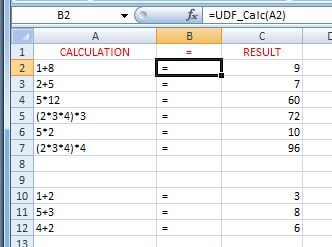
I have arranged the worksheet HHEX to mirror the original posted screenshot, so the result is in a form of the suggested example.
https://i.postimg.cc/J0kz1Gty/Calc-Result.jpg
The UDF formula/ function thing needs to be dragged down column B, or done in the copy paste way for a formula
A couple of things that make this solution a slightly worse variation of that from Taelsin … ..
_(i) The result column C, has the formula. (But as a user you will see the result)
_(ii) This sort of thing sometimes needs something to kick the thing into making a calculation after you have changed a formula in a cell or cells in column A, or if you have added formulas and dragged down/ copy pasted the UDF formula/ function thing in column B. I am not sure what is going on there, and I have not yet looked at all the possibilities to do that kicking into action. One convenient way seems to be to click on Save as an alternative to hitting Enter after you have made a change: In other words as example: you change the formula in a cell, then instead of hitting Enter as you would normally do, hit the save Button instead.. If you have done many changes, using the Save once after you are finished all the changes will update everything
.____
Description of what the coding is doing.
What is going on here is that the UDF, which is in column B works in two ways.
_1) In a conventional way, it puts the = text into the cell that the UDF is in. Nothing special about that.
_2) In addition, unconventionally it puts something in column C in the same row, specifically in this example the Result of the calculation text in that is in column A of that row.
Alan
‘StackOverflowUDFChangeOtherCells.xls’ https://app.box.com/s/knpm51iolgr1pu3ek2j96rju8aifu4ow

 Reply With Quote
Bookmarks