


Question from the Web: ……. I need a UDF to change other cells
https://stackoverflow.com/q/8520732/4031841
https://stackoverflow.com/a/79788169/4031841
……I would really like it if there was some way I could just fill in one square with my formula, and Excel would fill in the squares below as needed…..
I have not quite figured exactly what was wanted,
But I can give a very simple alternative coding to get a UDF to change other cells, directly in terms of simplicity, ( possibly very indirectly in terms of what is happening behind the scenes.: What is going on here is sometimes considered as VBA having some redirection and ended up a bit lost, or rather does not know where it came from ).
_ First put these codings in a normal module
You will need to name a worksheet "Derek"., (That is not a general requirement but just ties up with the demo coding above and in the uploaded workbook)Code:Option Explicit ' This is the main UDF, used by writing in a cell something of this form =UDF_Where(E3:E5) Function UDF_Where(ByVal Cels As Range) As String ' Looking at this conventionally, a string is likely to be returned by this function in the cell you put the UDF into Let UDF_Where = "This is cell " & ActiveCell.Address & ", where the UDF is in" ' Conventional use of UDF to change value of the cell that it is in Worksheets("Derek").Evaluate Name:="OverProc(" & Cels.Address & ")" ' Unconventional use of a UDF to change other cells ' The Evaluate(" ") thing takes the syntax of Excel spreadsheet So I need this sort of thing Cels.Address to give me the string bit like $D$2 End Function Sub OverProc(Cels As Range) ' This can be a Sub or Function Dim SteerCel As Range For Each SteerCel In Cels Let SteerCel = "This is cell " & SteerCel.Address & ", from the range I passed my UDF (" & Cels.Address & ")" Next SteerCel ActiveCell.Offset(10, 0) = "This cell is 10 rows down from where my UDF is" End Sub
_ Now write the formula/function in a cell
In the worksheet named "Derek", type in any cell, for example D2, the following
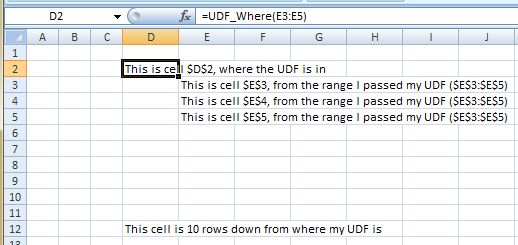
=UDF_Where(E3:E5)
, then hit Enter
You should see these results
https://i.postimg.cc/QtSFHPR1/Derek.jpg Derek.JPG
‘StackOverflowUDFChangeOtherCells.xls’ https://app.box.com/s/knpm51iolgr1pu3ek2j96rju8aifu4ow

 Reply With Quote
Bookmarks