Page 2 of 3 FirstFirst 123 LastLast
Results 11 to 20 of 24

Thread: UDF that can change values in cells other than the cell in which the UDF is used

  1. #11
    Fuhrer, Vierte Reich DocAElstein's Avatar
    Join Date
    Aug 2014
    Posts
    10,457
    Rep Power
    10
    “AdeelSolution2” ( )
    (A Final Simplified Solution)


    There is not much to do.

    I am not interested in the code lines to put the result in a different cell , ( although they are still working : )

    So this looks like our final solution.

    Code:
    '   '   From  Adeel  spreadsheet    '  =sum_color(D6:G15;C17)    '    http://www.eileenslounge.com/viewtopic.php?p=300075#p300075
    ' First thing
    Function DoSomeColor(ByVal RngA As Range, ByVal RngB As Range) As String
     Dim vTemp As Variant
     Let vTemp = Evaluate("='" & ThisWorkbook.Path & "\" & ThisWorkbook.Name & "'!DisplayFormatUDF.SomeColor(" & RngA.Address & ", " & RngB.Address & ")")      '
    ' Let vTemp = Evaluate("SomeColor(" & RngA.Address & ", " & RngB.Address & ")")  ' Shortened version relying on default
     Let DoSomeColor = vTemp
    End Function
    
    
    ' Second thing
    Function SomeColor(ByVal RgA As Range, RgB As Range) As String
    Stop  '  It wont
    Dim Vee As Long, Sea As Range
        For Each Sea In RgA
            If Sea.DisplayFormat.Interior.ColorIndex = RgB.DisplayFormat.Interior.ColorIndex Then
             Let Vee = Vee + Sea.Value
            Else
            End If
        Next Sea
    ' Let RgB.Offset(1, 2).Value = ""
    ' Let RgB.Offset(1, 2).Value = Vee
     Let SomeColor = Vee
    End Function
    
    That’s it


    Here is a simplified version for clarity to post in a forum Thread
    Code:
    '   '                          https://www.excelfox.com/forum/showthread.php/2831-UDF-that-can-change-values-in-cells-other-than-the-cell-in-which-the-UDF-is-used?p=18456&viewfull=1#post18456          https://www.excelfox.com/forum/showthread.php/2831-UDF-that-can-change-values-in-cells-other-than-the-cell-in-which-the-UDF-is-used/page2#post18456
    ' First thing
    Function DoSum_Colour(ByVal RngA As Range, ByVal RngB As Range) As String       '    From  Adeel  spreadsheet    '  =sum_color(D6:G15;C17)    '    http://www.eileenslounge.com/viewtopic.php?p=300075#p300075
     Let DoSum_Colour = Evaluate("Sum_Colour(" & RngA.Address & ", " & RngB.Address & ")")
    End Function
    ' Second thing
    Function Sum_Colour(ByVal RgA As Range, RgB As Range) As String
    Dim Vee As Long, Sea As Range
        For Each Sea In RgA
            If Sea.DisplayFormat.Interior.ColorIndex = RgB.DisplayFormat.Interior.ColorIndex Then
             Let Vee = Vee + Sea.Value
            Else
            End If
        Next Sea
     Let Sum_Colour = Vee
    End Function
    Last edited by DocAElstein; 09-07-2025 at 11:12 PM.

  2. #12
    Fuhrer, Vierte Reich DocAElstein's Avatar
    Join Date
    Aug 2014
    Posts
    10,457
    Rep Power
    10
    spare post

  3. #13
    Fuhrer, Vierte Reich DocAElstein's Avatar
    Join Date
    Aug 2014
    Posts
    10,457
    Rep Power
    10
    spare post

  4. #14
    Fuhrer, Vierte Reich DocAElstein's Avatar
    Join Date
    Aug 2014
    Posts
    10,457
    Rep Power
    10
    spare post

  5. #15
    Fuhrer, Vierte Reich DocAElstein's Avatar
    Join Date
    Aug 2014
    Posts
    10,457
    Rep Power
    10
    spare post

  6. #16
    Fuhrer, Vierte Reich DocAElstein's Avatar
    Join Date
    Aug 2014
    Posts
    10,457
    Rep Power
    10
    Question from the web: Update Other Cells via User-Defined Function
    https://stackoverflow.com/questions/...fined-function
    Some of the answers
    ……a UDF cannot do this
    …… cannot modify cells …..They can only return values


    At ExcelFox we are reluctant to say things cannot be done.


    In that stack overflow referenced Thread, in general, it is not always clear if we are talking about Functions and/ or User Defined Functions (UDFs) and so on

    However, I have gleaned some info and I think I can make a useful contribution by giving my take on both
    _ what the question is
    and
    _ what a simply direct answer could be..


    First the question:

    I have a UDF(User-Defined Function) in VBA that needs to modify cell range on Excel.
    (Since a UDF cannot do this……) …. how do I update other cells by calling a UDF?


    Before my take on an answer, there may have been a bit of confusion as to what the requirement was, that is to say what we a talking about in terms of functions.
    I suggest we are talking about
    _ a UDF(User-Defined Function) making a call from a worksheet
    , and not
    _a function in general, or a UDF, which is called from VBA. As TimWilliams said in a comment, …. As long as you're not calling it as a UDF then yes a function can modify the sheet in the ……
    In other words a UDF called from VBA or any function called from VBA are in principal the same thing.
    But when one refers to a UDF, it generally implies that the user wants to call it from a worksheet. Perhaps this definition is not set in stone, hence the confusion and uncertainty in what we are talking about, in terms of the requirement. The original question did ask …. how do I update other cells by calling a UDF? … This is implying I think that we are calling the function from a cell.


    Now my answer.


    The first part of my answer is to say, JIMVHO, is that it's usually a bad idea to say that something can't be done.
    My answer does something similar to the worded suggestion from Cem Firat …..If call other function with ***Application.Evaluate method in your UDF function you can change everything on sheet (Values,Steel,Etc.) because VBA does not know which function is called….
    I was not able to see an actual answer from his examples.
    That is what I am doing here in my answer: In my UDF I am calling another procedure with the Evaluate method, and that procedure will modify a cell range on Excel.
    Let me make it clear again what I am doing, as it is easy to get things in a muddle. I am going to write a function which I will name UDFfunction( ). It will take two arguments, a range, and a text. The range is where you want the text to go. The function is to be put in a normal code module. This means that if I write a = in a cell, followed by the function name ( and arguments if it requires them, as it does in this case ), then the function will run. I might refer to this as calling the function from Excel, or calling the function from a cell.

    So…
    All of this coding should be put into a normal module. (Change the worksheet name to suit the worksheet you want to use the function from *** I favour using the Worksheet Evaluate of the worksheet where you want to use, (call from the worksheet), the UDF. I find that using the Application Evaluate may trigger other things, especially if you are using the basic solution idea in more than one worksheet )
    Code:
    ' This is the UDF.  A user would use it by typing in any cell in a spreadsheet, something like   = UDFfunction(A1:B2)
    Public Function UDFfunction(Rng As Range, Txt As String) As String
    Worksheets("CemFiratGreg").Evaluate "OtherProc(" & Rng.Address & ", """ & Txt & """)"                  ' Unconventional use of a UDF
     Let UDFfunction = "You did just put the text of """ & Txt & """ in range " & Rng.Address(RowAbsolute:=False, ColumnAbsolute:=False) ' A conventional use of a UDF
    End Function
    
    ' This can be a  Sub  or a  Function
    Sub OtherProc(ByVal Rng As Range, ByVal Txt As String)
     Let Rng = ""
     Let Rng = Txt
    End Sub
    (For some versions of Excel it may be necessary at this point to save and close and reopen the file)

    Now type something like this in any cell
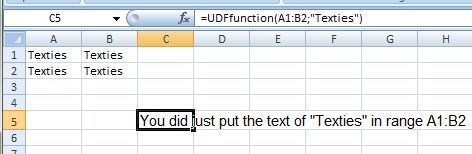
    =UDFfunction(A1:B2;"Texties")


    As a result of this, two things should happen.
    _(i) In the cell you typed the UDF into, you will get the text You did just put the text of "Texties" in cell A1:B2. That is what one might commonly expect a UDF to do, in other words give some text or numbers in the cell that it is written in. Commonly one hears that A UDF is a function that returns a value in the cell where it is called.
    _(ii) The word Texties will appear in the range A1:B2. That is doing something often regarded as impossible. One often hears it said that A UDF cannot change the contents of any cell, other than the one it is in.

    https://i.postimg.cc/HkZCynF7/Texties-in-Cell.jpg
    https://i.postimg.cc/XvGtB8f0/You-ju...s-in-A1-B2.jpg
    Texties in Cell.JPG


    Share ‘StackOverflowUDFChangeOtherCells.xls’ https://app.box.com/s/knpm51iolgr1pu3ek2j96rju8aifu4ow
    Last edited by DocAElstein; 10-11-2025 at 09:53 PM.

  7. #17
    Fuhrer, Vierte Reich DocAElstein's Avatar
    Join Date
    Aug 2014
    Posts
    10,457
    Rep Power
    10
    Question from the Web: ……. I need a UDF to change other cells
    https://stackoverflow.com/q/8520732/4031841
    https://stackoverflow.com/a/79788169/4031841

    ……I would really like it if there was some way I could just fill in one square with my formula, and Excel would fill in the squares below as needed…..

    I have not quite figured exactly what was wanted,

    But I can give a very simple alternative coding to get a UDF to change other cells, directly in terms of simplicity, ( possibly very indirectly in terms of what is happening behind the scenes.: What is going on here is sometimes considered as VBA having some redirection and ended up a bit lost, or rather does not know where it came from ).


    _ First put these codings in a normal module
    Code:
    Option Explicit
    ' This is the main UDF, used by writing in a cell something of this form   =UDF_Where(E3:E5)
    Function UDF_Where(ByVal Cels As Range) As String      ' Looking at this conventionally, a string is likely to be returned  by this function in the cell you put the UDF into
     Let UDF_Where = "This is cell " & ActiveCell.Address & ", where the UDF is in" ' Conventional use of UDF to change value of the cell that it is in
    Worksheets("Derek").Evaluate Name:="OverProc(" & Cels.Address & ")"             ' Unconventional use of a UDF to change other cells    ' The  Evaluate(" ")  thing takes the syntax of  Excel spreadsheet   So I need this sort of thing    Cels.Address   to give me the  string bit like  $D$2
    End Function
    
    
    Sub OverProc(Cels As Range) ' This can be a  Sub  or  Function
    Dim SteerCel As Range
        For Each SteerCel In Cels
         Let SteerCel = "This is cell " & SteerCel.Address & ", from the range I passed my UDF (" & Cels.Address & ")"
        Next SteerCel
     ActiveCell.Offset(10, 0) = "This cell is 10 rows down from where my UDF is"
    End Sub
    
    You will need to name a worksheet "Derek"., (That is not a general requirement but just ties up with the demo coding above and in the uploaded workbook)

    _ Now write the formula/function in a cell
    In the worksheet named "Derek", type in any cell, for example D2, the following

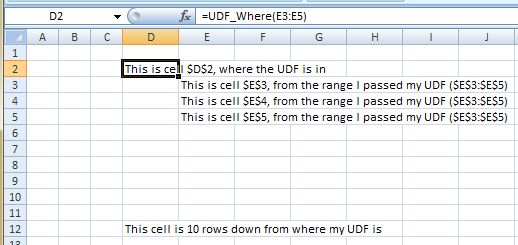
    =UDF_Where(E3:E5)

    , then hit Enter

    You should see these results

    https://i.postimg.cc/QtSFHPR1/Derek.jpg Derek.JPG


    ‘StackOverflowUDFChangeOtherCells.xls’ https://app.box.com/s/knpm51iolgr1pu3ek2j96rju8aifu4ow
    Last edited by DocAElstein; 10-12-2025 at 12:06 AM.

  8. #18
    Fuhrer, Vierte Reich DocAElstein's Avatar
    Join Date
    Aug 2014
    Posts
    10,457
    Rep Power
    10

    Doing the "impossible" again

    Question from the web: Excel formula that will paste a specific value in a different cell?
    https://superuser.com/a/1926549/1142601

    The question:
    ….So basically I want to write a formula that will check a condition, and if that condition is met, then I want to paste a specific line of text in a different cell. I should note that I do not want the formula to exist in the cell I want to paste a value into. So for example, if I want to paste a value into B5, I don't want the formula to be in cell B5...

    Comments there of this sort as usual:
    …..it is impossible for a formula in one cell to modify another cell. – ….


    I have seen this question asked a lot. Often it comes form people less familiar with things like VBA.
    It’s usually a bad idea to say, something can’t be done, which is usually the answer to the question there, as is in some of the comments there. It can be done, and very easily. (I am not necessarily saying that it should be done. But an incorrect blanket statement that it can’t be done is a bad idea, JIMVHO)
    My contribution is a simple way, using a formula to change values in another cell, ( I will use it to paste something in B5, as in the original request example). No formula will appear in cell B5.

    I wanted to answer close to what is asked for in the Thread title, and in the sin of the original poster knowledge level, as I know that thread has been caught a few times by others in the same "newbie" vain.

    (The solution I offer here does mean that you need to know some very basic VBA coding - VBA coding is some coding that is "behind" Microsoft Office, but exists already there for you freely available in all Microsoft Office versions from the last 30 years or so. (Using Microsoft Office without the VBA you already have, can be compared with having some all purpose vehicle parked outside your door, that can do just about everything that any vehicle can and much more like flying to Mars, submerging to the centre of the earth, digging out a trench to make a river to save a Forest for younger generations etc., etc., but you just use it once a week for the same short journey to go to the local shops)


    If you have no ideas about VBA then for the short term it is not a problem as I will give you a solution example in the uploaded file.
    You need to use the Excel formula / function Boolox, which I wrote.

    This is that VBA coding “behind” the formula / function Boolox that I wrote.
    Code:
    '   https://www.excelfox.com/forum/showthread.php/2831-UDF-that-can-change-values-in-cells-other-than-the-cell-in-which-the-UDF-is-used?p=27592&viewfull=1#post27592    https://superuser.com/a/1926549/1142601
    Option Explicit
    ' First main  "UDF"  Procedure.  In a spreadsheet cell we use "it" something like this:   =Boolox(A2)
    Public Function Boolox(ByVal Rng As Range) As String
    Rem 1 Unconventional use of the general thing we might call a  UDF
     Worksheets("RBobJeff").Evaluate Name:="=AnuverProc(" & Rng.Address & ")"  '    The   Evaluate("  ")  string, that is to say the   Name:="  "    bit in this case,   uses Excel spreadsheet syntax, not VBA syntax, and we can get that  spreadsheet  A1  type address syntax from the   .Address   stuff in VBA
    
    Rem 2 The conventional use of a  UDF  to return a value in the cell that it is in, in a similar way to how a formula or in built function does
        If Rng = "Boolox" Then
         Let Boolox = "you got Boolox"    '  This sets/ defines the  String  returned from the function, so if used in the spreadsheet, this is what comes in the cell where you type the formula/ function
        Else
         Let Boolox = "you got no Boolox" '  This sets/ defines the  String  returned from the function, so if used in the spreadsheet, this is what comes in the cell where you type the formula/ function
        End If
    End Function
     
     ' Second Procedure. Debateable whether or not it is part of the  "UDF"
    Sub AnuverProc(Rng As Range)
        If Rng = "Boolox" Then
         Let Worksheets("RBobJeff").Range("B5") = "you got Boolox"
        Else
         Let Worksheets("RBobJeff").Range("B5") = "you got no Boolox"
        End If
    End Sub
    

    You need all the coding, and one typical convenient place to keep it is in the workbook where you are wanting to use the “it”. “It” being the formula and necessarily the coding which it won’t work without
    To keep it simple, the coding needs to go in what we call a normal code module.


    Although not always necessarily necessary, for the purposes of the demo, you need to confine yourself to using the worksheet named "RBobJeff" in the uploaded file, ( Or name a worksheet in another workbook "RBobJeff", and do the demonstration in that )

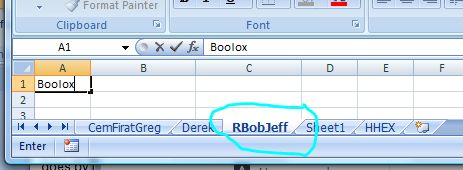
    Now, in the first cell, A1, I have written Boolox, ( or if you are using your own file, then write Boolox in the first cell, A1 )
    https://i.postimg.cc/ydTyjn3n/Boolox-in-first-cell.jpg


    Now you can do the demo

    If you write in any other cell ( other than B5 – as per the original request if a condition is met something will be pasted there in B5 ) this formula,

    =Boolox(A1)
    , then the line of text, you got Boolox , will be written in B5, and nothing else – no formula or anything other than that text will be in B5

    If you use the formula in a similar way, but with anything other than A1 as the cell, such as using
    =Boolox(A12)
    , then a similar thing happens except the text says you got no Boolox


    For examples

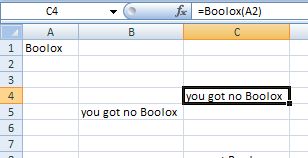
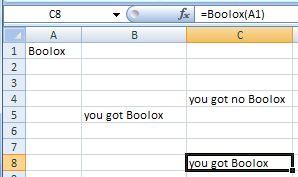
    For example, after writing in cell C4 =Boolox(A2) , you should see
    https://i.postimg.cc/1RYQzkyN/you-got-no-boolox.jpg


    For example, after writing in cell C8 =Boolox(A1) , you should see
    https://i.postimg.cc/05HsNT9K/you-got-boolox.jpg


    _.___-

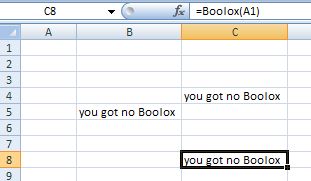
    As a further experiment, remove the text in the first cell, and the text in B5 will change
    https://i.postimg.cc/d3XPSyWV/Boolox-gone.jpg


    In those experiment examples two basic things happen,
    _(i) what appears in C4 or C8 is as anyone with basic Excel and Excel VBA would expect. It reflects the conventional use of a "UDF" .- There is a formulas / function on a cell, and by default setting you will see the result in the cell, ( and the formula can be seen in the formula bar)
    _(ii) what happens in B5 is the "impossible", which is what the original request asked for …. formula ( I use as example that in C4 or C8 ) , that will check a condition, and if that condition is met, then I want to paste a specific line of text in a different cell. I should note that I do not want the formula to exist in the cell I want to paste a value into. So for example, if I want to paste a value into B5, I don't want the formula to be in cell B5


    Coding description
    There are two main coding sections in the first procedure, ( Function Boolox( ___ ) , corresponding to the main two things that happen, Depending on your point of view
    , the first procedure may be regarded as the main "User Defined Function", UDF
    or
    , in everyday language you might refer to the entire coding as the UDF which is the Boolox.

    _(i) Rem 2
    In this particular example coding, The same text is also is put in the cell you type the formula in, but if you do not want that, then just remove the second section in the first procedure, Rem 2.
    Rem 2 in the first procedure is the conventional way to use this type of coding.. Such conventional coding can be called just some VBA coding, or a Function procedure in VBA. It can be used generally as coding, and it can be set off (run, Called) in several ways. But if it is intended to be set off/ called from a formula in a spreadsheet, then usually it goes by the name of a UDF (User Defined Function). That name makes sense if you think about it, a user, me in this case, has made/ defined a function / formula to use in a spreadsheet, rather than the existing built in ones. The procedure / Function, Boolox, and the associated formula / function used in the spreadsheet would loosely go by the name of UDF if you were talking about it in everyday conservations, like you might say, “Hey man, wow, check out Alan’s UDF, it’s the Boolox

    _(ii) Rem 1
    It is usually said that a UDF cannot change values in a different cell. Well, I guess we can debate that until the Cows come home, and/or debate whether I am strictly doing that in the section Rem 1

    Rem 1 is the bit that does something alone the lines of what was asked for. Or depending on your pint of view, it may set in motion the second procedure and that does something alone the lines of what was asked for.
    In simple layman terms it sets off a second procedure, which you probably would not call a UDF. But someone might in general all day talking say it is part of the UDF since it gets the job done from the user made/defined formula/ function in the spreadsheet.
    I suspect nobody really knows what is going on here, but it is generally thought that one reason it works is because Excel has lost it’s orientation a bit on where the second procedure is or has come from.. Maybe that helps us debate if the UDF is changing the other cells or some lost soul set off in the Excel world.


    StackOverflowUDFChangeOtherCells.xlshttps://app.box.com/s/knpm51iolgr1pu3ek2j96rju8aifu4ow

    Last edited by DocAElstein; 10-13-2025 at 02:09 PM.
    ….If you are my competitor, I will try all I can to beat you. But if I do, I will not belittle you. I will Salute you, because without you, I am nothing.
    If you are my enemy, we will try to kick the fucking shit out of you…..
    Winston Churchill, 1939
    Save your Forum..._
    KILL A MODERATOR!!

  9. #19
    Fuhrer, Vierte Reich DocAElstein's Avatar
    Join Date
    Aug 2014
    Posts
    10,457
    Rep Power
    10
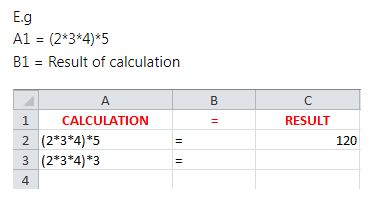
    Question from the Web: Excel calculation in one cell result in another
    https://i.postimg.cc/MHQpWvXX/Calc-i...in-another.jpg


    Answer from Alan


    What I am doing is taking the text of the formula in column A, putting the result of an Excel calculation into another cell.
    So I am coming very close to answering the actual Thread title, especially as I will do it in a form of the suggested example.
    Now, the thing is, that I am doing it with a UDF.
    Depending on how you view things, a UDF could be thought of as a VBA solution using a function that you would primarily call from an Excel Spreadsheet.
    On the other hand, sometimes a UDF solution is considered an Excel solution since you usually use it in an Excel spreadsheet as you would any Excel formula or built in Excel function

    My solution is doing an unusual thing of the UDF putting a result in another cell. That is perhaps the issue that I am thinking may have caught this Thread on people’s searches. It did me, a lot of times. Now, years later, I figured it out, and thought it would be helpful to others if I make this contribution. It is not perfect in this particular example , and there are some possible awkward characteristics. But there may at least be some ideas for someone from what I am doing, as until I did this sort of thing around 2018, what I am doing was considered impossible.
    Whether it should be done is something perhaps worthy of some other contributions or discussions.
    But I am doing it because I can

    All this coding is needed in a normal code module

    Code:
    Option Explicit  '  https://stackoverflow.com/a/79789576/4031841   https://www.excelfox.com/forum/showthread.php/2831/page2#post27593
    ' This is the UDF.  A user would use it by typing in any cell in a spreadsheet, something like   = UDF_Calc(A2)
    Public Function UDF_Calc(ByVal Rng As Range) As String
     Worksheets("HHEX").Evaluate "OtherProK(" & Rng.Address & ")"                  ' Unconventional use of a UDF  ( The string used in  Evaluate(" ")  format need to be that as typed in a cell, hence for the range we need something looking of the form  A1   That is the reason for the  .Address   bit
     Let UDF_Calc = " = "                                       ' A conventional use of a UDF
    End Function
    
    ' This can be a  Sub  or a  Function
    Sub OtherProk(ByVal Rng As Range)
     Let Rng.Offset(0, 2) = ""
     Let Rng.Offset(0, 2) = "=" & Rng.Value
    End Sub
    I also have this coding in the uploaded file,

    StackOverflowUDFChangeOtherCells.xls’ https://app.box.com/s/knpm51iolgr1pu3ek2j96rju8aifu4ow

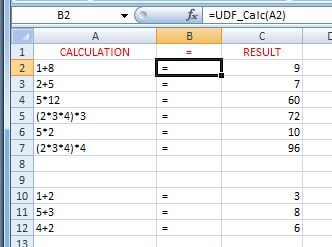
    I have arranged the worksheet HHEX to mirror the original posted screenshot, so the result is in a form of the suggested example.

    https://i.postimg.cc/J0kz1Gty/Calc-Result.jpg


    The UDF formula/ function thing needs to be dragged down column B, or done in the copy paste way for a formula

    A couple of things that make this solution a slightly worse variation of that from Taelsin … ..

    _(i) The result column C, has the formula. (But as a user you will see the result)

    _(ii) This sort of thing sometimes needs something to kick the thing into making a calculation after you have changed a formula in a cell or cells in column A, or if you have added formulas and dragged down/ copy pasted the UDF formula/ function thing in column B. I am not sure what is going on there, and I have not yet looked at all the possibilities to do that kicking into action. One convenient way seems to be to click on Save as an alternative to hitting Enter after you have made a change: In other words as example: you change the formula in a cell, then instead of hitting Enter as you would normally do, hit the save Button instead.. If you have done many changes, using the Save once after you are finished all the changes will update everything

    .____

    Description of what the coding is doing.

    What is going on here is that the UDF, which is in column B works in two ways.

    _1) In a conventional way, it puts the = text into the cell that the UDF is in. Nothing special about that.

    _2) In addition, unconventionally it puts something in column C in the same row, specifically in this example the Result of the calculation text in that is in column A of that row.


    Alan


    ‘StackOverflowUDFChangeOtherCells.xls’ https://app.box.com/s/knpm51iolgr1pu3ek2j96rju8aifu4ow
    Last edited by DocAElstein; 10-16-2025 at 08:02 PM.

  10. #20
    Fuhrer, Vierte Reich DocAElstein's Avatar
    Join Date
    Aug 2014
    Posts
    10,457
    Rep Power
    10
    spare post
    Last edited by DocAElstein; 10-17-2025 at 11:29 PM.

Similar Threads

  1. Question on UDF LookUpConcat
    By K2` in forum Excel Help
    Replies: 4
    Last Post: 05-07-2013, 10:25 PM
  2. Trouble implementing UDF's
    By ProspectiveCounselor in forum Excel Help
    Replies: 4
    Last Post: 05-06-2013, 08:07 PM
  3. Insert Picture in a Cell UDF
    By Admin in forum Download Center
    Replies: 10
    Last Post: 12-07-2012, 04:49 PM
  4. UDF to Create In-Cell Chart in Excel
    By Admin in forum Download Center
    Replies: 0
    Last Post: 08-13-2011, 09:53 AM

Posting Permissions

  • You may not post new threads
  • You may not post replies
  • You may not post attachments
  • You may not edit your posts
  •