This is post https://www.excelfox.com/forum/showt...age3#post17887
Some further notes related to this post
https://eileenslounge.com/viewtopic.php?f=30&t=41784
https://eileenslounge.com/viewtopic....324039#p324039
Some StrTrim experiments and musings
Considering here some Jolly Trimmy, Jimmy Riddling, (Piddling about) with the win32 API Function StrTrim: - pseudo like it should do
StrTrim("abad", "a") - > "bad"
Let's see if we can learn any API stuff from experimenting with it. We will try it out in 4 forms:
_ "straight" AASI, - the StrTrimA, string parameters as string type
_ "Half way" (HWH) AASI. - the StrTrimA, string parameters as long (pointers)
_ "Full" WUnicorn - the StrTrimW, string parameters as long (pointers)
_ "Half way" (HWHWU) WUnicorn - - the StrTrimW, string parameters as string Type
For each of the 4 sets of experiments , we
_ first apply an idea suggested here as an win32 API function doping nothing, - the idea being to go through a lot of characters trimming nothing off, pseudo like
StrTrim(Chucky(x), "") - > should be Chucky(x) , where Chucky(x) could be looped for x 0 – 255 or 0-65535 in the VBA functions Chr(x) or ChrW(x) , or alternatively in place of Chucky(x) we could just go through some list of characters, for example those in a code page list.
Just to make that clear, let's say the character of interest is A, either taken from a list, or got from Chr(65) or ChrW(65)
StrTrim(Chr(65), "") - > should be Chr(65)
StrTrim("A", "") - > should be "A"
We then compare the character going in with the character coming out.
Our returned value (The ByVal/ByRef issue)
Important to note, the pseudo coding above is pseudo coding, just to give the general idea.
If you are familiar with VBA functions generally then you may typically experience the function returning something such as the result you want. A typical characteristic of win32 API functions in VBA is that the return from the function itself is most often something like a Boolean ( 0 or 1 ) to give some general indication of something, such as if the function "worked" or did something.( In this case a 1 would be returned if something was trimmed off, and a 0 otherwise).
Any result we want comes typically from something similar to the classic Use of ByRef instead of function return value of a VBA function . (The fact that we use ByVal rather than the ByRef that we might initially have guessed is the major issue that sparked of these entire series of VBA win32 API musings. For here and now we just accept that ByVal is necessary)
In short – the trimmed, ( or in this first experiment the untrimmed ) result is returned in the same variable we use to supply the input string, in our codings Ay in
StrTrim(Ay, "")
Spreadsheet for results
We will exclusively use the spreadsheet for results, since some initial investigations suggests that the spreadsheet reproduces a very large number of different characters, so we can most likely assume that no extra complications are raised as a result of pasting out into a spreadsheet. Similarly we will assume that VBA variables hold accurately all characters so that a simple comparison of a variables holding the inputted and outputted character will gives us an accurate indication of if the character has changed. We can then list results thus:
A True A 1
a True a 1
ā False a 1
https://i.postimg.cc/Bt9cqfc6/Str-Tr...ng-results.jpg 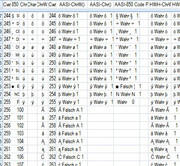
https://i.postimg.cc/0QsYSvdF/A-True-A.jpg 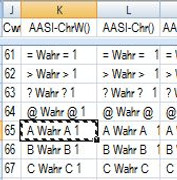
(, where I am also including a number for the length of the output, 1 in this case. **The significance of that will be apparent later )
_ secondly we do the same thing but with StrTrim arranged to do something, pseudo like
StrTrim(Chucky(x) & "a" & Chucky(x) & "a" , "") - > should be "a" & Chucky(x) & "a"
, to make that a bit more clear, let's say Chucky(x) is Chr(98) . ( or ChrW(98) ) , which is b , then
StrTrim(Chr(98) & "a" & Chr(98) & "a" , Chr(98)) - > should be "a" & Chr(98) & "a"
StrTrim(Chr(98) & "a" & Chr(98) & "a" , Chr(98)) - > should be "a" & "b" & "a"
StrTrim(Chr(98) & "a" & Chr(98) & "a" , Chr(98)) - > should be "aba"
StrTrim("baba" , "b") - > should be "aba"
Correspondingly if the function does as it is intended, then our results will be
baba Wahr aba
https://i.postimg.cc/Vk1Vz9nj/baba-True-aba.jpg 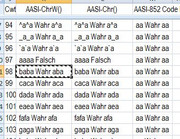
The True result will be based on the last 3 characters on the left being the same as the (first**) 3 characters on the right. I also include in some of these results again the length of the character set on the right. You can see for the first time in this next screen shot something screwy, as 4s are showing where we should see 3s. More to that again later
https://i.postimg.cc/Wzwm71wx/Len-4-...d-of-Len-3.jpg 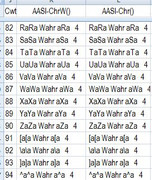
A large file with a lot of results is here, I will add it for completeness and future reference.
AASIWUnicorn.xlsm
It is very crowded with coding and results, so below I will just
_ give sample coding in the next post
and
_ talk though a small selection and make some general observations in the over next post .


 Reply With Quote
Bookmarks