


In support of this main forum post
https://excelfox.com/forum/showthrea...cell-in-sheet2
ResultsCode:Sub WhatsInColumnA() Rem 0 worksheets data info Dim Ws1 As Worksheet: Set Ws1 = ThisWorkbook.Worksheets.Item(1) Rem 1 Put data range in clipboards Ws1.UsedRange.Copy Rem 2 get text data from windows clipboard Dim objDataObject As Object: Set objDataObject = GetObject("New:{1C3B4210-F441-11CE-B9EA-00AA006B1A69}") ' http://web.archive.org/web/20200124185244/http://excelmatters.com/2013/10/04/late-bound-msforms-dataobject/ Dim StringBack As String objDataObject.GetFromClipboard: Let StringBack = objDataObject.GetText() Rem 3 Analyse string back from windows clipboard Call WtchaGot_Unic_NotMuchIfYaChoppedItOff(StringBack) ' https://pastebin.com/raw/eutzzxHv End Sub
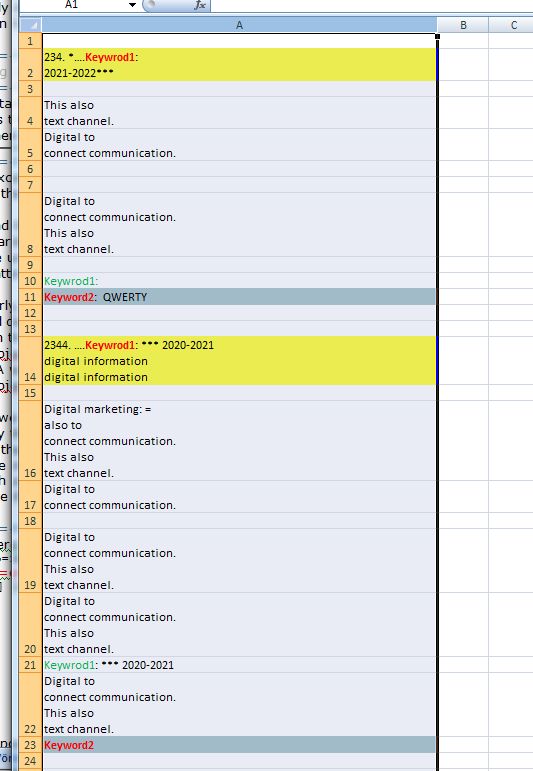
Compare that with the range copied manually and pasted here, and a screenshot of the spreadsheet ( with wrap text enabled )Code:"""" & "234" & "." & " " & Chr(42) & ChrW(8230) & "." & "Keywrod1" & ":" & " " & vbLf & "2021" & "-" & "2022" & Chr(42) & Chr(42) & Chr(42) & """" & vbCr & vbLf & vbCr & vbLf & """" & "This also " & vbLf & "text channel" & "." & """" & vbCr & vbLf & """" & "Digital to " & vbLf & "connect communication" & "." & " " & """" & vbCr & vbLf & vbCr & vbLf & vbCr & vbLf & """" & "Digital to " & vbLf & "connect communication" & "." & " " & vbLf & "This also " & vbLf & "text channel" & "." & """" & vbCr & vbLf & vbCr & vbLf & "Keywrod1" & ":" & " " & vbCr & vbLf & "Keyword2" & ":" & " QWERTY" & vbCr & vbLf & vbCr & vbLf & vbCr & vbLf & """" & "2344" & "." & " " & ChrW(8230) & "." & "Keywrod1" & ":" & " " & Chr(42) & Chr(42) & Chr(42) & " 2020" & "-" & "2021" & vbLf & "digital information" & vbLf & "digital information" & """" & vbCr & vbLf & vbCr & vbLf & """" & "Digital marketing" & ":" & " " & "=" & vbLf & "also to " & vbLf & "connect communication" & "." & " " & vbLf & "This also " & vbLf & "text channel" & "." & """" & vbCr & vbLf & """" & "Digital to " & vbLf & "connect communication" & "." & " " & """" & vbCr & vbLf & vbCr & vbLf & """" & "Digital to " & vbLf & "connect communication" & "." & " " & vbLf & "This also " & vbLf & "text channel" & "." & """" & vbCr & vbLf & """" & "Digital to " & vbLf & "connect communication" & "." & " " & vbLf & "This also " & vbLf & "text channel" & "." & """" & vbCr & vbLf & "Keywrod1" & ":" & " " & Chr(42) & Chr(42) & Chr(42) & " 2020" & "-" & "2021" & vbCr & vbLf & """" & "Digital to " & vbLf & "connect communication" & "." & " " & vbLf & "This also " & vbLf & "text channel" & "." & """" & vbCr & vbLf & "Keyword2" & vbCr & vbLf
Code:"234. *….Keywrod1: 2021-2022***" "This also text channel." "Digital to connect communication. " "Digital to connect communication. This also text channel." Keywrod1: Keyword2: QWERTY "2344. ….Keywrod1: *** 2020-2021 digital information digital information" "Digital marketing: = also to connect communication. This also text channel." "Digital to connect communication. " "Digital to connect communication. This also text channel." "Digital to connect communication. This also text channel." Keywrod1: *** 2020-2021 "Digital to connect communication. This also text channel." Keyword2
Conclusions
The row separator in the windows clipboard is that most typically used for a new line in computing, a Carriage return and a Line feed ( in VBA coding vbCr & vbLf ).
For a new line within a cell, we have the typical convention in Excel of just the Line feed ( in VBA coding, vbLf )
In the case of 2 or more lines within a cell, the entire string for the cell is enclosed in a pair of quotes. ( I expect this is to help avoid the vbLf being taken as a new row )
VBA row to cell1 reduced data.xls : https://app.box.com/s/qne60lkrfp30d50w444gedzjg6b7nyat
https://excelfox.com/forum/showthrea...ll=1#post16735

 Reply With Quote
Bookmarks