


Code:' https://excelfox.com/forum/showthread.php/2345-Appendix-Thread-(-Codes-for-other-Threads-HTML-Tables-etc-)?p=16529&viewfull=1#post16529 ' http://www.eileenslounge.com/viewtopic.php?f=30&t=38110&p=294692#p294692 Sub Stantial() Rem 0 data Dim Ws1 As Worksheet: Set Ws1 = ThisWorkbook.Worksheets("Sheet1") Dim RngPlus1 As Range Set RngPlus1 = Ws1.Cells.Item(1).CurrentRegion.Resize(Ws1.Cells.Item(1).CurrentRegion.Rows.Count + 1, Ws1.Cells.Item(1).CurrentRegion.Columns.Count) Dim vArr() As Variant: Let vArr() = RngPlus1.Value2 Rem 1 determine the biggest group ( that maximum Amounts or Notes count ) Dim Cnt As Long, Cnt2 As Long, Mx As Long: Let Mx = 1: Let Cnt = 1 Do ' ############################# Main Outer Loop keeps us going through all data rows Do ' ----------------- Inner Loop that takes us through a group Let Cnt = Cnt + 1 ' Cnt is the main data row number Let Cnt2 = Cnt2 + 1 Loop While vArr(Cnt + 1, 1) = vArr(Cnt, 1) ' ---- Inner Loop that takes us through a group If Cnt2 > Mx Then Let Mx = Cnt2 Let Cnt2 = 0 Loop While Cnt < UBound(vArr(), 1) - 1 ' #### Main Outer Loop keeps us going through all data rows Rem 2 ' ############################# Main Outer Loop keeps us going through all data rows Let Cnt = 1 Do Dim HrCnt As Long: Let HrCnt = 1 Dim strClipR As String, strClipL As String: Let strClipL = strClipL & vArr(Cnt + 1, 1) Do '2a The first inner loop Let Cnt = Cnt + 1 Let HrCnt = HrCnt + 1 Let strClipL = strClipL & vbTab & vArr(Cnt, 2) Let strClipR = strClipR & vbTab & vArr(Cnt, 3) Loop While vArr(Cnt + 1, 1) = vArr(Cnt, 1) ' The first inner loop Do While HrCnt < Mx + 1 '2b the second inner loop Let strClipL = strClipL & vbTab Let strClipR = strClipR & vbTab Let HrCnt = HrCnt + 1 Loop ' the second inner loop '2c Finishing off the strings, and final string for an output line, after the inner loops Let strClipR = strClipR & vbTab & vArr(Cnt, 4) ' add the group name Dim strClip As String: Let strClip = strClip & strClipL & strClipR & vbCr & vbLf ' join the strings and add a line seperator to the output row string 'Call WtchaGot_Unic_NotMuchIfYaChoppedItOff(strClip) Let strClipL = "": strClipR = "" Loop While Cnt < UBound(vArr(), 1) - 1 ' #### Main Outer Loop keeps us going through all data rows 'Call WtchaGot_Unic_NotMuchIfYaChoppedItOff(strClip) '2d paste strClip out via the windows Clipboard Dim objDataObject As Object: Set objDataObject = GetObject("New:{1C3B4210-F441-11CE-B9EA-00AA006B1A69}") ' http://web.archive.org/web/20200124185244/http://excelmatters.com/2013/10/04/late-bound-msforms-dataobject/ objDataObject.SetText Text:=strClip objDataObject.PutInClipboard Ws1.Paste Destination:=Ws1.Range("G2") End Sub
_.________________________________________________ _______________________________
Following on from posts,
https://excelfox.com/forum/showthrea...ll=1#post16530 https://excelfox.com/forum/showthrea...ll=1#post16529
http://www.eileenslounge.com/viewtop...294692#p294692
,
The header row,
Group Amount1 Amount2 Amount3 Amount4 Notes1 Notes2 Notes3 Notes4 Name
, we could make partially dynamic, as is needed, since we don’t know the maximum number of amounts ( = maximum number of Notes ) , before seeing the data.
We do have the information needed, since Mx contains, in our current example, the required value of 4
Evaluate Range techniques are a convenient way to get these sort of things.
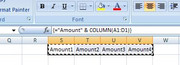
We start by considering spreadsheet formulas such as this,
={"Amount" & COLUMN(A1:D1)}
, which returns us an array, which applied across a range , would give us like
Amount1 Amount2 Amount3 Amount4
Taking that general idea and a few other steps we can finally get at our heading like in this demo coding
Code:' https://excelfox.com/forum/showthread.php/2345-Appendix-Thread-(-Codes-for-other-Threads-HTML-Tables-etc-)?p=16532&viewfull=1#post16532 Sub MakeHeadings() Dim Mx As Long: Let Mx = 4 Dim Amounts() As Variant Let Amounts() = Evaluate("=""Amount"" & COLUMN(A1:D1)") Let Amounts() = Evaluate("=""Amount"" & COLUMN(A:D)") Let Amounts() = Evaluate("=""Amount"" & COLUMN(A:" & "D" & ")") ' We need to get D from what we know, Mx Dim vTemp As Variant vTemp = Cells(1, 4).Address vTemp = Split(vTemp, "$", 3, vbBinaryCompare) vTemp = vTemp(1) ' Or vTemp = Split(Cells(1, 4).Address, "$", 3, vbBinaryCompare)(1) ' Or vTemp = Split(Cells(1, 4).Address, "$")(1) vTemp = Split(Cells(1, Mx).Address, "$")(1) Let Amounts() = Evaluate("=""Amount"" & COLUMN(A:" & vTemp & ")") Let Amounts() = Evaluate("=""Amount"" & COLUMN(A:" & Split(Cells(1, Mx).Address, "$")(1) & ")") ' ' We want this array as a string with vbTabs seperating the array elements Dim strAmounts As String Let strAmounts = Join(Amounts(), vbTab) Let strAmounts = Join(Evaluate("=""Amount"" & COLUMN(A:" & Split(Cells(1, Mx).Address, "$")(1) & ")"), vbTab) ' similarly for the notes Dim strNotes As String Let strNotes = Join(Evaluate("=""Note"" & COLUMN(A:" & Split(Cells(1, Mx).Address, "$")(1) & ")"), vbTab) ' To get our final heading string, Dim strHd As String Let strHd = "Group" & vbTab & Join(Evaluate("=""Amount"" & COLUMN(A:" & Split(Cells(1, Mx).Address, "$")(1) & ")"), vbTab) & vbTab & Join(Evaluate("=""Note"" & COLUMN(A:" & Split(Cells(1, Mx).Address, "$")(1) & ")"), vbTab) & vbTab & "Notes" Dim objDataObject As Object: Set objDataObject = GetObject("New:{1C3B4210-F441-11CE-B9EA-00AA006B1A69}") ' http://web.archive.org/web/20200124185244/http://excelmatters.com/2013/10/04/late-bound-msforms-dataobject/ objDataObject.SetText Text:=strHd objDataObject.PutInClipboard Dim Ws1 As Worksheet: Set Ws1 = ThisWorkbook.Worksheets("Sheet1") Ws1.Paste Destination:=Ws1.Range("G1") End Sub
In the next post , https://excelfox.com/forum/showthrea...ll=1#post16533 , is that integrated into the main coding in Rem 3
In support of this main Forum post:
http://www.eileenslounge.com/viewtop...297074#p297074 http://http://www.eileenslounge.com/viewtop...297074#p297074
Second simplified Solution
I think in the first solution I made initially a mistake in trying to set the pseudo public variables, *** and so went off in a tangent using the Application.Run stuff. You don’t need any of that and can forget the two macros that fill the variables as well.
You just need this
Worksheet code module, Sheet1 ( in PurseWayDoughPublicVariables.xls )
Workbook code module, ThisWorkbook ( in PurseWayDoughPublicVariables.xls )Code:Public C1 As String
Code:Public C2 As String
And then the other macros are like
Code:Private Sub CommandButton1_Click() Select Case Me.CheckBox1 Case True 'C1 = "yes" ' Application.Run Macro:="'" & ThisWorkbook.Path & "\" & "PurseWayDoughPublicVariables.xls'!Sheet1.PhilC1", Arg1:="Yus" Let Workbooks("PurseWayDoughPublicVariables.xls").Worksheets("Sheet1").C1 = "Yus" End Select Select Case Me.CheckBox2 Case True 'C2 = "yes" ' Application.Run Macro:="'" & ThisWorkbook.Path & "\" & "PurseWayDoughPublicVariables.xls'!ThisWorkbook.PhilC2", Arg1:="Ja" Let Workbooks("PurseWayDoughPublicVariables.xls").C2 = "Ja" End Select Unload Me Call Sheet2.Fi_l End SubCode:Sub Fi_l() 'Act_ive 'Let Range("A2").Resize(10).Value = C1 Let Range("A2").Resize(10).Value = Workbooks("PurseWayDoughPublicVariables.xls").Worksheets("Sheet1").C1 'let Range("B2").Resize(10).Value = C2 Let Range("B2").Resize(10).Value = Workbooks("PurseWayDoughPublicVariables.xls").C2 End Sub

 Reply With Quote
Bookmarks