Thx for the feedback

Originally Posted by
Amelynn

… take your advice using .Text after TextBox., and .Value2 after .Range. It seems to be the most powerful way if it also takes currency and date formats…...
Note: .Value2 does not preserve any format: Just to clarify:
.Value2 is the lowest level number, the most fundamental, the simplist, which Excel holds for the cells value. It is probably most efficient and best to use this if you can, that is to say, Use it if it gets the results that you want.
.Value is very similar to .Value2. The small difference is that it may give you date and currency values in some format. The final format you get will vary depending on your various settings in your particular Excel.
( .Value will often be used by default by Excel in some situations where you referrence the cell by the range object in coding where a value is expected, but you don't specify explicitly what value you want it to use. )
.Text is new to me. I have not used it much. But my first impression is that it would appear that it gives you the string format similar to what you actually see in the spreadsheet.
As Example:
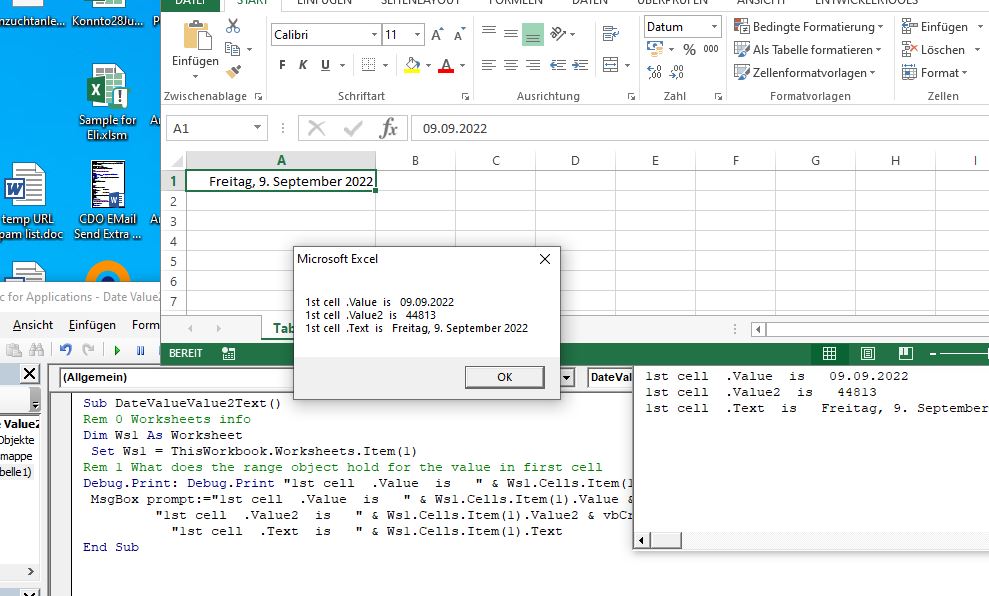
In the attached file, I have a date in the first cell.
In that attached file is also the macro shown below. If you run that macro, it should give you three different values. Those three different values are the three value properties of the range object of the first cell, .Text , .Value , .Value2
You will not get exactly the same results as me for .Value and .Text , because the value is influenced by your internal settings and your Land version.
The value for .Value2 should be exactly the same as what I get, because: For dates in Excel, Excel holds as the most low level value, a number which starts at 1 for the date of January 1, 1900. For the date which I have in the first cell ( 9th September, 2022) Excel has the internal value of 44813.
Alan
Code:
Sub DateValueValue2Text()
Rem 0 Worksheets info
Dim Ws1 As Worksheet
 Set Ws1 = ThisWorkbook.Worksheets.Item(1)
Rem 1 What does the range object hold for the value in first cell
Debug.Print: Debug.Print "1st cell  .Value  is   " & Ws1.Cells.Item(1).Value & vbCr & vbLf & "1st cell  .Value2  is   " & Ws1.Cells.Item(1).Value2 & vbCr & vbLf & "1st cell  .Text  is   " & Ws1.Cells.Item(1).Text
 MsgBox prompt:="1st cell  .Value  is   " & Ws1.Cells.Item(1).Value & vbCr & vbLf & _
         "1st cell  .Value2  is   " & Ws1.Cells.Item(1).Value2 & vbCr & vbLf & _
           "1st cell  .Text  is   " & Ws1.Cells.Item(1).Text
End Sub
Date Value2 Value and Text.jpg
https://i.postimg.cc/KjFm1988/Date-V...e-and-Text.jpg


 Reply With Quote

Bookmarks