


Hi
OK, that’s all a bit clearer for me, thanks.
I probably could have a go… But …
I am still having problems doing anything with your UserForm.
I tried on three different computers, with Excel versions 2007, 2010 and 2013(professional)
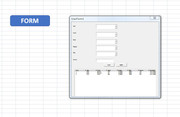
So, I press the Form Button
This happens:
Excel 2007 text is too small to do anything with, as before ( that I did before was on another computer which also had Excel 2007 )
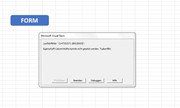
Excel 2010 error
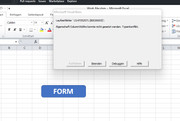
Excel 2013 ( Professional ) error
Translating those error texts in the last two screenshots to English – it says something about not being able to set ColumnWidth property due to type mismatch
If nobody else helps you in the meantime, I will try and take a look again later today when I have more time. I might be able to do something in Excel 2007, but its going to be very difficult for me to try and add data in the UserForm as I can barely see anything.
Its very strange that I get those errors in newer Excel versions. Also the small size I see, could suggest, along with the errors in newer versions, that something is dodgy with your userform
What Excel version are you using?
Perhaps in the meantime you could take a look and see if you can do something with the UserForm. Maybe make something bigger , at least just temporarily. Maybe if you make the Form and / or the text bigger and upload some other files with a modified UserForm size in, then I might have a better chance of seeing something in it.
And/ or see if you can figure out why I can't get the UserForm to come up in some of my Excels.
As I mentined, I do not have much experience with UserForms, but I have made a few. So far, when they work, they work in all my Excel versions. So I think there is at least a chance that something is a bit wonky in your UserForm, something that just by chance allows it work, all be it with very small text, in Excel 2007.
Could be a totally other explanation. I am just geussing due to my lack of a lot of experience with UserForms
I will try and look again today. It might have to wait until tomorrow.
Please if you get it fixed in the meantime, let me know, so I don’t waste my time.
Thanks
Alan

 Reply With Quote
Bookmarks