


Hi
I have done a little internet research and also done some testing,
( https://excelfox.com/forum/showthrea...ll=1#post15637
https://excelfox.com/forum/showthrea...ll=1#post15638
https://excelfox.com/forum/showthrea...ll=1#post15639 https://excelfox.com/forum/showthrea...ll=1#post15640
https://excelfox.com/forum/showthrea...ll=1#post15641
https://excelfox.com/forum/showthrea...ll=1#post15642
https://excelfox.com/forum/showthrea...ll=1#post15643
https://excelfox.com/forum/showthrea...ll=1#post15644
https://excelfox.com/forum/showthrea...ll=1#post15645 )
I remain somewhat puzzled that the macro that you initially gave ever worked!
But , never mind that for now!
I think I have just about learnt enough to be able to make a macro to Get Pictures from Word Document.
I suggest that we concentrate initially on convincing ourselves that we can make a macro to Get Pictures from Word Document.
If we are then confidentand happy that we can do that, then we can move on later to the issue of Word Documents in All Sub Folders
Run the following macro when you have the attached returned file open.
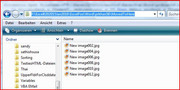
After running that macro, you should see that your 6 image files are in the folder MovedToHereCode:Sub GetPicturesfromWordDocument() ' Documents.Open FileName:="F:\Excel0202015Jan2016\ExcelFox\Word\prkhan56\2. KEEP DUPLICATE RECORDS.docx" ' This wont error if document file is already open Rem 1 Our File with possibly images in it Dim DocWithImgs As Document: Set DocWithImgs = ActiveDocument ' This is a personal preferrence of mine to do it like this, as i do not like to use ActiveDocument too much in coding incase some other documant becomes accidentally active. Doing this, I only need to make sure the documant that I am intersted in is active initially Dim strPath As String: Let strPath = DocWithImgs.Path Dim strOriginalFile As String: Let strOriginalFile = DocWithImgs.FullName ' This is the full path and file name of the current Active document. This should be the file from which you want to extract the images Dim strDocumentName As String: Let strDocumentName = Left(DocWithImgs.Name, InStrRev(DocWithImgs.Name, ".") - 1) ' this will be the active Rem 2 save file as extension type .htm - this will produce a .htm file and a folder with, amoungst other things, files of any images in the document. In English Excel this folder will have the name strDocumentName & "-Files" In German it will be strDocumentName & "-Dateien" DocWithImgs.SaveAs Filename:=strPath & "\" & strDocumentName & ".htm", FileFormat:=wdFormatHTML Documents(strDocumentName & ".htm").Close ' The purpose of the Save As .htm was to get thee new folder made, that's all, so we can close that file now, and then kill (delete) it Kill strPath & "\" & strDocumentName & ".htm" Rem 3 check we have a new Folder with a name like strDocumentName & "-...... " - In English Excel this folder should have the full name and path of strPath & "\" & "2. KEEP DUPLICATE RECORDS-Files" In German Excel it should be strPath & "\" & "2. KEEP DUPLICATE RECORDS-Dateien" If Dir(strPath & "\" & strDocumentName & "-*", vbDirectory) = "" Then MsgBox prompt:="Something went wrong. There is no new folder produced" Else Dim FileFlder As String: Let FileFlder = Dir(strPath & "\" & strDocumentName & "-*", vbDirectory) End If Rem 4 copy all .jpg images to a new folder MovedToHere If Dir(strPath & "\MovedToHere", vbDirectory) = "" Then MkDir strPath & "\MovedToHere" ' The macro makes a folder, MovedToHere in the same place as where the current active document is. I have slightly modified this code line, to prevent it erroring if the folder already exists: It only makes the folder if the folder does not exist. - If you try to make a folder when it already exists, then that would chuck up an error Dim strFile As String: Let strFile = Dir(strPath & "\" & FileFlder & "\*.jpg", vbNormal) ' look for first .jpg file, if there is one Do While strFile <> "" ' The purpose of the Do While __ Loop _ loop is to keep going while you still find files of the extension type currently being looked for. Name strPath & "\" & FileFlder & "\" & strFile As strPath & "\MovedToHere\" & "New " & strFile ' Each of the files you find gets copied to folder, MovedToHere and has its name modified a bit to have the text "New " added at the start, like for example, Filex.png would become New Filex.png Let strFile = Dir ' The use of Dir on its own, without any bracket ( ) stuff tells VBA to look again for the next file of the same type and in the same place that it looked the last time Loop ' While strFile <> "" Rem 5 remove the directory made by the SaveAs .htm If Not Dir(strPath & "\" & FileFlder & "\*.*") = "" Then Kill strPath & "\" & FileFlder & "\*.*" RmDir strPath & "\" & FileFlder End Sub
6 jpgs after running Sub GetPicturesfromWordDocument().JPG
See how you get on with that.
Alan

 Reply With Quote
Bookmarks