


Some Extra notes for this forum post
https://eileenslounge.com/viewtopic....310565#p310565
https://eileenslounge.com/viewtopic....310720#p310720
Here is an interesting use of the "scripting.filesystemobject"
Question: extract only a .csv name file from url string, for example:
ANPR_archivio_comuni.csv
comuni.csv
cap.csv
comuni_codici-catastali.csv
stemmi.csv
, from
https://www.anagrafenazionale.intern...vio_comuni.csv
https://raw.githubusercontent.com/op...ati/comuni.csv
https://raw.githubusercontent.com/op...n/dati/cap.csv
https://raw.githubusercontent.com/op...-catastali.csv
https://raw.githubusercontent.com/op...ati/stemmi.csv
Answer:
The answer here almost works, there is the deliberate mistake of a missing "…. Remember, snb, " In VBA almost every double quote should be followed by a 'closing' quote" … do that and then it works
join(filter(split(replace(createobject("scripting.filesystemobject").opentextfile("G:\OF\nomefilecsv.txt").readall,vbcrlf,"/"),"/"),".csv"),vblf)
Lets look at that
It is a "one liner". Maybe we can use the ideas there to get a whole text file.
Here it is, broken down / opened up, for future reference.
Idea for a "one liner" toCode:' https://eileenslounge.com/viewtopic.php?p=310565#p310565 'Sub M_snb() ' msgbox join(filter(split(replace(createobject("scripting.filesystemobject").opentextfile("G:\OF\nomefilecsv.txt).readall,vbcrlf,"/"),"/"),".csv"),vblf) 'End Sub Sub M_snb() Dim vTemp As Variant Let vTemp = CreateObject("scripting.filesystemobject").opentextfile("" & ThisWorkbook.Path & "\nomefilecsv.txt").readall 'https://www.anagrafenazionale.interno.it/wp-content/uploads/ANPR_archivio_comuni.csv 'https://raw.githubusercontent.com/opendatasicilia/comuni-italiani/main/dati/comuni.csv 'https://raw.githubusercontent.com/opendatasicilia/comuni-italiani/main/dati/cap.csv 'https://raw.githubusercontent.com/opendatasicilia/comuni-italiani/main/dati/comuni_codici-catastali.csv 'https://raw.githubusercontent.com/opendatasicilia/comuni-italiani/main/dati/stemmi.csv Let vTemp = Replace(vTemp, vbCr & vbLf, "/") ' https://www.anagrafenazionale.interno.it/wp-content/uploads/ANPR_archivio_comuni.csv/https://raw.githubusercontent.com/opendatasicilia/comuni-italiani/main/dati/comuni.csv/https://raw.githubusercontent.com/opendatasicilia/comuni-italiani/main/dati/cap.csv/https://raw.githubusercontent.com/opendatasicilia/comuni-italiani/main/dati/comuni_codici-catastali.csv/https://raw.githubusercontent.com/opendatasicilia/comuni-italiani/main/dati/stemmi.csv Let vTemp = Split(vTemp, "/") '' https://i.postimg.cc/gjnjtx2S/v-Temp...Temp-slash.jpg Let vTemp = Filter(Sourcearray:=vTemp, Match:=".csv", Include:=True, Compare:=vbBinaryCompare) '
' https://i.postimg.cc/0jpzgbS9/v-Temp...-Match-csv.jpg Let vTemp = Join(vTemp, vbCr & vbLf) 'ANPR_archivio_comuni.csv 'comuni.csv 'cap.csv 'comuni_codici -catastali.csv 'stemmi.csv
_ bring a text file into an Excel worksheet,
or
_ bring a text file into a VBA variable
The idea, summarised in words is, to do, all in one line …
_The entire text file is brought ( into a string ) using the CreateObject("scripting.filesystemobject").opentextfile("TextFile") .readall thing
_ the line separator ( most likely the invisible character pair, vbCr & vbLf ) will be replaced by the column separator , the thing which most commonly is the comma ,
_ the Split of the modified string by the , separator , to give a long single array 1 dimensional array,
_ finally the 2Darray = Index ( 1Darray, Rws , Clms() ) ideas , for example here , https://www.excelfox.com/forum/showt...3287#post23287 , will be used to give us the final array or range of values
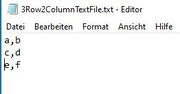
First try with simple 3 row, 2 column array
a, b
c, d
e, f
I made that manually. Here is a quick check on what it is made up of:
Using this,
, we get results of this form for its character contents,Code:Sub QuickTxtFileCheck() Rem 0 Path info Dim PathAndFileName As String, TotalFile As String Let PathAndFileName = ThisWorkbook.Path & Application.PathSeparator & "3Row2ColumnTextFile.txt" ' CHANGE TO SUIT From vixer zyxw1234 : http://www.eileenslounge.com/viewtopic.php?f=30&t=34629 DF.txt https://app.box.com/s/gw941dh9v8sqhvzin3lo9rfc67fjsbic ' My usually used way Dim FileNum As Long: Let FileNum = FreeFile(1) ' https://msdn.microsoft.com/en-us/vba/language-reference-vba/articles/freefile-function Open PathAndFileName For Binary As #FileNum 'Open Route to data. Binary is a fundemental type data input... Let TotalFile = Space(LOF(FileNum)) '....and wot recives it has to be a string of exactly the right length Get #FileNum, , TotalFile Close #FileNum Debug.Print TotalFile ' a , b ' c , d ' e , f Call WtchaGot_Unic_NotMuchIfYaChoppedItOff(TotalFile) ' "a" & "," & "b" & vbCr & vbLf & "c" & "," & "d" & vbCr & vbLf & "e" & "," & "f" ' using the CreateObject("scripting.filesystemobject").opentextfile("TextFile") thing Let TotalFile = CreateObject("scripting.filesystemobject").opentextfile(PathAndFileName).readall Debug.Print TotalFile ' a , b ' c , d ' e , f Call WtchaGot_Unic_NotMuchIfYaChoppedItOff(TotalFile) ' "a" & "," & "b" & vbCr & vbLf & "c" & "," & "d" & vbCr & vbLf & "e" & "," & "f" End Sub
06 Sep 2023
Lenf is 13a,b
c,d
e,f06 Sep 2023
Lenf is 13a,b
c,d
e,f1 a 97 1 a 97 2 , 44 2 , 44 3 b 98 3 b 98 4 13 4 13 5 10 5 10 6 c 99 6 c 99 7 , 44 7 , 44 8 d 100 8 d 100 9 13 9 13 10 10 10 10 11 e 101 11 e 101 12 , 44 12 , 44 13 f 102 13 f 102
, so no surprise, all looks as expected.
Some coding attempts in the next post

 Reply With Quote
Bookmarks