
Some extra stuff for this post
https://eileenslounge.com/viewtopic.php?f=27&t=38243
later


Some extra stuff for this post
https://eileenslounge.com/viewtopic.php?f=27&t=38243
later
….If you are my competitor, I will try all I can to beat you. But if I do, I will not belittle you. I will Salute you, because without you, I am nothing.
If you are my enemy, we will try to kick the fucking shit out of you…..
Winston Churchill, 1939
Save your Forum..._
KILL A MODERATOR!!
In support of this main forum Thread
https://excelfox.com/forum/showthrea...nto-excel-cell
_1) create new number and place in cell B1 according to last serial number in csv file,
Before
ExcelFile:
_____ Workbook: SerialNumbers.xls ( Using Excel 2007 32 bit )
Worksheet: Sheet1
Row\Col Serial# : TTR0000001 TTR0000002 TTR0000003
Text File:
Code:TTR0000001 TTR0000002 TTR0000003
Run macro:
Code:Sub NewSN() ' Rem 1 Get the text file as a long single string Dim FileNum As Long: Let FileNum = FreeFile(1) ' https://msdn.microsoft.com/en-us/vba/language-reference-vba/articles/freefile-function Dim PathAndFileName As String, TotalFile As String Let PathAndFileName = ThisWorkbook.Path & Application.PathSeparator & "serial_number.csv" ' Open PathAndFileName For Binary As #FileNum 'Open Route to data. Binary is a fundamental type data input... ' Let TotalFile = Space(LOF(FileNum)) '....and wot receives it has to be a string of exactly the right length 'Get #FileNum, , TotalFile ' Or http://www.eileenslounge.com/viewtopic.php?p=295782&sid=f6dcab07c4d24e00e697fe4343dc7392#p295782 Let TotalFile = Input(LOF(FileNum), FileNum) Close #FileNum Rem 2 determine a new number '2a Current number If Right(TotalFile, 2) = vbCr & vbLf Then Let TotalFile = Left(TotalFile, Len(TotalFile) - 2) ' Take off last line feed Dim PosLstLineFeed As Long: Let PosLstLineFeed = InStrRev(TotalFile, vbCr & vbLf, -1, vbBinaryCompare) Dim CrntNmbr As String: Let CrntNmbr = Mid(TotalFile, PosLstLineFeed + 2) Let CrntNmbr = Replace(CrntNmbr, "TTR", "", 1, -1, vbBinaryCompare) '2b creat new number Let CrntNmbr = CrntNmbr + 1 Let CrntNmbr = Format(CrntNmbr, "0000000") Let CrntNmbr = "TTR" & CrntNmbr Rem 3 Put new number in Excel file Dim Ws1 As Worksheet: Set Ws1 = ThisWorkbook.Worksheets.Item(1) Dim LrB As Long: Let LrB = Ws1.Range("B" & Ws1.Rows.Count & "").End(xlUp).Row Let Ws1.Range("B" & LrB + 1 & "").Value = CrntNmbr End Sub
After:
_____ Workbook: SerialNumbers.xls ( Using Excel 2007 32 bit )
Worksheet: Sheet1
Row\Col Serial# : TTR0000001 TTR0000002 TTR0000003 TTR0000004
Last edited by DocAElstein; 06-13-2022 at 02:15 PM.
In support of this main forum Thread
https://excelfox.com/forum/showthrea...nto-excel-cell
_2) save new serial number to csv file below last numbers.
Before :
text File
Excel FileCode:TTR0000001 TTR0000002 TTR0000003
_____ Workbook: SerialNumbers.xls ( Using Excel 2007 32 bit )
Worksheet: Sheet1
Row\Col Serial# : TTR0000001 TTR0000002 TTR0000003 TTR0000004
Run this macro
Code:' https://excelfox.com/forum/showthread.php/2797-find-last-alphanumeric-row-of-txt-file-and-fill-into-excel-cell Sub SaveLatestSNinTextFile() Rem 1 Get the text file as a long single string Dim FileNum As Long: Let FileNum = FreeFile(1) ' https://msdn.microsoft.com/en-us/vba/language-reference-vba/articles/freefile-function Dim PathAndFileName As String, TotalFile As String Let PathAndFileName = ThisWorkbook.Path & Application.PathSeparator & "serial_number.csv" ' Open PathAndFileName For Binary As #FileNum 'Open Route to data. Binary is a fundamental type data input... ' Let TotalFile = Space(LOF(FileNum)) '....and wot receives it has to be a string of exactly the right length 'Get #FileNum, , TotalFile ' Or http://www.eileenslounge.com/viewtopic.php?p=295782&sid=f6dcab07c4d24e00e697fe4343dc7392#p295782 Let TotalFile = Input(LOF(FileNum), FileNum) Close #FileNum Rem 2 get latest serial nimber from Excel file Dim Ws1 As Worksheet: Set Ws1 = ThisWorkbook.Worksheets.Item(1) Dim LrB As Long: Let LrB = Ws1.Range("B" & Ws1.Rows.Count & "").End(xlUp).Row Dim CrntNmbr As String: Let CrntNmbr = Ws1.Range("B" & LrB & "").Value Rem 3 add latest serial number to text file ' 3a add a new line and the latest serial number to the string of the entire file If Right(TotalFile, 2) = vbCr & vbLf Then Let TotalFile = Left(TotalFile, Len(TotalFile) - 2) Let TotalFile = TotalFile & vbCr & vbLf & CrntNmbr ' ' 3b replace the text file with the new string Dim FileNum2 As Long: Let FileNum2 = FreeFile(0) ' https://msdn.microsoft.com/en-us/vba/language-reference-vba/articles/freefile-function Open PathAndFileName For Output As #FileNum2 Print #FileNum2, TotalFile ' write out entire text file Close #FileNum2 End Sub
After:
Code:TTR0000001 TTR0000002 TTR0000003 TTR0000004
In support of this main forum Thread post:
https://excelfox.com/forum/showthrea...ll=1#post16695
content in one line input reduced sample.txt https://app.box.com/s/grrxh1rl372pzp2exn6em00ovhj4qhih
content in one line output reduced sample.txt https://app.box.com/s/mpyvgf4kj9q04szjtj0255cns24lbxos
What’s those two text files got in them?:
Using the Function , Sub WtchaGot_Unic_NotMuchIfYaChoppedItOff(ByVal strIn As String, Optional ByVal FlNme As String) '
, from here: https://excelfox.com/forum/showthrea...ll=1#post15524
https://pastebin.com/eutzzxHv
, and using this Calling macro
Here is the results, for example from the immediate window :Code:' https://excelfox.com/forum/showthread.php/2559-Notes-tests-text-files-manipulation-of-text-files-in-Excel-and-with-Excel-VBA?p=16696&viewfull=1#post16696 Sub SantaComing() ' Rem 1 Get the text file as a long single string Dim FileNum As Long: Let FileNum = FreeFile(1) ' https://msdn.microsoft.com/en-us/vba/language-reference-vba/articles/freefile-function Dim PathAndFileName As String, TotalFile As String Let PathAndFileName = ThisWorkbook.Path & Application.PathSeparator & "content in one line input reduced sample.txt" ' Open PathAndFileName For Binary As #FileNum 'Open Route to data. Binary is a fundamental type data input... ' Let TotalFile = Space(LOF(FileNum)) '....and wot receives it has to be a string of exactly the right length 'Get #FileNum, , TotalFile ' Or http://www.eileenslounge.com/viewtopic.php?p=295782&sid=f6dcab07c4d24e00e697fe4343dc7392#p295782 Let TotalFile = Input(LOF(FileNum), FileNum) Close #FileNum Call WtchaGot_Unic_NotMuchIfYaChoppedItOff(TotalFile) End Sub
Here are the corresponding results if I do the same to look at the after file ( content in one line output reduced sample.txt https://app.box.com/s/mpyvgf4kj9q04szjtj0255cns24lbxos )Code:Chr(239) & Chr(187) & Chr(191) & "1111" & "." & " Last year" & "," & " I put together this list of the most iconic poems " & vbCr & vbLf & "in the English language" & ";" & " it" & Chr(226) & ChrW(8364) & ChrW(8482) & "s high time to do the same for short " & vbCr & vbLf & "stories" & "." & " But before we go any further" & "," & " you may be asking" & ":" & " What does " & vbCr & vbLf & Chr(226) & ChrW(8364) & ChrW(339) & "iconic" & Chr(226) & ChrW(8364) & Chr(157) & " mean in this context" & "?" & " Can a short story " & vbCr & vbLf & "really be iconic in the way of a poem" & "," & " or a painting" & "," & " or Elvis" & "?" & vbCr & vbLf & vbCr & vbLf & vbCr & vbLf & "really be iconic in the way of a poem" & "," & " or a painting" & "," & " or Elvis" & "?" & vbCr & vbLf & vbCr & vbLf & vbCr & vbLf & "Well" & "," & " who knows" & "," & " but for our purposes" & "," & " " & Chr(226) & ChrW(8364) & ChrW(339) & "iconic" & Chr(226) & ChrW(8364) & Chr(157) & " means that " & vbCr & vbLf & "the story has somehow wormed"
So, what do we conclude?:Code:Chr(239) & Chr(187) & Chr(191) & "1111" & "." & " Last year" & "," & " I put together this list of the most iconic poems in the English language" & ";" & " it" & Chr(226) & ChrW(8364) & ChrW(8482) & "s high time to do the same for short stories" & "." & " But before we go any further" & "," & " you may be asking" & ":" & " What does " & Chr(226) & ChrW(8364) & ChrW(339) & "iconic" & Chr(226) & ChrW(8364) & Chr(157) & " mean in this context" & "?" & " Can a short story really be iconic in the way of a poem" & "," & " or a painting" & "," & " or Elvis" & "?" & vbCr & vbLf & vbCr & vbLf & vbCr & vbLf & "really be iconic in the way of a poem" & "," & " or a painting" & "," & " or Elvis" & "?" & vbCr & vbLf & vbCr & vbLf & vbCr & vbLf & "Well" & "," & " who knows" & "," & " but for our purposes" & "," & " " & Chr(226) & ChrW(8364) & ChrW(339) & "iconic" & Chr(226) & ChrW(8364) & Chr(157) & " means that the story has somehow wormed"
_ 1) there are no tab characters
_ 2) It seems that the line separator is the commonly used 2 character pair of a carriage return and a line feed, ( In VBA coding, vbCr & vbLf )
_ 3) It seems like the character string we wish to remove, ( the extra new line forming characters ) are three character:
A space and a carriage return and a line feed. ( In VBA coding _ " " & vbCr & vbLf _ )
( _ 4) I expect the OP, ( susan santa 12345 et al. ) , probably would not want to remove all that, but rather replace it with a single space , so I will do that!)
This initial macro seems to do the required:
Here is the corresponding output from my function for the new text file madeCode:Sub ReplaceInTextFileThreeCharacters__Space_vbCr_vbLf__WithA__Space__() ' https://excelfox.com/forum/showthread.php/2817-Make-all-text-file-content-in-one-line-if-a-space-found ' Rem 1 Get the text file as a long single string Dim FileNum As Long: Let FileNum = FreeFile(1) ' https://msdn.microsoft.com/en-us/vba/language-reference-vba/articles/freefile-function Dim PathAndFileName As String, TotalFile As String Let PathAndFileName = ThisWorkbook.Path & Application.PathSeparator & "content in one line input reduced sample.txt" ' Open PathAndFileName For Binary As #FileNum 'Open Route to data. Binary is a fundamental type data input... ' Let TotalFile = Space(LOF(FileNum)) '....and wot receives it has to be a string of exactly the right length 'Get #FileNum, , TotalFile ' Or http://www.eileenslounge.com/viewtopic.php?p=295782&sid=f6dcab07c4d24e00e697fe4343dc7392#p295782 Let TotalFile = Input(LOF(FileNum), FileNum) Close #FileNum Rem 2 remove " " & vbCr & vbLf ' Let TotalFile = Replace(TotalFile, " " & vbCr & vbLf, "", 1, -1, vbBinaryCompare) Let TotalFile = Replace(TotalFile, " " & vbCr & vbLf, " ", 1, -1, vbBinaryCompare) ' I expect the OP, ( susan santa 12345 et al. ) , probably would not want to remove all that, but rather replace it with a single space , so I do that! Rem 3 Make new file Let PathAndFileName = ThisWorkbook.Path & Application.PathSeparator & "new text file.txt" Dim FileNum2 As Long: Let FileNum2 = FreeFile(0) ' https://msdn.microsoft.com/en-us/vba/language-reference-vba/articles/freefile-function Open PathAndFileName For Output As #FileNum2 Print #FileNum2, TotalFile ' write out entire text file Close #FileNum2 End Sub
That looks very similar to the output requested. Here is the new text file made:Code:Chr(239) & Chr(187) & Chr(191) & "1111" & "." & " Last year" & "," & " I put together this list of the most iconic poems in the English language" & ";" & " it" & Chr(226) & ChrW(8364) & ChrW(8482) & "s high time to do the same for short stories" & "." & " But before we go any further" & "," & " you may be asking" & ":" & " What does " & Chr(226) & ChrW(8364) & ChrW(339) & "iconic" & Chr(226) & ChrW(8364) & Chr(157) & " mean in this context" & "?" & " Can a short story really be iconic in the way of a poem" & "," & " or a painting" & "," & " or Elvis" & "?" & vbCr & vbLf & vbCr & vbLf & vbCr & vbLf & "really be iconic in the way of a poem" & "," & " or a painting" & "," & " or Elvis" & "?" & vbCr & vbLf & vbCr & vbLf & vbCr & vbLf & "Well" & "," & " who knows" & "," & " but for our purposes" & "," & " " & Chr(226) & ChrW(8364) & ChrW(339) & "iconic" & Chr(226) & ChrW(8364) & Chr(157) & " means that the story has somehow wormed" & vbCr & vbLf
new text file.txt https://app.box.com/s/w2zydwa20lr3jyxuk8z7ddjgpl0xrcvn
SantaClawsIsComing.xls https://app.box.com/s/7ken6nf050xd4xqwhxu3av1yebdb74dr
Last edited by DocAElstein; 09-14-2022 at 07:55 PM.
In support of this main forum Thread post:
https://excelfox.com/forum/showthrea...ll=1#post16695
content in one line input reduced sample.txt https://app.box.com/s/grrxh1rl372pzp2exn6em00ovhj4qhih
content in one line output reduced sample.txt https://app.box.com/s/mpyvgf4kj9q04szjtj0255cns24lbxos
What’s those two text files got in them?:
Using the Function , Sub WtchaGot_Unic_NotMuchIfYaChoppedItOff(ByVal strIn As String, Optional ByVal FlNme As String) '
, from here: https://excelfox.com/forum/showthrea...ll=1#post15524
https://pastebin.com/eutzzxHv
, and using this Calling macro
Here is the results, for example from the immediate window :Code:' https://excelfox.com/forum/showthread.php/2559-Notes-tests-text-files-manipulation-of-text-files-in-Excel-and-with-Excel-VBA?p=16696&viewfull=1#post16696 Sub SantaComing() ' Rem 1 Get the text file as a long single string Dim FileNum As Long: Let FileNum = FreeFile(1) ' https://msdn.microsoft.com/en-us/vba/language-reference-vba/articles/freefile-function Dim PathAndFileName As String, TotalFile As String Let PathAndFileName = ThisWorkbook.Path & Application.PathSeparator & "content in one line input reduced sample.txt" ' Open PathAndFileName For Binary As #FileNum 'Open Route to data. Binary is a fundamental type data input... ' Let TotalFile = Space(LOF(FileNum)) '....and wot receives it has to be a string of exactly the right length 'Get #FileNum, , TotalFile ' Or http://www.eileenslounge.com/viewtopic.php?p=295782&sid=f6dcab07c4d24e00e697fe4343dc7392#p295782 Let TotalFile = Input(LOF(FileNum), FileNum) Close #FileNum Call WtchaGot_Unic_NotMuchIfYaChoppedItOff(TotalFile) End Sub
Here are the corresponding results if I do the same to look at the after file ( content in one line output reduced sample.txt https://app.box.com/s/mpyvgf4kj9q04szjtj0255cns24lbxos )Code:Chr(239) & Chr(187) & Chr(191) & "1111" & "." & " Last year" & "," & " I put together this list of the most iconic poems " & vbCr & vbLf & "in the English language" & ";" & " it" & Chr(226) & ChrW(8364) & ChrW(8482) & "s high time to do the same for short " & vbCr & vbLf & "stories" & "." & " But before we go any further" & "," & " you may be asking" & ":" & " What does " & vbCr & vbLf & Chr(226) & ChrW(8364) & ChrW(339) & "iconic" & Chr(226) & ChrW(8364) & Chr(157) & " mean in this context" & "?" & " Can a short story " & vbCr & vbLf & "really be iconic in the way of a poem" & "," & " or a painting" & "," & " or Elvis" & "?" & vbCr & vbLf & vbCr & vbLf & vbCr & vbLf & "really be iconic in the way of a poem" & "," & " or a painting" & "," & " or Elvis" & "?" & vbCr & vbLf & vbCr & vbLf & vbCr & vbLf & "Well" & "," & " who knows" & "," & " but for our purposes" & "," & " " & Chr(226) & ChrW(8364) & ChrW(339) & "iconic" & Chr(226) & ChrW(8364) & Chr(157) & " means that " & vbCr & vbLf & "the story has somehow wormed"
So, what do we conclude?:Code:Chr(239) & Chr(187) & Chr(191) & "1111" & "." & " Last year" & "," & " I put together this list of the most iconic poems in the English language" & ";" & " it" & Chr(226) & ChrW(8364) & ChrW(8482) & "s high time to do the same for short stories" & "." & " But before we go any further" & "," & " you may be asking" & ":" & " What does " & Chr(226) & ChrW(8364) & ChrW(339) & "iconic" & Chr(226) & ChrW(8364) & Chr(157) & " mean in this context" & "?" & " Can a short story really be iconic in the way of a poem" & "," & " or a painting" & "," & " or Elvis" & "?" & vbCr & vbLf & vbCr & vbLf & vbCr & vbLf & "really be iconic in the way of a poem" & "," & " or a painting" & "," & " or Elvis" & "?" & vbCr & vbLf & vbCr & vbLf & vbCr & vbLf & "Well" & "," & " who knows" & "," & " but for our purposes" & "," & " " & Chr(226) & ChrW(8364) & ChrW(339) & "iconic" & Chr(226) & ChrW(8364) & Chr(157) & " means that the story has somehow wormed"
_ 1) there are no tab characters
_ 2) It seems that the line separator is the commonly used 2 character pair of a carriage return and a line feed, ( In VBA coding, vbCr & vbLf )
_ 3) It seems like the character string we wish to remove, ( the extra new line forming characters ) are three character:
A space and a carriage return and a line feed. ( In VBA coding _ " " & vbCr & vbLf _ )
( _ 4) I expect the OP, ( susan santa 12345 et al. ) , probably would not want to remove all that, but rather replace it with a single space , so I will do that!)
This initial macro seems to do the required:
Here is the corresponding output from my function for the new text file madeCode:Sub ReplaceInTextFileThreeCharacters__Space_vbCr_vbLf__WithA__Space__() ' https://excelfox.com/forum/showthread.php/2817-Make-all-text-file-content-in-one-line-if-a-space-found ' Rem 1 Get the text file as a long single string Dim FileNum As Long: Let FileNum = FreeFile(1) ' https://msdn.microsoft.com/en-us/vba/language-reference-vba/articles/freefile-function Dim PathAndFileName As String, TotalFile As String Let PathAndFileName = ThisWorkbook.Path & Application.PathSeparator & "content in one line input reduced sample.txt" ' Open PathAndFileName For Binary As #FileNum 'Open Route to data. Binary is a fundamental type data input... ' Let TotalFile = Space(LOF(FileNum)) '....and wot receives it has to be a string of exactly the right length 'Get #FileNum, , TotalFile ' Or http://www.eileenslounge.com/viewtopic.php?p=295782&sid=f6dcab07c4d24e00e697fe4343dc7392#p295782 Let TotalFile = Input(LOF(FileNum), FileNum) Close #FileNum Rem 2 remove " " & vbCr & vbLf ' Let TotalFile = Replace(TotalFile, " " & vbCr & vbLf, "", 1, -1, vbBinaryCompare) Let TotalFile = Replace(TotalFile, " " & vbCr & vbLf, " ", 1, -1, vbBinaryCompare) ' I expect the OP, ( susan santa 12345 et al. ) , probably would not want to remove all that, but rather replace it with a single space , so I do that! Rem 3 Make new file Let PathAndFileName = ThisWorkbook.Path & Application.PathSeparator & "new text file.txt" Dim FileNum2 As Long: Let FileNum2 = FreeFile(0) ' https://msdn.microsoft.com/en-us/vba/language-reference-vba/articles/freefile-function Open PathAndFileName For Output As #FileNum2 Print #FileNum2, TotalFile ' write out entire text file Close #FileNum2 End Sub
That looks very similar to the output requested. Here is the new text file made:Code:Chr(239) & Chr(187) & Chr(191) & "1111" & "." & " Last year" & "," & " I put together this list of the most iconic poems in the English language" & ";" & " it" & Chr(226) & ChrW(8364) & ChrW(8482) & "s high time to do the same for short stories" & "." & " But before we go any further" & "," & " you may be asking" & ":" & " What does " & Chr(226) & ChrW(8364) & ChrW(339) & "iconic" & Chr(226) & ChrW(8364) & Chr(157) & " mean in this context" & "?" & " Can a short story really be iconic in the way of a poem" & "," & " or a painting" & "," & " or Elvis" & "?" & vbCr & vbLf & vbCr & vbLf & vbCr & vbLf & "really be iconic in the way of a poem" & "," & " or a painting" & "," & " or Elvis" & "?" & vbCr & vbLf & vbCr & vbLf & vbCr & vbLf & "Well" & "," & " who knows" & "," & " but for our purposes" & "," & " " & Chr(226) & ChrW(8364) & ChrW(339) & "iconic" & Chr(226) & ChrW(8364) & Chr(157) & " means that the story has somehow wormed" & vbCr & vbLf
new text file.txt https://app.box.com/s/w2zydwa20lr3jyxuk8z7ddjgpl0xrcvn
SantaClawsIsComing.xls https://app.box.com/s/7ken6nf050xd4xqwhxu3av1yebdb74dr
Some notes in support of this forum main post
https://excelfox.com/forum/showthrea...ll=1#post16712
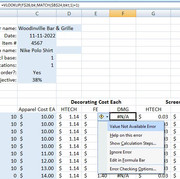
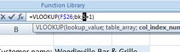
An erroring formula: https://i.postimg.cc/nzbWtGTQ/An-erroring-formula.jpg
Highlight a section, such as the Match section https://i.postimg.cc/5NxZ0pJB/Highlight-match.jpg
Hit key F9 https://i.postimg.cc/7P1FwdFP/Hit-ke...esult-is-5.jpg
This reveals that we have 5 , or in total , 5 + 1 = 6
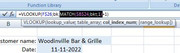
So in the VLookUp we are looking at column 6 in the range given by bk
The names manager tells us which range we want:
Second formula section is the range bk https://i.postimg.cc/JhBFg23L/range-bk.jpg
Similarly we can investigate the first section in the erroring formula
Highlight first formula section https://i.postimg.cc/902syY7j/Highli...la-section.jpg
Hit key F9 https://i.postimg.cc/wvLStG3V/Hiut-F...st-section.jpg
This reveals that the Look up value, the value that you are looking for is "DMG1"
Further investigations by trial and error , reveals that some character combinations in cell A2 cause the error. But I do not know why yet ?
Examples:
Not work:
https://i.postimg.cc/YqbTmg2J/d-not-work.jpg
https://i.postimg.cc/d0zbVYQ3/d-MG1-not-work.jpg
Works
https://i.postimg.cc/3xq6tTv1/MG1-works.jpg
In fact, it seems that some character combinations are not allowed as the Look Up value generally , for example try another cell, and I can find a character combination that does not work
https://i.postimg.cc/SK204shH/Not-wo...ters-in-A6.jpg
I am puzzled.
In fact if you look in detail at the results you are getting when it does appear to work, then they are not alwaysthe correct values.
https://postimg.cc/kBnt3Zzg
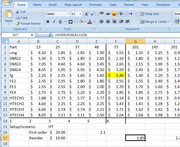
Very strange. I am even more puzzled
?????
Update Answer from Sandy https://excelfox.com/forum/showthrea...ll=1#post16717
Originally Posted by sandy666

https://i.postimg.cc/15VpN7Hj/ThatsIt.jpg
( I thought I had checked that, but missed something somewhere, I don’t know why I missed that, maybe I think also I need to learn how to use VLoopUp properly! )
Last edited by DocAElstein; 10-01-2022 at 01:06 PM.
….If you are my competitor, I will try all I can to beat you. But if I do, I will not belittle you. I will Salute you, because without you, I am nothing.
If you are my enemy, we will try to kick the fucking shit out of you…..
Winston Churchill, 1939
Save your Forum..._
KILL A MODERATOR!!
Some notes in support of this forum main post
https://excelfox.com/forum/showthrea...ll=1#post16712
An erroring formula: https://i.postimg.cc/nzbWtGTQ/An-erroring-formula.jpg
Highlight a section, such as the Match section https://i.postimg.cc/5NxZ0pJB/Highlight-match.jpg
Hit key F9 https://i.postimg.cc/7P1FwdFP/Hit-ke...esult-is-5.jpg
This reveals that we have 5 , or in total , 5 + 1 = 6
So in the VLookUp we are looking at column 6 in the range given by bk
The names manager tells us which range we want:
Second formula section is the range bk https://i.postimg.cc/JhBFg23L/range-bk.jpg
Similarly we can investigate the first section in the erroring formula
Highlight first formula section https://i.postimg.cc/902syY7j/Highli...la-section.jpg
Hit key F9 https://i.postimg.cc/wvLStG3V/Hiut-F...st-section.jpg
This reveals that the Look up value, the value that you are looking for is "DMG1"
Further investigations by trial and error , reveals that some character combinations in cell A2 cause the error. But I do not know why yet ?
Examples:
Not work:
https://i.postimg.cc/YqbTmg2J/d-not-work.jpg
https://i.postimg.cc/d0zbVYQ3/d-MG1-not-work.jpg
Works
https://i.postimg.cc/3xq6tTv1/MG1-works.jpg
In fact, it seems that some character combinations are not allowed as the Look Up value generally , for example try another cell, and I can find a character combination that does not work
https://i.postimg.cc/SK204shH/Not-wo...ters-in-A6.jpg
I am puzzled.
In fact if you look in detail at the results you are getting when it does appear to work, then they are not alwaysthe correct values.
https://postimg.cc/kBnt3Zzg
Very strange. I am even more puzzled
?????
Update Answer from Sandy https://excelfox.com/forum/showthrea...ll=1#post16717
https://i.postimg.cc/15VpN7Hj/ThatsIt.jpg
( I thought I had checked that, but missed something somewhere, I don’t know why I missed that, maybe I think also I need to learn how to use VLoopUp properly! )
….If you are my competitor, I will try all I can to beat you. But if I do, I will not belittle you. I will Salute you, because without you, I am nothing.
If you are my enemy, we will try to kick the fucking shit out of you…..
Winston Churchill, 1939
Save your Forum..._
KILL A MODERATOR!!
This is post https://excelfox.com/forum/showthrea...6727#post16727
#post16727
In support of this forum Thread: https://excelfox.com/forum/showthrea...6726#post16726
https://excelfox.com/forum/showthrea...6718#post16718
I want to analyse the text in cells A2, A5, B7, and B10.
I can use my Function , Sub WtchaGot_Unic_NotMuchIfYaChoppedItOff(ByVal strIn As String, Optional ByVal FlNme As String) '
, from here: https://excelfox.com/forum/showthrea...ll=1#post15524
https://pastebin.com/eutzzxHv
In conjunction with this short macro
Here are some of the resultsCode:Option Explicit ' https://excelfox.com/forum/showthread.php/2559-Notes-tests-text-files-manipulation-of-text-files-in-Excel-and-with-Excel-VBA?p=16727&viewfull=1#post16727 ' https://excelfox.com/forum/showthread.php/2818-in-VBA-if-the-given-string-is-found-then-delete-everything-between-two-newlines-where-the-string-appears Sub WotsEeGot() Call WtchaGot_Unic_NotMuchIfYaChoppedItOff(Range("A2").Value2) ' https://pastebin.com/raw/eutzzxHv Call WtchaGot_Unic_NotMuchIfYaChoppedItOff(Range("A5").Value2) Call WtchaGot_Unic_NotMuchIfYaChoppedItOff(Range("B7").Value2) Call WtchaGot_Unic_NotMuchIfYaChoppedItOff(Range("B10").Value2) End Sub
So it looks like most important info to glean is that the line separator is as conventional in an Excel cell, vbLfCode:"in VBA if the given string is found then delete everything between two newlines where the string appears" & "." & vbLf & """" & "Looking for help in VBA" & """" & vbLf & vbLf & "if the given string is found in any paragraph" & "/" & "line excel cell then delete everything between two newlines where the string appears" & "." & " in VBA if the given string is found then delete everything between two newlines where the string appears" & "." & vbLf & """" & "Looking for help in VBA" & """" & "searched" & Chr(42) & "string" & vbLf & vbLf & "if the given string is found in any excel cell then delete everything between two newlines where the string appears" & "." "in VBA if the given string is found then delete everything between two newlines where the string appears" & "." & vbLf & """" & "Looking for help in " & "#" & "VBA" & """" & vbLf & "if the given string is found in any excel cell then delete paragraph" & "/" & "line everything between two newlines where the string appears" & "." & vbLf & "in VBA if the given string is found then delete paragraph" & "/" & "line everything between two newlines where the string appears" & "." & vbLf & """" & "Looking for help in VBA" & """" & vbLf & "if the given string is found in any excel cell then delete everything between two newlines where the string appears" & "." & vbLf & "searched" & Chr(42) & "string" "in VBA if the given string is found then delete everything between two newlines where the string appears" & "." & vbLf & """" & "Looking for help in VBA" & """" & vbLf & vbLf & "if the given string is found in any paragraph" & "/" & "line excel cell then delete everything between two newlines where the string appears" & "." & " in VBA if the given string is found then delete everything between two newlines where the string appears" & "." & vbLf & """" & "Looking for help in VBA" & """" & "searched" & Chr(42) & "string" & vbLf & vbLf & "if the given string is found in any excel cell then delete everything between two newlines where the string appears" & "." "in VBA if the given string is found then delete everything between two newlines where the string appears" & "." & vbLf & """" & "Looking for help in " & "#" & "VBA" & """" & vbLf & "if the given string is found in any excel cell then delete paragraph" & "/" & "line everything between two newlines where the string appears" & "." & vbLf & "in VBA if the given string is found then delete paragraph" & "/" & "line everything between two newlines where the string appears" & "." & vbLf & """" & "Looking for help in VBA" & """" & vbLf & "if the given string is found in any excel cell then delete everything between two newlines where the string appears" & "." & vbLf & "searched" & Chr(42) & "string"
Last edited by DocAElstein; 01-23-2023 at 03:00 PM.
….If you are my competitor, I will try all I can to beat you. But if I do, I will not belittle you. I will Salute you, because without you, I am nothing.
If you are my enemy, we will try to kick the fucking shit out of you…..
Winston Churchill, 1939
Save your Forum..._
KILL A MODERATOR!!
This is post https://excelfox.com/forum/showthrea...ll=1#post19610
#post19610
It was copied initially before I edited it from the post above, #post16727 , and that #post16727 stayes yellow highlighted after the copy
Some note in support of this main forum post
https://eileenslounge.com/viewtopic....303644#p303644
„WieGehtsYouTubeServerChrome.txt“ https://app.box.com/s/a7k2izgyzqhd7f98hlaq9csw0l4tyyl6
Last edited by DocAElstein; 01-23-2023 at 03:06 PM.
….If you are my competitor, I will try all I can to beat you. But if I do, I will not belittle you. I will Salute you, because without you, I am nothing.
If you are my enemy, we will try to kick the fucking shit out of you…..
Winston Churchill, 1939
Save your Forum..._
KILL A MODERATOR!!
This is post https://excelfox.com/forum/showthrea...6727#post16727
#post16727
In support of this forum Thread: https://excelfox.com/forum/showthrea...6726#post16726
https://excelfox.com/forum/showthrea...6718#post16718
I want to analyse the text in cells A2, A5, B7, and B10.
I can use my Function , Sub WtchaGot_Unic_NotMuchIfYaChoppedItOff(ByVal strIn As String, Optional ByVal FlNme As String) '
, from here: https://excelfox.com/forum/showthrea...ll=1#post15524
https://pastebin.com/eutzzxHv
In conjunction with this short macro
Here are some of the resultsCode:Option Explicit ' https://excelfox.com/forum/showthread.php/2559-Notes-tests-text-files-manipulation-of-text-files-in-Excel-and-with-Excel-VBA?p=16727&viewfull=1#post16727 ' https://excelfox.com/forum/showthread.php/2818-in-VBA-if-the-given-string-is-found-then-delete-everything-between-two-newlines-where-the-string-appears Sub WotsEeGot() Call WtchaGot_Unic_NotMuchIfYaChoppedItOff(Range("A2").Value2) ' https://pastebin.com/raw/eutzzxHv Call WtchaGot_Unic_NotMuchIfYaChoppedItOff(Range("A5").Value2) Call WtchaGot_Unic_NotMuchIfYaChoppedItOff(Range("B7").Value2) Call WtchaGot_Unic_NotMuchIfYaChoppedItOff(Range("B10").Value2) End Sub
So it looks like most important info to glean is that the line separator is as conventional in an Excel cell, vbLfCode:"in VBA if the given string is found then delete everything between two newlines where the string appears" & "." & vbLf & """" & "Looking for help in VBA" & """" & vbLf & vbLf & "if the given string is found in any paragraph" & "/" & "line excel cell then delete everything between two newlines where the string appears" & "." & " in VBA if the given string is found then delete everything between two newlines where the string appears" & "." & vbLf & """" & "Looking for help in VBA" & """" & "searched" & Chr(42) & "string" & vbLf & vbLf & "if the given string is found in any excel cell then delete everything between two newlines where the string appears" & "." "in VBA if the given string is found then delete everything between two newlines where the string appears" & "." & vbLf & """" & "Looking for help in " & "#" & "VBA" & """" & vbLf & "if the given string is found in any excel cell then delete paragraph" & "/" & "line everything between two newlines where the string appears" & "." & vbLf & "in VBA if the given string is found then delete paragraph" & "/" & "line everything between two newlines where the string appears" & "." & vbLf & """" & "Looking for help in VBA" & """" & vbLf & "if the given string is found in any excel cell then delete everything between two newlines where the string appears" & "." & vbLf & "searched" & Chr(42) & "string" "in VBA if the given string is found then delete everything between two newlines where the string appears" & "." & vbLf & """" & "Looking for help in VBA" & """" & vbLf & vbLf & "if the given string is found in any paragraph" & "/" & "line excel cell then delete everything between two newlines where the string appears" & "." & " in VBA if the given string is found then delete everything between two newlines where the string appears" & "." & vbLf & """" & "Looking for help in VBA" & """" & "searched" & Chr(42) & "string" & vbLf & vbLf & "if the given string is found in any excel cell then delete everything between two newlines where the string appears" & "." "in VBA if the given string is found then delete everything between two newlines where the string appears" & "." & vbLf & """" & "Looking for help in " & "#" & "VBA" & """" & vbLf & "if the given string is found in any excel cell then delete paragraph" & "/" & "line everything between two newlines where the string appears" & "." & vbLf & "in VBA if the given string is found then delete paragraph" & "/" & "line everything between two newlines where the string appears" & "." & vbLf & """" & "Looking for help in VBA" & """" & vbLf & "if the given string is found in any excel cell then delete everything between two newlines where the string appears" & "." & vbLf & "searched" & Chr(42) & "string"
….If you are my competitor, I will try all I can to beat you. But if I do, I will not belittle you. I will Salute you, because without you, I am nothing.
If you are my enemy, we will try to kick the fucking shit out of you…..
Winston Churchill, 1939
Save your Forum..._
KILL A MODERATOR!!
 Posting Permissions


 Reply With Quote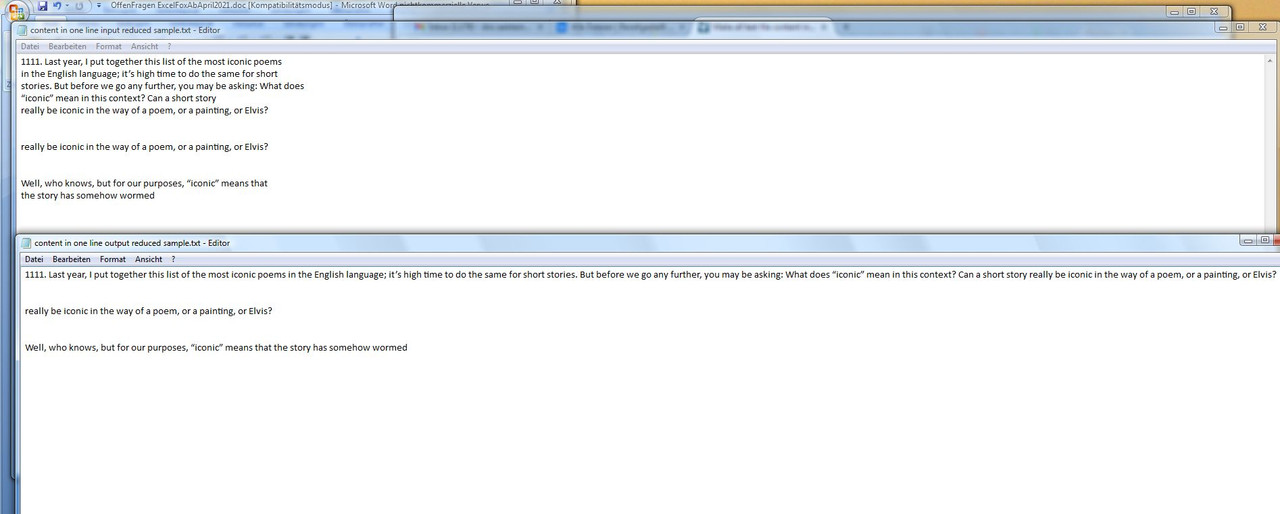


Bookmarks