


This thread post URL link is https://excelfox.com/forum/showthrea...ge43#post12695
https://excelfox.com/forum/showthread.php/2408-Windows-10-and-Office-Excel/page43#post12695
The exe thing from Chris’s Tool thing…
A lot of people kept asking Chris for a simple exe. ( He mentioned how to do it from about minute 24 in this video
https://www.youtube.com/watch?v=dyDMmfvwT2w&t=1436s
https://drive.google.com/file/d/1AKi...?usp=drive_web ) ( Edit much later after viewing the Video again , ( I often pick up something else when review the video again) Chris seems to have done the exe demo again at 1 54 20 , https://youtu.be/dyDMmfvwT2w?t=6841 and it went much smoother that time.
)
A few weeks later he made one that you can download. ( https://www.christitus.com/windows-toolbox )
I got one from both ways. Here are some quick notes of the first attempt. I may add to them in the future
Self made one:
Things went approximately as in the explanation from Chris in the videos. (He did it live while waiting for something else, and , as he says , its more complicated then it needed to be, which ties up with my experience: With the benefit of not having to do it live, I have found it very simple to do.)
If I understand correctly, the free software thing, "ps2exe", that somehow makes the exe is somehow held directly by, or is integrated in, or in some other way strongly associated with windows power script stuff. Exactly what I mean by that I am not sure yet. But the end result is that a simple short set of powershell commands seem to set it off.
The following steps, which worked to get me a exe, were a combination of following Chris’s explanation along with a bit of experimenting and guess work.
You start by getting powershell with Administrator rights ip, (or the windows 11 terminal equivalent)
The first few code lines you need are like those I would typically do initially when getting the Tool to launch from the ps1 text file.
( This is the test text ( ps1 ) file I am playing around with recently, and it’s a very minor modified version of the script from Chris that has been available over the last couple of months,
win10debloat6Dec-31Dec.ps1 https://app.box.com/s/hho3gtdy4cx6284bghe2idfq4mtqmvyd )
When doing this experiment I had that file in a folder at this path ,
G:\Temp Opt\GitHub\win10script-master\My ps1 file Folder
So the usual first powershell code line is / was
Set-ExecutionPolicy Unrestricted
When I did that, it set some stuff off:
Ausführungsrichtlinie ändern
Die Ausführungsrichtlinie trägt zum Schutz vor nicht vertrauenswürdigen Skripts bei. Wenn Sie die Ausführungsrichtlinie
ändern, sind Sie möglicherweise den im Hilfethema "about_Execution_Policies" unter
"https:/go.microsoft.com/fwlink/?LinkID=135170" beschriebenen Sicherheitsrisiken ausgesetzt. Möchten Sie die
Ausführungsrichtlinie ändern?
[J] Ja [A] Ja, alle [N] Nein [K] Nein, keine [H] Anhalten [?] Hilfe (Standard ist "N"):
That is some kind of warning that I don’t think I need to worry about yet, so I usually answer that with either of these
J or j or a or A
The next code line is needed to get us to where we want to be which is where we usually have or want stuff to go. In this worked example I would write
cd 'G:\Temp Opt\GitHub\win10script-master\My ps1 file Folder'
( I could have done that script code line first: I don’t think it matters if I do it before the other one)
Sometimes at this point I might do the command
Dir
just to list out what I have at this place, but that is optional
At this point we start the exe making stuff. The following is the simple code line that in Chris’s explanation was half way there to getting the job done. By me it set off some other steps
install-module ps2exe
This is what was set off when I tried it:
Der NuGet-Anbieter ist erforderlich, um den Vorgang fortzusetzen.
PowerShellGet erfordert die NuGet-Anbieterversion 2.8.5.201 oder höher für die Interaktion mit NuGet-basierten
Repositorys. Der NuGet-Anbieter muss in "C:\Program Files\PackageManagement\ProviderAssemblies" oder
"C:\Users\User\AppData\Local\PackageManagement\Prov iderAssemblies" verfügbar sein. Sie können den NuGet-Anbieter auch
durch Ausführen von 'Install-PackageProvider -Name NuGet -MinimumVersion 2.8.5.201 -Force' installieren. Möchten Sie
den NuGet-Anbieter jetzt durch PowerShellGet installieren und importieren lassen?
[J] Ja [N] Nein [H] Anhalten [?] Hilfe (Standard ist "J"):
I decided to try a ? to get some more info, which it gave me:
J - Nur mit dem nächsten Schritt des Vorgangs fortfahren.
N - Diesen Vorgang überspringen und mit dem folgenden Vorgang fortfahren.
H - Die aktuelle Pipeline anhalten und zur Eingabeaufforderung zurückkehren. Geben Sie "exit" ein, um die Pipeline
fortzusetzen.
[J] Ja [N] Nein [H] Anhalten [?] Hilfe (Standard ist "J"):
I decided to try a j, which returned me:
Nicht vertrauenswürdiges Repository
Sie installieren die Module aus einem nicht vertrauenswürdigen Repository. Wenn Sie diesem Repository vertrauen, ändern
Sie dessen InstallationPolicy-Wert, indem Sie das Set-PSRepository-Cmdlet ausführen. Möchten Sie die Module von
'PSGallery' wirklich installieren?
[J] Ja [A] Ja, alle [N] Nein [K] Nein, keine [H] Anhalten [?] Hilfe (Standard ist "N"):
I answered that with j
So those last bits were a bit extra to what Chris did: He didn’t need to do any of that, he went on directly to what I did next, ( or he would have done had he not got a bit mixed up and forgot his Set-ExecutionPolicy Unrestricted )
So this is the next and final bit: It is a three part code line, consisting of -…
_ calling up the ps2exe thing __ the ps1 powerscript text file ___ and the arbitrary name I can chose to give the finally made exe file
_____ ps2exe ___ .\win10debloat6Dec-31Dec.ps1 _ .\win10debloat6Dec-31Dec.exe
Here is an actual screenshot of the last few bits of all that, as actually typically seen by me in the powershell window, starting from the bit where we start the exe making stuff: https://postimg.cc/KKYm2Wsg
Summary
So really, in a nut shell, the two important things are just the last two script code lines.
If you are starting from scratch then these are the sort of script code lines you need, (changing the path and file name to suit yours)
cd 'G:\Temp Opt\GitHub\win10script-master\My ps1 file Folder'
Set-ExecutionPolicy Unrestricted
install-module ps2exe
ps2exe .\win10debloat6Dec-31Dec.ps1 .\win10debloat6Dec-31Dec.exe
That is basically what Chris did in the video, ( he just went off in a tangent before he figured out that he had forgot the Set-ExecutionPolicy Unrestricted – ( those sort of code lines irritate him, probably for good reasons that I don’t understand yet) )
The exe file should then be made and put in your folder: https://i.postimg.cc/Rh9YpYDM/exe-fi...our-folder.jpg
Some possible Security problems
Initially the exe file did appear in my folder, My ps1 file Folder , but my windows defender kept chucking up warning pop ups, as it did again when I double clicked on the exe file, or when I right clicked and ran it as administrator,
Also the file seemed to vanish after a while!
I note that at an internet site associated with the development of this coding, https://i.postimg.cc/2SBVSB3s/Git-GH...the-ps2exe.jpg , they mention some problems with the thing being falsely flagged as a virus.
I disabled my Windows Defender temporarily, https://i.postimg.cc/QMGV9xTH/Disabl...s-Defender.jpg , and tried the whole thing again. The first time it did not seem to work, but then after a few attempts it seemed to work and the exe popped up.
I re enabled my windows defender shortly later and I seemed to get some security warning and similar problems again.
I left the defender off for a while and forgot about it. Some time later I switched it back on, and since then I have no longer had any problems launching the things.
GUI size
The size seems very similar to that of the usual script chucked up GUI which itself was a bit too big.
https://i.postimg.cc/Pxdxy3KH/Original-script-GUI.jpg
The original script chucked up GUI did not typically fit on a typical laptop screen, but with a bit of luck you could get the bottom buttons with the scroll bar: It seems that all the GUIs come up occasionally with a vertical scroll bar to the right, and with that you can just about get at the last few buttons at the bottom
Initially the GUIs appear to be close to identical.
On a typical laptop screen the exe GUI is too big:
https://i.postimg.cc/KjH8ZZbc/ps2exe-too-big.jpg
Chris’s exe
You can download the exe that Chris has made for 5$ at this site: https://www.christitus.com/windows-toolbox
Chris has some instructions and stuff to help if you have security problems.
When I tried it out, it downloaded and launched with no problem. It looks almost identical to the one I made. It remains a bit too big on a typical lap top screen.
https://i.postimg.cc/3NSddXXT/Chris-ps2exe-too-big.jpg
I tried extending my desktop onto a second monitor,
https://i.postimg.cc/X7PrWgNK/Extended-Desktop.jpg ( am old large television with 1920 x 1080 resolution ) , and it looks a bit better )
Here is the exe from Chris and the self made exe filling up the screen of a second monitor connected to the laptop using the extended desktop option,
https://i.postimg.cc/WpW3m7ZR/Purcha...lly-Monito.jpg
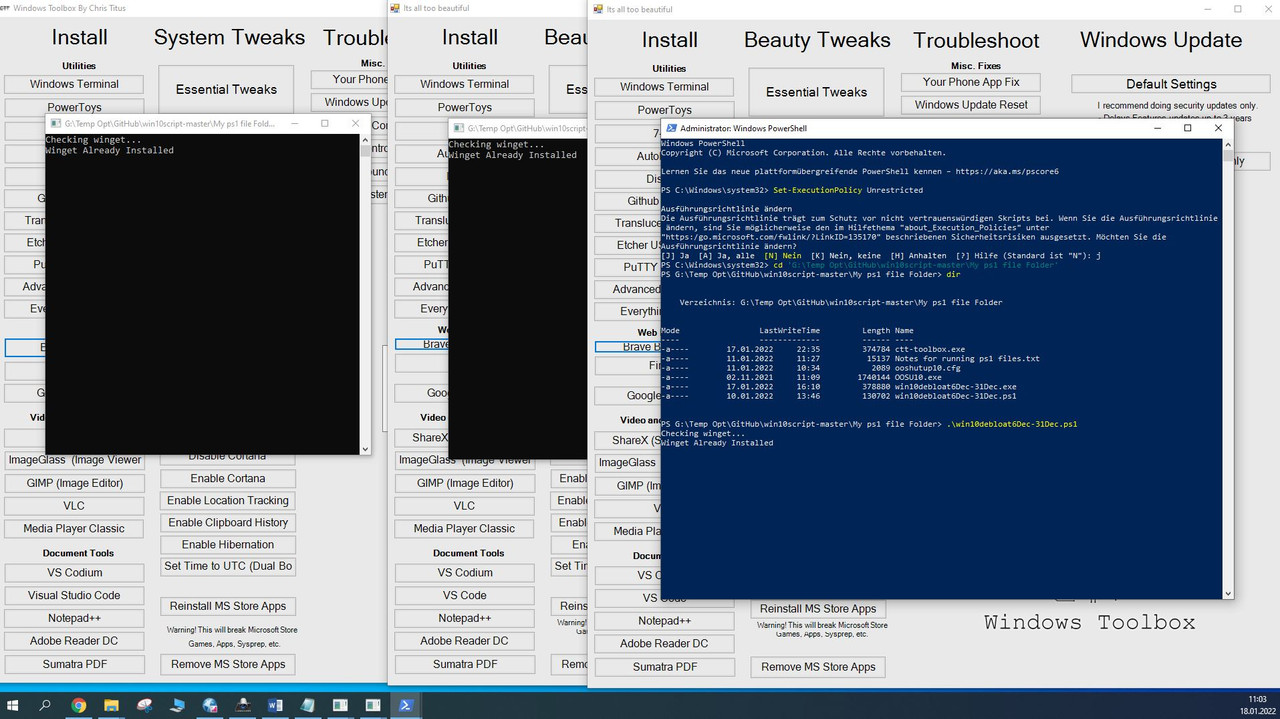
Here is all three shown together , the purchased exe from Chris, the self made exe and the GUI chucked up by running the ps1 script: ( Note that this is what I see on my extended desktop second monitor: On my normal laptop screen I can barely get one fitted in )
https://i.postimg.cc/0jQNRzLH/Compar...rom-script.jpg Comparison of all 3 Chriss exe self made exe run from script.jpg
Edit:
In a live stream on GitHub, at 1 hr, 6and a half minute, Chris is talking crap that the exe would be better with the size scaling…
https://youtu.be/ZEW5f7F94FY?t=3990

 Reply With Quote
Bookmarks