


Test Burgandy
Generic color name: Burgundy
Colors that make up #8C001A
RGB: 140, 0, 26 - HSL: 0.97, 1.00, 0.27
Purple[COLOR="#800080"]Purple[/COLOR]
Purple[COLOR=Purple]Purple[/COLOR]
Maroon[COLOR="#800000"]Maroon[/COLOR]
Maroon[COLOR=Maroon]Maroon[/COLOR]
Burgundy[COLOR="#8C001A"]Burgundy[/COLOR]
Windows10[color="#3E0000"]Windows10[/COLOR]
color:#A82D00 $NFS
HTML Code:<div class=WordSection1> <p class=MsoNormal><span lang=EN-GB style='font-size:9.0pt;line-height:115%; font-family:"Lucida Console";mso-bidi-font-family:"Lucida Console";color:#A82D00; mso-ansi-language:EN-GB;mso-fareast-language:DE'>$NFS</span><span lang=EN-GB style='font-size:9.0pt;line-height:115%;font-family:"Lucida Console"; mso-bidi-font-family:"Lucida Console";mso-ansi-language:EN-GB;mso-fareast-language: DE'><span style='mso-spacerun:yes'> </span><span style='color:dimgray'>=</span> <span style='color:blue'>New-Object</span> <span class=SpellE><span style='color:blueviolet'>system.Windows.Forms.Button</span></span></span><span lang=EN-US style='mso-ansi-language:EN-US'><o:p></o:p></span></p> </div>Code:'Sub Makro9BBBurgundy() ' ' https://excelfox.com/forum/showthread.php/2417-Test-BB-Code-Highlighting-and-Colors?p=16370#post16370 ' With Selection ' .Font.Color = 1704076 ' .Text = "[color=""#8C001A""] " & .Text & " [/color]" ' .Collapse Direction:=wdCollapseEnd ' End With 'End Sub Sub Makro9BBBurgundy() ' Ctrl+Shift+B,G ' https://eileenslounge.com/viewtopic.php?f=26&t=37808&p=292620#p292620 Dim Text1 As String Dim Text2 As String Text1 = "[color=""#8C001A""] " Text2 = " [/color]" With Selection .InsertBefore Text:=Text1 .InsertAfter Text:=Text2 ActiveDocument.Range(Selection.Start, Selection.Start + Len(Text1)).Font.Size = 8 ActiveDocument.Range(Selection.End - Len(Text2), Selection.End).Font.Size = 8 .Font.Color = 1704076 .Collapse Direction:=wdCollapseEnd End With End Sub
….If you are my competitor, I will try all I can to beat you. But if I do, I will not belittle you. I will Salute you, because without you, I am nothing.
If you are my enemy, we will try to kick the fucking shit out of you…..
Winston Churchill, 1939
Save your Forum..._
KILL A MODERATOR!!
Hello Atlantis764
Welcome to ExcelFox
I don’t have any experience with UserForms
and
I don’t really understand the full picture of what you are trying to do.
Here is a screenshot of the file you uploaded: https://excelfox.com/forum/showthrea...ll=1#post16365
I can see that there is some correlation in the coloured cells, but all I can understand from your explanation is that you want to match Name and Project and Task as you showed in the workbook
The best I can do is that I can get you started on doing that matching:
We can make an array which has as many elements as there are data rows in Database1
Each element will contain a string made up from each row of the
Name & Project & Task
We can do something similar for worksheet Database
Then you can match the strings in the two arrays.
Run this demo macro and I think you will see what I mean
Here's the same basic macro done slightly differentlyCode:' https://excelfox.com/forum/showthread.php/2783-User-Form-entry-in-a-second-sheet-need-help-with-VBA-code?p=16371&viewfull=1#post16371 Sub MatchNameProjectTask() Rem 0 Worksheets info Dim WsD As Worksheet, WsD1 As Worksheet Set WsD = ThisWorkbook.Worksheets("Database"): Set WsD1 = ThisWorkbook.Worksheets("Database1") Dim LrD As Long, LrD1 As Long Let LrD = WsD.Range("A" & WsD.Rows.Count & "").End(xlUp).Row: Let LrD1 = WsD1.Range("A" & WsD1.Rows.Count & "").End(xlUp).Row Rem 2 make arrays of concatenated words 'Dim v: v = WsD.Evaluate("=D2:D4&E2:E4&F2:F4"): v = WsD.Evaluate("=D2:D" & LrD & "&E2:E" & LrD & "&F2:F" & LrD & "") Dim arrD() As Variant: Let arrD() = WsD.Evaluate("=D2:D" & LrD & "&E2:E" & LrD & "&F2:F" & LrD & "") Dim arrD1() As Variant: Let arrD1() = WsD1.Evaluate("=A2:A" & LrD1 & "&B2:B" & LrD1 & "&C2:C" & LrD1 & "") Rem 3 compare arrays Dim rwD As Long, rwD1 As Long For rwD = 2 To LrD For rwD1 = 2 To LrD1 If arrD(rwD - 1, 1) = arrD1(rwD1 - 1, 1) Then MsgBox prompt:="match for " & arrD(rwD - 1, 1) & " at Database row " & rwD & " Database1 row " & rwD1 Next rwD1 Next rwD End Sub
AlanCode:Sub MatchNameProjectTask2() Rem 0 Worksheets info Dim WsD As Worksheet, WsD1 As Worksheet Set WsD = ThisWorkbook.Worksheets("Database"): Set WsD1 = ThisWorkbook.Worksheets("Database1") Dim LrD As Long, LrD1 As Long Let LrD = WsD.Range("A" & WsD.Rows.Count & "").End(xlUp).Row: Let LrD1 = WsD1.Range("A" & WsD1.Rows.Count & "").End(xlUp).Row Rem 2 make arrays of concatenated words Dim arrD() As String, arrD1() As String ReDim arrD(2 To LrD): ReDim arrD1(2 To LrD1) Dim rwD As Long, rwD1 As Long For rwD = 2 To LrD Let arrD(rwD) = WsD.Range("D" & rwD & "") & WsD.Range("E" & rwD & "") & WsD.Range("F" & rwD & "") Next rwD For rwD1 = 2 To LrD1 Let arrD1(rwD1) = WsD1.Range("A" & rwD1 & "") & WsD1.Range("B" & rwD1 & "") & WsD1.Range("C" & rwD1 & "") Next rwD1 Rem 3 compare arrays For rwD = 2 To LrD For rwD1 = 2 To LrD1 If arrD(rwD) = arrD1(rwD1) Then MsgBox prompt:="match for " & arrD(rwD) & " at Database row " & rwD & " Database1 row " & rwD1 Next rwD1 Next rwD End Sub
Hi Kris
Just one very minor observation: You will need Excel 2010 or higher because I think .ForeColor.Brightness isn't supported in earlier Excel
Attachment 3832
(I checked in a few versions of 2010 and higher, and all seems OK)
Alan
Hi Liviu
It’s possibly difficult for me to understand the full picture as I know nothing about UserForms.
I doubt therefore that I will be able to give you exactly the final coding you need, since I don’t understand the workings of UserForms.
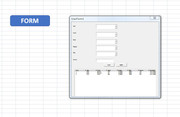
Also, if I click that Form button , then I see this, which is impossible for me to see anything in.
https://i.postimg.cc/8cdDypfn/Click-Form-Button.jpg
Attachment 3833
( If you have an issue / problem specific to something associated with the UserForm then I can’t help further. If for example, there is a simple typo in Task, or you have task rather than Task, then I can’t see that in that UserForm )
The best I can do therefore is give again some ideas that takes the matching further and goes on to match those date values, and then puts the Amount in the appropriate place in database1
(Basically, what I did for you before is going some way to demo to you coding that does that sort of row matching based on the various criteria of matching headings. So that was just matching the rows, which matched effectively "Name" and "Project" and the "Task).
This next macro is basically the same as my last. But instead of the demo message box, it now adds the "Amount" value to be added to Database1 sheet in the corresponding cell
The way I have done this extra section, is to convert the Year and Month from column B and C in Database, (along with an assumed day of the first of the month) to an Excel date serial number *****
I then compare that with the date serial numbers for the top row of Database1.
A match will then tell me which column to put the Amount in
Code:Sub MatchNameProjectTask3() Rem 0 Worksheets info Dim WsD As Worksheet, WsD1 As Worksheet Set WsD = ThisWorkbook.Worksheets("Database"): Set WsD1 = ThisWorkbook.Worksheets("Database1") Dim LrD As Long, LrD1 As Long Let LrD = WsD.Range("A" & WsD.Rows.Count & "").End(xlUp).Row: Let LrD1 = WsD1.Range("A" & WsD1.Rows.Count & "").End(xlUp).Row Rem 2 make arrays of concatenated words Dim arrD() As String, arrD1() As String ReDim arrD(2 To LrD): ReDim arrD1(2 To LrD1) Dim rwD As Long, rwD1 As Long For rwD = 2 To LrD Let arrD(rwD) = WsD.Range("D" & rwD & "") & WsD.Range("E" & rwD & "") & WsD.Range("F" & rwD & "") Next rwD For rwD1 = 2 To LrD1 Let arrD1(rwD1) = WsD1.Range("A" & rwD1 & "") & WsD1.Range("B" & rwD1 & "") & WsD1.Range("C" & rwD1 & "") Next rwD1 '2b) Array of date serials from Database1 Dim arrDtSerials() As Variant, LcD1 As Long Let LcD1 = WsD1.Cells(1, WsD1.Columns.Count).End(xlToLeft).Column Let arrDtSerials() = WsD1.Range("A1").Resize(1, LcD1).Value2 Rem 3 compare arrays for headings For rwD = 2 To LrD For rwD1 = 2 To LrD1 If arrD(rwD) = arrD1(rwD1) Then ' MsgBox prompt:="match for " & arrD(rwD) & " at Database row " & rwD & " Database1 row " & rwD1 '3b We have a heading match , so now match the date Dim DteSerial As Variant ' Let DteSerial = WsD.Evaluate("=DATEVALUE(""1 " & WsD.Range("C2").Value & " " & WsD.Range("B2").Value & """)") Let DteSerial = WsD.Evaluate("=DATEVALUE(""1 " & WsD.Range("C" & rwD & "").Value & " " & WsD.Range("B" & rwD & "").Value & """)") Dim MtchRes As Variant Let MtchRes = Application.match(DteSerial, arrDtSerials(), 0) If IsError(MtchRes) Then MsgBox prompt:="No date match": Exit Sub Let WsD1.Cells(rwD1, MtchRes) = WsD.Range("G" & rwD & "").Value Else End If Next rwD1 Next rwD End Sub
So this would be the Before, as we had before: https://excelfox.com/forum/showthrea...ll=1#post16377
Then, after running that macro, this would be the After https://excelfox.com/forum/showthrea...ll=1#post16378
Alan
*****Unfortunately dates in Excel and VBA are a real pain in the arse, since different excel versions and land versions and user setting all give different results, so you may need to tweak some of the coding that gets the date match. There is no known way around these problems. It makes sharing files to different people with dates in them sometimes impossible.
The macro is working in my Excel
Its based on this bit working to give me the correct date serial number from worksheet Database
Code:Sub Dts() Rem 0 Worksheets info Dim WsD As Worksheet Set WsD = ThisWorkbook.Worksheets("Database") Dim DteSerial As Variant Let DteSerial = Evaluate("=DATEVALUE(""1-January-2022"")") ' 44562 : Variant/Double Let DteSerial = WsD.Evaluate("=DATEVALUE(""1-"" & ""January"" & ""-2022"")") ' 44562 : Variant/Double Let DteSerial = WsD.Evaluate("=DATEVALUE(""1-" & WsD.Range("C2").Value & "-2022"")") ' 44562 : Variant/Double Let DteSerial = WsD.Evaluate("=DATEVALUE(""1-" & WsD.Range("C2").Value & "-2022"")") ' 44562 : Variant/Double Let DteSerial = WsD.Evaluate("=DATEVALUE(""1-" & WsD.Range("C2").Value & "-" & WsD.Range("B2").Value & """)") ' 44562 : Variant/Double Let DteSerial = WsD.Evaluate("=DATEVALUE(""1 " & WsD.Range("C2").Value & " " & WsD.Range("B2").Value & """)") ' 44562 : Variant/Double End Sub
Ref http://www.eileenslounge.com/viewtop...290229#p290229
https://excelfox.com/forum/showthrea...otes-and-Tests
Hi
I can’t help directly as I have little experience with Microsoft Word.
We do not have many Word VBA experts looking in to excelfox
However, I can tell you that the Author of that code, HansV, is quite active posting at Eileen’s Lounge, https://eileenslounge.com/app.php/portal
Here is the link to the Word Sub Forum there:
https://eileenslounge.com/viewforum.php?f=26
You may be able to get help from that forum, if you join and post your question there
If you decide to ask for help there, then I would suggest that you prepare and upload a Word File document example, and explain clearly exactly what you want the coding to do.
( Remember to tell them that you have also posted here:
You must tell them, that you have also posted the same question at excelfox: Give them this link to your post here:
https://excelfox.com/forum/showthread.php/2786-VBA-Copy-Tables-from-Word-to-Excel )
Alan
Hi
I am not sure what hte problem is with the download for you. Once in a while something wont download on a particular operating system or Browser. We never figured out why yet.
I just put it in a share place for you, perhaps that will work for you
Share ‘Work_file.xlsm’ https://app.box.com/s/v9ifgeicp6nzha0axcha3qcprzgprgob
It's difficult for me to help further beacuse
_1 I can't see anything on the userform - as i showed in the screen shot the text and numbers are too small to see,
_ 2 I still really don't know what should happen.I don't understand what you want, where data comes from etc. etc... - You have given a pefectly good explanation for yourself or anyone else maybe who knows already the sort of thing that you are doing.
But you are talking to a complee stranger that knows VBA quite well but has no idea of your work. (and hasn't done much with userforms either - I do understand the very basics of them). I expect it would take me 10 seconds to sort your problem out , but a day first before I figured out what it is that should happen.
You will always improve your chances of an answer here, or elsewhere, if you give a very detailed walkthrough of what should happen , giving sample data and saying exactly what steps you do, where the data is coming from etc. etc
I feel your pain. You have an annoying problem and want the answer quick. Sometimes you strike lucky, and find someone that has done almost excactly what you are doing and sees at a glance what the problem is.
I hav'nt, so I can't
Alan
….If you are my competitor, I will try all I can to beat you. But if I do, I will not belittle you. I will Salute you, because without you, I am nothing.
If you are my enemy, we will try to kick the fucking shit out of you…..
Winston Churchill, 1939
Save your Forum..._
KILL A MODERATOR!!
Hi
OK, that’s all a bit clearer for me, thanks.
I probably could have a go… But …
I am still having problems doing anything with your UserForm.
I tried on three different computers, with Excel versions 2007, 2010 and 2013(professional)
So, I press the Form Button
This happens:
Excel 2007 text is too small to do anything with, as before ( that I did before was on another computer which also had Excel 2007 )
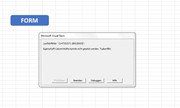
Excel 2010 error
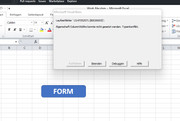
Excel 2013 ( Professional ) error
Translating those error texts in the last two screenshots to English – it says something about not being able to set ColumnWidth property due to type mismatch
If nobody else helps you in the meantime, I will try and take a look again later today when I have more time. I might be able to do something in Excel 2007, but its going to be very difficult for me to try and add data in the UserForm as I can barely see anything.
Its very strange that I get those errors in newer Excel versions. Also the small size I see, could suggest, along with the errors in newer versions, that something is dodgy with your userform
What Excel version are you using?
Perhaps in the meantime you could take a look and see if you can do something with the UserForm. Maybe make something bigger , at least just temporarily. Maybe if you make the Form and / or the text bigger and upload some other files with a modified UserForm size in, then I might have a better chance of seeing something in it.
And/ or see if you can figure out why I can't get the UserForm to come up in some of my Excels.
As I mentined, I do not have much experience with UserForms, but I have made a few. So far, when they work, they work in all my Excel versions. So I think there is at least a chance that something is a bit wonky in your UserForm, something that just by chance allows it work, all be it with very small text, in Excel 2007.
Could be a totally other explanation. I am just geussing due to my lack of a lot of experience with UserForms
I will try and look again today. It might have to wait until tomorrow.
Please if you get it fixed in the meantime, let me know, so I don’t waste my time.
Thanks
Alan
Hi Liviu
OK, I done it for you. ( It was not really solving a problem in your coding. There was no coding anywhere that made any attempt to put data into worksheet Database1 )
I have basically added / incorporated coding of the form I had in Sub MatchNameProjectTask3() into your macro to do the extra filling of Database1
So your initial explanation in post #1 was a bit misleading.
No matter
Here is the solution(s)
Some minor issues first
_ The userFormtext size is very good now. But the Form size was a bit big and bloated. But I fiddled around a bit (blindly) in the UserForm properties and in Private Sub UserForm_Initialize(). So that’s good enough for me to work with
_ I figured out that strange error as well in the .ColumnWidths : I am mostly using German Excel and my list separator is sometimes taken as ; rather than a ,
I did a quick bodge to get over that, but you might want to put that back to as you had it.
It is usually better to do this sort of thing withput error handling, but I did not know how to easilly determine the seperator used by any Excel. I might be able later to do something along the lines that I did here: https://eileenslounge.com/viewtopic....290229#p290229 https://eileenslounge.com/viewtopic....267466#p267466Code:' Quick dodge to get over problem of different seperators in different land Office versions On Error Resume Next .LstDatabase.ColumnWidths = "40;50;60;60;60;60;60;30" .LstDatabase.ColumnWidths = "40,50,60,60,60,60,60,30" On Error GoTo 0 If iRow > 1 Then
Possibly someone else passing this Thread knows of a simpler way.? I wpuld be very intersted and grateful of any imput
So on now to the main stuff…
This is approximately the macro you uploaded which need the additions
Code:Dim sh As Worksheet Dim sh1 As Worksheet Dim iRow As Long, colno As Integer, iCol As Long, rowno As Integer Dim iRow1 As Long, colno1 As Integer, iCol1 As Integer, reqdRow As Integer Set sh = ThisWorkbook.Sheets("Database") Set sh1 = ThisWorkbook.Sheets("Database1") iRow = [Counta(Database!A:A)] + 1 iCol = Sheets("Database").Cells(1, Columns.Count).End(xlToLeft).Column - 1 iRow1 = [Counta(Database1!A:A)] + 1 iCol1 = Sheets("Database1").Cells(1, Columns.Count).End(xlToLeft).Column - 1 With sh .Cells(iRow, 1) = iRow - 1 .Cells(iRow, 2) = UserFormTest.CmbYear.Value .Cells(iRow, 3) = UserFormTest.CmbMonth.Value .Cells(iRow, 4) = UserFormTest.CmbName.Value .Cells(iRow, 5) = UserFormTest.CmbProject.Value .Cells(iRow, 6) = UserFormTest.CmbTask.Value .Cells(iRow, 7) = UserFormTest.TxtAmount.Value .Cells(iRow, 8) = Application.UserName End With Call Reset MsgBox "Date incarcate cu succes!" End Sub
This next is that macro with the addition. The additions are based on my last macro Sub MatchNameProjectTask3()
Code:Sub Submit_Data() Dim Wsh As Worksheet Dim Wsh1 As Worksheet Dim iRow As Long, colno As Integer, iCol As Long, rowno As Integer Dim iRow1 As Long, colno1 As Integer, iCol1 As Integer, reqdRow As Integer Set Wsh = ThisWorkbook.Sheets("Database"): Wsh.Select Set Wsh1 = ThisWorkbook.Sheets("Database1") iRow = [Counta(Database!A:A)] + 1 'Dim LrD As Long: Let LrD = iRow - 1 iCol = Sheets("Database").Cells(1, Columns.Count).End(xlToLeft).Column - 1 iRow1 = [Counta(Database1!A:A)] + 1 iCol1 = Sheets("Database1").Cells(1, Columns.Count).End(xlToLeft).Column - 1 With Wsh .Cells(iRow, 1) = iRow - 1 .Cells(iRow, 2) = UserFormTest.CmbYear.Value ' Year .Cells(iRow, 3) = UserFormTest.CmbMonth.Value ' Month .Cells(iRow, 4) = UserFormTest.CmbName.Value ' Name .Cells(iRow, 5) = UserFormTest.CmbProject.Value ' Project .Cells(iRow, 6) = UserFormTest.CmbTask.Value ' Task .Cells(iRow, 7) = UserFormTest.TxtAmount.Value ' Amount .Cells(iRow, 8) = Application.UserName ' Submit End With ' the bit to put Amount on Database1 Rem 2a match Name and Project and Task With UserFormTest Dim Kee As String: Let Kee = .CmbName.Value & .CmbProject.Value & .CmbTask.Value End With Dim LrD1 As Long: Let LrD1 = Wsh1.Range("A" & Wsh1.Rows.Count & "").End(xlUp).Row Dim arrD1() As String: ReDim arrD1(2 To LrD1) Dim rwD1 As Long For rwD1 = 2 To LrD1 Let arrD1(rwD1) = Wsh1.Range("A" & rwD1 & "") & Wsh1.Range("B" & rwD1 & "") & Wsh1.Range("C" & rwD1 & "") Next rwD1 '2b) Array of date serials from Database1 Dim arrDtSerials() As Variant, LcD1 As Long Let LcD1 = Wsh1.Cells(1, Wsh1.Columns.Count).End(xlToLeft).Column Let arrDtSerials() = Wsh1.Range("A1").Resize(1, LcD1).Value2 Rem 3 compare arrays for headings For rwD1 = 2 To LrD1 If Kee = arrD1(rwD1) Then ' MsgBox prompt:="match for " & Kee & " at Database1 row " & rwD1 '3b We have a heading match , so now match the date Dim DteSerial As Variant ' Let DteSerial = WsD.Evaluate("=DATEVALUE(""1 " & WsD.Range("C2").Value & " " & WsD.Range("B2").Value & """)") ' Let DteSerial = Wsh.Evaluate("=DATEVALUE(""1 " & Wsh.Range("C" & rwD & "").Value & " " & WsD.Range("B" & rwD & "").Value & """)") Let DteSerial = Wsh.Evaluate("=DATEVALUE(""1 " & Wsh.Range("C" & iRow & "").Value & " " & Wsh.Range("B" & iRow & "").Value & """)") Dim MtchRes As Variant Let MtchRes = Application.match(DteSerial, arrDtSerials(), 0) If IsError(MtchRes) Then MsgBox prompt:="No date match": Exit Sub 'Let Wsh1.Cells(rwD1, MtchRes) = WsD.Range("G" & rwD & "").Value Wsh1.Activate Let Wsh1.Cells(rwD1, MtchRes) = Wsh.Range("G" & iRow & "").Value Else End If Next rwD1 Call Reset MsgBox "Date incarcate cu succes!" End Sub
The uploaded file, Work_file_modifiedBefore.xlsm is approximately your original uploaded (modified ) file.
, and Work_file_modifiedAfter.xlsm, is that same file with the modified macro
If anything is not quite right, then let me know and I will take another look. but you will have to wait a few days
Alan
Files at share site, incase you can’t get them from the upload again:
Share ‘Work_file_modifiedBefore.xlsm’ https://app.box.com/s/szruzgnhmccgwm3v9o8iafz9s29p182a
Share ‘Work_file_modifiedAfter.xlsm’ https://app.box.com/s/wigzth8u6khlwpqmtqj5eb1u6gqpwc2z
….If you are my competitor, I will try all I can to beat you. But if I do, I will not belittle you. I will Salute you, because without you, I am nothing.
If you are my enemy, we will try to kick the fucking shit out of you…..
Winston Churchill, 1939
Save your Forum..._
KILL A MODERATOR!!
Your welcome, thanks for the feedback
It is always very difficult to explain to someone else in enough detail for them to understand. It is also very difficult if you do not speak the English language.
But a good detailed walkthrough explanation will always make it easier for you to get help.
Alan
( P.S. Another thing that may help you get help in the future:
It is some times courteous to tell the people at mrexcel.com that you have a solution, and tell them where you got it. That would help anyone seeing that Thread in the future at mrexcel.com that is looking for a similar solution.
Being courteous like that may also help you to get help from mrexcel.com in the future.
But that is not too important)
….If you are my competitor, I will try all I can to beat you. But if I do, I will not belittle you. I will Salute you, because without you, I am nothing.
If you are my enemy, we will try to kick the fucking shit out of you…..
Winston Churchill, 1939
Save your Forum..._
KILL A MODERATOR!!
 Posting Permissions


 Reply With Quote
Bookmarks