Page 50 of 93 FirstFirst ... 40484950515260 ... LastLast
Results 491 to 500 of 935

Thread: Windows 10 and Office Excel

Hybrid View

Previous Post Previous Post   Next Post Next Post
  1. #1
    Fuhrer, Vierte Reich DocAElstein's Avatar
    Join Date
    Aug 2014
    Posts
    10,457
    Rep Power
    10
    5b) GUI redesign. GUI code Debloat
    _5b) A few obvious minor issues in Chris’s code..
    The Problem/ Characteristic/ Feature/ Reality.
    The GUI, and the use of it in Posh GUI looks great and big and great and awesome in a YouTube Video.
    That’s good enough reason to use it. Chris will and that’s fine by me. All power to him and his YouTube stuff. He has saved me loads of time.

    Post GUI totally fucks up code development. (Use GitHub and the disaster is complete)
    I think its designed to be like the VBA macro(code) generator. It pukes out code for what you do, and / or what you end up with.
    It’s helpful to get you started, but Nothing else in code development. Inevitably you end up with repeated, redundant, contradicting, inefficient coding. Even worse if you continue to use it. It just bloats up to a ridiculous amount.

    A few obvious minor issues in Chris’s GUI related code
    The GUI come up too fucking big.
    _ The .AutoSize = True and .AutoScroll = True are a bit contradictory and cause it to bloat up, and if occasionally the scroll bar appears, it usually vanishes. Its unstable. The .AutoSize = True needs to be removed.
    _ There seems to be two lines to size the GUI. They have the same dimensions. They are a bit different but I expect either one will do

    _ I think Chris sees it at a size that, on average, is a bit smaller than most people see it. I think he uses , on average, a higher screen resolution, which somehow seems to effect the GUI size in his messed up coding. Instead of two code lines giving the dimension of '1050, 1000' , perhaps the simplest of the two with '800, 600' is about right for most people

    _ Some other code lines may have been puked out by Posh GUI and aren’t needed, I am not sure. Some things will be at the default value, and the code lines will reflect this. I probably would not delete those lines as they could be useful to use later if I want to try out non default values, but I would #comment them out.


    Here are the sane code lines for a simple GUI. It will come up in a convenient size, has a scroll bar and you can resize it
    Code:
     Add-Type -AssemblyName System.Windows.Forms
    $Form = New-Object system.Windows.Forms.Form # Create a new form
    $Form.ClientSize = '800, 600' # Define the size
    $Form.AutoScroll= $True # Adds a scroll bar if needed – example if You have added panels ( ranges ) bigger than the size
    $Form.StartPosition = "CenterScreen"# Personal choice if you want it to come up middle screen 


     [void]$Form.ShowDialog()  # Display the form
    Anything else is bloat
    https://i.postimg.cc/tgH3rXR0/Simple-GUI.jpg https://i.postimg.cc/Y2yQ5N2z/GUI-comes-up.jpg


    _.__________________________________________---------
    ( I am not sure what these two lines do either , other than fuck things up a bit more
    $Form.Width = $objImage.Width
    $Form.Height = $objImage.Height
    )


    See also here:
    GUI Too Fucking big https://excelfox.com/forum/showthread.php/2408-Windows-10-and-Office-Excel/page43#post12697
    https://excelfox.com/forum/showthrea...ge43#post12697
    Last edited by DocAElstein; 02-11-2022 at 03:06 AM.

  2. #2
    Fuhrer, Vierte Reich DocAElstein's Avatar
    Join Date
    Aug 2014
    Posts
    10,457
    Rep Power
    10
    _5c) making Buttons (The function to make buttons issue….)
    Its good programming practice apparently to loop similar things rather than having a long list. I don’t personally subscribe to that, not being a good programmer, and most likely never wanting to be one. Most programmers seem a bit screwy, - from harmlessly a bit weird to seriously narcissistic Psychos.
    Text is cheap, so leave it all in I say, preferably in approximately the order you see stuff. Makes it easier to modify individual things, if you want to make it very irregular / diverse, like a dashboard , later.
    But:
    _(i) This is most likely gonna stay very simple – a GUI box with simple buttons on it.
    _(ii) I would like to make myself space, as I would like initially to keep Chris’s stuff there so as to keep up to date and future reference and comparison with what he is doing

    Currently Chris’s code has, for the buttons, a whole lot of repeated crap like this:
    Code:
    $defaultwindowsupdate            = New-Object system.Windows.Forms.Button
    $defaultwindowsupdate.text       = "Default Updates"
    defaultwindowsupdate.width      = 160
    $defaultwindowsupdate.height     = 21
    $defaultwindowsupdate.location   = New-Object System.Drawing.Point(162, 2)
    That makes one button
    At least one chap, A1ex N , has shown Chris how to do that in a function https://github.com/ChrisTitusTech/wi...diff=split&w=0 .
    Chris hasn’t really had time to look at them, and is probably gonna keep using his Posh GUI to generate crap on top of crap. It looks good on video, that’s all.

    It’s not difficult to write such a function. I wrote my own function, after a quick look at what A1ex N did.
    Code:
     # Function to creat button      - idea from a "Pully" thing  https://github.com/ChrisTitusTech/win10script/pull/140/commits/cebd4effb84152b04603cbebe14bc63b2770b0b6?diff=split&w=0
    function Create-Button {param([string]$Text, [int]$FntSz, [int]$Width, [int]$Height, [int]$ClmX, [int]$RwY)#As Object   # This function allows us to make a buttons in one line.                                                                                              (Those later single lines do not make the button appear
    $Btn.Text = $Text
    $Btn.Width = $Width   ;  $Btn.Height = $Height
    $Btn.Location = New-Object System.Drawing.Point($ClmX, $RwY)                                                        
    $Btn.Font = New-Object System.Drawing.Font('Arial', $FntSz)
    return $Btn   }
    Having done that function, then a single following code line of this form will "make" a single button. In other words the following does the equivalent of that previous button code example
    Code:
     $defaultwindowsupdate = Create-Button -Text "Default Updates" -fntsz 11 -Width 160 -Height 21 -ClmX 162 -RwY 2
    That is not quite the full final story. Some of the following final steps could also be tidied up with a function. But I don’t bother: In fact putting all the short commands on a single line makes it look very similar to if I had done a function…

    "Pinning" the buttons somewhere
    Although the argument syntax of the button has those location parameters, _ 162, 2 _ , they are not yet referring to anywhere. It might be a reasonable Laymen thought that they are automatically referring to somewhere in the GUI. But it just doesn’t work like that. There is no reference to the GUI specifically. One good reason for that will be soon obvious.
    We could just make the co ordinates refer to the GUI box like this
    $Form.controls.AddRange(@($defaultwindowsupdate))
    The convention would then be that the co-ordinates refer to 0, 0 being at top left of the GUI. In this example we would be 162 across to the right from top left of the GUI and 2 down, from top left of the GUI. So we could do that, - but we usually don’t …_
    Panels
    _... its usually more convenient to split the GUI into "Panel"s, which as the name suggests are areas, rectangular, and we put a group of things such as a set of buttons, for example those related to similar things, in. This is more for convenience than anything else. We could for example change the location of a panel which would then automatically move all those buttons in one go.
    The way that works then is that you
    _ make the Panels
    _ Use the code line of the form $Form.controls.AddRange(@($Panel1, $Panel2, ……….)) to put the Panels rather than the buttons in the GUI, ( The which itself could be regarded as a Panel )
    _ Finally, the buttons would be added to their respective Panel with similar , $Panel1 .controls.AddRange(@($Panel1, $Panel2, ……….)) , $Panel2.controls.AddRange(@($Panel1, $Panel2, ……….))
    , …etc.. code lines

    Here’s the current code lines, which I will probably change them a bit over the next few posts. Chris used 4 main column Panels. I have currently 5 column panels and another smaller panel somewhere around middle / top right.

    Code:
    $Panel4 = New-Object system.Windows.Forms.Panel ; $Panel4.height = 60 ; $Panel4.width = 350 ; $Panel4.location = New-Object System.Drawing.Point(380,25) # around top right / middle top 
    $Panel2B = New-Object system.Windows.Forms.Panel ; $Panel2B.location = New-Object System.Drawing.Point(550,50) ;$Panel2B.height = 938 ; $Panel2B.width = 120  # 5th column                                                                                                                                                                                       # $Form.Width                   = $objImage.Width
    $Panel2 = New-Object system.Windows.Forms.Panel ; $Panel2.location = New-Object System.Drawing.Point(420,50) ;$Panel2.height = 938 ; $Panel2.width = 120    # 4th column                                                                                                                                                                # $Form.Height                  = $objImage.Height
    $Panel3 = New-Object system.Windows.Forms.Panel ; $Panel3.location = New-Object System.Drawing.Point(250,50) ; $Panel3.height = 939 ; $Panel3.width =200 # 3rd column
    $Panel1 = New-Object system.Windows.Forms.Panel ; $Panel1.location = New-Object System.Drawing.Point(0,50) ; $Panel1.height = 939 ; $Panel1.width = 120 # 1st column
    $PanelB = New-Object system.Windows.Forms.Panel ; $PanelB.location = New-Object System.Drawing.Point(125,50) ; $PanelB.height = 939 ; $PanelB.width = 120 # 2nd column                          #$Panel1.height                   = 939 #  939


    $Form.controls.AddRange(@($Panel10,$Panel1,$PanelB,$Panel2,$Panel2B,$Label3,$Label15,$Panel4,$PictureBox1,$Label1,$Label4,$Panel3,$ResultText,$Label10,$Label11,$urlfixwinstartup,$urlremovevirus,$urlcreateiso))
    
    $Panel1.controls.AddRange(@($PS,$PS7_2,$notepad,$firefox,$gchrome,$mpc,$vlc,$powertoys,$winterminal,$vscode,$Label2,$everythingsearch,$vscodium,$imageglass,$gimp,$Label7,$Label8,$Label9,$advancedipscanner,$putty,$etcher,$translucenttb,$githubdesktop,$discord,$autohotkey))
    $PanelB.controls.AddRange(@($brave,$7zip,$sharex,$adobereader,$vlc,$powertoys,$everythingsearch,$sumatrapdf,$imageglass,$gimp,$Label7,$advancedipscanner,$putty,$etcher,$translucenttb,$githubdesktop,$discord,$autohotkey))       
    $Panel2B.controls.AddRange(@($darkmode,$performancefx,$lightmode,$essentialundo,$EActionCenter,$ECortana,$RBackgroundApps,$HTrayIcons,$EClipboardHistory,$ELocation,$InstallOneDrive,$WarningLabel,$Label5,$EHibernation))
    $Panel2.controls.AddRange(@($RestorePt,$essentialtweaks,$0andOShup,$TeleRegTweaks,$servicetweaks,$backgroundapps,$cortana,$actioncenter,$darkmode,$onedrive,$lightmode,$removebloat,$WarningLabel,$appearancefx,$STrayIcons,$dualboottime))
    $Panel3.controls.AddRange(@($yourphonefix,$Label6,$windowsupdatefix,$ncpa,$oldcontrolpanel,$oldsoundpanel,$OldSystemPanel,$reinstallbloat))                                                                                                                                                                                 # MissingEndParenthesisInSubexpression
    $Panel4.controls.AddRange(@($defaultwindowsupdate,$securitywindowsupdate,$Label16,$Label17,$Label18,$Label19))
    Last edited by DocAElstein; 02-08-2022 at 03:32 PM.

  3. #3
    Fuhrer, Vierte Reich DocAElstein's Avatar
    Join Date
    Aug 2014
    Posts
    10,457
    Rep Power
    10
    Current stand. Last remnants of Chris’s coding
    The uploaded file is Chris’s script, messed around a lot with a few other things added
    I did it as part of my PowerShell scrip learning.
    But its still useful for future Re reference as I want to continue to follow Chris’s work and contribute if I can, to help.

    On the next page, or more likely the over next page, #52, I will start from scratch I think

    The rest of this page, #50, and most of the next page, #51, will probably be used for notes on
    _ a few issues I might try to get across to Chris,
    and/ or
    _ just general issues related to further development of mine and Chris’s script


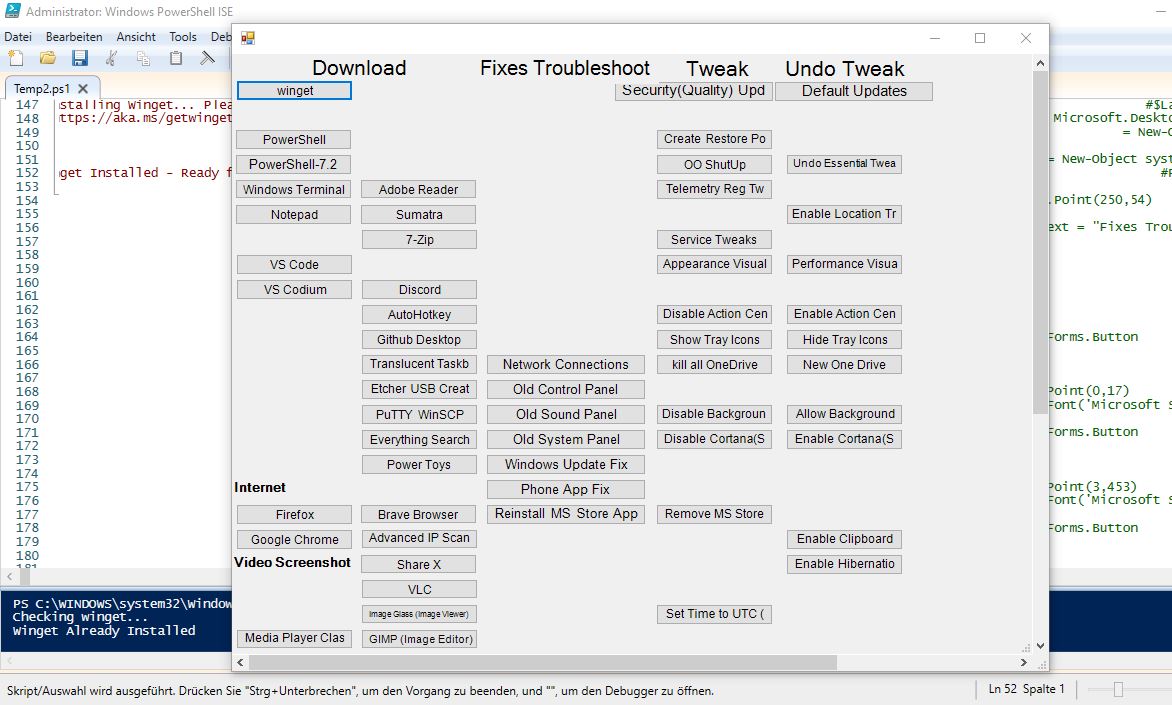
    This is what that code will bring up
    https://postimg.cc/Lqfq6kxH https://i.postimg.cc/pdcKCq8n/Last-C...script-GUI.jpg
    Last Chris related script GUI.jpg


    This is typically how it come up on screens with resolution 1366x768 and 1440x900
    https://i.postimg.cc/RCfDbDyz/Temp4-ps1-1366x768.jpg https://i.postimg.cc/65f1BGBj/Temp1-in-1440x900.jpg


    Share ‘Temp2.txt’ https://app.box.com/s/t7utchjkhoxto56tqtnbx9f4vovav5r8
    Share ‘Temp2.ps1’ https://app.box.com/s/un0oxan387v5azqb7t18yu0lu87k2v97

    Last edited by DocAElstein; 03-17-2022 at 01:27 AM.

  4. #4
    Fuhrer, Vierte Reich DocAElstein's Avatar
    Join Date
    Aug 2014
    Posts
    10,457
    Rep Power
    10
    This is post #499 https://excelfox.com/forum/showthrea...ge50#post12774
    https://excelfox.com/forum/showthread.php/2408-Windows-10-and-Office-Excel/page50#post12774


    So at about the start of February, I was thinking of starting my own Tool from scratch, looking something like the pics from the last post. But I went off to learn PowerShell script a bit better, and do a few other things until about mid March.
    Chris updated a few times during this period, so this post is a History to keep me in touch. I may not add the things or changes Chris made. But I may adjusts my lines to , for example add spaces where he inserted stuff. This is so I can still relate my script to his in the future..**

    Friday, 11 Feb., 2022 Update
    On the Friday, 11 Feb., 2022, Chris did his Live stream on the Tool, … 9.30 Live - Toolbox Update - New Features (Disable_Enable Updates)-WRg5nItpghA_11 02 2022
    https://www.youtube.com/watch?v=WRg5nItpghA
    https://drive.google.com/file/d/1kNQ...?usp=drive_web
    https://drive.google.com/file/d/1khe...?usp=drive_web


    I have taken my last temporary file up to Temp 4, Temp4.ps1 , to take account of this. But I am not adding the changes, but rather just adding spaces so that my code lines are approximately the same.**
    Notes on these spaces and the generally current code stand follow
    At the same the time, the following notes give a general review of the code from Chris, now a bit further on, before I write the whole thing from scratch. Basically the 11 Feb Live video came out while I was about to start my new from scratch script
    So I am combining a general review of the current stand of Chris’s code, win10debloatChris12Feb2022.ps1
    Share ‘win10debloatChris12Feb2022.ps1’ https://app.box.com/s/5lfgt22pqtly1g127ubnybj6ltn3j1x3

    , with my latest, Temp4.ps1
    Share ‘Temp4.ps1’ https://app.box.com/s/y291ha4eb906v7lkvd8ehzz9ii70cvoh


    Chris playing with his PoshGUI( 53:30 … don’t hate me for it! https://www.youtube.com/watch?v=WRg5nItpghA&t=3210s )
    Chris was playing with his PoshGUI again.
    Looking at what he does… I think as you put buttons on an existing thing that it will make the variable with the name you give it ( by default it will give you button1 , botton2, button6 etc.. as available, - as you re name it, then that default name, button1 , for example is available to poshGUI to use). I expects poshGUI will then automatically add that bloated button layout bit, and add appropriately the reference in the adding variable in the pane code lines.
    The $kkjash.Add_Click bit you do yourself, ( before or after ) but if you do it after, some intellisense offers the .Add_Click for it, amongst other things, when you write in the variable $kkjash.somewhere.
    The stuff you put in the $kkjash.Add_Click is the real meaty stuff that does anything. If Chris was doing this for himself, in his day job, he would just have all that meaty stuff and run that as he wanted


    So, This is a generally summary of mine since/ just after Chris’s, and the Live video
    Up to about 30 is some crap bloat, and the winget bit, then the Form is finished
    at about 40 and then we are mostly into the large repeated GUI produced button bloat
    To allow for 4 new buttons and a warning label made by Chris in that video, I make a big space from approx 620 – 650 , which pushes the small number ( 5-7 ) of Form Pane lines up to approximately 660


    So these 4 bloat button bits and a label is what posh GUI did
    $NFS
    $laptopnumlock #( ------ *** )
    $disableupdates
    $enableupdates
    $Label12

    That got added to the large form button repeated bloat section taking us to approx 860

    Me or Chris has got a line or two out of step, but we are approximately together, 866-867 Essential Tweaks starts, ……….._
    _........
    _.... ( with service tweaks starting at about 1056-1058 )
    As far as I can see, that Edge Bing start up tweak, ( https://github.com/nikilson/win10scr...e09a7125868e92 )
    Set-ItemProperty -Path "HKCU:\SOFTWARE\Microsoft\Windows\CurrentVersion\Se arch" -Name "BingSearchEnabled" -Type DWord -Value 0 ; Set-ItemProperty -Path "HKCU:\SOFTWARE\Microsoft\Windows\CurrentVersion\Se arch" -Name "AllowSearchToUseLocation" -Type DWord -Value 0
    , is still missing, ( Chris , I think, meant to put it just after end of services/essential tweaks … ( https://excelfox.com/forum/showthrea...ge50#post12767 ) )
    I have Essential Tweaks split up a bit. But we are finishing approximately together at 1156-1157

    We both have a dualboottime Add_Click and then I have made a space for a laptopnumlock which came in from Chris on the 11th Feb. He seemed to think it should have been there and he had forgotten it. ( *** Chris actually then duplicated a Add_Click which was already there- so he had just missed the button previously. )
    So we both start the essential undo at 1173. At this stage I have not split or changed any essential undo so we finish that at 1286.
    1288 – 1371 We then have a very large $windowssearch Add_Click which does not seem to have a button?? ( It has a short #commented out Cortana disable section )

    A short $backgroundapps Add_Click then
    1383 _
    __– 1404 A fairly large disable Cortana

    1406- 1496 The Bloatware array
    1497 – 1522 Button pair: removes and re ad bloat ( MS Store Apps )

    1524 – 1563 Button pair: default updates or the security only

    Up to about 1895 is mostly all other buttons used on script until the 11 Feb redesign, (*** and I note a strange $DisableNumLock Add_Click is a duplicate of the added on Feb 11 $laptopnumlock [ Laptop Numlock Fix ] ***

    Chris also slipped in the $NFS .Add_Click at 1790, so I have a space from 1790 to 1802

    1897 – end ( 2069 ) button pairs which were main theme from 11 Feb. $disableupdates .Add_Click $enableupdates .Add_Click
    So for mine I have a big space from 1897 – 2069


    Summary
    There is a very short GUI bit at the start that Chris never seems to go near anymore . This makes a meal of the very simple few lines that make a form, and fucks it up.

    The rest is all ( except for the meat behind the buttons, ( the $hfvafh Add-Click stuff ) bit ) all dome by PoshGui in a terribly jumbled up way.
    It’s so jumbled and messed up, that Chris often screws up putting the meaty bits in.


    win10debloatChris12Feb2022.ps1 https://app.box.com/s/5lfgt22pqtly1g127ubnybj6ltn3j1x3
    Temp4.ps1 ’ https://app.box.com/s/y291ha4eb906v7lkvd8ehzz9ii70cvoh


    Here is a few minor issues, which I might try to get across to him
    Num Lock chaos issue https://www.youtube.com/watch?v=WRg5...P1d2B994AaABAg https://www.youtube.com/watch?v=WRg5nItpghA&t=2210s
    At minute 36:50 he noticed by chance when doing something else, that some time previously he had missed a Disable NumLock after startup button and coding, so he made one , $laptopnumlock
    ( https://www.youtube.com/watch?v=WRg5nItpghA&t=2210s )
    629 $laptopnumlock = New-Object system.Windows.Forms.Button
    630 $laptopnumlock.text = "Laptop Numlock Fix"
    631 $laptopnumlock.width = 211
    632 $laptopnumlock.height = 30
    633 $laptopnumlock.location = New-Object System.Drawing.Point(4,267)
    643 $laptopnumlock.Font = New-Object System.Drawing.Font('Microsoft Sans Serif',12)


    1164 $laptopnumlock.Add_Click({
    1165 Set-ItemProperty -Path "HKU:\.DEFAULT\Control Panel\Keyboard" -Name "InitialKeyboardIndicators" -Type DWord -Value 0
    1166 Add-Type -AssemblyName System.Windows.Forms
    1167 If (([System.Windows.Forms.Control]::IsKeyLocked('NumLock'))) {
    1168 $wsh = New-Object -ComObject WScript.Shell
    1169 $wsh.SendKeys('{NUMLOCK}')
    1170 }
    1171 })


    In fact he had only forgotten the GUI button, the Add Click coding was there
    1751 $DisableNumLock.Add_Click({
    1752 Write-Host "Disable NumLock after startup..."
    1753 Set-ItemProperty -Path "HKU:\.DEFAULT\Control Panel\Keyboard" -Name "InitialKeyboardIndicators" -Type DWord -Value 0
    1754 Add-Type -AssemblyName System.Windows.Forms
    1755 If (([System.Windows.Forms.Control]::IsKeyLocked('NumLock'))) {
    1756 $wsh = New-Object -ComObject WScript.Shell
    1757 $wsh.SendKeys('{NUMLOCK}')
    1758 }
    1759 $ResultText.text = "`r`n" +"`r`n" + "NUMLOCK Disabled"
    1760 })


    He is still screwing up the GUI size, I did a few comments again at YouTube. Most got deleted, as did late a lot of very helpful posts I did at GitHub


    Commit 17 Feb 2022
    Chris added some Virtual thing that I don’t understand yet. He did a video on 19 Feb.
    Apparently it is already there in Windows Pro, so he has a button in his troubleshoot section. So I guess the script he added behind the button does some of what you would do get the thing up and running.
    So I will do a simple Temp4.ps1 to Temp5.ps1 , making spaces so that Temp5.ps1 has the same line positioning of most stuff as this
    win10debloatChris17Feb2022.ps1
    https://app.box.com/s/fajb84rq6x2dz9vl0a6dhgbj8l5t8xku

    So we need to shift down some lines in mine from 657 for the button to the form:
    https://i.postimg.cc/Y23rjBBP/Shift-down-from-657.jpg
    and
    similarly for the coding behind the button, my Temp5.ps1 has the start line for the code behind update fix button, $windowsupdatefix.Add_Click({ , shifted down to 1826
    https://i.postimg.cc/VLkYCZYk/update...wn-to-1826.jpg

    That appears to be all I need to do, but while I am here……

    I seem to have not made the end space at the end for the 11 Feb enable and disable update meat behind the button stuff? - I am not sure if that was intentional, or whether that got truncated accidentally somehow.
    So going backwards up the script, I put some comment lines in to keep it in wach.
    https://i.postimg.cc/6p6YwRLS/adding...dded-by-me.jpg
    https://i.postimg.cc/P5Fzj7qp/adding...dded-by-me.jpg
    https://i.postimg.cc/zGMWMRdT/adding...dded-by-me.jpg

    In fact as a very last action for Temp5.ps1, I added some similar comment lines to help me orientate in the future to things added by Chris but not yet added by me.
    https://i.postimg.cc/YSzrF5mj/adding...dded-by-me.jpg
    https://i.postimg.cc/4yhj6cFw/adding...-yet-added.jpg
    https://i.postimg.cc/j51GncvL/adding...-yet-added.jpg
    https://i.postimg.cc/0NVgPPwG/adding...t-added-by.jpg
    https://i.postimg.cc/Y905SZ65/adding...added-by-m.jpg
    https://i.postimg.cc/6TJgYQkK/Chriss...king-lines.jpg
    https://i.postimg.cc/7YSZDJYg/Consol...everywhere.jpg
    https://i.postimg.cc/K8FvYcRC/Consol...everywhere.jpg
    https://i.postimg.cc/QN2dRJs8/Consol...everywhere.jpg


    ( Just one last thing. I #commented out the default winget install at this Temp5.ps1 stage, just because I want to do some testing later on virgin machines which involves investigating if this is done. I don’t want to do that currently )
    https://i.postimg.cc/9X7Wtw9v/Tempor...-temp5-ps1.jpg


    Temp5.ps1 https://app.box.com/s/vp8sdqoducp6rn1yj4dsb7edinasdjlf
    win10debloatChris17Feb2022.ps1 https://app.box.com/s/fajb84rq6x2dz9vl0a6dhgbj8l5t8xku


    Last edited by DocAElstein; 04-01-2022 at 10:52 PM.

  5. #5
    Fuhrer, Vierte Reich DocAElstein's Avatar
    Join Date
    Aug 2014
    Posts
    10,457
    Rep Power
    10
    Chris got a bit ahead of me again, so here another update, going to my Temp6.ps1 from his version of around the 10-16 march, ( Commit 10 March, I took a copy on 16 March)

    Commit 10 March 2022 Power options added
    Main changes are
    _ a bit of reorganising of wording and buttons in the area of tweak, troubleshoot, fixes, and moving of Windows Update Reset button https://i.postimg.cc/FsQNtjzv/Temp5-...on-changes.jpg

    _ addition of two buttons , Restore Power Options and Win7 Power Panel, ( and I note here that in a recent video Chris noticed that he may have some duplicated stuff issues to take care of , https://youtu.be/KjHfCDPfLdI?t=153 ,
    https://excelfox.com/forum/showthrea...ge43#post12702
    )
    ( He seems to be referring now to Old jashdkjadh Panel stuff now as Win7 jashdkjadh Panel

    Putting things back into wach, that is to say some constancy in code line numbers between mine and Chris’s script , is a bit difficult for me in some places as Chris has taken out a bit of stuff, in places where I had an empty space**, ( all be it by the virtue of shifting some of his bloat in comments to the far right. So I would be working a bit blind).
    **This could cause problems if I have used these spaces for new things that I have added, I will need to be careful of this.
    I need to do this by first seeing the difference to lines in his February and March versions that I have, at least initially in the Label area
    ( One important thing to note here is that Chris may** have gone against his own religiously held rule of messing with the script parts given by his PoshGUI (** He may have not if he did the changes on the PoshGUI )
    To assist me I will make an in-between help file, based on a modified version of the script that was available from around 15-17 February

    The unusual changes involving removing lines
    _(i) Taking out $Label4 “Troubleshoot” = remove 8 lines , 293-300
    _(ii) Taking out $Label6 “Misc Fixes” = remove 8 lines , 426-433
    I remove these lines and save the modified script as win10debloatChris17Feb2022Bee.ps1 So this new ps1 File will be a modified version of the script that was available from around 15-17 February

    The more usual typical changes as a result of things being added
    _(iii) Adding a $oldpower button and $restorepower button requires adding in total 14 lines from 649.
    For later reference I will add comments
    649 # $oldpower
    656 # $restorepower
    Here is that last bit, where on the right is the current script from around 10-16 March script, and on the left is the modified version of the script that was available from around 15-17 February:
    https://i.postimg.cc/Hk6g7R2W/14-spa...s-from-649.jpg

    _(iv) The coding for the two new buttons starts at 1795, so from here we need to makes space down in the left coding in the following screenshot:
    https://i.postimg.cc/g2SC0Rzn/Space-...ns-at-1795.jpg


    ( The changes of moving button positioning: Doesn’t concern me. I ignore that, since I already messed around a lot with where my buttons are )

    That all now seems to be all needed to give me a modified version of the 15-17 February script,
    win10debloatChris17Feb2022Bee.ps1 https://app.box.com/s/xpgcidd0ouhcc4xb8lxpm8xop51oto19
    , which I will now use to partially help me to take my script to Temp6.ps1 from my Temp5.ps1
    _.__________

    _(i) Taking out $Label4 “Troubleshoot” = remove 8 lines , 293-300
    Luckily, it seems that I have not yet used the spaces made by Debloating Chris’s script, so I am free to delete the lines as before.
    This example shows a good illustration of the usefulness of keeping Chris’s original coding in green comments to the right: From this screenshot we immediately see the lines we need to remove.
    https://i.postimg.cc/T338GQXz/Remove-Label4.jpg
    Finally, removed Label4: https://i.postimg.cc/7Lby19s3/Removed-Label4.jpg

    _(ii) Taking out $Label6 “Misc Fixes” = remove 8 lines , 426-433
    Once again I have luckily not used yet the space created by removing Chris’s bloat,
    https://i.postimg.cc/L89S52j0/Remove-Label6.jpg
    https://i.postimg.cc/zf44CrRN/Remove-Label6.jpg
    (The best way to do this , by the way, is to select the lines all from holding the left mouse button down in the margin and dragging to select all the lines. Then use delete key or back (-ve Tab < ) key : https://i.postimg.cc/RVQ9vNJH/Remove-Label6.jpg )
    Finally removed Label6: https://i.postimg.cc/6QSxMZgD/Removed-Label6.jpg

    _(iii) Adding a $oldpower button and $restorepower button requires adding in total 14 lines from 649. I am having to work a bit blind here, and also I have used some of the space here obtained by Debloating Chris’s script around line 649,
    https://i.postimg.cc/XvrTBJqx/Used-a...e-from-649.jpg

    , but carefully adding 14 lines seems to bring everything back into wach, https://i.postimg.cc/RVRrjy21/carefu...nes-at-649.jpg
    and note coincidentally nicely separates the similar, but different sets of command lines
    _ the single form adding to GUI stuff $Form.controls.AddRange(@(
    and the
    _ various panel adding to GUI sdtuff $Panelaskjdg.controls.AddRange(@(


    A few comments to aid further orientation and we have this bit finished https://i.postimg.cc/cC7q1bCS/Adding...rientation.jpg

    _(iv) The coding for the two new buttons starts at 1795
    Fairly easy and straight forward:
    Here the Before screenshot : https://i.postimg.cc/brhM59TF/Before-iv.jpg
    Here the After screenshot : https://i.postimg.cc/FRc8GBjL/After-iv.jpg

    Just to finally remind us what is going on here: That last screenshot is showing. On the left my final Temp6.ps1 ; The screenshot on the right is a file used to aid me get in wach with Chris’s latest ps1 file.
    I can do a final quick check by substituting the right file for an actual current Chris ps1 script
    https://i.postimg.cc/yxy5C3p6/After-...-march2022.jpg


    Share ‘Temp6.ps1’ https://app.box.com/s/sn8dsqt237zffgkmjaqnvn7ewvqjdou8


    ( Link to first post on page #51
    Page 51, Post #501
    https://excelfox.com/forum/showthrea...ge51#post12776 )
    Last edited by DocAElstein; 03-18-2022 at 06:57 PM.

  6. #6
    Fuhrer, Vierte Reich DocAElstein's Avatar
    Join Date
    Aug 2014
    Posts
    10,457
    Rep Power
    10
    This post: Page 51, Post #501
    https://excelfox.com/forum/showthrea...ge51#post12776
    https://excelfox.com/forum/showthread.php/2408-Windows-10-and-Office-Excel/page51#post12776
    ( link to last post on page #50 https://excelfox.com/forum/showthrea...ge50#post12775 )


    #501 From about here is…. Clearing up some other minor issues, making up a few extra bits, along the way to and before doing my own complete rewrite from scratch

    Examining Services
    Following on, and in support of, this Forum Post: http://www.eileenslounge.com/viewtop...292266#p292266
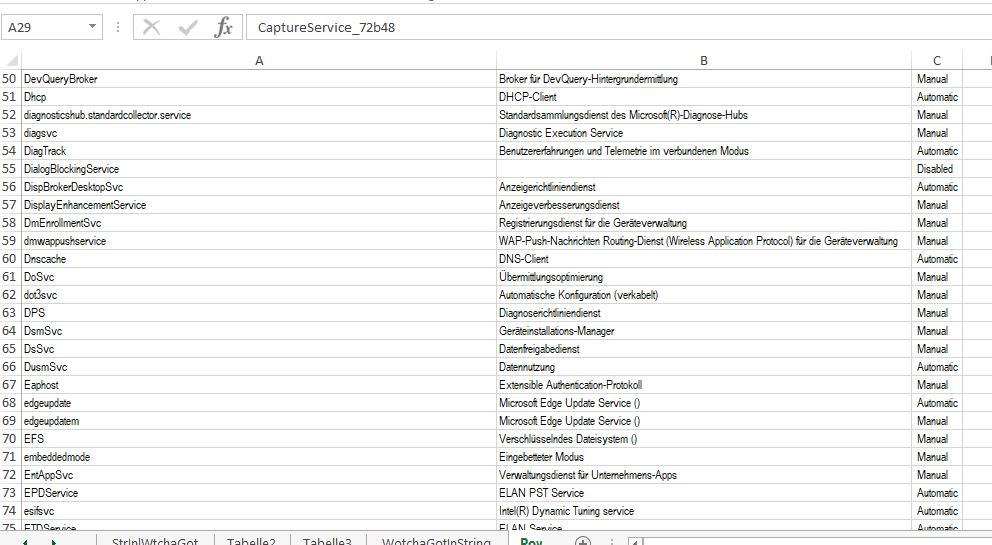
    In that Post we figured out how to get a text file 3 column list of the Service´s Name , DisplayName and StartType, using a single PowerShell script commandlet.
    Get-Service|Select-Object name,displayname,starttype|Format-Table -AutoSize|Out-File -FilePath\ 'C:\Users\acer\Desktop\test.txt' -Width 1000

    Here I want to automate that a bit, and get the result somewhere convenient, such as an excel spreadsheet.

    I took a look at the text file produced, and based on that did a typical bit of coding to get all text column stuff into a convenient 3 “column” VBA array. It was all standard stuff.
    https://excelfox.com/forum/showthrea...ll=1#post15357 https://excelfox.com/forum/showthrea...5356#post15356

    Then I got some info for doing that PowerShell commandLet in VBA from Daniel Pineault here https://www.devhut.net/vba-run-powershell-command/

    Here is a final macro
    https://excelfox.com/forum/showthrea...ll=1#post16368

    Example, on a Windows 10 Pro ( Version 20h2 19042.1466 )
    Share ‘PowerShell.xls’ https://app.box.com/s/t65uuhic69g64yo4se2xuwopo9ezefa6
    Share ‘test.txt’ https://app.box.com/s/lhln63eqcsn8d8zi0gd4yhrn09b3r79c
    Share ‘Polak Services.JPG’ https://app.box.com/s/1ydaab5e5518flphg05i36xrp9n34r2q https://i.postimg.cc/65Rdrbvm/Polak-Services.jpg


    Edit Some issues…
    I messed up with a few things.
    _ the display name could be long and go up to the startuptype in the text file, which messed up the manipulation of a line of data from the text file a bit. For now I fiddled that by adding some spaces before the words used for the startuptype. A better solution will probably wait until I fully understand the PowerShell code line
    _ There seems to be some strange effects with something somewhere working too slow, too fast or not giving accurate information about if a text file is present. For now that is fiddled with some Waits , Dirs and a Kill. That will do for now, but that need to be looked at again when I understand better wots going on


    https://www.youtube.com/channel/UCnxwq2aGJRbjOo_MO54oaHA
    https://www.youtube.com/watch?v=SIDLFRkUEIo&lc=UgzTF5vvB67Zbfs9qvx4AaABAg
    https://www.youtube.com/watch?v=v_1iqtOnUMg&lc=UgxLtKj969oiIu7zNb94AaABAg
    https://www.youtube.com/watch?v=f7xZivqLZxc&lc=Ugxq4JHRza_zx3sz0fx4AaABAg
    https://www.youtube.com/watch?v=f7xZivqLZxc&lc=Ugxq4JHRza_zx3sz0fx4AaABAg
    https://www.youtube.com/watch?v=f7xZivqLZxc&lc=UgzMCQUIQgrbec400jl4AaABAg
    https://www.youtube.com/watch?v=LuAipOW8BNQ&lc=Ugz0Uy2bCSCTb1W-0_14AaABAg
    https://www.youtube.com/watch?v=ITI1HaFeq_g&lc=Ugx12mI-a39T41NaZ8F4AaABAg.9iDQqIP56NV9iFD0AkeeJG
    https://www.youtube.com/watch?v=vXyMScSbhk4&lc=Ugxa2VYHMWJWXA6QI294AaABAg.9irLgSdeU3r9itU7zdnW Hw
    https://www.youtube.com/watch?v=tPRv-ATUBe4&lc=UgzFkoI0n_BxwnwVMcZ4AaABAg
    https://www.youtube.com/watch?v=LuAipOW8BNQ&lc=Ugz0Uy2bCSCTb1W-0_14AaABAg.9htChVuaX9W9htG01cKBzX
    https://www.youtube.com/watch?v=LuAipOW8BNQ&lc=Ugw6UrV69zpeKvLOeOV4AaABAg.9ht16tzryC49htJ6TpIO XR
    https://www.youtube.com/watch?v=LuAipOW8BNQ&lc=UgwMKwGZpDjv7vi7pCx4AaABAg
    https://www.youtube.com/watch?v=LuAipOW8BNQ&lc=Ugw6UrV69zpeKvLOeOV4AaABAg.9ht16tzryC49htOKs4jh 3M
    https://www.youtube.com/watch?v=LuAipOW8BNQ&lc=UgxVW-am20rQ5GFuJ9F4AaABAg
    https://www.youtube.com/channel/UCnxwq2aGJRbjOo_MO54oaHA
    Last edited by DocAElstein; 10-24-2023 at 02:56 PM.

  7. #7
    Fuhrer, Vierte Reich DocAElstein's Avatar
    Join Date
    Aug 2014
    Posts
    10,457
    Rep Power
    10
    Post #502 URL link
    https://excelfox.com/forum/showthrea...ge51#post12777
    https://excelfox.com/forum/showthread.php/2408-Windows-10-and-Office-Excel/page51#post12777


    #501b
    Power Shell Services list via Power Shell COM Object

    I have been watching a series of videos from Ashish Raj, and here he does something similar with Services in PowerShell via COM Object Excel.Application
    https://www.youtube.com/watch?v=xc8A7Z0JLB0&t=995s

    His example is not exactly like my requirement, so I make some notes here of an attempt for a direct comparison.

    To refresh what I did before, from Excel
    I came up with a single PowerShell script code line to give me all the info I wanted in a text string, that is to say a text file. https://eileenslounge.com/viewtopic....292453#p292453
    I did some initial work to check out the exact format of the final text file, which turned out to be a good idea, as there were some “invisible” characters that were best off got rid of.
    https://excelfox.com/forum/showthrea...ll=1#post15357
    https://excelfox.com/forum/showthrea...age3#post15357

    , and here is a final Excel VBA solution that I ended up with
    https://excelfox.com/forum/showthrea...l=1#post163689
    https://excelfox.com/forum/showthrea...ge52#post16369

    Summary of that final macro
    There are a few fiddles to do with Waits and related coding in the macro. I don’t yet understand the problems there, so for now, no further comments on those. I concentrate on the main thing the macro is doing. Briefly: It:-
    _ Does the PowerShell CmdLet to make a text file with all the info in it
    _ Brings the text file into the Excel VBA coding
    _ manipulates and pastes the data out in three columns

    The final macro in more detail:-
    The macro itself performs the PowerShell command
    __ Get-Service|Select-Object name,displayname,starttype|Format-Table -AutoSize|Out-File -FilePath 'C:\Users\acer\Desktop\test.txt' -Width 1000
    The macro then brings ( imports ) that text file into VBA as a single string stream, and manipulates the string in standard ways , to organise it into a 2 dimensional VBA array convenient to paste into a worksheet such that it comes out in 3 simple columns of info, as shown in the last post above
    https://excelfox.com/forum/showthrea...ge51#post12776

    _.________
    Script similar to Ashish Raj’s
    I am interested in the headings of name,displayname,starttype
    Ashish had display name and status. He also collared a cell green or red to indicate running status or stopped status.
    I will use my headings, but do a similar colouring.
    This is the basic simple coding. ( Note the strange requirement to have an extra () in some places )
    Share ‘AshishRajFeedbackCOMObjectExcel.ps1
    https://app.box.com/s/mnvyiln2xqs7elizhjassl1m74trmuve
    Share ‘AshishRajFeedbackCOMObjectExcelAlanPreferredFor mat.ps1’
    https://app.box.com/s/gjve7vriwgp4vu3q0l0vec0cvobccx9e

    Code:
    Remove-Variable * -ErrorAction SilentlyContinue      #   This is very helpful when developing and debuging skript in the ISE, because the ISE has a habit of maintaining variables values between script executions, so this is needed, or else a removed variable may still be there - when fucking about with variables, this can get you in a very frustrating mess.    In technical terms: By default variables are persistant.   https://pscustomobject.github.io/powershell/howto/PowerShell-ISE-Clear-Variables/                                                                                                                                                                                                       https://eileenslounge.com/viewtopic.php?t=33011&sid=726de7ffbd0c03680b62280fd86753e0
    #    Path I have used for my text file output 'C:\Users\Admin\Desktop\test.txt'    here full line      Get-Service|Select-Object name,displayname,starttype|Format-Table -AutoSize|Out-File -FilePath 'C:\Users\Admin\Desktop\test.txt' -Width 2000
    #              and for Excel example file      C:\Users\Admin\Desktop\PowerShellAshishRajFeedback.xls
    try # Most of the main coding is in a  try  section  ==============================================================================
    {[object]$excel = New-Object -ComObject Excel.Application     #    https://www.youtube.com/watch?v=xc8A7Z0JLB0&t=995s
    $excel.Visible = $true
    [string]$excelPath = "C:\Users\Admin\Desktop\PowerShellAshishRajFeedback.xls"
    $excelWB = $excel.workbooks.Open($excelPath)
    # Worksheets info
    $excelWS=$excelWB.WorkSheets.item("AshishRajCOM")
    $excelWS.Activate() #  It seems that in PowerShell script an extra  ()  is needed
    $excelWS.Cells.Item(1, 1).Value = "name" ; $excelWS.Cells.Item(1, 2).Value = "displayname"  ; $excelWS.Cells.Item(1, 3).Value = "starttype"
    # write in service
    [int]$rowWS = 2
        ForEach($Service in Get-Service) { $excelWS.Cells.Item($rowWS, 1).Value = $Service.Name.ToString()  ;  $excelWS.Cells.Item($rowWS, 2).Value = $Service.DisplayName.ToString()   ;   $excelWS.Cells.Item($rowWS, 3).Value = $Service.StartType.ToString()
            If($Service.Status -eq "Running") { $excelWS.Cells.Item($rowWS, 1).Range(”A1:C1").Font.ColorIndex = 10 }
            elseif($Service.Status -eq "Stopped")  { $excelWS.Cells.Item($rowWS, 1).Range("A1:C1").Font.ColorIndex = 3 }
        $rowWS++      }  
    $excelWS.Cells.Columns("A:C").EntireColumn.AutoFit() #  Tidy up column widths
    # $excelWB.SaveAs($excelPath)
     $excelWB.Save()     #  It seems that in PowerShell script an extra  ()  is needed
     $excel.Quit()       } # =============================================================================================================
    catch   {  Write-Host  "some error occurred"  }  
    finally {  $excel.Quit() }    #  this section will be done if an error occurs
    Last edited by DocAElstein; 03-08-2022 at 04:43 PM.

  8. #8
    Fuhrer, Vierte Reich DocAElstein's Avatar
    Join Date
    Aug 2014
    Posts
    10,457
    Rep Power
    10
    #502a
    Power Shell 7

    Hans and Joe have put me on to this open source non Windows thing. (I think its still from Microsoft, and also its somehow involved with GitHub… https://eileenslounge.com/viewtopic....292238#p292238 https://eileenslounge.com/viewtopic....292008#p292008 https://eileenslounge.com/viewtopic....292018#p292018
    There are a lot of useful links they gave which I will need to look through thoroughly when I have the time
    Getting it, downloading, up and running etc. Intro.
    Its fairly new, (at least compared with my most old stuff!) . Maybe for that reason the internet stuff on it is spares and some of seems a bit contradicting, in particular how and where it is downloaded. So I started playing around…

    Download
    There seems to be a lot of stuff, sometime contradictory about this.
    For no particular reason I started doing it from a new button on me current in development Debloat [color=lightgrey ]/ Tool / Utility [/color]GUI thing. That is taking things perhaps a few step further than I might normally, but I am ( was) not sure where it goes, and I was a bit worried of only having one chance, that is to say not being able to get rid of it cleanly to start again, so I tried to hit a compromise a bit nearer to my current end goal, ince I want it possibly as an install option on the Debloat / Tool / Utility thing.
    I put on a button, taking the syntax from a combination of internet searching and what was on some existing buttons
    Code:
     $PS.Add_Click({
        Write-Host "Installing PowerShell 7"
        $ResultText.text = "`r`n" +"`r`n" + "Installing PowerShell 7... Please Wait" 
        winget install --id Microsoft.PowerShell --source winget| Out-Host
        if($?) { Write-Host "Installed PowerShell 7" }
        $ResultText.text = "`r`n" + "Finished Installing PowerShell 7" + "`r`n" + "`r`n" + "Ready for Next Task"
    })
    I clicked and it seemed that the first attempt hanged, ( that was evening 9 Feb )
    https://i.postimg.cc/5ys1x1tj/Power-...instal-1-8.jpg
    https://i.postimg.cc/T1dfMhfZ/Power-Shell-instal-2.jpg
    https://i.postimg.cc/FRgNB05y/Power-...nstal-hung.jpg


    I had to restart the computer, ( or stop the ISE through task-Manager ) to clear the hanged situation in the ISE and the GUI

    Next Day:
    On the second attempt at clicking the button ( morning 10 Feb ) it seemed to get a lot further
    https://i.postimg.cc/J4SvjtSM/Power-Shell-instal-5.jpg
    https://i.postimg.cc/6QXP1g9P/Power-Shell-instal-6.jpg
    https://i.postimg.cc/q7xFfwqv/Power-Shell-instal-7.jpg
    https://i.postimg.cc/6pRSctNR/Power-Shell-instal-9.jpg
    https://i.postimg.cc/yYD2J0QL/Power-...y-finished.jpg


    When I finally found where some of the stuff was, it seemed to suggest it was put there on the 9 Feb.
    https://i.postimg.cc/9FjRNY6k/seemed...-yesterday.jpg
    ( Note also that WindowsPowerShell is also there, (and that is possibly related to what I find at a place that some internet research suggested I should find not the existing 5.1 and the new 7.2. In fact I only see after the install the existing 5.1 https://i.postimg.cc/52rfDxHt/Window...-2-install.jpg Note also that nothing related to 5.1 ( WindowsPowerShell) seems to be in the normal program list )

    As I found where it was, and it appeared as a normal installed program,
    https://i.postimg.cc/TYjN5Qjq/de-install-1-2.jpg
    https://i.postimg.cc/kXPh5LSg/de-install-3.jpg

    , I de installed it just for fun, so as to be able to install it again

    Second attempt at instal:
    I hit the button again and it seemed to install
    https://i.postimg.cc/k5q4KLMc/Install-1.jpg
    https://i.postimg.cc/9QG04c20/Install-2.jpg
    https://i.postimg.cc/13x45fLb/Install-3.jpg
    https://i.postimg.cc/sDGvrp0p/Install-4.jpg
    https://i.postimg.cc/JnhzdJkH/Install-5.jpg
    https://i.postimg.cc/8k0j9ywp/Install-6.jpg
    https://i.postimg.cc/1zr8ds72/Install-7.jpg

    Once again it seemed to hang, , but this time I looked at this stage at the place it was in, and it would appear to be there. https://i.postimg.cc/Fz8zSR1d/Seemed...-its-there.jpg


    So I made a copy of the 7 Folder, https://i.postimg.cc/cH1vy2VH/Kopie-7.jpg , then used task manager to stop the hanged stuff, https://i.postimg.cc/nh7jvv4H/Right-...sk-Manager.jpg , https://i.postimg.cc/j58Lsvbh/Task-M...SE-process.jpg , then re started the script and re clicked the button.
    On this second, second attempt the download went as before, but did not hang.
    So this was the same as by the first second attempt.
    A quick look suggests that nothing has changed, https://i.postimg.cc/L6GgYyZC/Kopie-...nd-attempt.jpg , and so an initial conclusion is that the first attempts, that is to say the first clicks which appeared to end in a hang, did actually in fact produce a successful download


    #502b
    Checking a few things now I have PowerShell 7

    #502b issue with service "dmwappushservice"
    http://www.eileenslounge.com/viewtop...292235#p292235
    http://www.eileenslounge.com/viewtop...292005#p292005
    https://excelfox.com/forum/showthrea...ge50#post12768


    If we take a look now, using PowerShell 7.2 to do this, on a non tweaked machine ( Win 10 20H2 (Build 19042.1466) ) ,
    Get-Service|Select-Object name,displayname, starttype |Format-Table -AutoSize|Out-File -FilePath 'C:\Users\acer\Desktop\teststarttype.txt' -Width 1000
    Get-Service|Select-Object name,displayname,startuptype|Format-Table -AutoSize|Out-File -FilePath 'C:\Users\acer\Desktop\teststartuptype.txt' -Width 1000

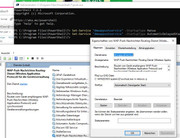
    , then we can see that, for example by "dmwappushservice" , then now we can also get the option of Automatic (Delayed Start)
    https://i.postimg.cc/VLHKgShb/Got-Au...ayed-Start.jpg https://i.postimg.cc/HkqBGqdY/Got-Au...ayed-Start.jpg


    Share ‘teststarttype.txt’ https://app.box.com/s/u4xxiefbgh2b13e3vn10ho2l497lbzn5
    Share ‘teststartuptype.txt’ https://app.box.com/s/q7lxmr1ffz9slf24cpgk7c1db3mourd4


    Set-Service "dmwappushservice"
    On the same computer I confirmed that I can set the option of Automatic (Delayed Start) provided I use something like this in PS7
    Set-Service "dmwappushservice" –StartupType AutomaticDelayedStart
    https://i.postimg.cc/BQDjYkYc/Set-Se...rter-Start.jpg
    https://i.postimg.cc/BnBXsDGj/Set-Se...ice-Manual.jpg


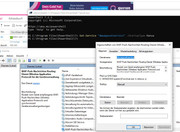
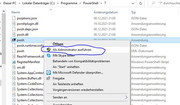
    But note that I will need to open as Administrator , https://i.postimg.cc/vm8DmBQ3/Right-Click-PS7-Admin.jpg
    , or else it will error, https://i.postimg.cc/13QfLBbx/Oops-P...t-as-Admin.jpg
    Last edited by DocAElstein; 03-06-2022 at 03:36 PM.

  9. #9
    Fuhrer, Vierte Reich DocAElstein's Avatar
    Join Date
    Aug 2014
    Posts
    10,457
    Rep Power
    10
    slkhflskhfslkhf

  10. #10
    Fuhrer, Vierte Reich DocAElstein's Avatar
    Join Date
    Aug 2014
    Posts
    10,457
    Rep Power
    10
    This is post #505
    https://excelfox.com/forum/showthrea...ge51#post12780
    https://excelfox.com/forum/showthread.php/2408-Windows-10-and-Office-Excel/page51#post12780


    At last old scripts!! !

    This is a year or so out of place, here, in my own personal notes. But no one anywhere answered my pleas for help in getting copies of the older scripts, which I had wanted to get so as to…
    _ aid me getting back up to date ,
    , and to,
    _ aid me in my learning of this Debloat stuff as well as the related learning of PowerShell script

    Specifically, I want to get scripts, where each script relates to the script at the time of, and relevant to, each of Chris’s Debloat related YouTube Videos

    I came across a related issue by coincidence here, https://github.com/ChrisTitusTech/wi...ipt/issues/229
    , where then brandonkal showed me how to do it https://github.com/ChrisTitusTech/wi...ent-1042610457
    https://github.com/ChrisTitusTech/wi...ent-1042788256

    ( Edit. I solved this issue and quite a few others in a lot of posts at GitHub around February March, but my account was deleted and all posts removed. No big deal, I was never so keen on the place, it seems to slow down and mess up projects, at least any I helped in. Maybe that did not go down too well. Possibly the real reason of GitHub is to mess some peoples projects up? )
    Solution to get old scripts
    Here we go, just to remind me for future reference:

    This solution seems very tolerant of even older Browsers and operating systems and there is no need to be logged in or have an account at GitHub.
    It’s not at all obvious, as with most things at GitHub, but once you do know, it’s a piece of piss, no problem at all and quick:
    Working example, for example Chris’s win10debloat stuff scripts..
    _1) Go to Chris’s GitHub Windows 10 Debloat page, https://github.com/ChrisTitusTech/win10script . By default you should be at the Code page, but to be sure hit the code button top left https://i.postimg.cc/fbRJrHN8/Code-B...10-Git-Hub.jpg
    https://i.postimg.cc/P5hLmXFs/Code-B...10-Git-Hub.jpg

    _ 2) Hit the History Clock icon https://i.postimg.cc/HxjdQRgC/Histor...10-Git-Hub.jpg
    https://i.postimg.cc/qRY0QwJ6/Histor...10-Git-Hub.jpg

    What you should now see is a page with a track / progress like vertical line along the left margin with junction points on it. Going down is like going back in the History https://i.postimg.cc/NfR999Dk/Histor...at-Git-Hub.jpg
    _2b) Furthermore, towards the bottom is an older button,
    https://i.postimg.cc/Y2Gm7ymV/Older-...ds-in-time.jpg
    , which takes you to the next page allowing you to go even further back in time.
    As far as I can tell, you can go right back to the beginning.
    _3) Where what when to look for
    Under the various dated junction points are things listed as “commits”. I don’t fully understand yet all the workings and what things that are being referred to, but I think I am only interested in changes to the main script, which are those referred to by something like Update win10debloat.ps1 https://i.postimg.cc/s1CzC2ZV/Click-...ebloat-ps1.jpg
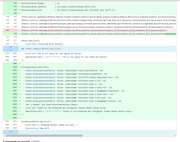
    A clue to what was done at that time to the script may be obtained by other things around the same date, and/ or you may get a hint from clicking on that word, Update win10debloat.ps1 , https://i.postimg.cc/FzKjjjr6/Click-...ebloat-ps1.jpg , which then will give some indication in a red / green before after type pictorial view
    https://i.postimg.cc/13H8BkLg/Click-...-type-view.jpg


    As example, that last screen shot is looking around the February 15 2022 time. Clearly there is something going on with “Virtualisation” things
    Relating a script to a Chris YouTube Debloat Video
    Chris does not typically give a direct reference to the script relevant to his Debloat related Videos. But it’s a fairly good guess that an Update around the time of a video, possibly shortly before, will be the one.
    Taking that last example, the from Feb 15, 2022, : If we look at Chris’s videos from about that time we find a couple of videos related to the theme of “Virtualisation” things:
    9.31a Live - Improving Virtualization in Windows-fYhBE4B77S8_18 02 2022
    https://www.youtube.com/watch?v=fYhBE4B77S8
    https://drive.google.com/file/d/19SH...?usp=drive_web

    9.31b How to Setup Hyper V on Windows-FCIA4YQHx9U_19 02 2022
    https://www.youtube.com/watch?v=FCIA4YQHx9U
    https://drive.google.com/file/d/1Gfo...?usp=drive_web

    We can conclude fairly safely here that this script change mainly involved adding a button to enable some in built Windows “Virtual-V” feature. ( The script changes will be the changes I talked about in the second half of this post of mine,
    https://excelfox.com/forum/showthrea...ge50#post12774
    , which took my script, (which is approximately following Chris’s script), from my version Temp4.ps1 to Temp5.ps1 )

    It is not always obvious that a video gives some indication of, or is related to a change.
    Sometimes the change may not be related specifically to some new addition referred to in a video.
    We might be able to relate it to something else, for examples…
    _ We might sometimes be able to refer it to some issue if you take a look down the list ( https://github.com/ChrisTitusTech/win10script/issues https://i.postimg.cc/kGhWwBDg/Chris-...Hub-Issues.jpg )
    _ Chris may refer to it either in passing or as it may be slightly related to a video. For example, the things that took my script from my version Temp5.ps1 to Temp6.ps1 ( https://excelfox.com/forum/showthrea...ge50#post12775 ) where some power related things which he mentioned briefly in these videos:
    9.32 Live - Optimizing Windows for Gaming-z3DNobuvkL8_11 03 2022
    https://www.youtube.com/watch?v=z3DNobuvkL8
    https://drive.google.com/file/d/1WcT...?usp=drive_web
    Optimize Windows for Gaming-KjHfCDPfLdI_12 03 2022
    https://www.youtube.com/watch?v=KjHfCDPfLdI
    https://drive.google.com/file/d/1O7h...?usp=drive_web

    ( See also some of my notes in this excelfox Thread post https://excelfox.com/forum/showthrea...ge43#post12702 )

    Get the actual script code
    So at this point we have identified the win10debloat.ps1 that we are interested in. Now to get the actual code….
    Its generally regarded as best taking what is referred to as the Raw code. I think this is intended to be a very clean text, rather than one that my have some things like “invisible” characters or something to do with formatting that might get accidentally copied in any simple copying attempt
    Get the Raw
    _(i) If we are looking at the Red green before after…
    First look for a View File option, https://i.postimg.cc/3JqkwF7b/View-F...fore-after.jpg . Click that, and you see a color formatted code. Look for the Raw option and click that, https://i.postimg.cc/15XgPjxq/Raw-option.jpg
    This should get the raw code view, https://i.postimg.cc/RhsNKcth/Raw-code.jpg
    _(ii) If we are looking at the History page.
    Look for a _ < >_ button at the right, https://i.postimg.cc/9QqrwwQX/Pointy...ode-button.jpg and click that.
    This should take us to what looks like the main code page where we started with.
    https://i.postimg.cc/gjWrQQn6/Achaiv...previously.jpg
    But actually it is something close to an archived copy of the main page at the previous chosen commit date. That page can be used in the same way you would use the current main page.
    So for example,
    _ click on the win10debloat.ps1 , https://i.postimg.cc/4d1KNCNz/Click-...ebloat-ps1.jpg
    _ we can now click on the Raw option, https://i.postimg.cc/VsDSxchw/Raw-option.jpg , and once again we see the Raw code, https://i.postimg.cc/W4LtGpdG/Raw-code.jpg

    Copy Raw _ Ctrl+a , Ctrl+c
    The simplest way to copy the raw code is to click anywhere in it , then use the key combination of Ctrl+a , which should select/ highlight the entire code, followed by Ctrl+c
    That should give you a clean text copy in the clipboard.


    So that’s it. Do now with that code what you want, such as
    _ paste it in a text editor such as Notepad or Notepad++ if , as me, you just want to look at it,
    or
    _ probably the most useful, paste it in an as Administrator launched ISE development window, and then you can do all - look at it, edit it, and run it conveniently as and when you choose

    _._____________

    The quick link
    One last thing, just for completeness, but which I am not so keen on using, persinally.
    Brandonkal also showed me how to get the quick link to run the script. But very important to note here is what brandonkal went on to say about …….. check the code for unversioned dependency links….. - He is warning of bad programming practice. For example, the code downloads "raw.githubusercontent.com/ChrisTitusTech/win10script/master/ooshutup10.cfg" which always points to the latest version. If you wish to have that file match what it was in an earlier version, you will have to update that reference in a fork.

    The short link, or “one liner”, I am talking about is that often given by Chris at his site and in videos ,
    iex ((New-Object System.Net.WebClient).DownloadString('https://git.io/JJ8R4'))
    , which he often describes as something like, the “one commend to run ‘em all”. That is basically a single code line to paste in PowerShell that somehow goes off via the internet and gets the script and does anything else necessary to get the script up an running for you somehow and run it live somehow on your computer. I am less keen on using that as it has the disadvantage that you don’t actually get the script to look at and edit. But it can be a convenient way to run the coding.
    Chris always gives the line for the current version, ( which can upset some people, example, https://github.com/ChrisTitusTech/wi...ent-1043477046 ) , but we can actually get the same one liner for the older script that we are interested in.

    Example:
    Take once again the example of, February 15, 2022 , and look at some numbers and URLs that have been seen in the screenshots
    _ Example: The Raw URL: https://raw.githubusercontent.com/ChrisTitusTech/win10script/c349966ed313d5d7979aeb58e2c3a7ae3f494c6f/win10debloat.ps1 https://i.postimg.cc/DzLJHJ9p/Raw-URL.jpg
    _ Example: A commit number that may have shown up in a few places, fc37c7d

    We may replace the download string in Chris’s one liner, with a either of these based on those numbers
    Code:
    iex ((New-Object System.Net.WebClient).DownloadString('https://raw.githubusercontent.com/ChrisTitusTech/win10script/c349966ed313d5d7979aeb58e2c3a7ae3f494c6f/win10debloat.ps1'))
    iex ((New-Object System.Net.WebClient).DownloadString('https://raw.githubusercontent.com/ChrisTitusTech/win10script/fc37c7d/win10debloat.ps1'))
    ( I am not too sure yet of the validity always of the last one, so perhaps best to use the first).

    Here just again for final clarity, first the typical one liner used currently to get the new GUI up and running,
    and after the second one is for the script from 15 Feb 2022
    Code:
    iex ((New-Object System.Net.WebClient).DownloadString('https://git.io/JJ8R4'))
    iex ((New-Object System.Net.WebClient).DownloadString('https://raw.githubusercontent.com/ChrisTitusTech/win10script/c349966ed313d5d7979aeb58e2c3a7ae3f494c6f/win10debloat.ps1'))
    _.______

    So that’s it all.


    In the next post I apply this knowledge to get specific Chris scripts, concentrating mostly on those most asked for, which usually are those talked about on his normal size videos specifically on the script and script updates.
    I may also take the opportunity for some extra notes a second time around, as well as look at some script versions that introduced things ( problems more often, lol, ) but which were not particularly discussed in any video.
    Last edited by DocAElstein; 03-28-2022 at 01:46 AM.

Similar Threads

  1. Tests and Notes on Range Referrencing
    By DocAElstein in forum Test Area
    Replies: 70
    Last Post: 02-20-2024, 01:54 AM
  2. Tests and Notes for EMail Threads
    By DocAElstein in forum Test Area
    Replies: 29
    Last Post: 11-15-2022, 04:39 PM
  3. Notes tests. Excel VBA Folder File Search
    By DocAElstein in forum Test Area
    Replies: 39
    Last Post: 03-20-2018, 04:09 PM
  4. Replies: 2
    Last Post: 12-04-2012, 02:05 PM

Posting Permissions

  • You may not post new threads
  • You may not post replies
  • You may not post attachments
  • You may not edit your posts
  •